
NOTABRICK Bluetooth Lautsprecher 40W
NOTABRICK 40W Portable Bluetooth Speaker User Manual
Model: Bluetooth Lautsprecher 40W
1. Introduction
Thank you for choosing the NOTABRICK 40W Portable Bluetooth Speaker. This manual provides essential information for setting up, operating, maintaining, and troubleshooting your speaker. Please read it thoroughly before use to ensure optimal performance and longevity of your device.

Image 1.1: NOTABRICK 40W Portable Bluetooth Speaker, showcasing its waterproof design with water splashing around it.
2. Safety Information
- Do not expose the speaker to extreme temperatures or direct sunlight for prolonged periods.
- Avoid dropping or subjecting the speaker to strong impacts.
- Keep the speaker away from medical devices, as it may interfere with their operation.
- Do not attempt to disassemble, repair, or modify the speaker yourself. Contact qualified service personnel for assistance.
- Ensure all port covers are securely closed when using the speaker near water to maintain its IPX7 waterproof rating.
- Use only the provided charging cable or a certified equivalent.
3. Package Contents
Please check the package for the following items:
- NOTABRICK 40W Portable Bluetooth Speaker
- USB Charging Cable
- 3.5mm Audio Cable
- Mountaineering Buckle Strap
- User Manual (this document)
Image 3.1: The speaker, charging cable, audio cable, and user manual laid out next to the product box.
4. Product Overview
4.1. Controls and Ports
Familiarize yourself with the buttons and ports on your NOTABRICK speaker:
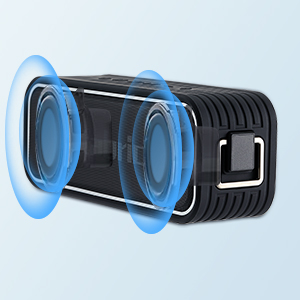
Image 4.1: Diagram illustrating the functions of the speaker's top-mounted buttons, including Power ON/OFF, TWS/Mode Switch, Play/Pause/Answer Call, Volume Down/Previous, Volume Up/Next, and 3D effects.
- Power Button: Press and hold to power on/off.
- M (Mode) Button: Short press to switch between Bluetooth, TF Card, and AUX modes. Long press for TWS pairing.
- Play/Pause Button: Play or pause music. Answer or reject phone calls.
- Volume Down / Previous Track: Short press for volume down, long press for previous track.
- Volume Up / Next Track: Short press for volume up, long press for next track.
- 3D Button: Press to activate or deactivate 3D sound mode.

Image 4.2: Close-up view of the speaker's side panel, showing the USB-C charging port, TF card slot, and 3.5mm AUX input, protected by a waterproof cover.
4.2. Key Features
- Powerful 40W Stereo Sound: Dual-driver system with DSP technology and subwoofer for rich audio.
- Multiple Listening Modes: Normal, Deep Bass, and 3D sound modes.
- True Wireless Stereo (TWS): Pair two NOTABRICK 40W speakers for an immersive 80W stereo experience.
- IPX7 Waterproof: Designed to withstand immersion in water up to 1 meter for 30 minutes.
- Bluetooth 5.0: Provides stable and fast wireless connection up to 100 feet (30.48 meters).
- Voice Assistant Support: Activate your device's voice assistant directly from the speaker.
- Hands-free Calling: Built-in microphone for clear calls.
- Extended Playtime: Up to 24 hours of continuous music playback on a single charge (at 1/2 volume).
- Versatile Connectivity: Supports Bluetooth, 3.5mm AUX input, and TF card playback.

Image 4.3: An exploded view of the speaker highlighting its internal drivers, accompanied by icons representing Bluetooth 5.0, AUX Line-in, TF Card Playing, IPX7 Waterproof, Hands-free Talking, HD Mic, TWS Function, and Super Bass.
5. Setup
5.1. Charging the Speaker
Before first use, fully charge the speaker. Connect the USB charging cable to the speaker's charging port and the other end to a USB power adapter (not included) or a computer's USB port. The charging indicator light will show charging status (specific light behavior not provided, typically red for charging, off/blue for full).
5.2. Powering On/Off
Press and hold the Power button for approximately 3 seconds to turn the speaker ON or OFF.
5.3. Bluetooth Pairing
- Ensure the speaker is powered on and in Bluetooth mode (indicated by a flashing blue light, if applicable). If not, short press the 'M' button to switch to Bluetooth mode.
- Enable Bluetooth on your device (smartphone, tablet, laptop, etc.).
- Search for available Bluetooth devices and select "NOTABRICK" from the list.
- Once connected, the speaker will indicate successful pairing (e.g., a solid blue light or an audible prompt).
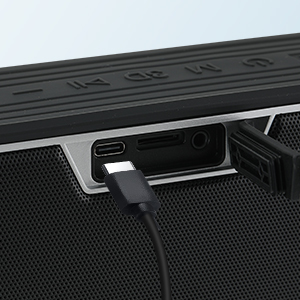
Image 5.1: A NOTABRICK speaker on a table with a smartphone, illustrating the Bluetooth connection process.
5.4. True Wireless Stereo (TWS) Pairing
To achieve 80W stereo sound, you can pair two NOTABRICK 40W speakers together:
- Ensure both speakers are powered on and not connected to any Bluetooth device.
- On one of the speakers (this will be the primary speaker), long press the 'M' button until you hear a prompt indicating TWS pairing mode.
- The two speakers will automatically search for and connect to each other. Once connected, you will hear a confirmation sound.
- Now, connect your device to the primary speaker via Bluetooth as described in section 5.3. The audio will play in stereo through both speakers.

Image 5.2: A couple enjoying a movie with two NOTABRICK speakers positioned on either side of a television, demonstrating the True Wireless Stereo (TWS) setup for enhanced audio.
5.5. Connecting via AUX Input
Use the provided 3.5mm audio cable to connect the speaker to any device with a 3.5mm audio output jack. The speaker will automatically switch to AUX mode or you may need to short press the 'M' button to select AUX mode.
5.6. TF Card Playback
Insert a TF (microSD) card loaded with audio files into the TF card slot. The speaker will automatically switch to TF card playback mode and begin playing music. If not, short press the 'M' button to select TF card mode.
6. Operating
6.1. Basic Music Controls
- Play/Pause: Short press the Play/Pause button.
- Volume Up: Short press the '+' button.
- Volume Down: Short press the '-' button.
- Next Track: Long press the '+' button.
- Previous Track: Long press the '-' button.
6.2. Listening Modes
The speaker offers three distinct listening modes:
- Normal Mode: Standard audio output.
- Deep Bass Mode: Enhances low-frequency sounds for a richer bass experience.
- 3D Mode: Creates a more immersive, spatial audio effect.
To switch between these modes, press the '3D' button on the speaker.
6.3. Voice Assistant
Short press the Play/Pause button to activate the voice assistant (e.g., Siri, Google Assistant) on your connected Bluetooth device. You can then speak commands through the speaker's built-in microphone.
Image 6.1: A NOTABRICK speaker on a desk with a speech bubble above it saying "Hi, Siri", indicating its voice assistant functionality.
6.4. Hands-free Calling
When a call comes in while connected via Bluetooth:
- Answer Call: Short press the Play/Pause button.
- End Call: Short press the Play/Pause button during a call.
- Reject Call: Long press the Play/Pause button.
7. Maintenance
7.1. Cleaning
Wipe the speaker with a soft, damp cloth. Do not use abrasive cleaners, alcohol, or chemical solvents, as these may damage the surface or internal components.
7.2. Waterproof Care (IPX7)
The speaker is IPX7 waterproof, meaning it can be submerged in water up to 1 meter for 30 minutes. To maintain this rating:
- Ensure the rubber flap covering the charging and AUX ports is securely closed before exposing the speaker to water.
- After exposure to water, especially saltwater or chlorinated water, rinse the speaker with fresh water and dry it thoroughly before charging or opening the port cover.
- Do not charge the speaker if the charging port or cable is wet.
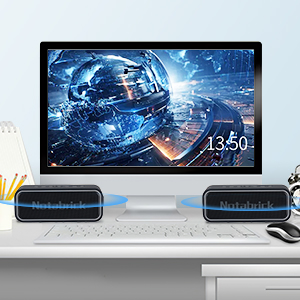
Image 7.1: The NOTABRICK speaker partially submerged in water, demonstrating its IPX7 waterproof capability.
7.3. Storage
Store the speaker in a cool, dry place away from direct sunlight and extreme temperatures. If storing for an extended period, charge the battery to approximately 50% to preserve battery health.
7.4. Battery Care
The speaker features a built-in rechargeable battery. To maximize its lifespan:
- Avoid fully discharging the battery frequently.
- Do not leave the speaker uncharged for very long periods.
- Charge the speaker regularly, even if not in frequent use.

Image 7.2: The NOTABRICK speaker on a beach, with a visual representation of its 24-hour playtime capability, transitioning from day to night.
8. Troubleshooting
If you encounter issues with your speaker, refer to the following common problems and solutions:
| Problem | Possible Cause | Solution |
|---|---|---|
| Speaker does not turn on. | Low battery; Power button not pressed long enough. | Charge the speaker; Press and hold the Power button for 3 seconds. |
| Cannot pair via Bluetooth. | Speaker not in pairing mode; Device Bluetooth off; Speaker already connected to another device; Too far from device. | Ensure speaker is in Bluetooth pairing mode; Turn on Bluetooth on your device; Disconnect from other devices; Move speaker closer to device (within 100ft/30m). |
| No sound or low volume. | Volume too low on speaker or device; Incorrect input mode; Speaker not connected. | Increase volume on both speaker and device; Press 'M' button to select correct mode (BT/AUX/TF); Re-establish connection. |
| TWS pairing fails. | Speakers already connected to other devices; Speakers too far apart. | Ensure both speakers are disconnected from other devices; Place speakers close to each other during pairing. |
| Sound distortion. | Volume too high; Low battery; Interference. | Reduce volume; Charge the speaker; Move away from other electronic devices. |
9. Specifications
| Feature | Specification |
|---|---|
| Model | Bluetooth Lautsprecher 40W |
| Output Power | 40W |
| Bluetooth Version | 5.0 |
| Bluetooth Range | Up to 100 feet (30.48 meters) |
| Waterproof Rating | IPX7 |
| Battery Life | Up to 24 hours (at 1/2 volume) |
| Audio Input | Bluetooth, 3.5mm AUX, TF Card |
| Speaker Type | Portable, Surround Sound |
| Dimensions (L x W x H) | 8.98 x 3.94 x 2.99 inches |
| Item Weight | 2.14 pounds (970 grams) |
| Included Components | Bluetooth speaker, mountaineering buckle strap |
10. Warranty and Support
NOTABRICK products are designed and manufactured to the highest quality standards. For any issues or inquiries regarding your speaker, please refer to the warranty information provided at the time of purchase or contact NOTABRICK customer support through the retailer's platform or the official brand website.
Please retain your proof of purchase for warranty claims.
Related documentsBluetooth Lautsprecher 40W


Ask a question about this manual
Ask about setup, troubleshooting, compatibility, parts, safety, or missing instructions. Manuals+ will review the question and use this page’s manual context to help answer it.