
1. Introduction
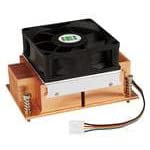
The IEI CF-1150SE-R11 is a high-performance CPU cooler designed specifically for LGA1150 socket processors. It provides efficient heat dissipation to maintain optimal operating temperatures for your CPU, ensuring stable system performance. This manual provides detailed instructions for installation, operation, maintenance, and troubleshooting.
1.1 Package Contents
- 1x IEI CF-1150SE-R11 CPU Cooler (Heatsink with pre-attached fan)
- 1x Mounting Hardware Kit (LGA1150 compatible)
- 1x Thermal Paste (pre-applied or in a small tube)
- 1x User Manual (this document)
2. Safety Information
Please read and understand all safety precautions before installing or operating this product. Failure to do so may result in personal injury or damage to your equipment.
- Always disconnect power from your computer before installation or maintenance.
- Handle the CPU and cooler with care to avoid damaging pins or components.
- Wear an anti-static wrist strap to prevent electrostatic discharge (ESD) damage to sensitive electronic components.
- Keep out of reach of children.
- Do not attempt to modify the cooler or its components.
- Ensure proper ventilation around your computer system.
3. Setup and Installation
Follow these steps carefully to install the IEI CF-1150SE-R11 CPU cooler onto your LGA1150 motherboard.
- Prepare the Motherboard: Ensure your motherboard is removed from the PC case or has sufficient access to the CPU socket area. If an old cooler was present, carefully remove it and clean any residual thermal paste from the CPU and motherboard.
- Apply Thermal Paste: If thermal paste is not pre-applied to the cooler's base, apply a small, pea-sized amount to the center of the CPU's integrated heat spreader (IHS). Do not spread it manually; the pressure from the cooler will distribute it.
- Position the Cooler: Carefully align the cooler's mounting holes with the holes around the LGA1150 CPU socket on the motherboard.
- Secure the Cooler: Gently lower the cooler onto the CPU. Use the provided mounting hardware (e.g., push-pins or screws) to secure the cooler evenly. Tighten screws in a diagonal pattern (e.g., top-left, bottom-right, top-right, bottom-left) to ensure even pressure distribution. Do not overtighten.
- Connect the Fan Cable: Locate the CPU_FAN header on your motherboard. Connect the 4-pin fan cable from the IEI CF-1150SE-R11 cooler to this header. Ensure the connector is fully seated.
- Verify Installation: Double-check that the cooler is securely mounted and the fan cable is properly connected.
4. Operating Instructions
Once properly installed and connected, the IEI CF-1150SE-R11 CPU cooler operates automatically. The fan speed is typically controlled by the motherboard's BIOS/UEFI settings or operating system software, based on the CPU temperature. Ensure your system's BIOS/UEFI is configured to manage CPU fan speeds for optimal cooling and noise levels.
5. Maintenance
Regular maintenance helps ensure the longevity and optimal performance of your CPU cooler.
- Dust Removal: Periodically (e.g., every 3-6 months), power off your computer and disconnect it from the power source. Use compressed air to gently blow dust out of the heatsink fins and fan blades. Hold the fan blades gently to prevent them from spinning rapidly during cleaning, which can damage the fan bearing.
- Thermal Paste: The thermal paste typically lasts for several years. If you notice significantly higher CPU temperatures, consider reapplying fresh thermal paste after carefully cleaning the old paste from the CPU and cooler base. This usually requires removing the cooler.
6. Troubleshooting
| Problem | Possible Cause | Solution |
|---|---|---|
| CPU Overheating | Improper cooler installation; insufficient thermal paste; fan not spinning; poor case airflow. | Re-seat the cooler, ensuring even pressure. Reapply thermal paste. Check fan connection to CPU_FAN header. Improve case ventilation. |
| Fan Not Spinning | Fan cable disconnected; faulty fan header; fan failure. | Ensure fan cable is securely connected to CPU_FAN. Try connecting to another fan header (if available). Contact support if fan is faulty. |
| Excessive Fan Noise | Dust accumulation; fan bearing issue; fan running at maximum RPM. | Clean dust from fan and heatsink. Check BIOS/UEFI settings for fan speed control (e.g., set to "Silent" or "Standard" mode). |
7. Specifications
| Feature | Detail |
|---|---|
| Model | CF-1150SE-R11 |
| Compatible CPU Sockets | LGA1150 |
| Dimensions (L x W x H) | 107mm x 61mm x 60mm (approximate) |
| Thermal Design Power (TDP) | Up to 95W |
| Maximum Rotational Speed | 3500 RPM |
| Power Connector | 4-pin PWM |
| Material | Copper (Heatsink), Plastic (Fan) |
| Compliance | RoHS Compliant |
| Item Weight | 9.99 Pounds (approx. 4.53 kg) |
| UPC | 705514633149 |
8. Warranty and Support
This product is covered by a manufacturer's warranty. Please refer to the warranty card included with your purchase or visit the official IEI website for detailed warranty terms and conditions. For technical support, troubleshooting assistance, or warranty claims, please contact IEI customer service through their official channels.
Manufacturer: IEI Technology
Website: www.ieiworld.com (Note: This is a placeholder URL for IEI's official website. Please verify the correct URL.)