
Introduction
This manual provides detailed instructions for the setup, operation, maintenance, and troubleshooting of your Audioengine A2 HD (HD3) Walnut Computer Speakers and DS1M Metal Stands. Please read this manual thoroughly before using your product to ensure optimal performance and longevity.
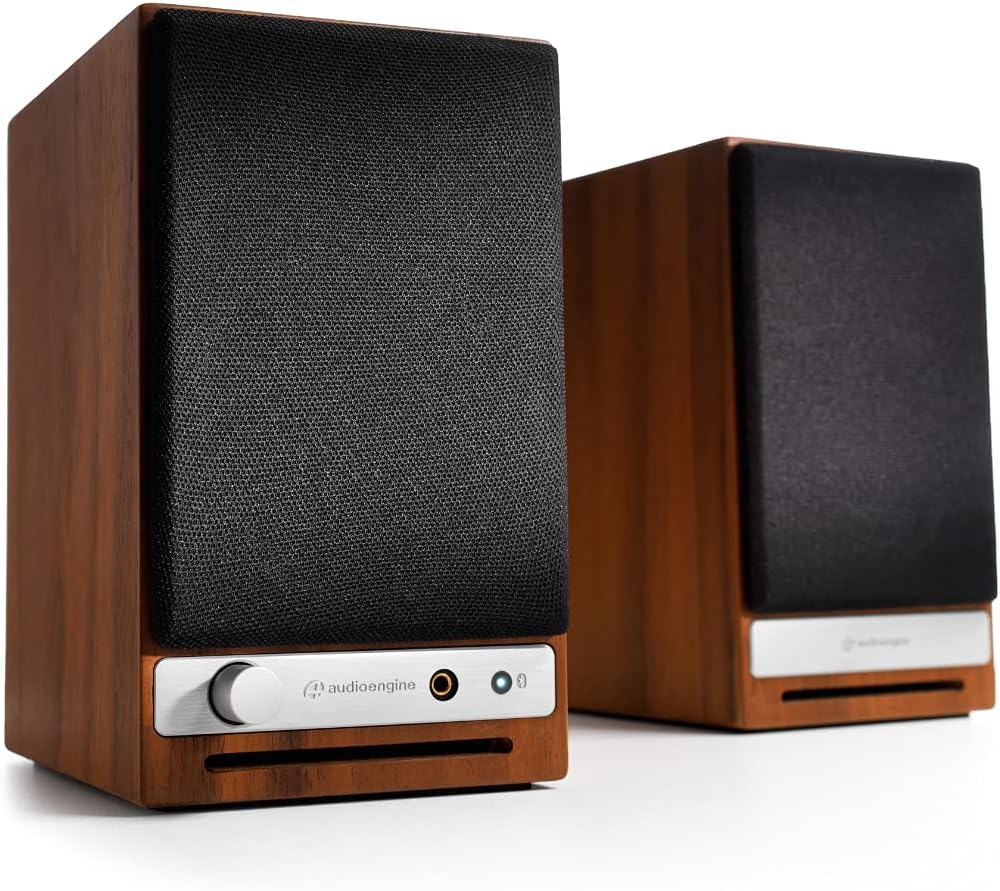
Front view of the Audioengine A2 HD speakers in walnut finish with grilles on. The left speaker features a volume knob, headphone jack, and Bluetooth pairing button.
What's in the Box
Your Audioengine A2 HD (HD3) package includes the following items:
- Quick Start Guide
- Power Cable
- Warranty Card
Setup
Speaker Placement
For optimal sound quality, position the speakers on a stable surface, such as a desk or bookshelf. The included DS1M Metal Stands are designed to elevate and angle the speakers towards your listening position, which can significantly enhance audio performance by directing sound more accurately. Place the left speaker (with controls) on the left side and the right speaker on the right side of your listening area.

An Audioengine A2 HD speaker is shown placed on a DS1M metal stand, positioned next to a laptop, illustrating a typical desktop setup.

This image displays the dimensions of the DS1M speaker stands, indicating a length of 6 inches (15.2 cm) and a width of 4 inches (10.2 cm).
Connections
The A2 HD speakers offer multiple connectivity options:
- RCA Input/Output: Connect audio sources using RCA cables. The RCA output can be used to connect a subwoofer.
- Auxiliary Input: Use a 3.5mm stereo mini-jack cable for connecting devices like smartphones or tablets.
- USB Input: Connect directly to your computer for high-quality digital audio playback.
- Bluetooth: For wireless audio streaming.
Connect the left (active) speaker to the right (passive) speaker using the provided speaker wire. Ensure correct polarity (+ to + and - to -).

Rear view of the Audioengine A2 HD speakers, highlighting the various input and output ports, including RCA, USB, and speaker wire terminals for connecting the passive speaker.
Power Connection
Connect the power cable to the left speaker and then to a power outlet. The power indicator on the front of the left speaker will illuminate.
Operating
Powering On/Off
The speakers will power on automatically when connected to a power source. To turn them off, disconnect the power cable.
Volume Control
Adjust the volume using the knob on the front of the left speaker. You can also control the volume from your connected audio source.
Input Selection
The A2 HD speakers automatically detect and switch to the active input. For Bluetooth, press the Bluetooth pairing button to initiate pairing mode.
Bluetooth Pairing
- Turn on your A2 HD speakers.
- Press and hold the Bluetooth pairing button on the front of the left speaker until the indicator light flashes.
- On your device (smartphone, tablet, computer), go to Bluetooth settings and select "Audioengine A2 HD" from the list of available devices.
- Once paired, the indicator light will turn solid.
Maintenance
To maintain the appearance and performance of your speakers:
- Wipe the cabinets with a soft, dry cloth. Avoid using harsh chemicals or abrasive cleaners.
- Keep the speakers away from direct sunlight, heat sources, and moisture.
- Ensure proper ventilation around the speakers.
Troubleshooting
No Sound
- Check all cable connections, including power, speaker wire, and audio input cables.
- Ensure the volume knob on the speaker and your audio source is turned up.
- Verify that the correct input source is selected (if applicable, for automatic switching, ensure only one source is active).
- If using Bluetooth, ensure the speakers are properly paired and connected to your device.
Bluetooth Connection Issues
- Ensure the speakers are in pairing mode (flashing Bluetooth light).
- Delete "Audioengine A2 HD" from your device's Bluetooth list and try pairing again.
- Move your device closer to the speakers to ensure it's within the 100-foot Bluetooth range.
- Restart both your device and the speakers.
Specifications
| Brand | Audioengine |
| Model Number | HD3 |
| Model Name | A2-HD |
| Speaker Type | Bookshelf |
| Speaker Maximum Output Power | 60 Watts |
| Frequency Response | 50 Hz |
| Connectivity Technology | Auxiliary, Bluetooth, RCA, USB |
| Audio Output Mode | Stereo |
| Mounting Type | Tabletop Mount |
| Enclosure Material | Wood |
| Additional Features | Hi Res Audio, Lightweight, Portable |
| Controller Type | iOS, Android |
| Maximum Range | 30 Meters |
| Control Method | Touch |
| Speaker Size | 2.75 Inches |
| Bluetooth Range | 100 Feet |
| Total USB 2.0 Ports | 1 |
| Specific Uses For Product | Gaming, Home Theatre, Pro Audio |
| Number of Audio Channels | 3.0 |
| Impedance | 10000 Ohms |
| Signal-to-Noise Ratio | 95 dB |
| Compatible Devices | Smartphone, Tablet, Laptop |
| Power Source | Corded Electric |
| Input Voltage | 110 Volts |
| Unit Count | 2.0 Count |
| Wireless Technology | Bluetooth |
| Subwoofer Connectivity Technology | Wired |
| Connectivity Protocol | Bluetooth |
| Audio Driver Type | Dynamic Driver |
Warranty and Support
Your Audioengine A2 HD (HD3) speakers come with a 3-year warranty. For warranty claims or technical support, please refer to the contact information provided in your Warranty Card or visit the official Audioengine website.
Official Product Videos
Audioengine - Never Settle for Less
This video highlights the Audioengine philosophy of never settling for less, showcasing various life moments enhanced by music. It features different Audioengine products in diverse settings.
20th Anniversary Video
A commemorative video celebrating 20 years of Audioengine, reflecting on the company's journey and commitment to quality audio products.
Doesn't Music Deserve it? Active Wireless Bookshelf Speakers
This video emphasizes the importance of high-quality audio for music, featuring active wireless bookshelf speakers in various home environments.