
1. Introduction
This manual provides essential information for the safe and efficient operation of your ETREPOW 3000W 12V Pure Sine Wave Power Inverter. Please read it thoroughly before installation and use, and retain it for future reference.
What's in the Box:
- ETREPOW 3000W 12V Pure Sine Wave Power Inverter
- Instruction Manual
- Battery Connection Cables (one set)
- Wireless Remote Control
- Spare Fuses (one set)

Image 1.1: The ETREPOW 3000W 12V Pure Sine Wave Power Inverter shown with its included accessories: battery cables, wireless remote, and spare fuses.
2. Safety Instructions
Always observe the following safety precautions to prevent personal injury or damage to the inverter and connected devices.
- Ventilation: Ensure adequate ventilation around the inverter. Do not block ventilation openings.
- Environment: Operate the inverter in a dry, cool, and well-ventilated area. Avoid direct sunlight, heat sources, and moisture.
- Flammable Materials: Do not operate the inverter near flammable liquids, gases, or other combustible materials.
- Battery Connection: Connect the inverter directly to a 12V battery. Ensure correct polarity (+ to + and - to -). Incorrect connection can cause damage.
- Grounding: The inverter must be properly grounded.
- Overload Protection: Do not exceed the inverter's rated power output (3000W continuous, 6000W peak). Overloading can trigger protection mechanisms or damage the unit.
- Maintenance: Only qualified personnel should perform maintenance or repairs.
- Children: Keep the inverter out of reach of children.
3. Product Features
- Pure Sine Wave Output: Provides a stable 220V/230V pure sine wave output, suitable for sensitive electronics and household appliances.
- LCD Display: Integrated LCD screen displays DC input voltage, frequency, AC output voltage, load operating power, and battery level.
- Wireless Remote Control: Allows convenient remote operation of the inverter. Ensure the inverter's main switch is in the "OFF" position when using the remote.
- Multiple Protections: Certified CE, ISO, and RoHS. Features protection against over-voltage, under-voltage, overload, short-circuit, and overheating.
- Smart Cooling Fan: The intelligent fan activates only when the internal temperature exceeds 45°C, optimizing efficiency and reducing noise.
- Versatile Applications: Ideal for solar systems, camping, RV travel, outdoor work, and emergency power situations.

Image 3.1: The inverter provides a pure sine wave output, ensuring compatibility and safety for sensitive electronic devices.

Image 3.2: The inverter is compatible with a wide range of devices, including laptops, refrigerators, and mobile phones.
4. Component Identification

Image 4.1: Detailed view of the inverter's front and rear panels, highlighting the ground terminal, USB port, ON/OFF switch, power indicator, AC outlets, fans, negative terminal, and positive terminal.
Front Panel:
- Power Fault Indicator: Illuminates to indicate a fault condition.
- USB Port (5V, 2.1A): For charging USB-powered devices.
- ON/OFF Switch: Main power switch for the inverter.
- Power Indicator: Illuminates when the inverter is operating normally.
- AC Outlets (x2): Standard EU AC outlets for connecting 220V/230V devices.
- LCD Display: Shows operational parameters.
Rear Panel:
- Ground Terminal: For connecting to an earth ground.
- Cooling Fans: Automatically activate to dissipate heat.
- Negative Terminal (Black): Connects to the negative terminal of the 12V battery.
- Positive Terminal (Red): Connects to the positive terminal of the 12V battery.
5. Setup
5.1 Connecting to a 12V Battery
- Ensure the inverter's ON/OFF switch is in the "OFF" position.
- Connect the red battery cable to the positive (+) terminal of the inverter and the positive (+) terminal of your 12V battery.
- Connect the black battery cable to the negative (-) terminal of the inverter and the negative (-) terminal of your 12V battery.
- Ensure all connections are tight and secure to prevent arcing and overheating.
- For optimal performance and safety, it is recommended to use a battery with a capacity of 200AH or higher for the 3000W inverter.

Image 5.1: Illustration of recommended battery capacity for the 3000W inverter to ensure sufficient power for various appliances.
5.2 Connecting AC Devices
Once the inverter is connected to the battery, you can plug your AC devices into the inverter's AC outlets. Ensure the total power consumption of your devices does not exceed the inverter's continuous power rating (3000W).
5.3 Solar System Integration
This inverter is suitable for integration into solar power systems. Connect the inverter to your 12V battery bank, which is charged by your solar panels via a charge controller. This setup provides an off-grid power solution.

Image 5.2: The inverter can be used as part of a solar power system, providing electricity in remote locations.
6. Operating Instructions
6.1 Powering On/Off
- To power on the inverter, switch the ON/OFF switch to the "ON" position. The power indicator will illuminate.
- To power off, switch the ON/OFF switch to the "OFF" position.
6.2 Using the LCD Display
The LCD display provides real-time information about the inverter's operation:
- DC IN: Displays the input voltage from the battery.
- Frequency: Shows the output frequency (50Hz).
- AC OUT: Displays the output AC voltage.
- Load (W): Indicates the current power consumption of connected devices.
- BAT: Graphic representation of the battery level.
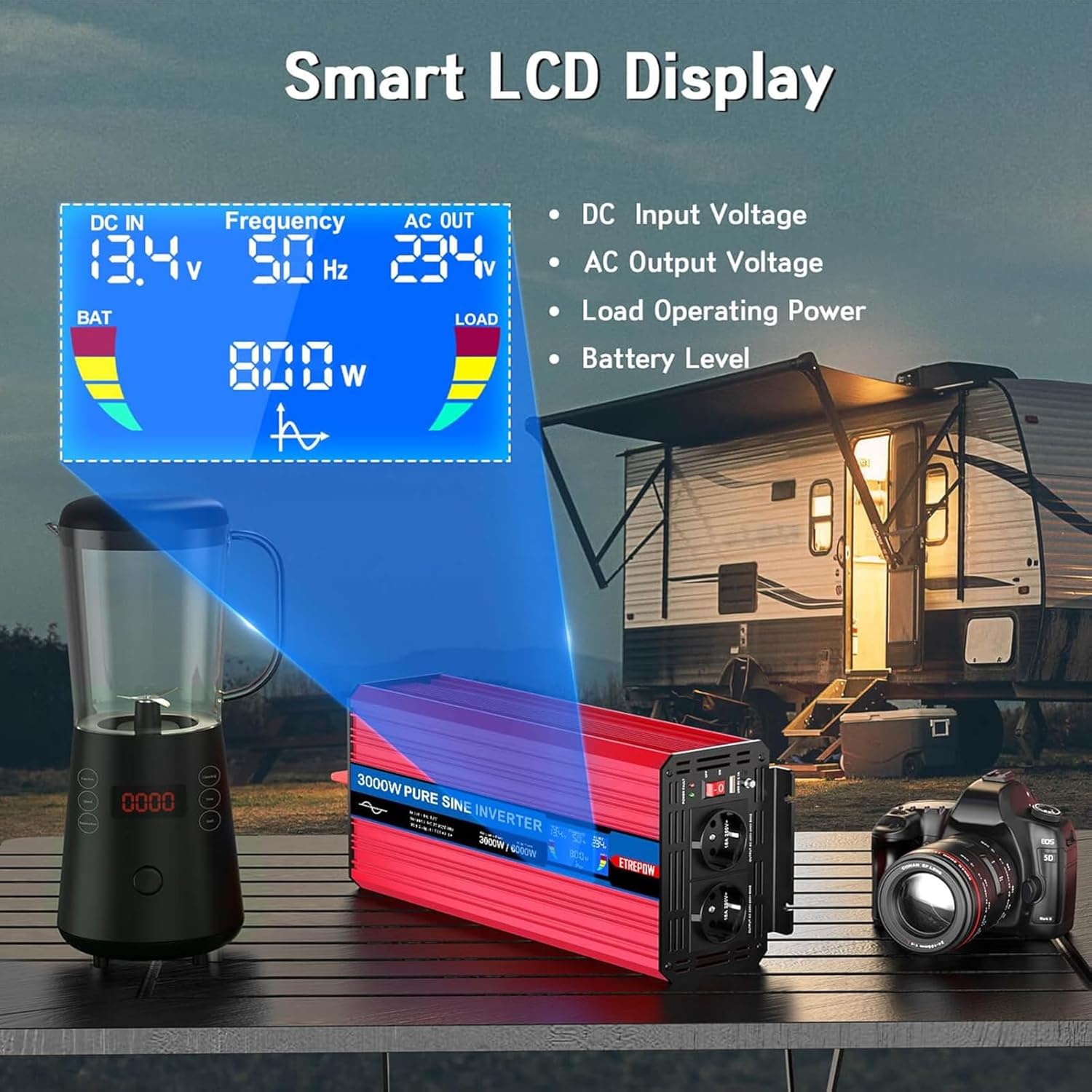
Image 6.1: The smart LCD display provides clear readings of input voltage, frequency, output voltage, load, and battery status.
6.3 Using the Wireless Remote Control
The wireless remote control allows you to turn the inverter on and off from a distance. To use the remote, ensure the inverter's main ON/OFF switch is in the "OFF" position. Press the power button on the remote to toggle the inverter's power state.

Image 6.2: The wireless remote control offers convenient operation of the inverter.
6.4 Connecting Devices (AC & USB)
Plug your 220V/230V AC appliances into the two EU AC outlets. For charging mobile phones or other USB-powered devices, use the 5V 2.1A USB port.
Video 6.1: Demonstration of the inverter powering a coffee machine, laptop, and charging a smartphone, showcasing its versatility for various electronic devices.
Video 6.2: Demonstration of the inverter powering high-wattage appliances such as a coffee machine, microwave, hair dryer, drill, and electric kettle, illustrating its robust performance.
7. Maintenance
- Cleaning: Regularly clean the inverter's exterior with a dry cloth. Ensure ventilation openings are free from dust and debris.
- Connections: Periodically check battery cable connections for tightness and corrosion. Clean if necessary.
- Storage: When not in use for extended periods, store the inverter in a cool, dry place. Disconnect it from the battery.
- Fuse Replacement: The inverter comes with spare fuses. If a fuse blows, replace it with a fuse of the same rating. Consult a qualified technician if unsure.
8. Troubleshooting
If you encounter issues with your inverter, refer to the following common problems and solutions:
| Problem | Possible Cause | Solution |
|---|---|---|
| No power output | Inverter switch OFF; Loose battery connections; Blown fuse; Low battery voltage | Turn switch ON; Check/tighten connections; Replace fuse; Recharge/replace battery |
| Low output voltage | Overload; Low battery voltage; Excessive cable length/gauge | Reduce load; Recharge battery; Use shorter/thicker cables |
| Inverter shuts down (overload protection) | Connected load exceeds inverter's capacity | Disconnect some appliances; Ensure total load is within 3000W continuous rating |
| Inverter shuts down (overheat protection) | Poor ventilation; High ambient temperature; Excessive load | Ensure clear airflow; Move to cooler environment; Reduce load |
| Remote control not working | Inverter main switch ON; Remote battery dead | Ensure inverter main switch is OFF; Replace remote battery |
If problems persist after attempting these solutions, please contact customer support.
9. Specifications
| Feature | Specification |
|---|---|
| Brand | ETREPOW |
| Model Name | LT30PEU12 |
| Power Output (Continuous) | 3000 Watts |
| Peak Power Output | 6000 Watts |
| Input Voltage | 12 Volts DC |
| Output Voltage | 230 Volts AC |
| Output Waveform | Pure Sine Wave |
| Output Frequency | 50 Hz |
| USB Output | 5V, 2.1A |
| Product Dimensions (L x W x H) | 42.6 x 16.5 x 11 cm |
| Recommended Battery Capacity | >= 200 Ampere-hours (for 3000W model) |
| Certifications | CE, ISO, RoHS |
10. Warranty and Support
Your ETREPOW 3000W 12V Pure Sine Wave Power Inverter comes with a one-year free replacement warranty. We are committed to providing comprehensive support.
If you have any questions regarding the use or performance of your device, please do not hesitate to contact our customer service. We offer friendly 24-hour customer support to assist you.
For warranty claims or technical assistance, please refer to the contact information provided with your purchase or visit the official ETREPOW website.


