
1. Introduction
The TOPDON TORNADO30000 (T30A) is an advanced automotive battery charger designed for a wide range of 6V, 12V, and 24V batteries. It supports various battery types, including lead-acid (Wet, Gel, MF, Cal, EFB, AGM) and 12V/24V Lithium-ion batteries, with capacities ranging from 50Ah to 1000Ah. This device functions as a charger, maintainer, desulfator, and a stable power supply for sensitive applications like ECU programming.
This manual provides essential information for the safe and effective operation of your TORNADO30000 battery charger. Please read it thoroughly before use.


2. Safety Information
Always prioritize safety when operating battery charging equipment. Failure to follow safety guidelines can result in injury or damage to equipment.
- Reverse Polarity Protection: The charger is equipped with protection against incorrect connection of battery terminals.
- Overheating Protection: Internal sensors and a cooling fan prevent the unit from overheating during operation.
- Reverse Charge Protection: Prevents battery discharge back into the charger.
- Short-Circuit Protection: Guards against damage from accidental short circuits.
- Over-Voltage Protection: Protects against excessive voltage output.
- ABS Flame Retardant Housing: The device casing is designed to prevent sparks and enhance safety.
- Ensure adequate ventilation during charging.
- Do not charge frozen batteries.
- Keep out of reach of children.


3. Product Overview
3.1 Components
The TOPDON TORNADO30000 package includes the main charger unit, AC power cable, and DC battery clamp cables.


3.2 Control Panel and Indicators
The charger features an intuitive control panel with a MODE button for selecting charging programs and LED indicators for charging status (25%, 50%, 75%, 100%), error, and power supply mode.
4. Setup
- Connect the AC Power Cable: Plug the AC power cable into a suitable wall outlet (100-240V input).
- Connect Battery Clamps: Attach the red positive (+) clamp to the positive battery terminal and the black negative (-) clamp to the negative battery terminal. Ensure a secure connection.
- Verify Connection: The charger will perform a self-check. If an error is detected (e.g., reverse polarity), the error indicator will illuminate. Correct any issues before proceeding.
5. Operating Instructions
5.1 Selecting a Charging Mode
Press the MODE button to cycle through the available charging programs. The charger offers 12 intelligent charging modes tailored for different battery types and conditions.


- NORM Mode: Standard charging for most battery types.
- COLD Mode: Optimized for charging in cold weather conditions.
- REPAIR Mode: Designed to restore lost battery performance by breaking down lead sulfate buildup in lead-acid batteries.
- SUPPLY Mode: Provides a stable voltage for ECU programming and diagnostic testing.
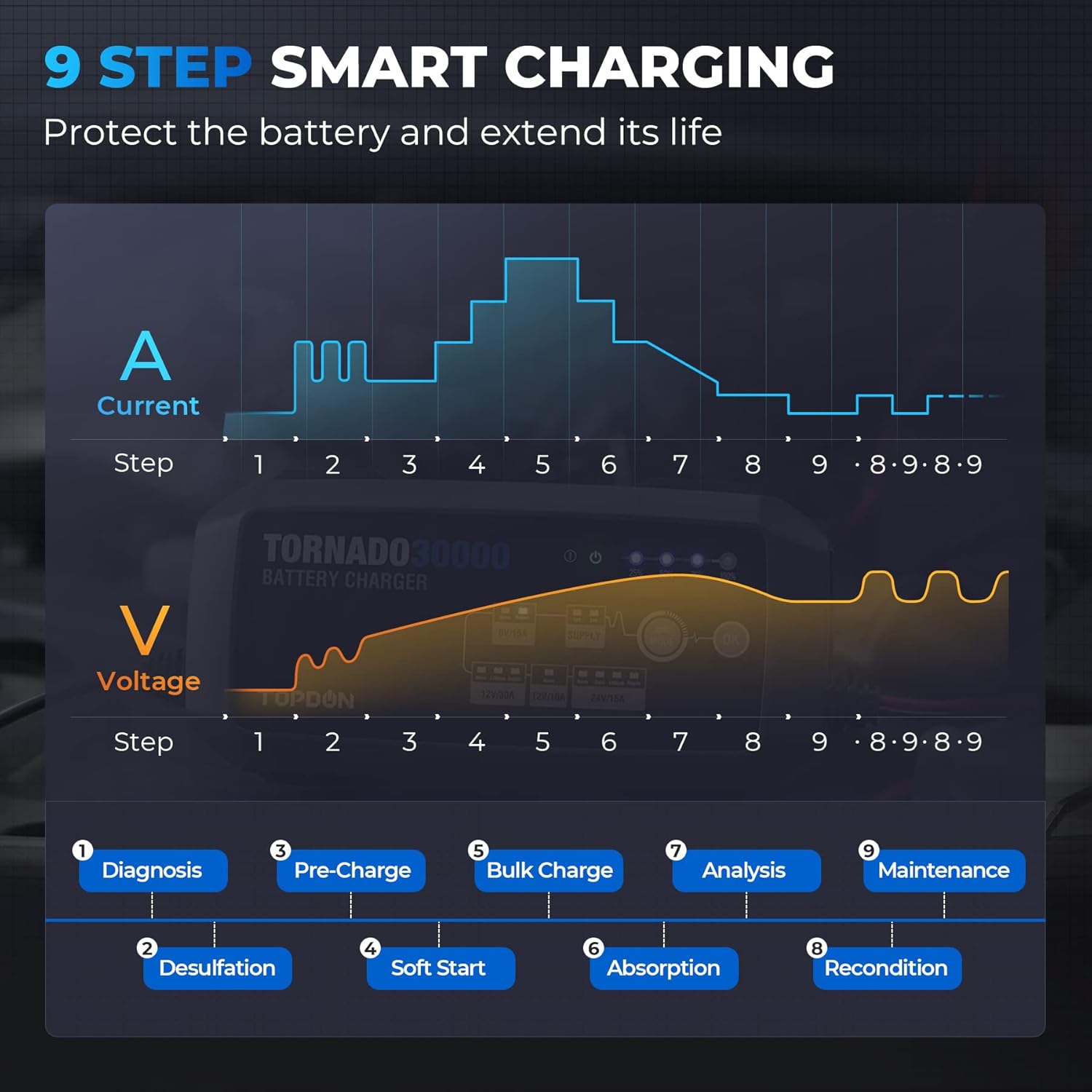
5.2 9-Step Smart Charging Process
The TORNADO30000 utilizes a 9-step smart charging process to optimize battery health and extend its lifespan:
- Diagnosis: Checks battery condition.
- Desulfation: Breaks down lead sulfate.
- Pre-Charge: Initial low-current charge.
- Soft Start: Gradually increases current.
- Bulk Charge: Charges to approximately 80% capacity.
- Absorption: Charges to 100% capacity.
- Analysis: Verifies charge level.
- Recondition: Optimizes battery cells.
- Maintenance: Trickle charge to maintain full capacity.
5.3 Power Supply Mode (SUPPLY)
The SUPPLY mode provides a stable voltage output, crucial for tasks such as ECU flashing, reprogramming, and diagnostic testing, preventing voltage drops that could corrupt vehicle modules.
- 12V Supply: Up to 30A (Max 13.5V)
- 24V Supply: Up to 15A (Max 27V)


5.4 Applications
The TORNADO30000 is suitable for a wide range of vehicles and battery types:
- Cars, Vans, SUVs, ATVs, ORVs
- Trucks, Speedboats, RVs
- Deep cycle batteries used in forklifts, golf carts, electric wheelchairs, sweepers, and solar energy systems.

5.5 Estimated Charging Times
The following table provides approximate charging times based on battery capacity and selected charging mode:

6. Maintenance
Regular maintenance ensures optimal performance and longevity of your battery and charger.
- Trickle Charging: The charger can be left connected indefinitely to maintain a full charge without the risk of overcharging, thanks to its maintenance mode.
- Desulfation: For lead-acid batteries, the repair mode can help restore lost capacity by breaking down sulfate crystals that accumulate on battery plates.
- Keep the charger clean and dry. Store in a cool, dry place when not in use.
- Inspect cables and clamps for damage before each use.


7. Troubleshooting
If the charger is not operating as expected, refer to the following common issues and solutions:
- No Power/Indicators Off: Ensure the AC power cable is securely plugged into a live outlet. Check for tripped circuit breakers.
- Error Indicator On: This typically indicates a safety protection has been triggered.
- Reverse Polarity: Disconnect clamps and re-attach positive to positive, negative to negative.
- Short Circuit: Ensure clamps are not touching each other or other conductive materials.
- Over-Voltage/Overheating: Disconnect the charger, allow it to cool down, and check battery voltage.
- Battery Not Charging: Verify that the correct charging mode is selected for your battery type and voltage. Ensure battery terminals are clean and connections are solid.
- Charger Cuts Out Mid-Charge: This could be due to overheating (allow to cool) or an internal fault. Ensure the cooling fan is not obstructed.
If issues persist after attempting these steps, contact TOPDON customer support.
8. Specifications
| Specification | Value |
|---|---|
| Manufacturer | TOPDON |
| Model Number | T30000 |
| Item Weight | 6 pounds |
| Product Dimensions | 12 x 16 x 5 inches |
| Amperage | 30 Amps |
| Output Voltage | 6V, 12V, 24V |
| Supported Battery Types | Lead-acid (Wet, Gel, MF, Cal, EFB, AGM), Li-ion |
| Supported Battery Capacity | 50Ah to 1000Ah |
| AC Cable Length | 2 meters (AWG18#) |
| DC Cable Length | 1.8 meters (AWG10#) |
| Date First Available | April 6, 2022 |
9. Warranty and Support
TOPDON products are designed for reliability and performance. For information regarding warranty coverage, please refer to the warranty card included with your product or visit the official TOPDON website. Keep your proof of purchase for warranty claims.
For technical assistance, troubleshooting, or general inquiries, please contact TOPDON customer support. You can find contact information on the official TOPDON website or through your retailer.
Visit the official TOPDON Store: TOPDON Store on Amazon


