
Introduction
Thank you for choosing the Sencor STM 3751GR-EUE3 Food Processor. This appliance is designed to assist with various kitchen tasks, including mixing, kneading, whipping, and blending. To ensure safe and efficient operation, please read this manual thoroughly before first use and keep it for future reference.
Important Safety Instructions
- Always ensure the appliance is unplugged from the power outlet before assembly, disassembly, or cleaning.
- Do not immerse the motor unit in water or any other liquid. Clean with a damp cloth only.
- Keep hands, hair, clothing, as well as spatulas and other utensils away from moving parts during operation to prevent injury.
- Never operate the appliance with a damaged cord or plug, or after the appliance malfunctions or has been dropped or damaged in any manner.
- This appliance is not intended for use by persons (including children) with reduced physical, sensory or mental capabilities, or lack of experience and knowledge, unless they have been given supervision or instruction concerning use of the appliance by a person responsible for their safety.
- Do not use attachments not recommended or sold by the manufacturer, as this may cause fire, electric shock, or injury.
- Always ensure the mixing bowl and attachments are securely locked in place before operating.
- Avoid contact with moving parts.
Product Overview and Components
The Sencor STM 3751GR-EUE3 Food Processor comes with several components designed for versatile use in your kitchen.
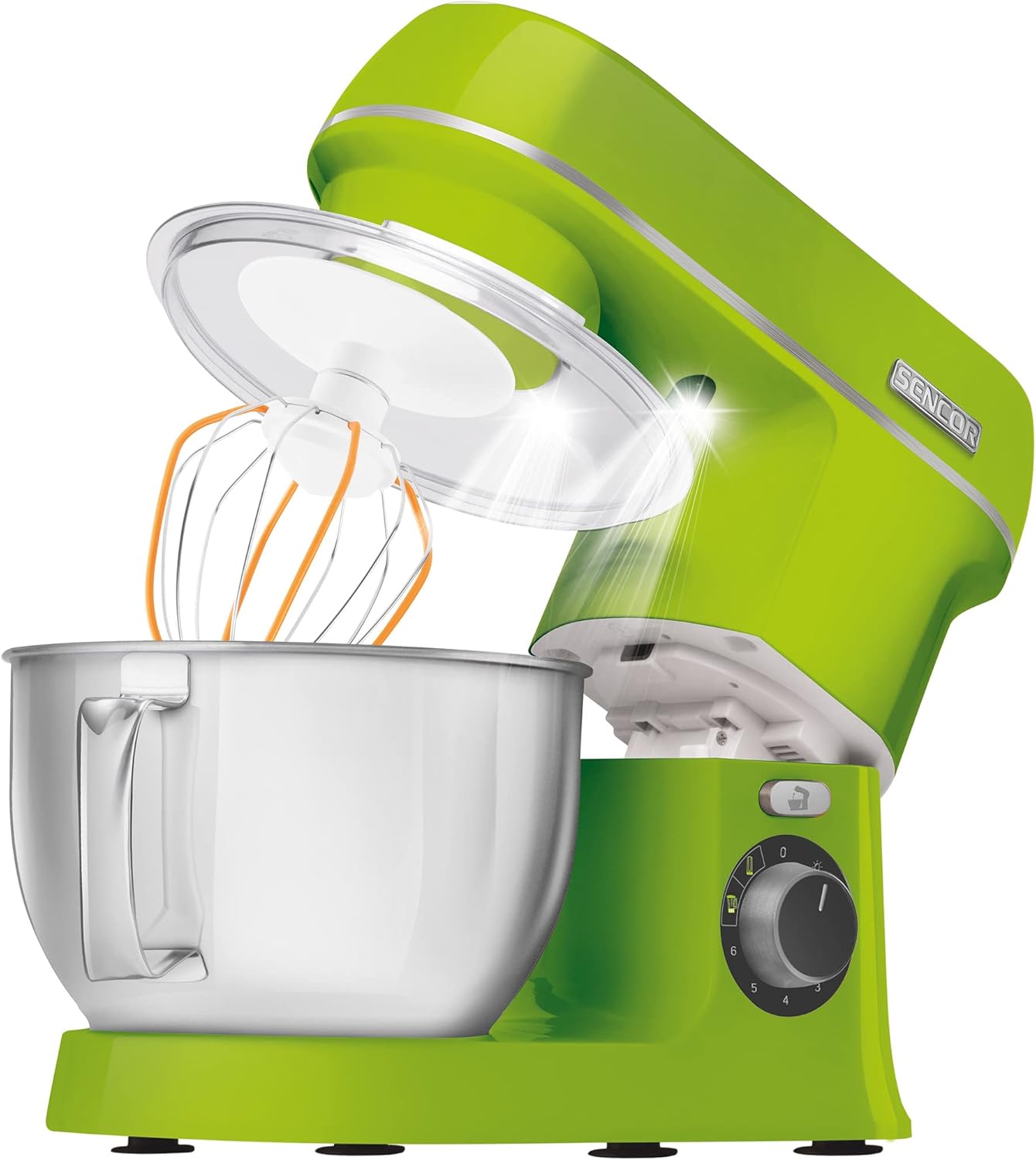
Image 1: The main unit of the Sencor food processor, showing the tilt-head design, stainless steel mixing bowl, whisk attachment, and transparent splash guard in an open position.

Image 2: An overview of the Sencor food processor with all its standard accessories, including various mixing attachments, the NutriBlender cup, and the glass blender jug.
Main Components:
- Motor Unit: The main body housing the 1000W motor and control dial.
- Tilt-Head: Allows easy access to the mixing bowl and attachments.
- 4-Liter Stainless Steel Mixing Bowl: Durable bowl with measurement scale.
- Whisk Attachment: For whipping cream, egg whites, and light batters.
- Kneading Hook: For heavy doughs like bread or pizza.
- Flat Beater: For medium to heavy mixtures such as cakes, cookies, and frostings.
- Splash Guard: Prevents ingredients from splashing out during mixing.
- NutriBlender Accessories: Includes a comfortable cup for blending smoothies and shakes.
- Glass Blender Jug: For blending liquids, soups, and sauces.
Setup
Follow these steps to set up your Sencor Food Processor for first use.
- Unpack: Carefully remove all components from the packaging. Retain packaging for storage or future transport.
- Clean: Before first use, wash the mixing bowl, splash guard, and all attachments (whisk, kneading hook, flat beater, NutriBlender cup, glass blender jug) in warm soapy water. Rinse thoroughly and dry completely. The main motor unit should only be wiped with a damp cloth.
- Position: Place the motor unit on a stable, flat, and dry surface. Ensure there is enough space around the appliance for ventilation and operation.
- Attach Mixing Bowl: Place the stainless steel mixing bowl onto the base and turn it clockwise until it locks securely into position.
- Install Attachment: Press the tilt-head release button and lift the motor head. Select the desired attachment (whisk, kneading hook, or flat beater) and insert it into the attachment shaft, pushing upwards and turning slightly until it clicks into place.
- Lower Head: Lower the motor head until it locks into position. You should hear a click.
- Attach Splash Guard: If desired, slide the splash guard onto the motor head, ensuring the opening aligns with the attachment.
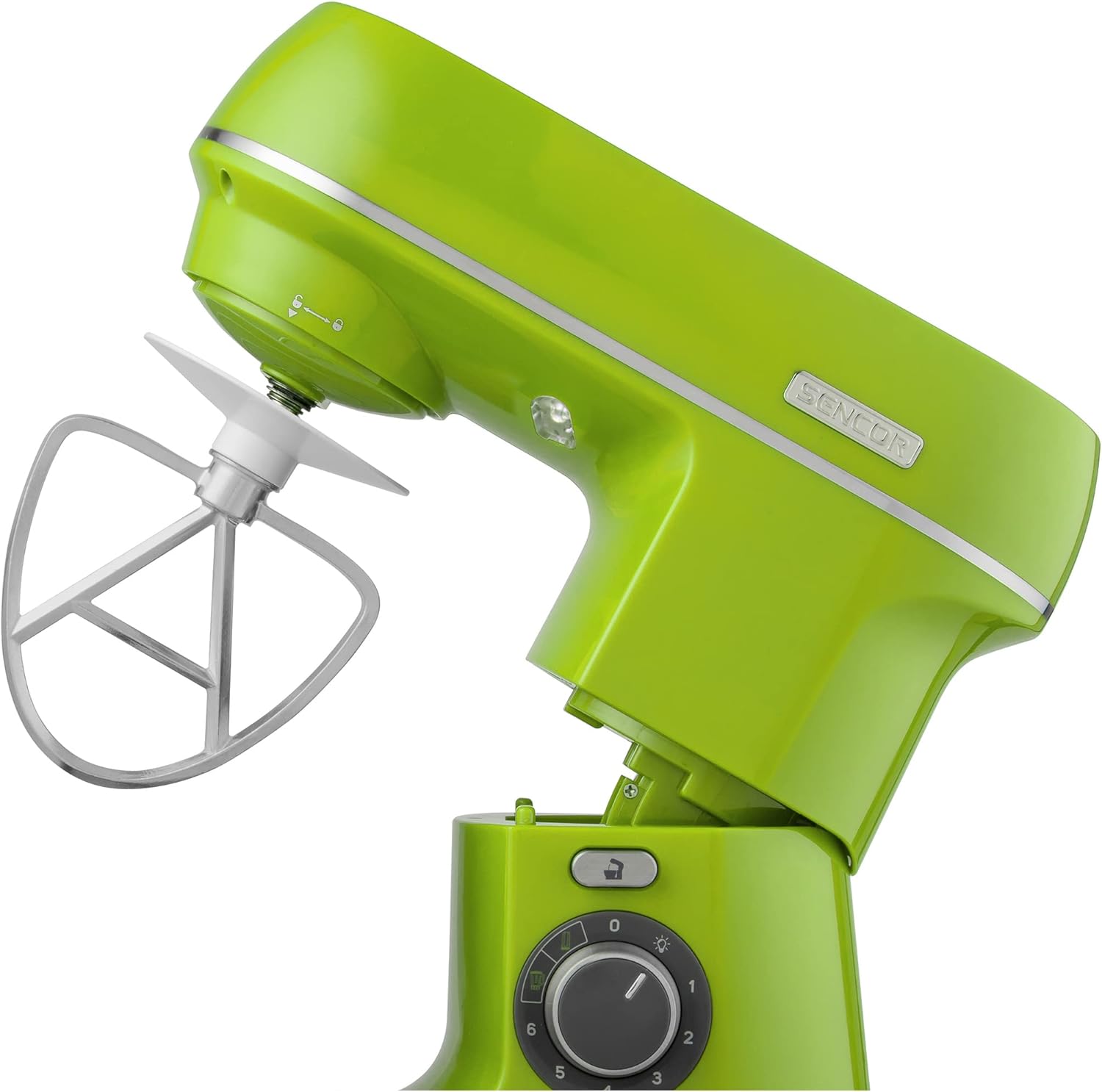
Image 3: The food processor with its head tilted upwards, demonstrating how to attach or remove mixing tools like the flat beater.
Operating Instructions
Using the Mixing Attachments (Whisk, Kneading Hook, Flat Beater)
- Ensure the appliance is unplugged.
- Follow steps 4-6 from the Setup section to install the mixing bowl and desired attachment.
- Add your ingredients to the mixing bowl. Do not overfill the bowl beyond the maximum capacity mark.
- Plug the appliance into a suitable power outlet.
- Turn the speed control dial to the desired setting (1-6). Start with a lower speed and gradually increase as needed to prevent splashing. The Sencor Smart Power & Energy system ensures optimal speed for various tasks.
- For short bursts of maximum power, use the pulse (P) setting.
- When finished, turn the speed dial to '0' and unplug the appliance.
- Press the tilt-head release button and lift the motor head to remove the attachment and bowl.
Using the NutriBlender / Glass Blender Jug

Image 4: The Sencor food processor with the blender attachment securely mounted on top of the motor unit.
- Ensure the appliance is unplugged.
- Fill the NutriBlender cup or glass blender jug with your ingredients. Do not exceed the maximum fill line.
- Securely attach the blade assembly and lid to the cup/jug.
- Place the assembled NutriBlender cup or glass blender jug onto the designated port on top of the motor unit and twist to lock it in place.
- Plug the appliance into a suitable power outlet.
- Select one of the 2 NutriSmart programs or turn the speed control dial to the desired setting for blending.
- Operate until desired consistency is achieved.
- When finished, turn the speed dial to '0' and unplug the appliance.
- Carefully remove the blender cup/jug from the motor unit.
Maintenance and Cleaning
Regular cleaning and maintenance will prolong the life of your Sencor Food Processor.
- Always unplug the appliance before cleaning.
- Motor Unit: Wipe the exterior of the motor unit with a soft, damp cloth. Do not use abrasive cleaners or immerse in water.
- Mixing Bowl and Attachments: The stainless steel mixing bowl, whisk, kneading hook, flat beater, NutriBlender cup, and glass blender jug are dishwasher safe for easy cleaning. Alternatively, wash them in warm soapy water, rinse, and dry thoroughly.
- Splash Guard: Wash in warm soapy water, rinse, and dry.
- Storage: Store the appliance and its accessories in a clean, dry place when not in use.
Troubleshooting
If you encounter any issues with your food processor, refer to the table below for common problems and solutions.
| Problem | Possible Cause | Solution |
|---|---|---|
| Appliance does not start. | Not plugged in; power outage; head not locked; bowl not locked. | Check power connection; check circuit breaker; ensure motor head is fully lowered and locked; ensure mixing bowl is twisted and locked. |
| Attachments not rotating. | Attachment not properly installed. | Lift motor head, re-insert attachment, pushing up and twisting until it clicks. |
| Loud noise during operation. | Overloaded; improper assembly. | Reduce ingredient quantity; check that all parts are correctly assembled and locked. |
| Motor stops during operation. | Overheating protection activated. | Turn off and unplug the appliance. Let it cool down for at least 30 minutes before restarting. Reduce load if consistently stopping. |
Specifications
Technical details for the Sencor STM 3751GR-EUE3 Food Processor.
| Feature | Specification |
|---|---|
| Model Number | STM 3751GR-EUE3 |
| Power | 1000 Watts |
| Voltage | 230 Volts |
| Capacity (Mixing Bowl) | 4 Liters |
| Material | Stainless Steel (bowl), various (attachments) |
| Dimensions (L x W x H) | 38.7 x 33.6 x 41 cm |
| Weight | 698 Grams |
| Special Features | 2 NutriSmart programs, Sencor Smart Power & Energy, FLEXI beater and whisk |
| Dishwasher Safe Parts | Mixing bowl, attachments, blender jug, NutriBlender cup |
Warranty and Support
Sencor products are manufactured to high-quality standards. For warranty information, please refer to the warranty card included with your purchase or visit the official Sencor website. For technical support or spare parts inquiries, please contact Sencor customer service through their official channels.


