
1. Introduction
This manual provides essential information for the safe and efficient installation, setup, and operation of your Theben Luxa 103 S360-100-12 Passive Infrared Presence Detector. Please read these instructions carefully before use and retain them for future reference.

Figure 1: Theben Luxa 103 S360-100-12 Passive Infrared Presence Detector. This image shows a white, circular passive infrared presence detector designed for ceiling mounting. The detection lens array is visible on the underside.
2. Safety Information
Warning: Electrical installation should only be performed by a qualified electrician. Incorrect installation can lead to electric shock, fire, or damage to the device. Always disconnect power at the main circuit breaker before installation or maintenance.
- Ensure the power supply matches the device's specifications (230 V).
- Do not expose the device to moisture or extreme temperatures outside its operating range.
- Keep children away from electrical components.
3. Product Features
The Theben Luxa 103 S360-100-12 is a passive infrared presence detector designed for ceiling mounting, offering advanced lighting control and energy efficiency.
- Detection Area: Passive infrared presence detection with a 360° circular detection zone, covering a diameter of 12 meters (113 m²) at a 3-meter mounting height.
- Lighting Control: Features 1 light channel (230 V relay) for efficient lighting management.
- Expandable Detection: The detection area can be extended through parallel connection of multiple units.
- Manual Override: Includes a connection option for a manual switch button.
- Operating Modes: Can operate as a fully automatic or semi-automatic system.
- Light Measurement: Equipped with directional mixed light measurement.
- Advanced Functions: Integrated Teach-in function, pulse function, test function, and staircase light function.
- Detection Zone Limitation: The detection area can be limited using protective clips.
- Ease of Use: Factory pre-set for immediate use.
- Flexible Adjustment: Settings can be adjusted via an optional remote control, a dedicated application, or integrated potentiometers.

Figure 2: Presence and Motion Detection. This image illustrates the detection capabilities of the sensor in an office environment, highlighting how it senses human presence and movement to control lighting.
4. Installation
The Luxa 103 S360-100-12 is designed for ceiling mounting. Ensure the chosen location provides optimal coverage for the desired detection area.
4.1 Mounting Location
- Mount the detector on the ceiling at an optimal height between 2.5 and 3.5 meters for best performance.
- Avoid mounting near heat sources, ventilation systems, or direct sunlight, as these can interfere with detection.
- Ensure the detection area is clear of obstructions.
4.2 Wiring
- Disconnect power at the main circuit breaker.
- Connect the electrical cable to the detector terminals as per the wiring diagram (refer to the product's specific wiring diagram, not included in this general manual).
- Ensure all connections are secure.
4.3 Detection Area and Parallel Connection
The detector provides a 360° circular detection area with a diameter of 12 meters (113 m²) when mounted at 3 meters. For larger areas, multiple detectors can be connected in parallel to extend the detection range.

Figure 3: Detection Area and Features. This diagram shows the 360-degree circular detection area with a 12-meter diameter (113 m²) and confirms the single light channel. It also mentions passive infrared detection for ceiling mounting and the option for detection range extension via parallel switching.
4.4 Dimensions

Figure 4: Detector Dimensions. A technical drawing providing the top and side dimensions of the presence detector, indicating a diameter of 94.00 mm and a height of 40.50 mm.
5. Setup and Configuration
The Luxa 103 S360-100-12 comes factory pre-set for immediate use. Fine-tuning and advanced settings can be configured using integrated potentiometers, an optional remote control, or a dedicated mobile application.
5.1 Operating Modes
- Fully Automatic: The detector automatically switches the light ON and OFF based on presence and ambient light levels.
- Semi-Automatic: The light is switched ON manually (e.g., via a connected push-button) and switched OFF automatically by the detector when no presence is detected for a set period.
5.2 Advanced Functions
- Teach-in Function: Allows the detector to learn and adapt to the ambient light conditions.
- Pulse Function: Provides a short pulse signal, useful for controlling external devices.
- Test Function: For verifying the detection range and functionality during installation.
- Staircase Light Function: Specific settings for staircase lighting control.
- Detection Area Limitation: Use the provided protective clips to precisely define the detection zone, preventing unwanted triggering.
5.3 Configuration via Mobile App
The Theben programming app allows for convenient adjustment of various parameters.

Figure 5: App Device Selection. A screenshot from the Theben programming application, displaying various device options for selection, including 'theLeda D', indicating app-based configuration.

Figure 6: App Mode and Dim Value Selection. Another screenshot from the Theben programming app, illustrating options for selecting operating modes and adjusting parameters such as the dim value for lighting control.
5.4 Configuration via Remote Control
Optional remote controls (sold separately) provide an alternative method for adjusting settings.

Figure 7: Compatible Remote Controls. This image displays three different remote control models: theSenda B (Item no. 9070985), theSenda P (Item no. 9070910), and theSenda S (Item no. 9070911), which can be used for configuring the presence detector.
6. Operation
Once installed and configured, the presence detector will operate according to its programmed settings. In fully automatic mode, lights will switch on when presence is detected and ambient light is below the set threshold, and switch off after a set delay when no presence is detected. In semi-automatic mode, lights are manually switched on and automatically switched off.
7. Maintenance
The Theben Luxa 103 S360-100-12 requires minimal maintenance.
- Periodically clean the detector lens with a soft, dry cloth to ensure optimal detection performance.
- Do not use abrasive cleaners or solvents.
- Ensure no objects obstruct the detection area.
8. Troubleshooting
If the detector is not functioning as expected, consider the following:
- No Detection: Check power supply. Ensure the detection area is clear. Verify sensitivity settings.
- Lights Stay On: Check the light switch-off delay setting. Ensure no continuous presence is detected. Verify ambient light threshold.
- Lights Don't Turn On: Check ambient light threshold. Verify power supply. Ensure presence is detected.
- Intermittent Operation: Check for environmental interferences (e.g., heat sources, drafts).
For persistent issues, consult a qualified electrician or contact Theben customer support.
9. Specifications
Detailed technical specifications for the Theben Luxa 103 S360-100-12.
| Specification | Value |
|---|---|
| Manufacturer | Theben |
| Item Model Number | 1030062 |
| Product Dimensions (L x W x H) | 62 x 19 x 14 cm; 157 grams |
| Color | N.A (Not Applicable) |
| Material | Plastic |
| Power Supply Type | Electric Cable |
| Quantity of Items | 1 |
| Temperature Range | 55 Degrees Celsius |
| Bulb Type | LED |
| Measurement System | Metric |
| Electrical Connection Type | Ceiling Mount |
| Battery(ies) Included | No |
| Battery(ies) Required | No |
| Operating Voltage | 230 V AC |
| Frequency | 50 Hz |
| Stand-by Consumption | approx. 0.5 W |
| Light Measurement | Mixed light measurement |
| Switching Output | Light |
| Installation Type | Ceiling installation |
| Setting Range Brightness | 5 - 1000 lx |
| Detection Angle | 360° |
| Installation Height | 2.5 - 3.5 m |
| Light Switch-off Delay | 15 s - 30 min |
| Incandescent/Halogen Lamp Load | 2300 W |
| Inrush Current | max. 500 A / 200 µs |
| LED Lamp 2-8 W | 400 W |
| LED Lamp > 8 W | 400 W |
| Compatible Lamps | Incandescent/halogen lamps, fluorescent lamps, energy saving lamps, LEDs |
| LED Lamp < 2 W | 6 W |
| LED Lamp 2-8 W | 60 W |
| LED Lamp > 8 W | 60 W |
| Maximum Range | 12 Meters, 3 Meters |
| Operating Temperature | 55 Degrees Celsius |
| Upper Rated Temperature | 35 Degrees Celsius |
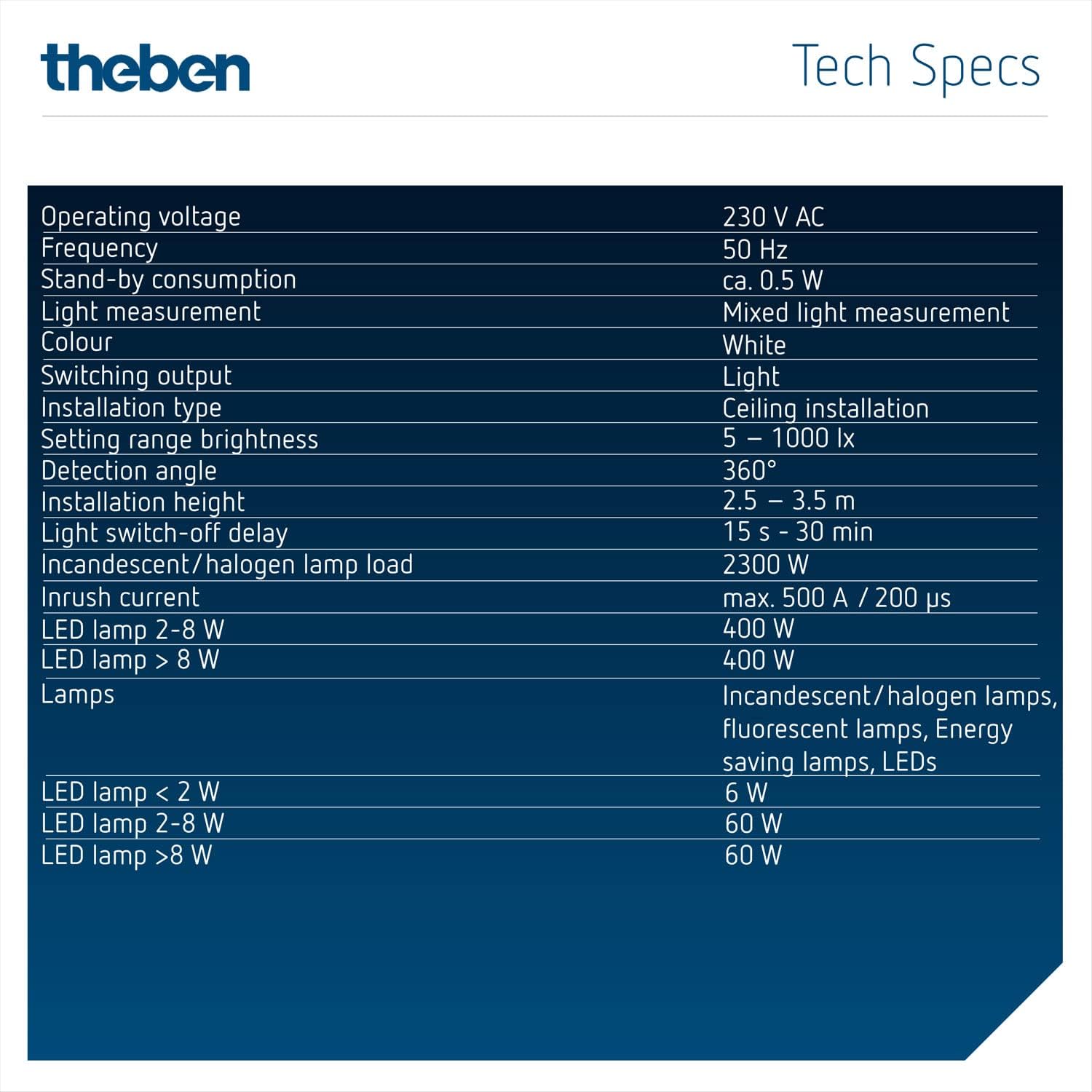
Figure 8: Technical Specifications. A detailed table outlining the technical specifications of the presence detector, including operating voltage, frequency, standby consumption, light measurement type, color, switching output, installation type, brightness setting range, detection angle, installation height, light switch-off delay, and various lamp load capacities.
10. Accessories
The following accessories are compatible with the Theben Luxa 103 S360-100-12:
10.1 Remote Controls
- theSenda B (Item no. 9070985)
- theSenda P (Item no. 9070910)
- theSenda S (Item no. 9070911)
10.2 Surface Boxes
- LUXA 103 BK (Black, Item no. 9070843)
- LUXA 103 GR (Grey, Item no. 9070844)
Figure 9: Surface Boxes. This image shows two accessory surface boxes: LUXA 103 BK (black, Item no. 9070843) and LUXA 103 GR (grey, Item no. 9070844), used for surface mounting the detector.
11. Warranty and Support
For warranty information, please refer to the documentation provided with your purchase or visit the official Theben website. For technical support, contact Theben customer service through their official channels.


