
Introduction
This manual provides essential information for the safe and efficient operation of your MIDEA Portable Air Conditioner. Please read it thoroughly before use and retain it for future reference. This unit offers both cooling and heating functionalities, designed for optimal comfort in various indoor environments.
Safety Information
Always observe basic safety precautions when using electrical appliances to reduce the risk of fire, electric shock, or injury.
- Ensure the unit is placed on a stable, level surface to prevent tipping.
- Do not block air inlets or outlets, as this can impair performance and lead to overheating.
- Keep children and pets away from the unit during operation.
- Unplug the unit from the power outlet before cleaning, maintenance, or when not in use for extended periods.
- Do not attempt to repair the unit yourself. Contact qualified service personnel for all repairs.
- Use only the power supply specified for this unit.
Product Overview
The MIDEA Portable Air Conditioner is a versatile climate control solution for your home or office. It combines powerful cooling and heating capabilities with user-friendly features.
Key Features
- All-Season Comfort: Offers both powerful cooling and efficient heating in a single device.
- High Capacity: 12000 BTU (3000 Frigories) for effective temperature control in large spaces up to 44 m².
- Easy Installation: Comes with a complete window kit for quick and effortless setup.
- Comprehensive Control: Manage settings via the intuitive LED touch panel or the included remote control with a 'Follow Me' function.
- Improved Air Quality: Features a double filter system to remove allergens, dust, and unpleasant odors.
- Eco-Friendly Refrigerant: Uses R290 refrigerant, significantly reducing environmental impact.
Unit Components and Dimensions
Familiarize yourself with the main components and the physical dimensions of your air conditioner.

Image: The MIDEA Portable Air Conditioner unit shown with its remote control, highlighting its 12000 BTU capacity.

Image: A diagram illustrating the dimensions of the MIDEA Portable Air Conditioner (39.7 cm depth, 46.7 cm width, 76.5 cm height) and pointing out its side handles and swivel wheels for easy movement.
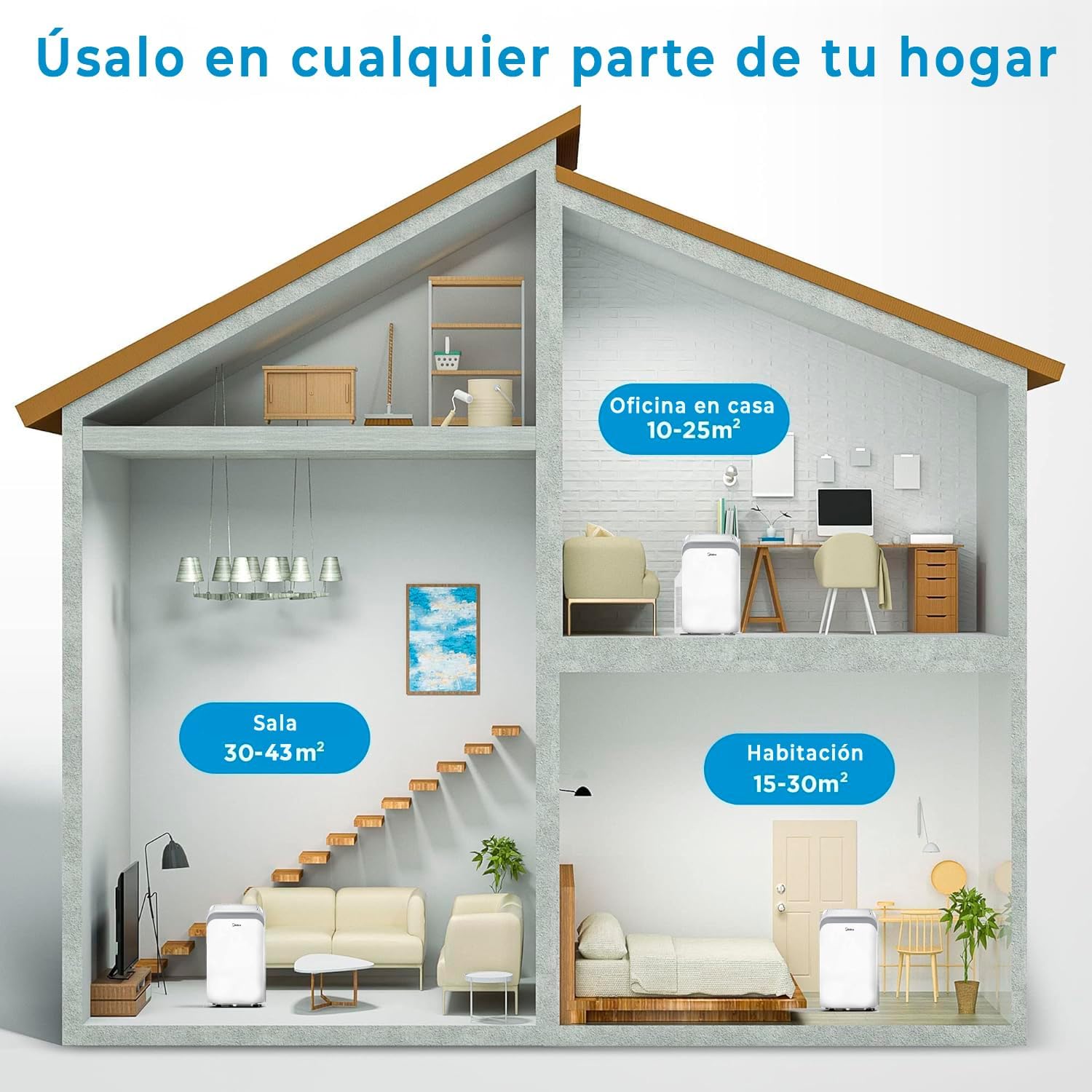
Image: An illustration demonstrating the recommended room sizes for optimal performance: Living Room (30-43m²), Home Office (10-25m²), and Bedroom (15-30m²).
Setup
The MIDEA Portable Air Conditioner is designed for quick and easy installation. Follow these steps to set up your unit:
- Unpack the Unit: Carefully remove the air conditioner and all included accessories from the packaging. Inspect for any damage.
- Positioning: Place the unit on a flat, stable surface near a window and a grounded power outlet. Ensure there is at least 20 cm (8 inches) of space around the unit for proper airflow.
- Window Kit Installation:
- Assemble the window slider kit according to your window type (horizontal or vertical).
- Attach the exhaust hose adapter to the window slider kit.
- Connect one end of the exhaust hose to the unit's exhaust outlet and the other end to the window slider kit.
- Extend the window slider kit to fit your window opening and secure it.
- Use the provided foam seals to seal any gaps around the window kit to prevent air leakage and maximize efficiency.
- Power Connection: Plug the power cord into a suitable grounded electrical outlet.

Image: The MIDEA Portable Air Conditioner positioned next to a window with its exhaust hose connected and extended through the window kit, illustrating easy installation.

Image: A detailed layout of all included accessories: device adapter, exhaust hose adapter, window slider adapter, exhaust hose, wrap-around support, self-adhesive foam seal, screw/bolt/pin, non-adhesive foam gasket, wall outlet adapter, remote control, window slider, and drainage hose.
Operating Instructions
Your MIDEA Portable Air Conditioner offers multiple operating modes and smart features for optimal comfort and energy efficiency.
Control Panel and Remote Control
The unit can be controlled via the intuitive LED touch panel on the unit or the included remote control. The remote control provides full functionality from a distance, including the unique 'Follow Me' feature.

Image: A visual guide to the control panel and remote control buttons, numbered for easy reference: 1. On/Off Control, 2. 4 Control Modes, 3. Fan Speed Control, 4. Sleep Mode Control, 5. Air Oscillation Control, 6. Temperature Control, 7. DIY Mode Control, 8. Timer Control, 9. LED Light Control, 10. Follow Me Mode Controls.
Operating Modes
Select the desired mode based on your comfort needs:
- Cooling Mode: Provides powerful refrigeration to cool your space.
- Heating Mode: Utilizes the heat pump to efficiently warm your room.
- Dehumidification Mode: Effectively controls humidity levels, removing excess moisture from the air.
- Fan Mode: Circulates air without cooling or heating, offering three adjustable fan speeds.
- Automatic Mode: The unit automatically selects the appropriate operating mode (cooling, heating, or fan) and fan speed based on the ambient temperature to maintain your desired comfort level.
- Sleep Mode: Activates a quiet operation mode that gradually adjusts the temperature over time to ensure comfortable sleep while conserving energy.
- Follow Me Function: When activated, the remote control acts as a portable thermostat, sensing the temperature at its location and adjusting the unit's operation to maintain the desired temperature around you.

Image: Illustration showing the MIDEA Portable Air Conditioner emitting both cool (blue) and warm (orange) air, demonstrating its dual cooling and heating functionality.

Image: Icons representing the intelligent features of the MIDEA Portable Air Conditioner: Automatic Oscillation, Follow Me Function, 3-Speed Fan, Sleep Mode, Dual Motors, and Dual Air Filtration System.

Image: The MIDEA Portable Air Conditioner highlighting its eco-friendly aspects, including 0.5W standby power (75% saving) and R290 refrigerant which reduces GWP by 99.7%.
Maintenance
Regular maintenance is crucial for ensuring the optimal performance, efficiency, and longevity of your MIDEA Portable Air Conditioner.
- Filter Cleaning: The unit features a double filter system. Clean the filters regularly (every two weeks or more frequently if used heavily) to maintain air quality and efficiency. To clean, remove the filters, wash them with warm, soapy water, rinse thoroughly, and allow them to air dry completely before reinserting.
- Unit Cleaning: Wipe the exterior of the unit with a soft, damp cloth. Do not use harsh chemicals, abrasive cleaners, or solvents, as these can damage the surface.
- Drainage: Periodically check the drainage hose and reservoir (if applicable) for any blockages or water accumulation. Ensure the drainage hose is clear and properly positioned to allow for continuous drainage, especially during dehumidification or cooling modes in high humidity.
- Storage: If storing the unit for an extended period, ensure it is thoroughly cleaned and dried. Drain any remaining water, clean the filters, and store the unit in a cool, dry place, preferably in its original packaging.

Image: A person demonstrating how to access and clean the filter of the MIDEA Portable Air Conditioner, emphasizing ease of maintenance.
Troubleshooting
If you encounter issues with your unit, refer to the following common problems and their potential solutions. If the problem persists, contact customer support.
| Problem | Possible Cause | Solution |
|---|---|---|
| Unit does not turn on. | No power, power cord unplugged, or circuit breaker tripped. | Check power connection, ensure outlet is working, reset circuit breaker. |
| Insufficient cooling/heating. | Dirty air filter, blocked air vents, room too large, or window kit not sealed. | Clean air filter, clear vents, ensure proper room size for unit, seal window kit. |
| Unit is noisy. | Unit not level, fan speed too high, or internal component issue. | Ensure unit is on a level surface, reduce fan speed, if noise persists contact support. |
| Water leakage. | Drainage hose blocked or improperly connected, or water tank full (if applicable). | Check drainage hose for kinks or blockages, ensure secure connection. Empty water tank if full. |
| Remote control not working. | Dead batteries, obstruction, or remote out of range. | Replace batteries, remove obstructions, ensure remote is within operating range. |
For issues not listed here or if troubleshooting steps do not resolve the problem, please contact Midea customer support.
Specifications
Detailed technical specifications for the MIDEA Portable Air Conditioner, Model MPPDB-12HRN7-QB6.
| Feature | Detail |
|---|---|
| Brand | Midea |
| Model Number | MPPDB-12HRN7-QB6 |
| Product Dimensions (L x W x H) | 39.7 x 46.7 x 76.5 cm |
| Weight | 33.2 kg |
| Cooling Capacity | 12000 British Thermal Units (BTU) / 3000 Frigories |
| Heating Capacity | 3500 W |
| Special Feature | Portable, Heat Pump |
| Energy Efficiency Rating (Cooling) | A |
| Energy Efficiency Rating (Heating) | A+ |
| Seasonal Energy Efficiency Ratio (SEER) | 15 |
| Color | White |
| Voltage | 3.5 Kilovolts |
| Noise Level | 65 dB |
| Refrigerant | R-290 |
| First Available Date | April 4, 2022 |
Warranty and Support
Midea is committed to providing excellent customer service and support for your product.
Your MIDEA Portable Air Conditioner comes with a 2-year warranty for uninterrupted technical service. Midea has an extensive network of over 170 technical assistance points distributed across the peninsula, Canary Islands, and Portugal, ensuring readily available support.
For technical assistance, warranty claims, or to find your nearest service center, please visit the official Midea website or contact their customer service directly. Please retain your purchase receipt as proof of purchase for warranty validation.

Image: Information regarding Midea's warranty, services, and spare parts, highlighting 2 years of uninterrupted technical service and 170 assistance points, along with SGS certifications.


