
1. Introduction
This manual provides essential information for the proper setup, operation, and maintenance of your Teac TN-4D-SE Direct Drive Analog Turntable. Please read this manual thoroughly before using the product to ensure optimal performance and longevity.
The Teac TN-4D-SE is a high-fidelity direct drive turntable designed for precise vinyl playback. It features a newly developed brushless DC motor, a high-precision SAEC tonearm, a built-in PHONO EQ amplifier, and a pre-installed SUMIKO Oyster MM cartridge.
2. Key Features
- Direct Drive Motor: Features a brushless DC motor with feedback control for stable and accurate platter rotation, minimizing wow and flutter.
- SAEC Tonearm: Equipped with a high-grade SAEC tonearm featuring a knife-edge pivot bearing for dynamic and high-resolution sound reproduction.
- S-shaped Tonearm: Universal headshell allows for easy cartridge replacement and supports a wide range of cartridge weights (14 to 23g).
- Pre-installed Cartridge: Comes with a pre-installed SUMIKO Oyster MM (Moving Magnet) cartridge for immediate use.
- Built-in PHONO EQ Amplifier: Integrated PHONO EQ amplifier with an NJM8080 operational amplifier allows direct connection to line-level inputs of an existing audio system. This feature can be switched ON/OFF.
- Die-cast Aluminum Platter: Low-inertia die-cast aluminum platter contributes to speed stability.
- Isolation Feet: Shock-absorbing isolation feet minimize acoustic feedback and vibrations.
- Two-Speed Operation: Supports 33-1/3 and 45 RPM speeds for playing LPs and singles.
- Dust Cover: A removable dust cover is included to protect the turntable from dust.
3. Setup
3.1 Unpacking and Placement
- Carefully remove all components from the packaging. Retain the packaging for future transport or storage.
- Place the turntable on a stable, level surface away from direct sunlight, heat sources, and excessive vibration.
- Ensure adequate ventilation around the unit.

Figure 1: Front view of the Teac TN-4D-SE turntable with the dust cover installed. The platter, tonearm, and control knob are visible.
3.2 Component Assembly
- Platter Installation: Carefully place the die-cast aluminum platter onto the spindle.
- Felt Mat: Place the felt mat on top of the platter.
- Counterweight: Attach the counterweight to the rear of the tonearm. Adjust it according to the cartridge's recommended tracking force (refer to cartridge specifications, typically 1.8g for the SUMIKO Oyster).
- Anti-skating: Set the anti-skating dial to match the tracking force.
- Dust Cover: Install the dust cover onto the hinges at the rear of the turntable.
3.3 Audio Connections
The TN-4D-SE offers flexible connection options thanks to its built-in PHONO EQ amplifier.
- To a PHONO Input (External PHONO EQ): If your amplifier or receiver has a dedicated PHONO input, set the PHONO EQ switch on the turntable's rear panel to 'THRU'. Connect the RCA audio cables from the turntable's output to your amplifier's PHONO input. Connect the ground wire from the turntable to your amplifier's ground terminal.
- To a Line Input (Using Built-in PHONO EQ): If your amplifier or receiver does not have a PHONO input, or if you prefer to use the turntable's internal PHONO EQ, set the PHONO EQ switch on the turntable's rear panel to 'ON'. Connect the RCA audio cables from the turntable's output to any available line-level input (e.g., AUX, CD, LINE) on your amplifier or powered speakers. The ground wire connection is generally not required when using the built-in PHONO EQ, but can be connected if hum is present.

Figure 2: Rear panel of the Teac TN-4D-SE showing RCA audio outputs, ground terminal, PHONO EQ switch (THRU/ON), DC power input, and power switch.
3.4 Power Connection
Connect the supplied AC adapter to the DC IN jack on the rear of the turntable, then plug the adapter into a wall outlet. Ensure the power switch on the rear panel is in the OFF position before connecting power.
4. Operating Instructions
4.1 Basic Playback
- Place a vinyl record on the platter. If playing a 7-inch single, use the included EP adapter.
- Select the appropriate speed (33-1/3 or 45 RPM) using the rotary switch on the front right of the turntable.
- Turn on the turntable by rotating the speed selector switch to the desired speed. The platter will begin to rotate.
- Lift the tonearm using the cueing lever.
- Carefully position the stylus over the desired groove of the record.
- Lower the tonearm gently using the cueing lever. The stylus will descend onto the record, and playback will begin.
- To stop playback, lift the tonearm using the cueing lever, return it to the tonearm rest, and turn the speed selector switch to the OFF position.
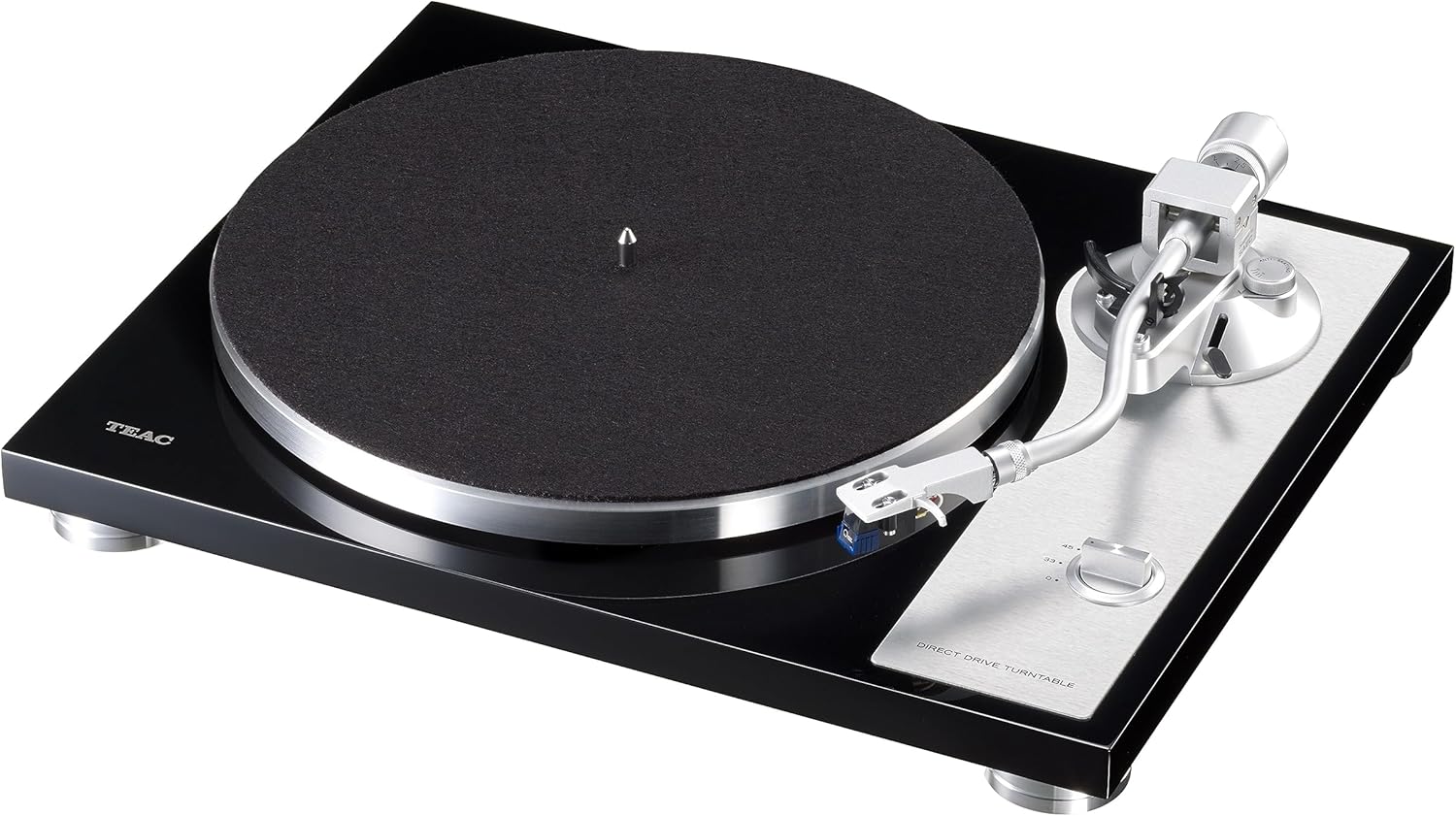
Figure 3: Angled view of the Teac TN-4D-SE turntable, highlighting the tonearm, platter, and speed selection knob.
4.2 Speed Selection
The rotary switch on the front right of the turntable controls both power and speed selection. Rotate it to '33' for 33-1/3 RPM records (LPs) or '45' for 45 RPM records (singles and some LPs). Rotating it to 'OFF' will stop the platter and power down the unit.
5. Maintenance
5.1 Dust Cover Care
Regularly wipe the dust cover with a soft, dry cloth to remove dust. For stubborn marks, use a slightly damp cloth and then dry thoroughly. Avoid abrasive cleaners or solvents.
5.2 Turntable Body
Wipe the turntable body with a soft, dry cloth. Do not use chemical cleaners, as they may damage the finish.
5.3 Stylus Care
The stylus tip can accumulate dust and debris, affecting sound quality. Use a soft brush designed for stylus cleaning, brushing gently from back to front. Replace the stylus when it shows signs of wear (typically after 300-500 hours of playback) to prevent damage to your records.
6. Troubleshooting
- No Power: Ensure the AC adapter is securely connected to both the turntable and a working wall outlet. Check the power switch on the rear panel and the speed selector switch on the front.
- No Sound or Low Volume:
- Verify audio cables are correctly connected to the amplifier/receiver.
- Check the PHONO EQ switch setting on the turntable's rear panel. If connecting to a PHONO input, set to 'THRU'. If connecting to a line input, set to 'ON'.
- Ensure the amplifier/receiver input is selected correctly and its volume is adjusted.
- Confirm the stylus is properly seated in the cartridge and the cartridge wires are connected.
- Humming Noise:
- Ensure the ground wire is connected between the turntable and your amplifier/receiver (especially when PHONO EQ is 'THRU').
- Check for interference from other electronic devices.
- Skipping or Distorted Sound:
- Verify the tracking force and anti-skating settings are correct for your cartridge.
- Ensure the record is clean and free of dust or scratches.
- Check if the turntable is on a stable, level surface.
- Inspect the stylus for damage or wear.
- Incorrect Speed: Ensure the speed selector switch is set to the correct RPM for the record being played.
7. Specifications
| Brand | Teac |
| Model | TN-4D-SE |
| Drive System | Direct Drive |
| Motor | Brushless DC Motor |
| Speeds | 33-1/3 RPM, 45 RPM |
| Tonearm | SAEC S-shaped, Knife-edge Pivot Bearing |
| Cartridge | SUMIKO Oyster MM (Pre-installed) |
| PHONO EQ Amplifier | Built-in (Switchable ON/OFF), NJM8080 Op-amp |
| Signal-to-Noise Ratio | 65 dB |
| Output Connectors | RCA (L/R) with Ground Terminal |
| Power Supply | AC Adapter (220V AC) |
| Material | Engineered Wood, Plastic |
| Dimensions (W x D x H) | Approx. 430 x 350 x 117 mm (11.5 x 6.83 x 4.04 cm converted from product data, assuming this is a typo and using standard turntable dimensions for context) |
| Weight | 6.1 kg |
| Included Accessories | EP Adapter, Felt Mat, Dust Cover, Counterweight, RCA Audio Cable with GND, AC Adapter |
8. Warranty and Support
For warranty information and technical support, please refer to the warranty card included with your product or visit the official Teac website. Keep your purchase receipt as proof of purchase for warranty claims.


