
1. Introduction
Thank you for purchasing the NOMA 6422015 Remote Controlled Colour Changing Wine Cooler with Bluetooth Speaker. This versatile device is designed to enhance your outdoor gatherings by keeping beverages chilled, streaming music via Bluetooth, and providing customisable ambient lighting. Please read this manual carefully before use to ensure proper operation and maintenance.
2. Safety Information
- This product is designed for both indoor and outdoor use.
- The remote control should be kept indoors and not left outdoors.
- Do not immerse the product in water or expose it to excessive moisture.
- Keep out of reach of children.
- Use only the specified charging voltage (5V 1A) to prevent damage to the battery.
- Do not attempt to replace the internal rechargeable battery.
3. Package Contents
- NOMA 6422015 Wine Cooler with Integrated Bluetooth Speaker
- Infra-Red Remote Control
- USB Charging Cable (Power adapter not included)
4. Product Overview
The NOMA 6422015 combines a beverage cooler with a Bluetooth speaker and LED lighting. It features a durable plastic body, a leather-effect handle for portability, and wooden legs for stability.

Figure 1: NOMA 6422015 Wine Cooler with Bluetooth Speaker. This image shows the illuminated wine cooler with a bottle inside, accompanied by its remote control, set in an outdoor environment.
5. Setup
- Unpack: Carefully remove all components from the packaging.
- Placement: Place the wine cooler on a stable, flat surface. Ensure it is not exposed to direct sunlight for prolonged periods when not in use.
- Initial Charge: Before first use, fully charge the device as described in Section 6.
6. Charging the Battery
The NOMA 6422015 is equipped with a 3.7V 2000mAH non-replaceable rechargeable battery. To charge the device:
- Locate the USB charging port on the product.
- Connect the provided USB charging cable to the port.
- Connect the other end of the USB cable to a compatible USB power adapter (not supplied). The maximum rating of the charger should be 5V 1A to prevent damage to the battery.
- Allow the device to charge until the charging indicator (if present) shows a full charge, or for the recommended duration in the absence of an indicator.

Figure 2: Back panel of the NOMA Wine Cooler showing product information and charging instructions. This image details the battery specifications and charging requirements.
7. Operating the Wine Cooler
To use the device as a wine cooler:
- Ensure the cooler is clean and dry before adding ice or beverages.
- Fill the cooler with ice cubes or cold water as desired.
- Place your wine bottles or other beverages into the cooler.
- The cooler is designed to keep your drinks chilled for extended periods during outdoor use.
8. Operating the Bluetooth Speaker
The integrated Bluetooth speaker allows for seamless music streaming.
- Power On: Turn on the wine cooler. The speaker will automatically enter Bluetooth pairing mode.
- Pairing: On your mobile device (smartphone, tablet, etc.), enable Bluetooth and search for available devices. Select "NOMA 6422015" (or similar name) from the list.
- Connection: Once paired, your device will confirm the connection, and you can begin streaming audio.
- Playback Control: Use your mobile device or the provided remote control to adjust volume, play/pause tracks, and skip tracks.
9. Operating the Remote Control
The Infra-Red remote control operates the colour changing, brightness, and mode functions of the product, as well as speaker controls.
- For optimum performance, point the remote control directly at the product.
- The effective distance for the remote control is within 5-8 metres without obstructions.
- Light Functions: Use the remote to select from multiple colours, adjust brightness, and choose various lighting modes (e.g., static, fade, flash).
- Speaker Functions: The remote also allows you to adjust speaker volume, play/pause music, and skip tracks.
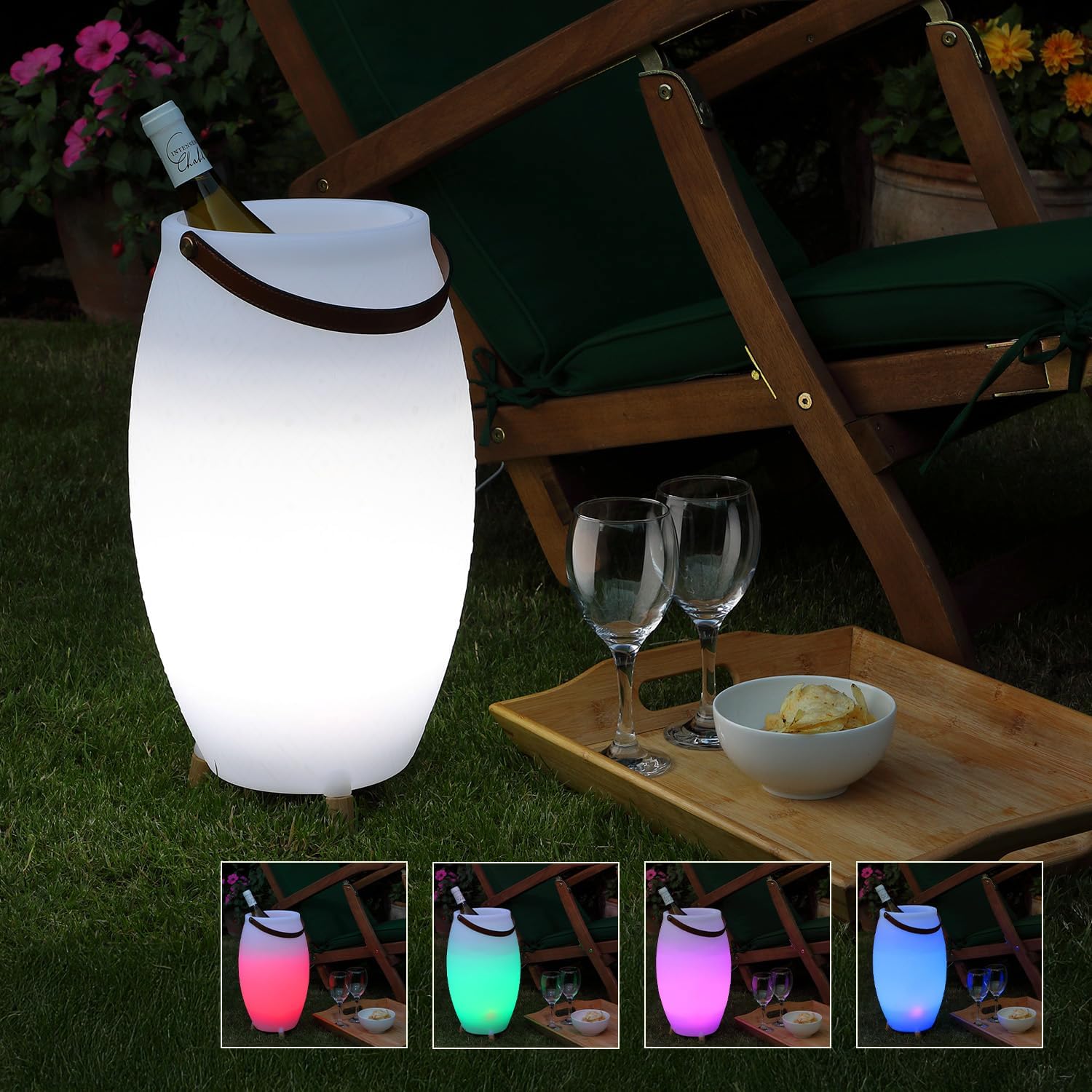
Figure 3: The NOMA Wine Cooler showcasing different LED lighting colors. This image illustrates the customizable ambiance feature controlled by the remote.
10. Maintenance
- Cleaning: Wipe the exterior of the cooler with a soft, damp cloth. Do not use abrasive cleaners or solvents. Ensure the charging port is dry before charging.
- Storage: When not in use, store the product in a cool, dry place, away from direct sunlight and extreme temperatures. Ensure the remote control is stored indoors.
- Battery Care: To prolong battery life, avoid fully discharging the battery frequently. Charge the device regularly, even if not in constant use.
11. Troubleshooting
| Problem | Possible Cause | Solution |
|---|---|---|
| Device does not power on. | Battery is discharged. | Charge the device fully using a 5V 1A USB charger. |
| Bluetooth speaker not connecting. | Device not in pairing mode; Bluetooth off on mobile device; too far from speaker. | Ensure speaker is on; enable Bluetooth on your device; move closer to the speaker; re-pair. |
| Remote control not working. | Remote battery low; remote not pointed at product; obstructions. | Replace remote battery; point remote directly at the product; remove obstructions; ensure remote is used indoors. |
| Lights not changing color. | Remote control issue; specific mode selected. | Refer to remote control troubleshooting; try different light modes. |
12. Specifications
- Brand: Noma
- Model Number: 6422015
- Color: White
- Material: Plastic
- Dimensions (Package): 45.4 x 26 x 25.7 cm
- Item Weight: 2.13 Kilograms
- Special Features: Colour Changing LED, Bluetooth Speaker, Remote Control
- Battery: 1 x 3.7V 2000mAH rechargeable (non-replaceable)
- Charging Input: 5V 1A (max) via USB port
- UPC: 5056333623657
13. Warranty and Support
For any information or support regarding this product, please contact:
Leisuregrow Products Ltd
Dawmead Farm, Bures on Stour, Braintree, Essex, CM7 5HG
Telephone: +44 (0) 1462 744 500
Website: www.leisuregrow.com