Introduction
The TSUSF KW206 is an intelligent and powerful OBD2 on-board computer display designed to provide real-time vehicle data. This device integrates multiple functions such as a speedometer, engine temperature gauge, oil thermometer, boost gauge, and fuel consumption meter into a single 3.5-inch digital LCD display. It enhances driving safety by presenting essential vehicle parameters directly to the driver, eliminating the need to constantly check the dashboard.
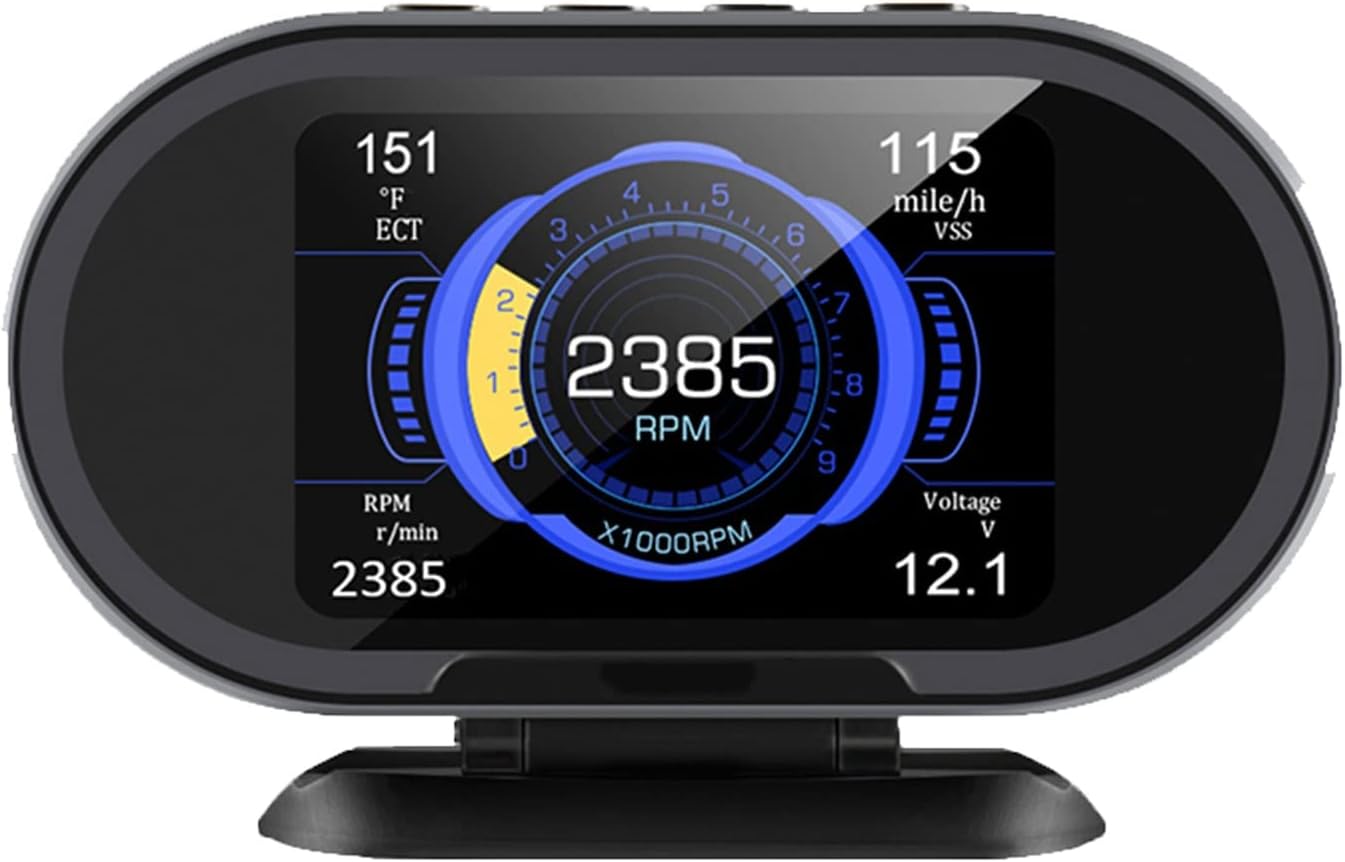
Image: The TSUSF KW206 display unit, showing various real-time vehicle parameters such as RPM, speed, engine coolant temperature, and battery voltage.
Package Contents
Verify that all items are present in the package:
- 1 x KW206 On-Board Computer Gauge Unit
- 1 x OBD2 Connection Cable (1.5 meters)
- 1 x USB Cable
- 1 x User Manual

Image: The complete package contents of the TSUSF KW206, showing the main unit, OBD2 cable, USB cable, and the instruction manual.
Product Features
The TSUSF KW206 offers a range of features designed for comprehensive vehicle monitoring and diagnostics:
- Real-time Data Display: 3.5-inch digital LCD shows vehicle parameters in real-time, including speed, RPM, engine coolant temperature, battery voltage, fuel level, engine load value, and oxygen sensor readings (B1S1, B2S1).
- Warning System: Provides warnings for over-speed, high engine temperature, and low battery voltage. Supports custom warning threshold settings.
- OBDII Diagnostic Functions: Supports OBDII system error code diagnostics, allowing users to read and clear diagnostic trouble codes (DTCs) and view live data streams in text format.
- Performance Testing: Includes a 0-100 km/h acceleration time recording function.
- Extensive Data Support: Displays up to 34 series of real-time data.
- Protocol Compatibility: Supports all full OBD2 protocols and commands, including Dual J1850, ISO9141-2, ISO14230-4 KWP, ISO15765-4 CAN, SAE J1850 PWM, and SAE J1850 VPW.
- Unit Switching: Supports switching between imperial and metric units, or individual parameter unit switching (e.g., Km to Mile, Fahrenheit to Celsius).
- Fast Response: High data update rate ensures low latency and quick response to real-time information.
- Automatic Power Management: Automatically shuts off when the voltage drops below the engine-off threshold, eliminating the need to unplug from the OBDII port.
- Automatic Brightness: Adjusts screen brightness automatically for optimal visibility during day and night.
- Multi-language Interface: Supports English, Russian, and Spanish languages.
- Lifetime Updates: Free lifetime software updates and upgrades.

Image: An overview of the KW206's capabilities, highlighting its diagnostic, monitoring, and alarm functions.
Setup
1. Installation
- Locate the OBDII Port: The OBDII port is typically located under the dashboard on the driver's side, near the steering column. Refer to your vehicle's owner's manual if you cannot find it.
- Connect the OBD2 Cable: Plug one end of the provided 1.5-meter OBD2 connection cable into the vehicle's OBDII port.
- Connect to the KW206: Plug the other end of the OBD2 cable into the designated port on the back of the KW206 unit.
- Position the Device: Place the KW206 unit on your dashboard or a suitable surface using its stand, ensuring it does not obstruct your view of the road.

Image: The rear panel of the KW206, displaying the OBD2 input port and a USB port for updates.
2. Initial Power-On
- Start the Vehicle: Turn your vehicle's ignition to the ON position or start the engine. The KW206 will automatically power on.
- System Initialization: The device will perform a self-check and attempt to establish communication with your vehicle's ECU. This may take a few moments.
- Display Data: Once connected, the display will show real-time vehicle data.
Operating Instructions
1. Navigation
The KW206 is operated using the buttons located on the unit. Refer to the on-screen menu for specific functions. The main menu typically includes options for Language, System Parameter Settings, OBD Parameter Settings, Alarm Settings, OBD Diagnose, 0-100KM Time, and About.
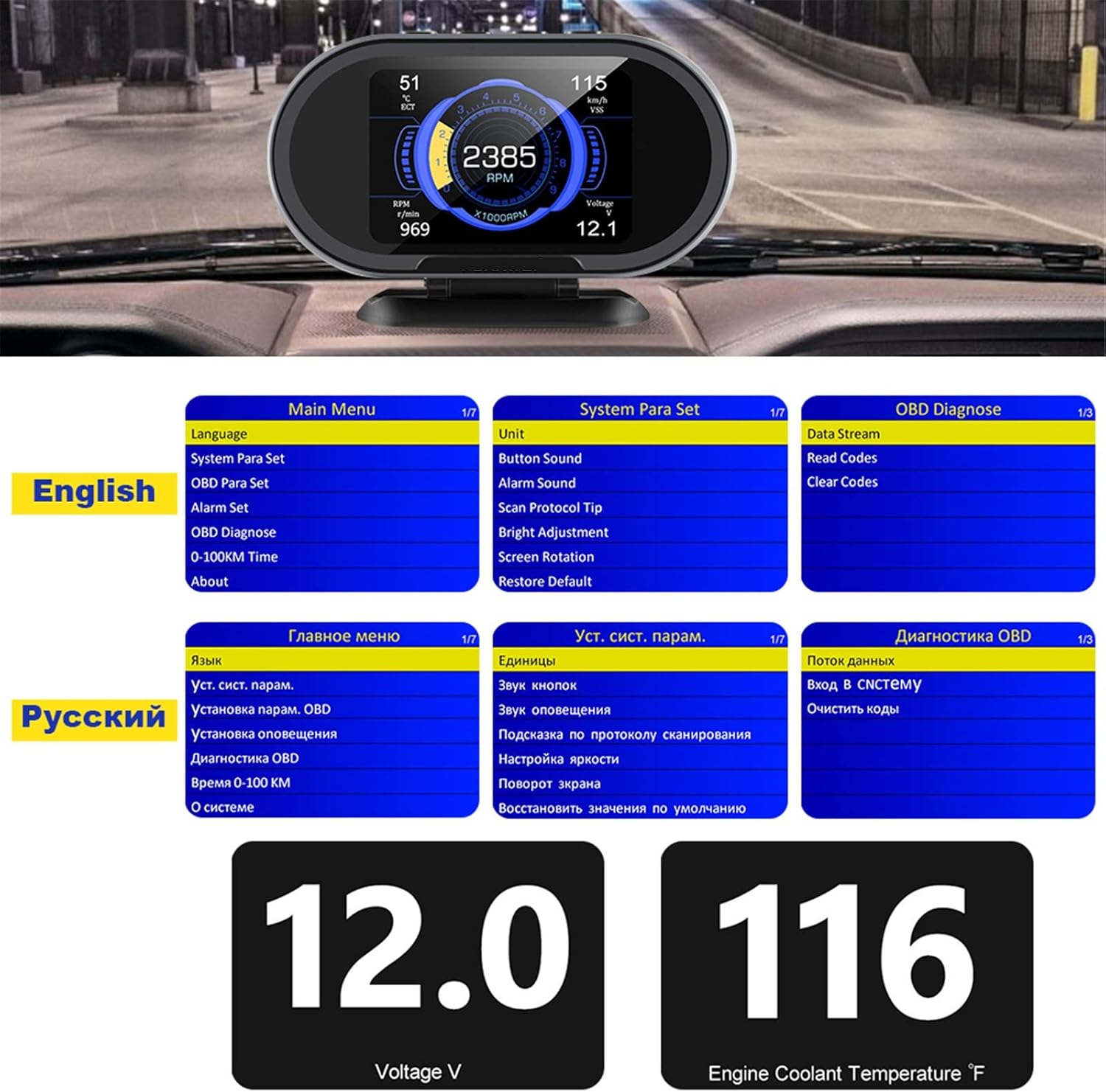
Image: The multi-language menu interface of the KW206, demonstrating options in English and Russian for various settings and diagnostic functions.
2. Display Modes
The device can display various parameters simultaneously. You can cycle through different display layouts or customize which parameters are shown. Consult the "System Parameter Settings" menu for display customization options.
3. Setting Alarms
Access the "Alarm Set" menu to configure warning thresholds for:
- Over-speed Warning: Set a maximum speed limit.
- Engine Temperature Warning: Set a maximum engine coolant temperature.
- Voltage Warning: Set minimum and maximum battery voltage thresholds.
The device will alert you visually and/or audibly if these thresholds are exceeded.
4. Diagnostic Functions (Read/Clear Codes, Data Stream)
Navigate to the "OBD Diagnose" menu to access diagnostic features:
- Read Codes: Retrieve current, pending, and historic Diagnostic Trouble Codes (DTCs) from the vehicle's engine control unit (ECU).
- Clear Codes: Erase DTCs and turn off the Check Engine Light (Malfunction Indicator Lamp - MIL). Note: Clearing codes does not fix the underlying issue. Address the problem before clearing codes.
- Data Stream: View live sensor data from the engine system in real-time, such as RPM, vehicle speed, coolant temperature, oxygen sensor readings, and more.
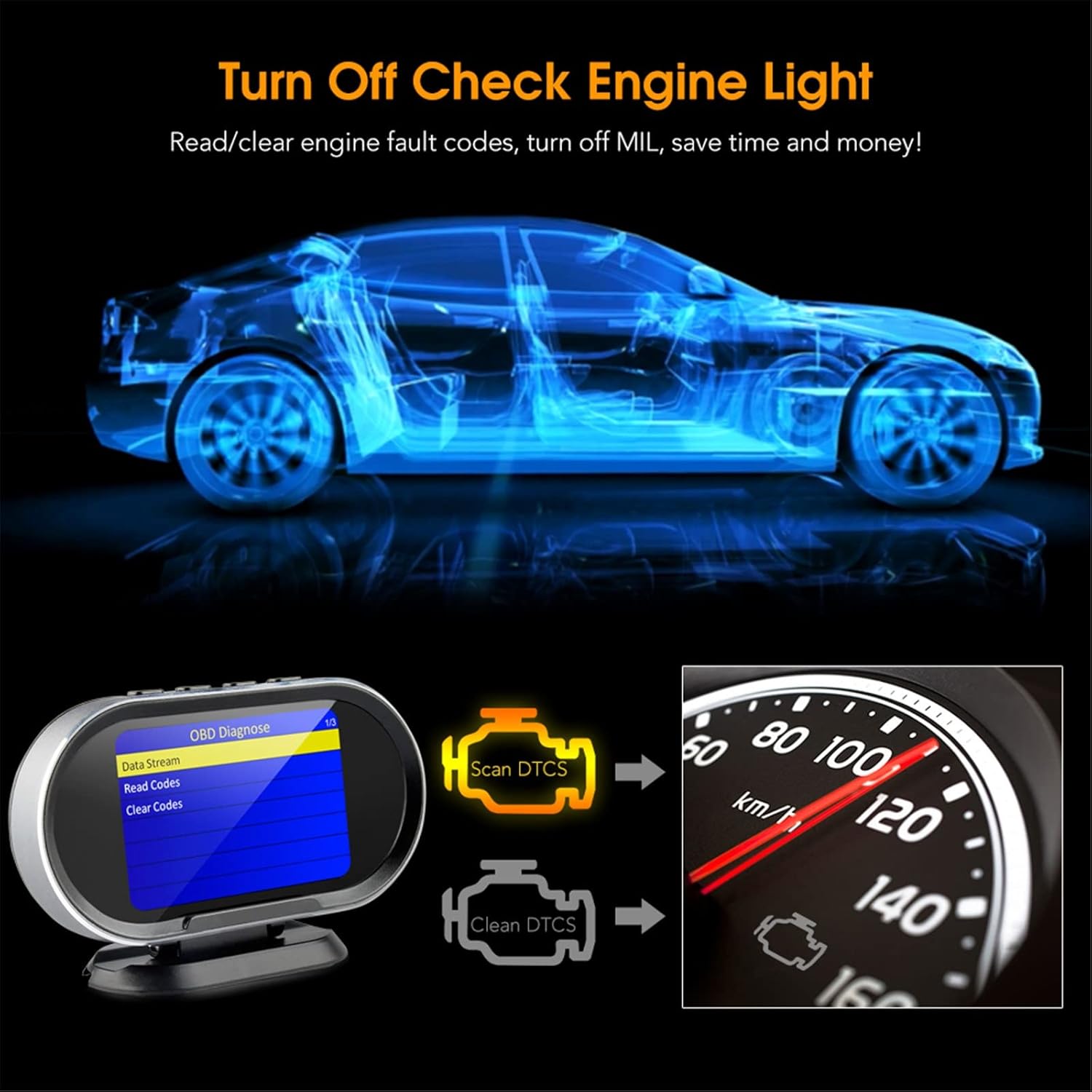
Image: A visual guide to using the KW206 for OBD diagnostics, including reading and clearing engine fault codes to turn off the check engine light.
5. Performance Tests (0-100km)
The "0-100KM Time" function allows you to measure your vehicle's acceleration from 0 to 100 kilometers per hour. Follow the on-screen prompts to initiate and record the test.
6. Unit Settings
In the "System Parameter Settings" menu, you can switch between imperial and metric units for all displayed parameters, or adjust individual units (e.g., change speed from Km/h to Mph, or temperature from Celsius to Fahrenheit).
7. Language Settings
Select your preferred language (English, Russian, or Spanish) from the "Language" option in the main menu.
Compatibility
The TSUSF KW206 is compatible with vehicles supporting standard OBD2 protocols. General compatibility guidelines are:
- USA Cars: Manufactured from 1996 to present.
- European Cars: Manufactured from 2003 to present.
- Asian Cars: Manufactured from 2008 to present.
- Chinese Cars: Manufactured from 2010 to present.
The device supports a wide range of OBD2 protocols, including ISO9141-2, ISO14230-4 KWP, ISO15765-4 CAN, SAE J1850 PWM, and SAE J1850 VPW.
Important Note: The KW206 primarily reads data from the engine system. It may not read data from other vehicle systems (e.g., certain instrument cluster-specific fuel consumption data) if those are not transmitted via the standard OBD2 engine protocols.

Image: A graphical representation of the KW206's broad compatibility with vehicles from different regions and manufacturing years.
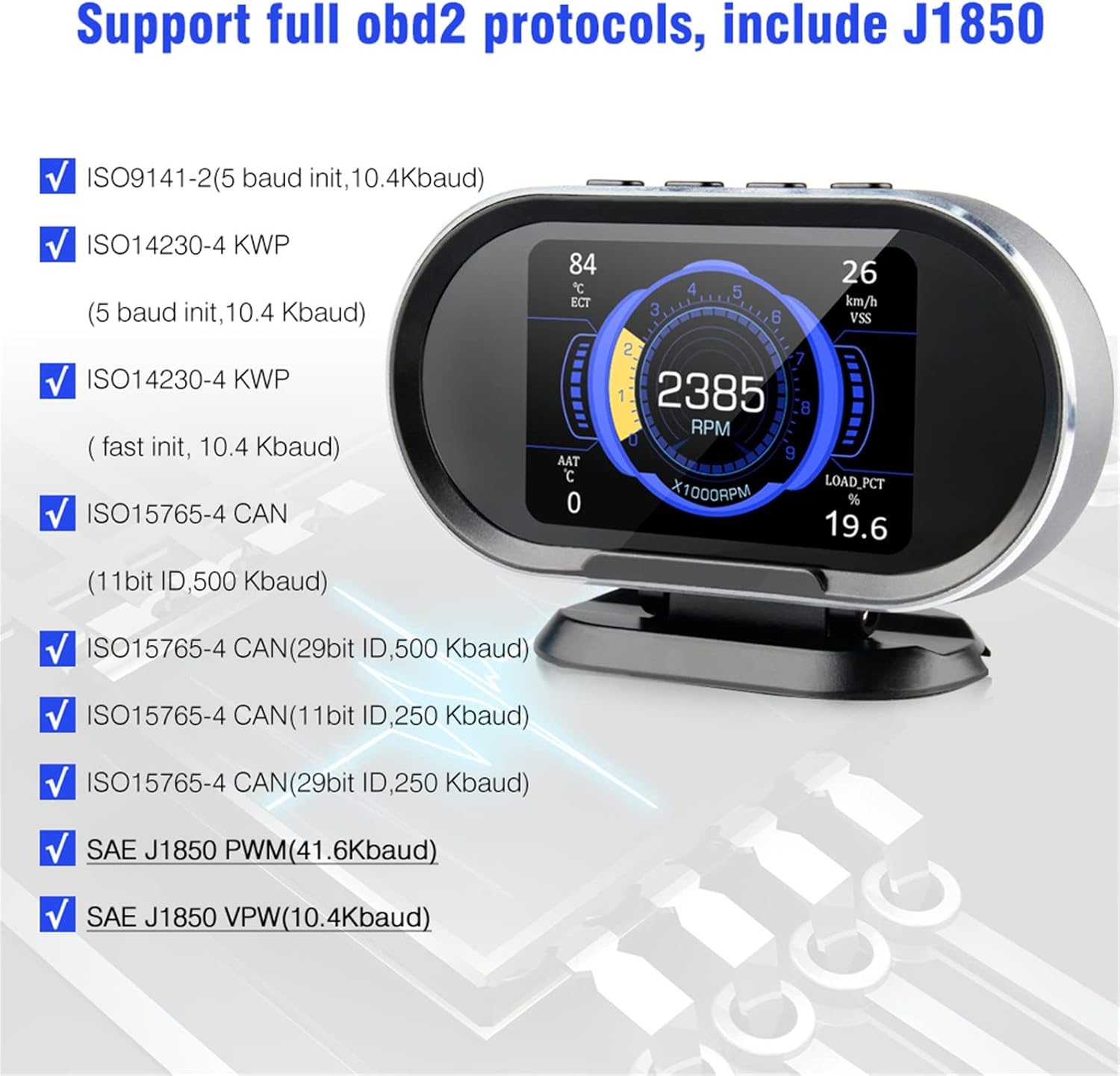
Image: A detailed list of the full OBD2 protocols supported by the KW206, ensuring wide vehicle compatibility.
Maintenance
1. Software Updates
The TSUSF KW206 offers free lifetime software updates. To update the device:
- Visit the official TSUSF support website (refer to the product packaging or included manual for the URL).
- Download the latest update software and firmware for the KW206 model.
- Connect the KW206 to your computer using the provided USB cable.
- Follow the instructions provided with the update software to complete the firmware upgrade.
2. Cleaning
To clean the display unit, use a soft, dry cloth. For stubborn marks, a slightly damp cloth with mild, non-abrasive cleaner can be used. Avoid using harsh chemicals or solvents, as these can damage the screen or casing.
Troubleshooting
- Device does not power on:
- Ensure the OBD2 cable is securely connected to both the vehicle's OBDII port and the KW206 unit.
- Verify the vehicle's ignition is in the ON position or the engine is running.
- Check the vehicle's fuse for the OBDII port (refer to your vehicle's manual).
- No data displayed or "Linking Error":
- Confirm the OBD2 cable connections are secure.
- Ensure your vehicle is OBD2 compliant (refer to the compatibility section).
- Try restarting the vehicle and the KW206 unit.
- Some vehicles may require the engine to be running for full data access.
- Inaccurate readings:
- Verify that the correct units (metric/imperial) are selected in the settings.
- Ensure the device firmware is up to date.
- Compare readings with other reliable gauges if available.
- Check Engine Light remains on after clearing codes:
- Clearing codes only turns off the light; it does not fix the underlying issue. The light will reappear if the fault persists.
- Diagnose and repair the vehicle's fault before attempting to clear codes again.
Specifications
| Brand | TSUSF |
| Model | KW206 |
| Display | 3.5-inch Digital LCD |
| Material | Metal and Plastic |
| Weight | 300 grams |
| Supported Protocols | All OBD2 protocols (ISO9141-2, ISO14230-4 KWP, ISO15765-4 CAN, SAE J1850 PWM, SAE J1850 VPW) |
| Languages | English, Russian, Spanish |
| Dimensions (Approx.) | 130mm (L) x 84mm (W) x 27mm (H) |

Image: Technical drawing illustrating the physical dimensions of the KW206 device.
Warranty and Support
For warranty information, technical support, or further assistance, please refer to the contact details provided in the product packaging or on the official TSUSF website. Keep your purchase receipt as proof of purchase for warranty claims.


