
DEWENWILS DHRLS11L
Contents
DEWENWILS Wireless Remote Control Outlet User Manual
Model: DHRLS11L
1. Product Overview
The DEWENWILS Wireless Remote Control Outlet (Model DHRLS11L) provides convenient control over your electrical appliances. It features a compact plug-in receiver and a versatile remote control switch that can be used handheld or mounted on a wall.

Figure 1: DEWENWILS Wireless Remote Control Outlet and Removable Wall Switch.
This system is designed for ease of use, offering a strong signal range and high power capacity, making it suitable for a variety of household appliances. The compact design of the outlet ensures it does not block adjacent sockets, and the remote switch includes a manual ON/OFF button for direct control.
2. Specifications
| Feature | Detail |
|---|---|
| Model Number | DHRLS11L |
| Max Load | 16A / 3680W |
| Operating Voltage | 230 Volts |
| Wireless Range | Up to 30 meters (open area) |
| Remote Battery | 1 x CR2032 (included) |
| Dimensions (Outlet) | 5 x 5 x 4.4 cm |
| Weight | 170 grams |
| Material | High-quality flame-retardant materials |
| Durability | 220,000 plug-in/unplug cycles |

Figure 2: The outlet supports a maximum load of 16A/3680W, suitable for various household appliances like heaters, air conditioners, and ovens.
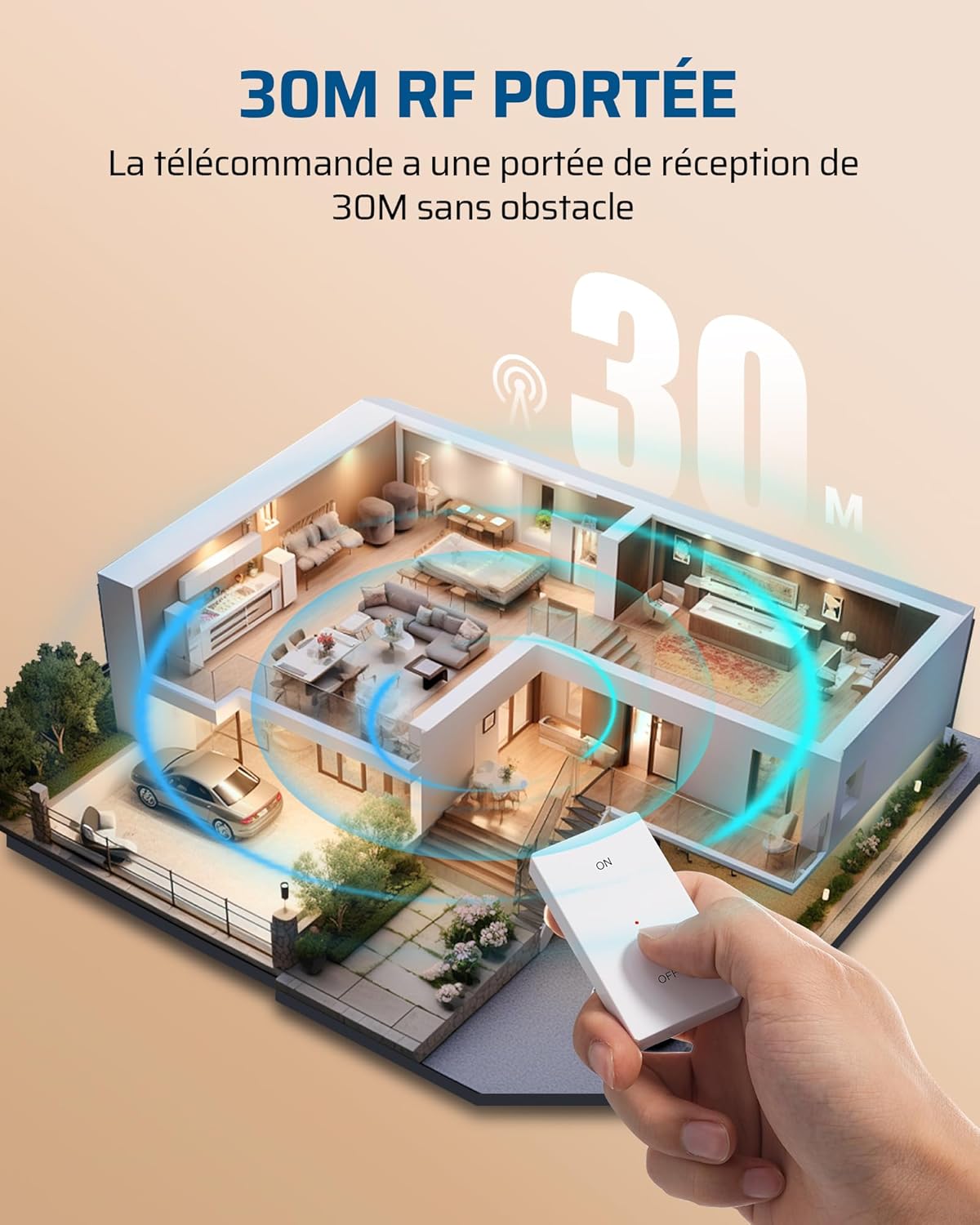
Figure 3: The remote control offers a wireless range of up to 30 meters in open areas, allowing control across rooms and through walls.
3. Setup Instructions
- Unpack the Device: Carefully remove the wireless remote control outlet and the wall switch from its packaging.
- Insert Battery (if not pre-installed): The remote control switch comes with a CR2032 battery. If not already installed, open the battery compartment on the back of the switch and insert the battery, observing polarity.
- Plug in the Receiver: Insert the DEWENWILS wireless outlet receiver into any standard wall socket. Ensure it is securely plugged in.
- Initial Pairing (Pre-paired): The remote control switch and the receiver are pre-paired at the factory. They should work immediately upon plugging in the receiver and pressing the ON/OFF button on the switch.
- Mount the Wall Switch (Optional):
- Choose a desired location on a wall.
- The wall switch base plate can be fixed directly to the wall using screws (not included) or adhesive tape (not included).
- Once the base plate is secured, the remote control switch can be magnetically attached to it, allowing for easy removal for handheld use.
- Connect Appliance: Plug the appliance you wish to control into the DEWENWILS wireless outlet receiver.

Figure 4: The remote switch can be fixed to the wall or used as a handheld remote control.
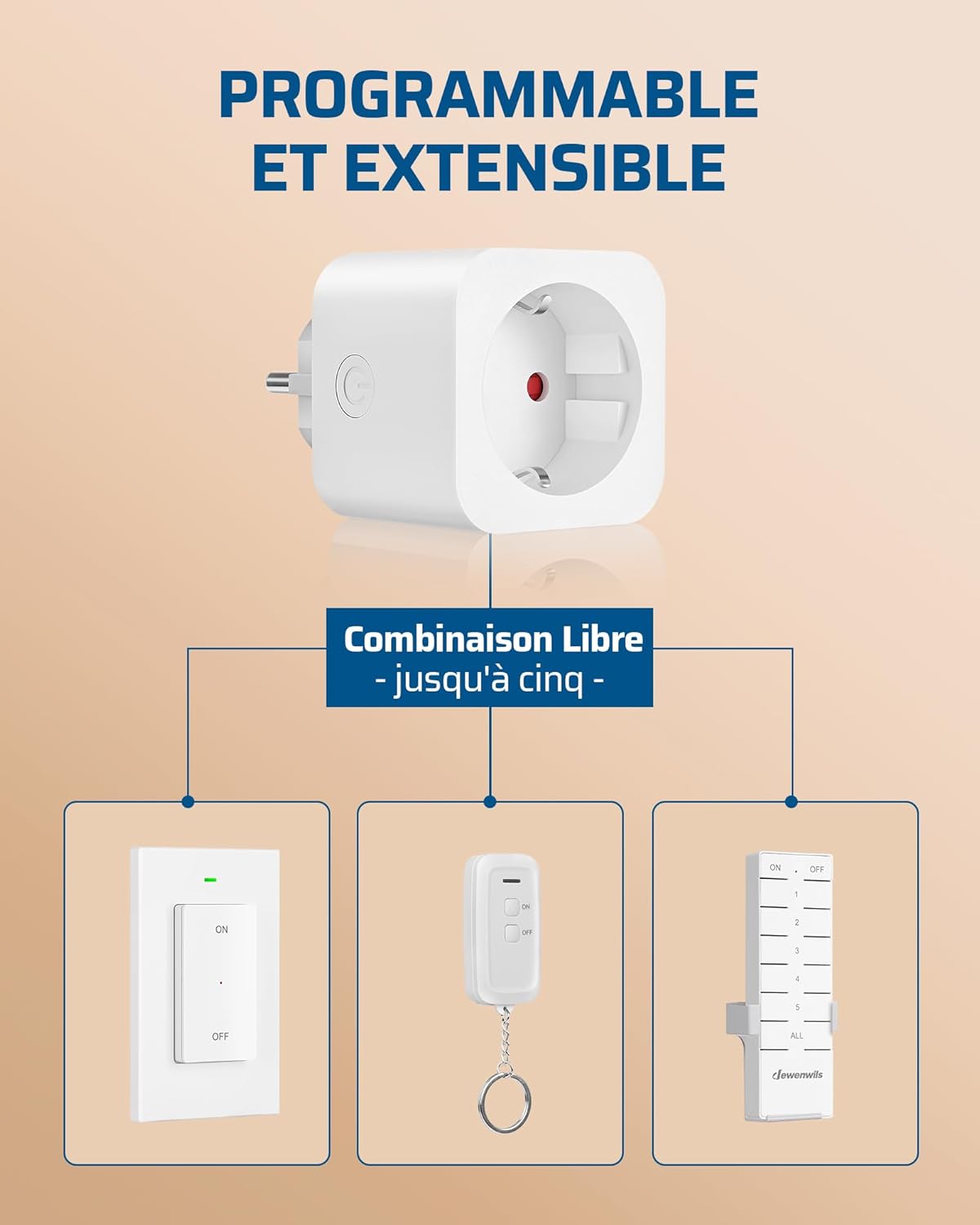
Figure 5: The system is extensible, allowing you to add up to five DEWENWILS remote control kits for broader control.
4. Operating Instructions
The DEWENWILS Wireless Remote Control Outlet is designed for simple ON/OFF operation.
- Turning On: Press the "ON" button on the remote control switch. The connected appliance will power on.
- Turning Off: Press the "OFF" button on the remote control switch. The connected appliance will power off.
- Manual Control: The receiver unit itself has a small button (often indicated by a power symbol) that allows for manual ON/OFF control directly at the outlet. Press this button to toggle the power state of the connected appliance.
The strong RF signal allows you to control appliances from a distance, even through walls and doors, within the specified range of 30 meters in open areas.

Figure 6: The remote control outlet is suitable for various occasions, providing convenient control for lamps, kitchen appliances, and more.

Figure 7: Simplify your life by controlling lights and other devices remotely, such as Christmas tree lights, from anywhere in your home.

Figure 8: Easily control a bedside lamp with the remote, enhancing comfort and convenience.
5. Maintenance
- Cleaning: Wipe the device with a soft, dry cloth. Do not use abrasive cleaners or solvents. Ensure the device is unplugged before cleaning.
- Battery Replacement: If the remote control switch's range decreases or it stops responding, the CR2032 battery may need replacement. Open the battery compartment on the back of the switch, remove the old battery, and insert a new CR2032 battery with the correct polarity.
- Storage: When not in use for extended periods, store the device in a cool, dry place away from direct sunlight and extreme temperatures.
- Safety: Do not disassemble or attempt to repair the device yourself. Refer to qualified personnel for any repairs.

Figure 9: The outlet is designed for durability, tested to withstand up to 220,000 plug-in and unplug cycles.

Figure 10: Constructed from high-quality flame-retardant materials to ensure safety and reliability.
6. Troubleshooting
| Problem | Possible Cause | Solution |
|---|---|---|
| Appliance does not turn ON/OFF via remote. |
|
|
| Remote switch feels loose on wall mount. | Magnetic attachment or base plate not secure. | Ensure the base plate is firmly attached to the wall. Check if the magnet in the switch is clean. |
| Outlet indicator light is off. | No power to the outlet. | Check the wall socket and circuit breaker. Ensure the outlet is fully inserted. |
| Cannot pair additional remotes/receivers. | Incorrect pairing procedure or maximum devices reached. | Refer to the specific pairing instructions for additional DEWENWILS kits. Ensure you are not exceeding the maximum of five kits. |
7. Safety Information
- Do not exceed the maximum load capacity of 16A/3680W.
- Do not immerse the device in water or expose it to excessive moisture.
- Do not use in environments with high temperatures or humidity.
- Keep out of reach of children and pets.
- Ensure the device is unplugged before performing any maintenance or cleaning.
- This product is for indoor use only.
8. Warranty and Support
DEWENWILS products are designed and manufactured to the highest quality standards. For warranty information or technical support, please contact DEWENWILS customer service through the retailer where you purchased the product or visit the official DEWENWILS website.
Note: Specific warranty terms may vary by region and retailer. Please retain your proof of purchase for warranty claims.
For further assistance, you may refer to the DEWENWILS brand store on Amazon: DEWENWILS Store
Ask a question about this manual
Ask about setup, troubleshooting, compatibility, parts, safety, or missing instructions. Manuals+ will review the question and use this page’s manual context to help answer it.