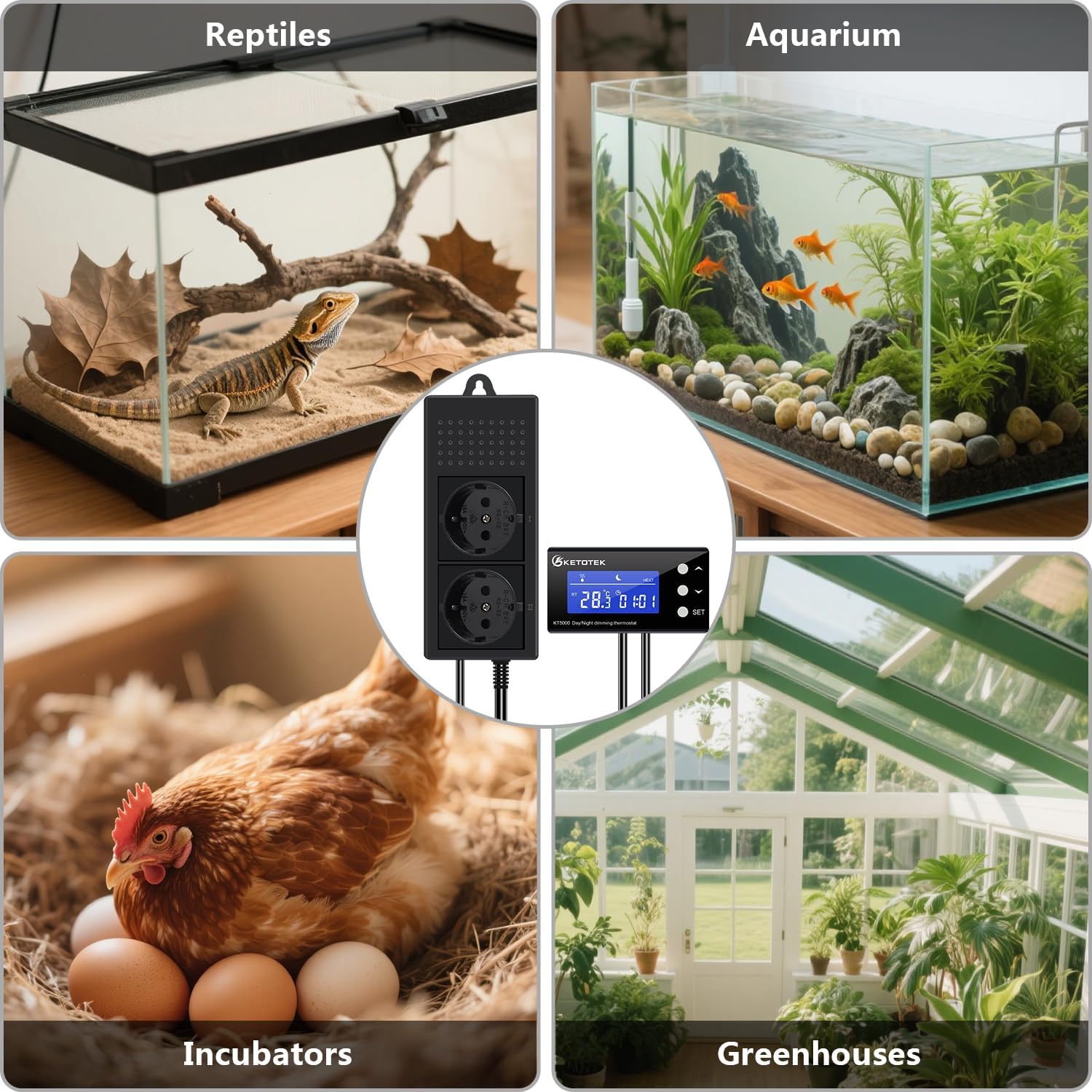
This manual provides detailed instructions for the KETOTEK KT5000 Dimming Thermostat. This device is designed for precise temperature control and timing functions, suitable for various applications such as reptile enclosures, incubators, greenhouses, and aquariums.
It features PID temperature control for heating and a separate timing output, offering stable and reliable environmental management. Please read this manual thoroughly before operation to ensure correct usage and to maximize the product's lifespan and performance.
Image: The KETOTEK KT5000 Dimming Thermostat shown in various application settings, including a reptile terrarium, an aquarium, an incubator, and a greenhouse, demonstrating its versatility.
Important Safety Information
Ensure the power supply voltage matches the device's specifications (220VAC ± 15%/50Hz).
Do not exceed the maximum power ratings for heating (440W) and timer output (Resistive: 1100W, Inductive: 275W, Incandescent: 220W).
Keep the device away from water, except for the waterproof probe.
Do not disassemble or modify the device. Refer all servicing to qualified personnel.
Always unplug the device from the power outlet before cleaning or performing maintenance.
This device is not a toy. Keep out of reach of children.
Package Contents
Verify that all items are present in the package:
1 x KETOTEK KT5000 Dimming Thermostat Unit
2 x Double-sided Adhesive Pads
1 x Instruction Manual
Image: KETOTEK KT5000 Dimming Thermostat, including the main unit, double-sided adhesive pads, and the instruction manual, packaged in its retail box.
Product Overview
The KETOTEK KT5000 consists of a control unit with a digital display and a power socket unit. It features two independent outputs: one for PID temperature control of heating devices and another for timing functions.
Image: The KETOTEK KT5000 Dimming Thermostat showing the main control unit with display, the dual-socket power unit, and the temperature probe.
Components:
Control Unit: Features an LCD display for temperature and time, and buttons for settings.
Power Socket Unit: Contains two power outlets. One is for the heating device (PID controlled), and the other is for the timed device.
Temperature Probe: A waterproof sensor for accurate temperature measurement.
Image: Diagram illustrating the two outputs of the KETOTEK KT5000. One socket is labeled for PID Temperature Heating Control, typically used for a heating lamp. The other socket is labeled for Timer control, shown connected to an air pump for an aquarium.
Technical Specifications
Parameter
Value
Model
KT5000
Input Voltage
220VAC ± 15%/50Hz
Temperature Control Range
0°C to 50°C
Temperature Accuracy
±1°C
Maximum Heating Power
440W
Maximum Timer Output (Resistive Load)
1100W
Maximum Timer Output (Inductive Load)
275W
Maximum Timer Output (Incandescent Lamps)
220W
Product Dimensions (L x W x H)
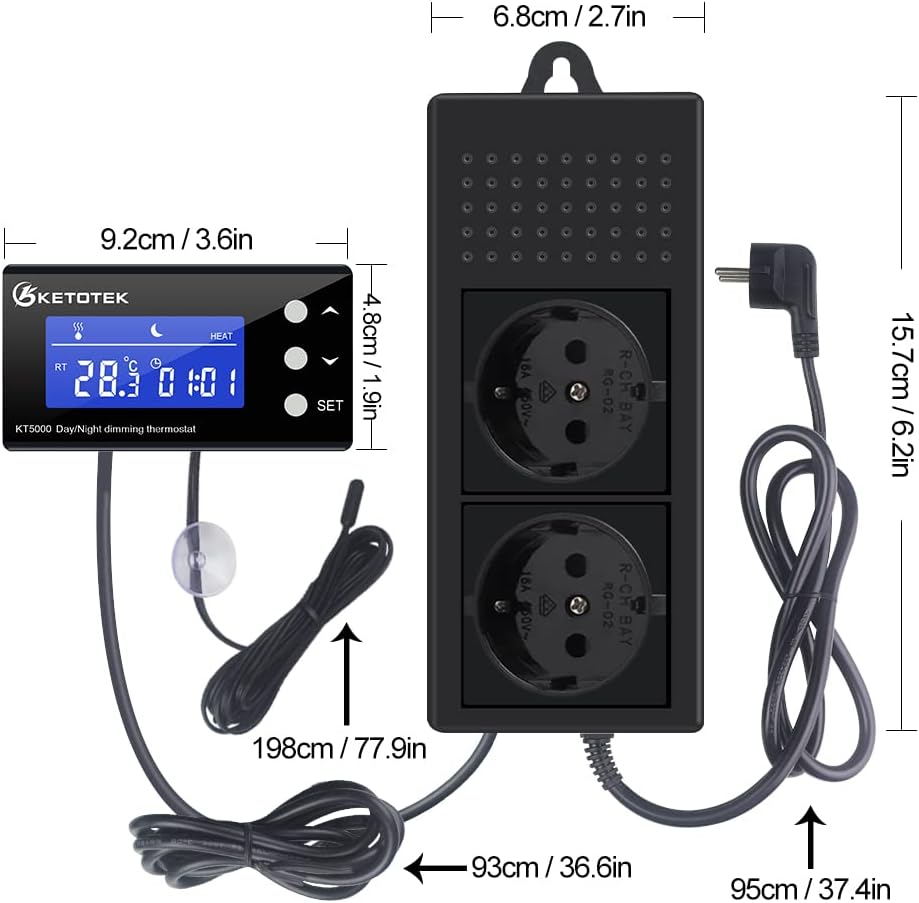
9.2 x 3.5 x 15.7 cm (overall)
Weight
590 grams
Color
Black
Probe Type
Waterproof
Image: Detailed dimensions of the KETOTEK KT5000 Dimming Thermostat, including the control unit, power socket unit, and cable lengths for the power cord and temperature probe.
Setup and Installation
Mounting the Control Unit:
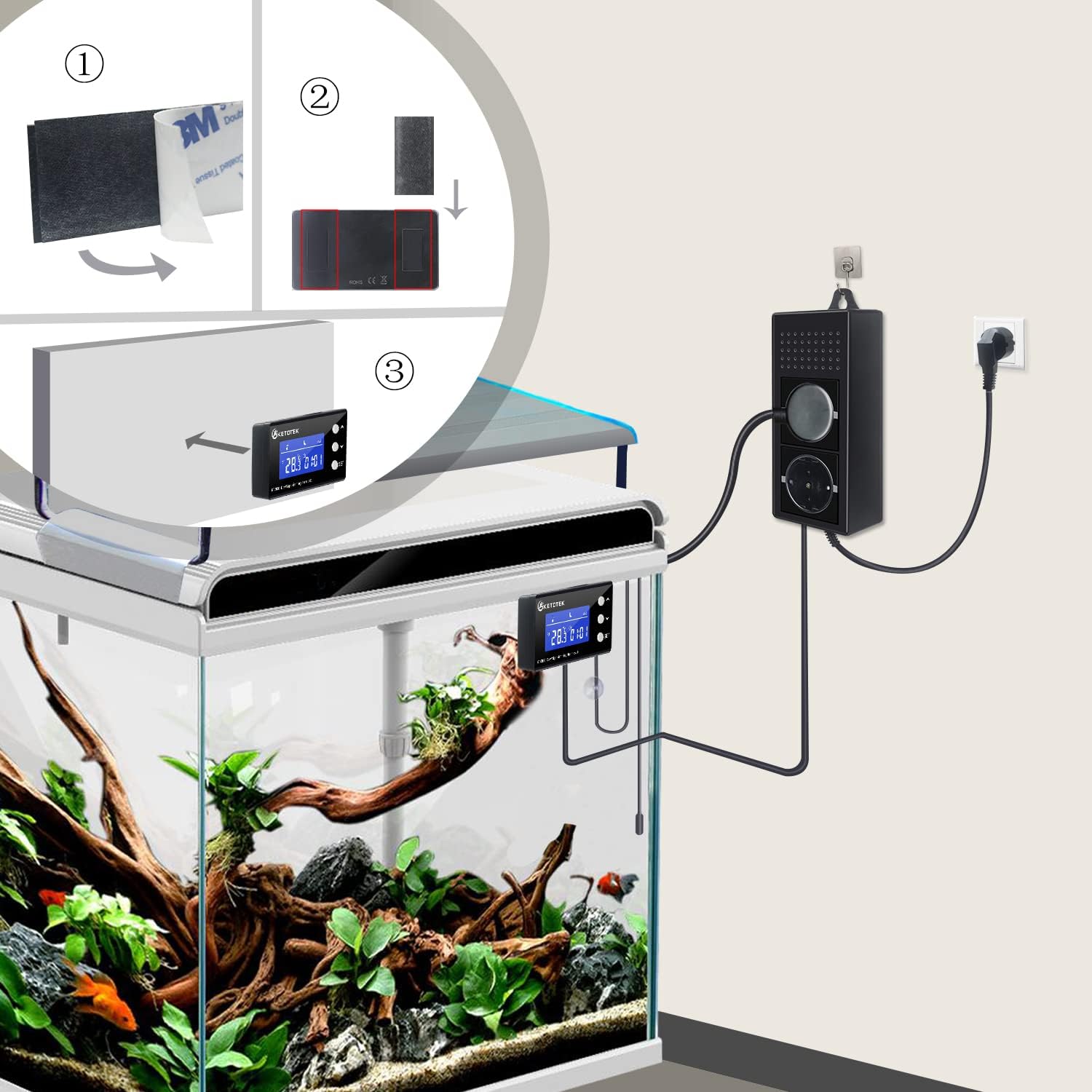
Use the provided double-sided adhesive pads to securely attach the control unit to a clean, dry surface. Ensure it is placed in a location where the display is easily visible and buttons are accessible.
Positioning the Temperature Probe:
Place the waterproof temperature probe in the environment where temperature needs to be controlled (e.g., terrarium, incubator). Ensure the probe is not directly exposed to heating elements or direct light sources that could affect its readings. The probe can be submerged in water if required.
Connecting Devices:
Plug your heating device (e.g., ceramic heat emitter, heat lamp) into the socket designated for PID Temperature Heating Control.
Plug your timed device (e.g., lighting, humidifier, air pump) into the socket designated for Timer control.
Power Connection:
Plug the main power cord of the KETOTEK KT5000 into a suitable 220VAC power outlet.
Image: An example setup showing the KETOTEK KT5000 Dimming Thermostat mounted on an aquarium, with the probe submerged and the power unit connected to a wall outlet.
Operating Instructions
The KETOTEK KT5000 features a user-friendly interface for setting temperature and timing parameters.
Basic Operation:
Upon powering on, the display will show the current temperature measured by the probe.
Use the SET button to enter the setting mode.
Use the Up and Down arrow buttons to adjust values.
Press SET again to confirm and move to the next parameter.
Setting Day and Night Temperatures:
The device allows for different temperature settings during day and night cycles over a 24-hour period. This is achieved through its dual-cycle time function.
Enter the setting mode by pressing SET.
Navigate through the settings until you find the parameters for "Day Temperature" and "Night Temperature".
Set the desired temperature for the day period (e.g., 20°C).
Set the desired temperature for the night period (e.g., 25°C).
Configure the start and end times for the day and night cycles (e.g., Day: 8:00 to 18:00; Night: 18:00 to 8:00 the next day). The device will automatically cycle these settings daily.
Timer Function:
The second output socket is controlled by a timer function. This allows you to schedule when an attached device turns on and off.
Access the timer settings via the SET menu.
Set the desired ON time and OFF time for the timed output.
Confirm settings to activate the timer.
Advanced Functions:
High Temperature Alarm: Set a maximum temperature threshold. If the temperature exceeds this, an alarm will activate.
Temperature Calibration: Adjust the temperature reading to match an external reference thermometer for increased accuracy.
Reset Function: Restore the device to factory default settings.
Power-off Data Record: The device retains your settings even after a power outage.
Image: The KETOTEK KT5000 Dimming Thermostat display, highlighting icons for heating control, timing function, over-temperature alarm, and probe fault alarm, indicating its various operational features.
Maintenance
Cleaning: Disconnect the device from power before cleaning. Wipe the control unit and power socket unit with a soft, dry cloth. Do not use abrasive cleaners or solvents.
Probe Care: The temperature probe is waterproof and can be cleaned with water. Ensure no damage occurs to the probe cable.
Storage: If storing the device for an extended period, unplug it and store it in a cool, dry place away from direct sunlight.
Troubleshooting
Problem
Possible Cause
Solution
Device does not power on.
No power from outlet; loose connection.
Check power outlet with another device; ensure power cord is securely plugged in.
Heating device not working.
Incorrect temperature setting; heating device malfunction; exceeding max power.
Verify target temperature is above current temperature; test heating device separately; ensure total wattage is within 440W.
Timed device not working.
Incorrect timer setting; device malfunction; exceeding max power.
Check timer ON/OFF settings; test device separately; ensure total wattage is within limits (1100W resistive, 275W inductive, 220W incandescent).
Relocate probe away from direct heat/light; check for probe damage; use temperature calibration function.
Display shows an error code.
Specific error condition (e.g., probe fault).
Refer to the full manual for specific error codes. Generally, check probe connection or replace if damaged.
Warranty and Support
KETOTEK products are manufactured to high-quality standards. For warranty information or technical support, please refer to the contact details provided with your purchase or visit the official KETOTEK website.
Please retain your proof of purchase for warranty claims.
Related Documents - KT5000
Ketotek KT3200 Plug-in Thermostat User Manual Instruction manual for the Ketotek KT3200 Plug-in Thermostat, a Day/Night Temperature Controller. Details operation modes (M1 TC, M2 TC+Timer, M3 Timer), temperature calibration, reset functions, and memory features.
KETOTEK KT3100 US Plug-in Thermostat Instruction Manual Learn how to operate the KETOTEK KT3100 US Plug-in Thermostat, a versatile temperature controller for heating, cooling, and timing applications in homes, greenhouses, and aquaculture. This manual covers setup, temperature control, timing modes, and specifications.
KETOTEK KTF017802 Smart WiFi Thermostat User Manual and Installation Guide Comprehensive user manual and installation guide for the KETOTEK KTF017802 Smart WiFi Thermostat. Learn how to install, configure, and operate your thermostat for efficient heating control, including app integration with Alexa and Google Assistant.
KT1000 Temperature Controller Operating Manual - Ketotek Detailed operating manual for the Ketotek KT1000 Temperature Controller. Covers specifications, wiring diagrams, key operations, parameter settings, and operational instructions for refrigeration and heating applications in industrial and domestic environments.
KETOTEK KT1210W Temperature Controller: Operating Manual Comprehensive operating manual for the KETOTEK KT1210W Temperature Controller, detailing its features, specifications, wiring, key instructions, and operation modes for heating and cooling systems.