
blonbar B17
User Manual for blonbar LED Bedside Lamp with Wireless Charger and Alarm Clock
Model: B17
1. Introduction
Thank you for purchasing the blonbar LED Bedside Lamp, Model B17. This versatile device integrates an LED lamp, a digital alarm clock, a 10W Qi wireless charger, and a wake-up light function, making it an ideal addition to your bedroom or living space. This manual provides detailed instructions for setup, operation, and maintenance to ensure optimal performance and longevity of your product.

Image: The blonbar LED Bedside Lamp, featuring a circular LED light, a digital clock display, and a wooden-textured base with a wireless charging pad.
2. Safety Information
Please read and understand all safety instructions before using this product. Failure to follow these instructions may result in electric shock, fire, or serious injury.
- Do not attempt to disassemble or repair the charger yourself. This can damage internal electronic components and pose safety hazards.
- Avoid using the charger in highly humid environments.
- Do not expose the device to temperatures exceeding 60 °C (140 °F).
- Ensure the product is placed on a stable, flat surface.
- Keep out of reach of children and pets.
- Use only the provided power adapter or a compatible one.
3. Product Overview
The blonbar LED Bedside Lamp combines multiple functionalities into one sleek design:
- LED Lamp: Provides adjustable illumination for various needs.
- Digital Alarm Clock: Features a clear time display and alarm function with snooze.
- 10W Qi Wireless Charger: Conveniently charges compatible smartphones.
- Wake-Up Light: Simulates sunrise to gently wake you up.
Components:
- Circular LED Light Ring
- Base Unit with Digital Display
- Wireless Charging Pad (on top of the base)
- Touch Control Area (on the light ring)
- Snooze Button (on the base)
- Power Input Port (at the back of the base)
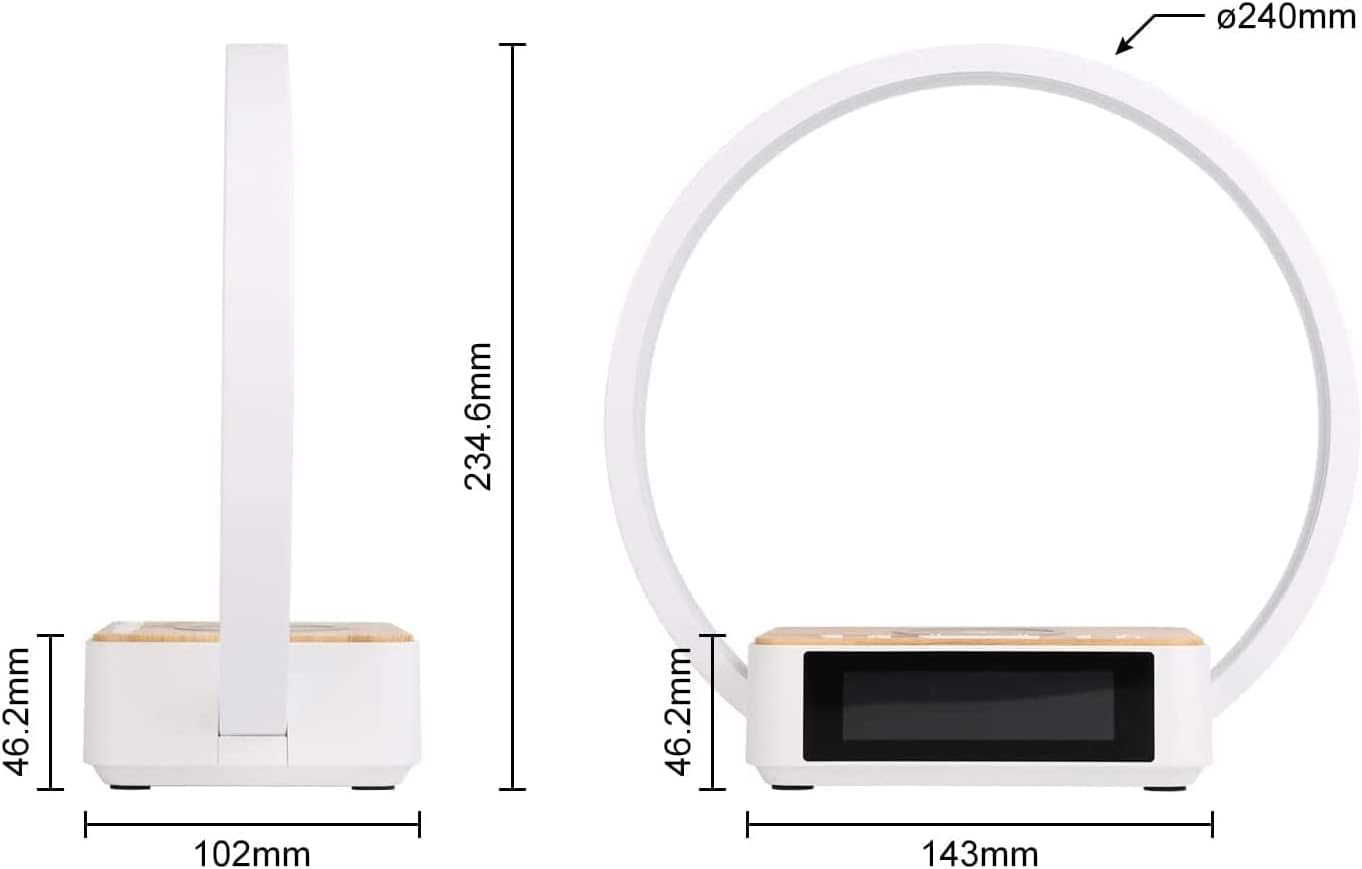
Image: Technical drawing illustrating the dimensions of the blonbar LED Bedside Lamp, including its height (234.6mm), base width (102mm), and base depth (143mm), with a light ring diameter of 240mm.
4. Setup
- Unpack: Carefully remove the lamp from its packaging.
- Connect Power: Plug the power adapter into the power input port at the back of the lamp's base, then plug the adapter into a wall outlet. The digital display will light up.
- Set Time: Refer to the "Operating Instructions" section for setting the current time on the digital display.
5. Operating Instructions
5.1. Lamp Control (Brightness Adjustment)
The lamp features a highly sensitive touch control for adjusting brightness. Simply touch anywhere on the light ring to cycle through brightness levels.
- Touch once: Turns on the lamp to Level 1 (Low brightness).
- Touch again: Cycles to Level 2 (Medium brightness).
- Touch a third time: Cycles to Level 3 (High brightness).
- Touch a fourth time: Turns off the lamp.

Image: Illustration of the lamp's touch control, demonstrating how to adjust between Level 1 (low), Level 2 (medium), and Level 3 (high) brightness settings.
5.2. Wireless Charging
The lamp is equipped with a 10W Qi wireless charger. Place your Qi-compatible smartphone on the charging pad located on the top of the lamp's base.
- Ensure your phone model supports wireless charging.
- Place the phone centrally on the charging pad for optimal charging.
- A charging indicator (if available on your phone) will confirm charging has begun.

Image: A smartphone placed on the wooden-textured base of the blonbar lamp, illustrating the 10W Qi wireless charging function.
5.3. Alarm Clock and Snooze Function
The integrated digital alarm clock allows you to set wake-up times and utilize a snooze feature.
- Setting the Time/Alarm: Specific buttons for time and alarm setting are usually located on the back or bottom of the base. Refer to the icons next to the buttons for their functions (e.g., 'SET', 'UP', 'DOWN', 'ALARM').
- Snooze: When the alarm sounds, press the "Snooze" button on the base to get an additional 10 minutes of sleep. This can be repeated up to 3 times.

Image: A person's hand reaching to press the "Snooze" button on the blonbar lamp's base, with the digital clock displaying 7:14 AM.
5.4. Wake-Up Light Function
The wake-up light function gradually increases brightness to simulate a natural sunrise, providing a gentle awakening.
- The wake-up light will automatically turn on 10 minutes before your set alarm time.
- The light brightness will gradually increase over these 10 minutes, reaching its full brightness at the alarm time.

Image: A person stretching in bed as the blonbar lamp illuminates the room, demonstrating the gentle wake-up light feature.
5.5. LED Screen Brightness Adjustment
You can adjust the brightness of the digital LED display to suit your preference, especially for nighttime use.
- Look for a dedicated button or touch area on the lamp's base or side, often marked with a sun or brightness icon.
- Press or touch this control to cycle through different display brightness levels (e.g., 100%, 60%, 30%, 0% / Off).

Image: A visual guide demonstrating the four adjustable brightness levels for the LED digital display: 100% (Level 1), 60% (Level 2), 30% (Level 3), and 0% (Off).
6. Maintenance
- Cleaning: Disconnect the power before cleaning. Use a soft, dry cloth to wipe the surface of the lamp. Do not use abrasive cleaners or solvents.
- Storage: If storing the lamp for an extended period, unplug it and keep it in a cool, dry place.
- Avoid Liquids: Do not expose the lamp to water or other liquids.
7. Troubleshooting
| Problem | Possible Cause | Solution |
|---|---|---|
| Lamp does not turn on. | Not plugged in; power outage; faulty connection. | Ensure power adapter is securely plugged into the lamp and wall outlet. Check power supply. |
| Wireless charging not working. | Phone not Qi-compatible; phone not placed correctly; phone case too thick. | Verify phone supports Qi wireless charging. Reposition phone centrally on the pad. Remove thick phone cases. |
| Digital display is too bright/dim. | Display brightness setting needs adjustment. | Adjust the LED screen brightness using the dedicated control (refer to section 5.5). |
| Alarm does not sound. | Alarm not set; alarm volume too low; incorrect time setting. | Ensure alarm is activated and set correctly. Check alarm volume settings. Verify current time is accurate. |
8. Specifications
| Feature | Detail |
|---|---|
| Brand | blonbar |
| Model Number | B17 |
| Product Dimensions (L x W x H) | 24 x 10.2 x 23.5 cm (9.45 x 4.02 x 9.25 inches) |
| Item Weight | 390 g (0.86 lbs) |
| Material | Ceramic (Base), Plastic (Lampshade) |
| Light Source Type | LED |
| Power | 10 Watts |
| Voltage | 2.3E+2 Volts (230V) |
| Special Features | Wireless Charging, Dimmable Touch Control, Smart Wake-up Alarm |
| Switch Style | Dimmable Touch Control |
| Included Components | Wireless charger, smart wake-up alarm clock |
| Energy Efficiency Rating | E (as per 2019/2015 EU label) View EU EPREL Database |
9. Warranty and Support
This blonbar product comes with a 1-year warranty from the date of purchase.
We are committed to producing high-quality products and ensuring customer satisfaction. If you encounter any issues or are not satisfied with your purchase for any reason, please contact blonbar customer support. We offer a 100% money-back guarantee.
For support, please refer to the contact information provided with your product packaging or visit the official blonbar website.
Related documentsB17


Ask a question about this manual
Ask about setup, troubleshooting, compatibility, parts, safety, or missing instructions. Manuals+ will review the question and use this page’s manual context to help answer it.