Introduction
This manual provides comprehensive instructions for the operation and maintenance of your YAOHUIMI replacement remote control. This remote is designed to be compatible with various Fujitsu air conditioner models, including AR-NJ1, ASY2U0, ASY25U, ASY35U, ASY25UA, ASY35UA, ASH9LSACW, ASH12LSACW, and ASY12USCCW, among others. Please read this manual carefully to ensure proper use and to maximize the lifespan of your remote control.
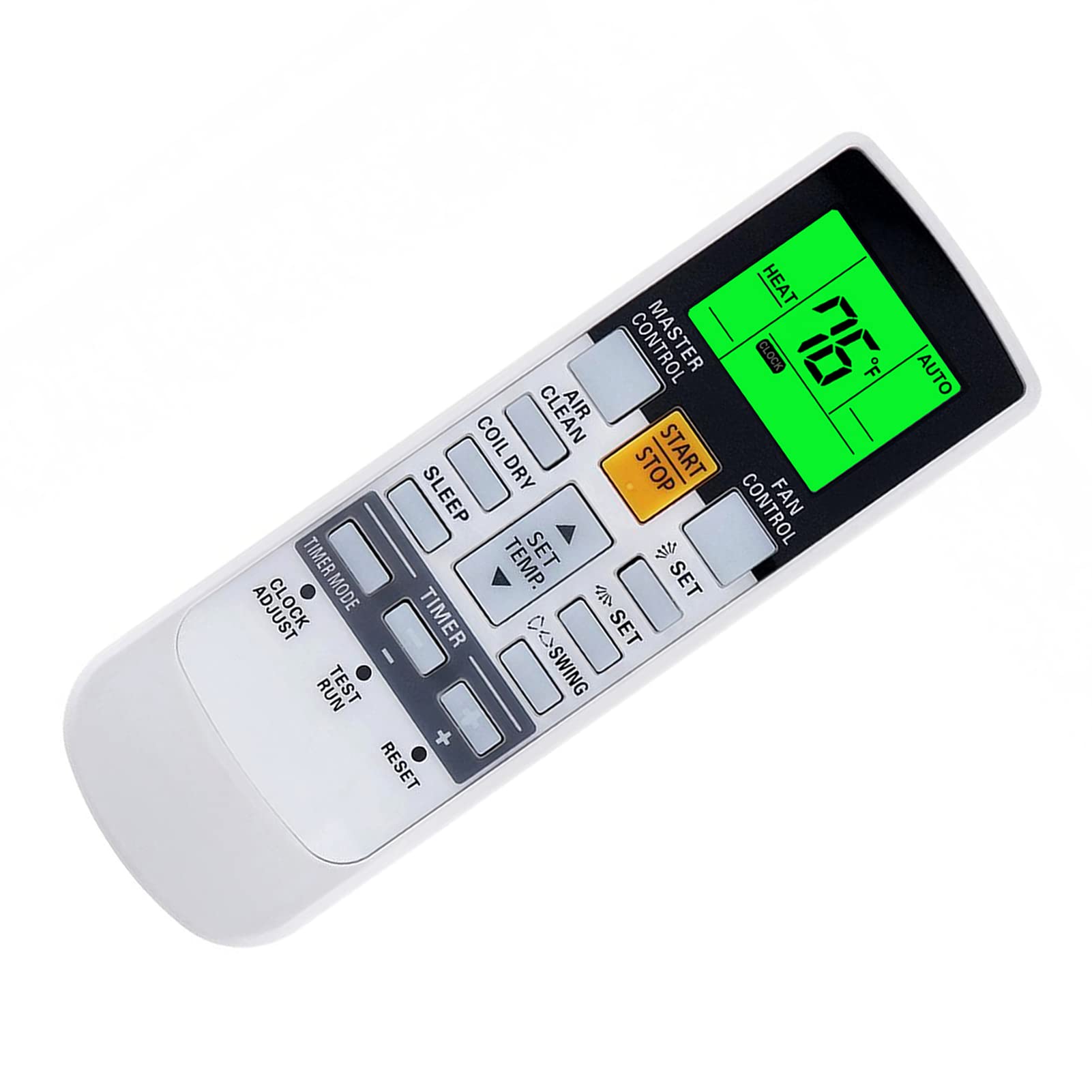
Image: Front view of the YAOHUIMI Replacement Remote Control.
Setup
Battery Installation
The remote control requires two AAA batteries (not included) for operation. Follow these steps to install the batteries:
- Locate the battery compartment cover on the back of the remote control.
- Slide the cover downwards to open the compartment.
- Insert two new AAA batteries, ensuring the positive (+) and negative (-) terminals match the diagrams inside the compartment.
- Slide the battery compartment cover back into place until it clicks securely.

Image: Front and back view of the remote control, illustrating the battery compartment location.
Initial Use
This replacement remote control is pre-programmed and typically requires no additional setup or pairing. Simply install the batteries and point the remote towards your Fujitsu air conditioner to begin operation.
Operating Instructions
Basic Functions
- START/STOP Button: Press to turn the air conditioner ON or OFF.
- MASTER CONTROL: Cycles through operating modes such as Auto, Cool, Dry, Fan, and Heat.
- FAN CONTROL: Adjusts the fan speed (e.g., Auto, Low, Medium, High).
- SET TEMP. Buttons (Up/Down Arrows): Adjusts the desired temperature setting.
- SWING Buttons: Controls the louver swing function for air distribution.
- TIMER Buttons: Used to set ON/OFF timers for the air conditioner.
Temperature Display (Fahrenheit/Celsius)
The remote control can display temperature in both Fahrenheit (°F) and Celsius (°C). To switch between these units:
- With the remote control powered on, observe the current temperature unit on the display.
- Press the designated button (often a small button near the temperature display or a combination of buttons) to toggle between °F and °C. Refer to the image below for visual guidance.

Image: Remote control display illustrating the Fahrenheit and Celsius temperature units and the green backlight.
Green Backlight Feature
The remote control features a green backlight for improved visibility in low-light conditions. This backlight activates automatically when buttons are pressed, making it easier to operate the air conditioner at night.
Advanced Heat Functions (If Applicable)
Some Fujitsu AC models support advanced heat functions such as "10°C HEAT", "50°F HEAT", "MINI.HEAT", or "ECONOMY". These functions are only available if your original remote control also had these specific buttons or capabilities. To activate these, you may need to press and hold a specific button for approximately 4 seconds. Consult your air conditioner's original manual for specific details on these functions.

Image: Diagram showing how to activate advanced heat functions by pressing and holding a button for 4 seconds.
Maintenance
Cleaning the Remote Control
To clean the remote control, use a soft, dry cloth. Do not use liquid cleaners, sprays, or abrasive materials, as these can damage the remote's surface or internal components.
Battery Replacement
Replace the batteries when the remote control's range decreases, or if the display becomes dim or unresponsive. Always replace both batteries at the same time with new AAA batteries. Do not mix old and new batteries, or different types of batteries.
If the remote control will not be used for an extended period, remove the batteries to prevent leakage and potential damage.
Troubleshooting
Remote Control Not Responding
- Check Batteries: Ensure batteries are inserted correctly with the correct polarity (+/-). Replace with fresh AAA batteries if necessary.
- Line of Sight: Make sure there are no obstructions between the remote control and the air conditioner's receiver.
- Distance: Ensure you are within the effective operating range of the air conditioner's infrared receiver.
- Infrared Interference: Strong light sources (e.g., direct sunlight, fluorescent lights) can interfere with the infrared signal. Try operating the remote in a different lighting condition.
Display Issues
- Dim Display: This usually indicates low battery power. Replace the batteries.
- No Display: Check battery installation and ensure batteries are fresh. If the issue persists after replacing batteries, the remote may require service.
Functions Not Working
- Compatibility: While this remote is broadly compatible, some advanced functions might not be supported by all Fujitsu AC models, especially if your original remote did not have those specific features.
- AC Unit Status: Ensure your air conditioner unit is powered on and functioning correctly.
Specifications
| Brand | YAOHUIMI |
| Model Number | A420220331-BEIGUANG-87 |
| Compatible Devices | Fujitsu AC models including AR-NJ1, ASH12LSACW, ASH9LSACW, ASY12USCCW, ASY25U, ASY25UA, ASY2U0, ASY35U, ASY35UA, and others. |
| Connectivity Technology | Infrared (IR) |
| Special Feature | Ergonomic design, Green Backlight, Fahrenheit/Celsius display |
| Power Source | 2 x AAA Batteries (not included) |
| Manufacturer | HUIMIKEJI |
Support
For further assistance or inquiries regarding your YAOHUIMI replacement remote control, please refer to the seller's contact information on the platform where the product was purchased. Ensure you have your product model number (A420220331-BEIGUANG-87) available when seeking support.


