
BANIGIPA A-G2 Black
BANIGIPA Open Ear Headphones User Manual
Model: A-G2 Black
Introduction
Thank you for choosing the BANIGIPA Open Ear Headphones. These air conduction headphones are designed to provide a comfortable listening experience while keeping you aware of your surroundings. With advanced Bluetooth 5.4 technology and a noise-canceling boom microphone, they are ideal for various activities including office work, sports, and daily use.
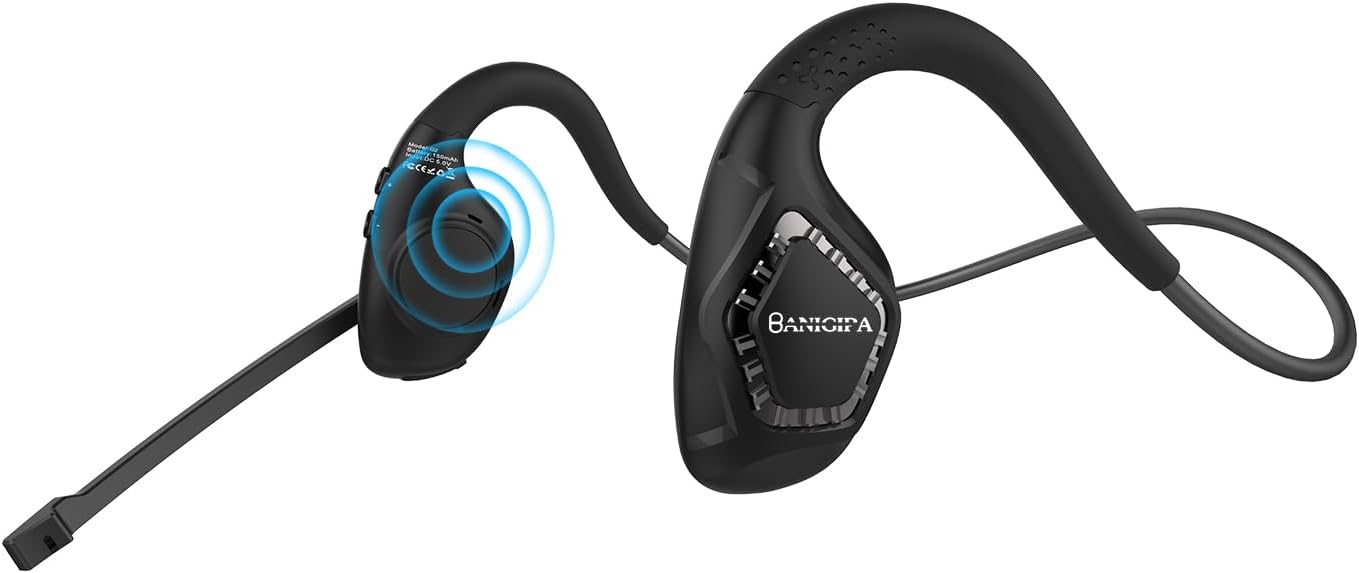
Image: The BANIGIPA A-G2 Black Open Ear Headphones, showcasing their design with the boom microphone.
What's in the Box?
- 1 x G2 Air Conduction Headset
- 1 x USB Charging Cable
- 1 x User Manual

Image: A visual representation of the items included in the product packaging: the G2 headset, a USB charging cable, and the user manual.
Key Features
- Open-Ear Air Conduction Design: Sound is conducted through the air, avoiding discomfort from in-ear or over-ear headphones. This design keeps the ear canal healthy and clean, and ensures situational awareness by allowing you to hear your surroundings.
- Upgraded Bluetooth 5.4: Features the latest Bluetooth 5.4 technology for stable and fast connections up to 10m/33ft. Supports dual audio decoding (AAC and SBC) for enhanced sound quality.
- 270° Rotatable Boom Microphone: Equipped with a noise-canceling boom microphone that uses a single-mark algorithm for noise reduction, filtering out up to 95% of background noise. The flexible boom can be rotated 270° to optimize voice pickup for clear calls.
- Long Battery Life: Built-in 165mAh rechargeable lithium-ion battery provides up to 10 hours of uninterrupted music/calls and 150 hours of standby time. Fully charges in approximately 1.5 hours via Type-C USB.
- Lightweight & Comfortable: Weighing only 28g, these headphones are designed for long-term wear without ear pain. Made with skin-friendly, soft silicone and high-resilience titanium alloy memory for 360° bending without deformation.

Image: Illustrates the comfort of open-ear headphones compared to traditional headphones, highlighting health and safety benefits.

Image: A graphic depicting the advanced Bluetooth 5.4 chip, emphasizing fast and stable connection capabilities.

Image: A man wearing the headset in an office setting, illustrating the effectiveness of the DSP noise-canceling microphone for HD calling.

Image: A visual guide demonstrating the 270° rotatable boom microphone and its mute function.

Image: An infographic detailing the durable and long battery life, showing 165mAh capacity, 2 hours charging time, 10 hours working time, and USB-C charging port.

Image: A man wearing the headphones while working on a laptop, illustrating the light and comfortable design for all-day wear.
Setup
Charging the Headset
Before first use, fully charge your BANIGIPA G2 headphones. Connect the included USB charging cable to the Type-C port on the headset and to a compatible USB power source. A full charge takes approximately 1.5 hours.
Bluetooth Pairing
- Ensure the headset is powered off.
- Press and hold the multi-function button until the LED indicator flashes blue and red, indicating pairing mode.
- On your device (phone, laptop, tablet), enable Bluetooth and search for available devices.
- Select "BANIGIPA G2" from the list. Once connected, the LED indicator will turn solid blue or off, depending on the model.
The headset supports simultaneous connection to two devices. To connect a second device, ensure the first device is connected, then put the headset back into pairing mode and connect to the second device. The headset will intelligently switch between devices.

Image: Shows the headphones simultaneously connected to a smartphone and a laptop, demonstrating multi-device compatibility.
Wearing the Headset
- Place the headphones on your head, ensuring the ear hooks rest comfortably over your ears.
- Adjust the ear hang to a comfortable and secure position.
- Rotate the boom microphone up to 270° to the most suitable position for clear voice pickup.

Image: A three-step diagram illustrating how to properly wear the headphones, adjust the ear hang, and position the microphone.
Operating Instructions
The BANIGIPA G2 headphones feature multi-function buttons for easy control of your audio and calls.

Image: A detailed diagram showing the location and function of each button on the headset, including power, volume, track control, call management, mute, and voice assistant activation.
- Power On/Off: Press and hold the multi-function button.
- Play/Pause Music: Single press the multi-function button.
- Next Song: Press the 'Volume +' button.
- Previous Song: Press the 'Volume -' button.
- Volume Up: Press and hold the 'Volume +' button.
- Volume Down: Press and hold the 'Volume -' button.
- Answer/Hang Up Call: Single press the multi-function button during an incoming call.
- Reject Call: Press and hold the multi-function button during an incoming call.
- Activate Voice Assistant: Double press the multi-function button.
- Switch Music/Game Mode: Triple press the multi-function button. (Note: Gaming mode has approximately 70ms audio delay.)
- Mute Function: Use the dedicated mute button on the boom microphone.
Maintenance
- Cleaning: Wipe the headset with a soft, dry cloth. Avoid using harsh chemicals or abrasive materials.
- Storage: Store the headphones in a cool, dry place away from direct sunlight and extreme temperatures.
- Battery Care: To prolong battery life, avoid fully discharging the battery frequently. Charge the headset regularly, even if not in use for extended periods.
- Water Resistance: The headset is waterproof, but avoid prolonged submersion in water. Dry thoroughly if exposed to moisture.
Troubleshooting
| Problem | Possible Cause | Solution |
|---|---|---|
| Headset does not power on. | Low battery. | Charge the headset fully using the provided USB cable. |
| Cannot pair with device. | Headset not in pairing mode; Bluetooth off on device; device too far. | Ensure headset is in pairing mode (flashing blue/red LED). Turn on Bluetooth on your device. Move device closer to headset (within 10m/33ft). Restart both devices. |
| No sound or poor sound quality. | Volume too low; incorrect audio output selected; interference. | Increase volume on headset and device. Check audio output settings on your device. Move away from sources of strong electromagnetic interference. |
| Microphone not working or unclear. | Microphone muted; incorrect microphone input selected; microphone not positioned correctly. | Ensure microphone is not muted. Check microphone input settings on your device. Rotate the boom microphone to be closer to your mouth. |
| Audio delay in gaming mode. | Normal operation for gaming mode. | The headset has an approximate 70ms audio delay in gaming mode, which is typical for this feature. |
| Headset is uncomfortable or causes ear pain. | Improper fit. | Adjust the ear hooks and headset position for a comfortable fit. The open-ear design is intended to prevent ear pain from prolonged use. |
Note: This is an air conduction headset, not a bone conduction headset. It is not recommended for people with hearing impairments.
Specifications
| Feature | Detail |
|---|---|
| Model Name | G2 Black |
| Connectivity Technology | Bluetooth, Wireless |
| Wireless Communication Technology | Bluetooth |
| Bluetooth Version | 5.4 |
| Bluetooth Range | 10 Meters (33ft) |
| Ear Placement | Open Ear |
| Form Factor | Open Ear |
| Microphone | Noise-Canceling Boom Microphone (270° Rotatable) |
| Battery Capacity | 165 mAh Lithium Ion |
| Battery Life | Up to 10 Hours (Music/Calls) |
| Standby Time | Up to 150 Hours |
| Charging Time | Approx. 1.5 Hours |
| Charging Port | Type-C USB |
| Item Weight | 28 Grams (0.988 ounces) |
| Material | Plastic, Silicone |
| Water Resistance Level | Waterproof |
| Compatible Devices | iOS and Android Cellphones, Laptops, Tablets, PC, Desktops |
| Audio Latency (Gaming Mode) | 70 Milliseconds |
| Included Components | 1 X G2 Air Conduction Headset, 1 X USB Charging Cable, User Manual |
Warranty & Support
For product support, troubleshooting assistance, or warranty inquiries, please contact BANIGIPA customer service through the retailer's platform or visit the official BANIGIPA store page on Amazon. Please refer to your purchase receipt for specific warranty terms and conditions.
Related documentsA-G2 Black


Ask a question about this manual
Ask about setup, troubleshooting, compatibility, parts, safety, or missing instructions. Manuals+ will review the question and use this page’s manual context to help answer it.