
FLYLINKTECH JF-H-42H
FLYLINKTECH Foldable Treadmill User Manual
Model: JF-H-42H
1. Introduction
Thank you for choosing the FLYLINKTECH Foldable Treadmill. This manual provides essential information for the safe and efficient operation, assembly, maintenance, and troubleshooting of your new fitness equipment. Please read this manual thoroughly before initial use and retain it for future reference.
This treadmill is designed for home use, offering a convenient and effective way to achieve your fitness goals. Key features include a powerful yet quiet motor, multiple incline levels, a spacious running belt, and smart app connectivity.

Image: The FLYLINKTECH Foldable Treadmill in use, showcasing its compact design and integrated display.
2. Safety Information
Your safety is paramount. Please observe the following precautions:
- Emergency Stop: Always attach the red safety key lanyard to your clothing before starting the treadmill. In an emergency, pulling the safety key will immediately stop the machine.
- Weight Limit: Do not exceed the maximum user weight capacity of 180 kg (396 lbs).
- Placement: Place the treadmill on a flat, stable surface with adequate clear space around it (at least 2 meters behind and 1 meter on each side).
- Children and Pets: Keep children and pets away from the treadmill during operation.
- Maintenance: Unplug the treadmill before cleaning, maintenance, or moving.
- Footwear: Always wear appropriate athletic footwear when using the treadmill.
- Medical Advice: Consult a physician before starting any new exercise program.

Image: A user running on the treadmill, demonstrating the proper attachment of the safety key lanyard to clothing.
3. Setup and Assembly
The FLYLINKTECH Treadmill is 95% pre-installed, making assembly quick and straightforward. You will primarily need to secure the console and handlebars.
3.1 Unpacking
- Carefully remove the treadmill from its packaging. It is recommended to have two people for this step due to the weight and size of the unit.
- Inspect all components for any damage. If any parts are missing or damaged, contact customer support immediately.

Image: The FLYLINKTECH Foldable Treadmill in its original packaging box, labeled JF-H-42H.
3.2 Assembly Steps
Typically, only 4 screws need to be installed to complete the setup.
- Lift the console and handlebar assembly into the upright position.
- Align the pre-drilled holes and secure the console/handlebars to the main frame using the provided screws and tools.
- Ensure all connections are tight and secure before plugging in the treadmill.
3.3 Folding and Storage
The treadmill features a hydraulic folding system and built-in transport wheels for easy storage and movement.
- To Fold: Gently lift the running deck until it locks into the upright position. The hydraulic cylinder will assist in the process.
- To Unfold: Push the release mechanism (often a foot pedal or lever) and gently lower the running deck. The hydraulic system will ensure a slow, controlled descent.
- Moving: Once folded, tilt the treadmill onto its transport wheels and roll it to your desired storage location.

Image: Illustration of the treadmill's hydraulic folding system and built-in transport wheels for compact storage.
4. Operating Instructions
Familiarize yourself with the control panel and various functions to maximize your workout experience.
4.1 Control Panel Overview
The LED display tracks essential workout metrics.

Image: Close-up of the treadmill's multi-function LED display, showing speed, distance, time, and calorie readouts, along with program selection buttons.
- Display: Shows speed, time, distance, and calories burned.
- Start/Stop: Initiates or pauses the workout.
- Speed +/-: Adjusts the running speed (up to 16 km/h).
- Program (P): Selects from 12 preset exercise modes.
4.2 Incline Adjustment
The treadmill offers 3 manual incline levels to vary your workout intensity.
- To adjust the incline, you must stop the treadmill and manually change the position of the incline pins located at the rear base of the machine.
- Ensure both sides are set to the same incline level for stability.

Image: Detail of the manual incline adjustment mechanism at the base of the treadmill.
4.3 Smart App Control (FitShow)
Connect your treadmill to the "FS" (FitShow) application via Bluetooth for enhanced control and tracking.
- Download the "FS" app from your device's app store (Google Play or Apple App Store).
- Enable Bluetooth on your mobile device.
- Open the "FS" app and follow the on-screen instructions to pair with your treadmill.
- The app allows you to monitor exercise data, control speed, and access additional workout programs.
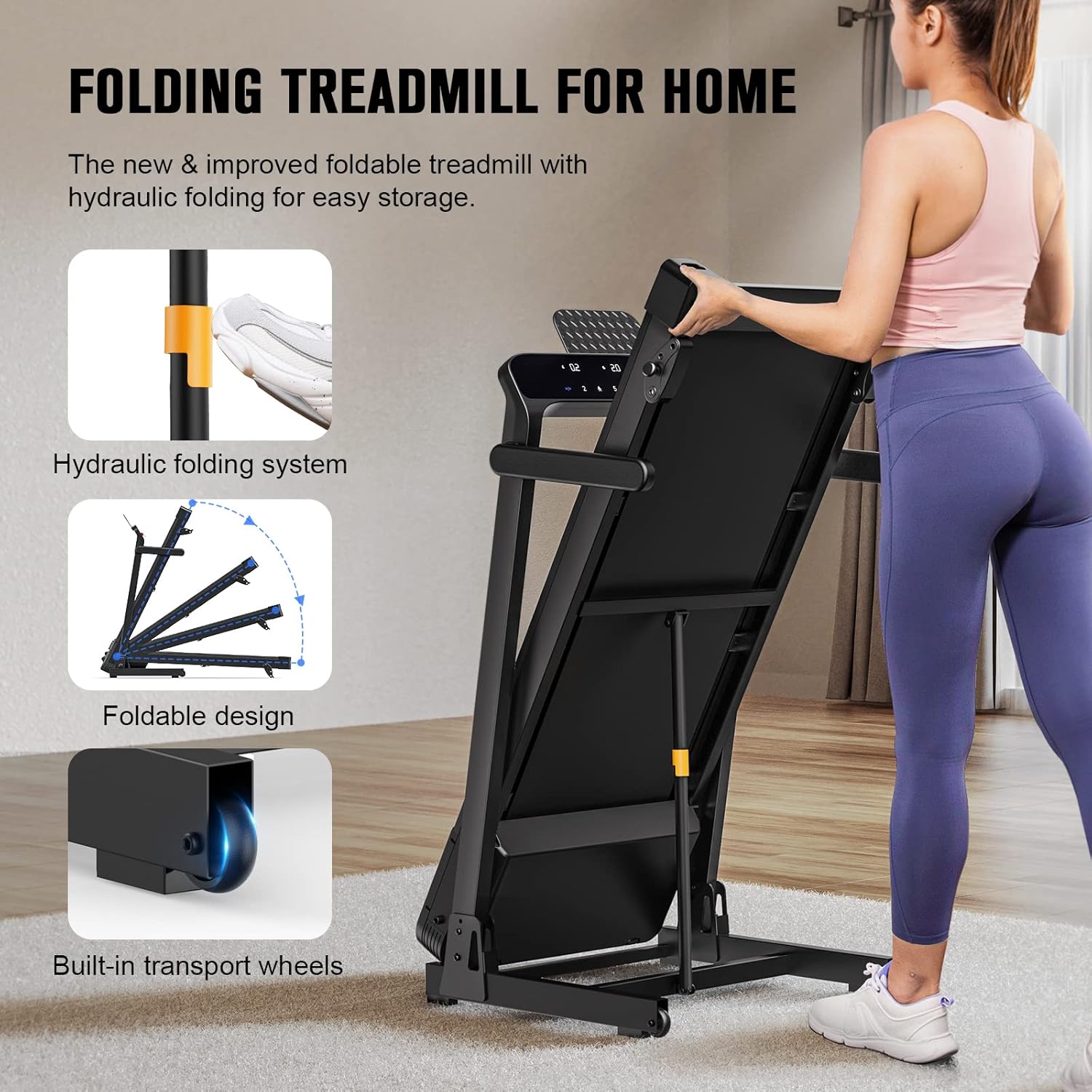
Image: A user interacting with the treadmill's smart app control feature on a mobile phone, showing the integration of the app with the workout.
5. Maintenance
Regular maintenance ensures the longevity and optimal performance of your treadmill.
5.1 Cleaning
- Wipe down the treadmill surfaces with a damp cloth after each use to remove sweat and dust.
- Do not use abrasive cleaners or solvents.
5.2 Running Belt Lubrication
Proper lubrication of the running belt is crucial to reduce friction and extend the life of the motor and belt.
- Lubricate the running belt every 3-6 months, or after approximately 50 hours of use, using 100% silicone lubricant.
- Lift the edge of the running belt and apply a thin line of lubricant to the center of the deck underneath the belt.
- Run the treadmill at a low speed (e.g., 3 km/h) for a few minutes to distribute the lubricant evenly.
5.3 Running Belt Adjustment
If the running belt shifts to one side or slips, it may need adjustment.
- Centering: If the belt drifts to one side, use the provided Allen key to turn the adjustment bolt on the corresponding side (clockwise to move the belt to the right, counter-clockwise to move it to the left) in small increments (quarter turns). Run the treadmill for a few minutes after each adjustment until the belt is centered.
- Tensioning: If the belt slips during use, it may be too loose. Turn both rear adjustment bolts clockwise in small, equal increments to increase tension. Do not overtighten.

Image: Cross-section diagram illustrating the 7-layer shock-absorbing and non-slip running belt construction.
6. Troubleshooting
This section addresses common issues you might encounter with your treadmill.
| Problem | Possible Cause | Solution |
|---|---|---|
| Treadmill does not start | Power cord not plugged in; Safety key not in place; Circuit breaker tripped. | Ensure power cord is securely plugged in; Insert safety key fully; Reset circuit breaker. |
| Running belt slips | Belt too loose; Belt needs lubrication. | Adjust belt tension (see Maintenance section); Lubricate belt (see Maintenance section). |
| Unusual noise from motor area | Loose components; Motor issue. | Check for loose screws and tighten; If noise persists, contact customer support. |
| Display not working | Loose cable connection; Console malfunction. | Check all cable connections to the console; If issue persists, contact customer support. |
7. Specifications
Key technical specifications for the FLYLINKTECH Foldable Treadmill (Model JF-H-42H):
| Feature | Specification |
|---|---|
| Model Number | JF-H-42H |
| Brand | FLYLINKTECH |
| Maximum Weight Capacity | 180 Kilograms |
| Speed Rating | Up to 16 km per hour |
| Horsepower | 2.5 Horsepower |
| Running Belt Dimensions | 43 cm (width) x 110 cm (length) |
| Number of Programs | 12 Preset Programs |
| Incline Levels | 3 Manual Incline Levels (0-15°) |
| Display Type | LED |
| Connectivity | Bluetooth (for "FS" App) |
| Foldable Feature | Yes, with Hydraulic Folding System |
| Product Dimensions (Unfolded) | 137.9 x 74.9 x 149.9 cm |
| Product Weight | 39 Kilograms |
| Frame Material | Alloy Steel |
| Power Source | Corded Electric |

Image: Detailed diagram showing the unfolded dimensions of the treadmill.

Image: Detailed diagram showing the folded dimensions of the treadmill for storage.
8. Warranty and Support
FLYLINKTECH is committed to providing high-quality products and excellent customer service.
8.1 Warranty Information
Please refer to the warranty card included with your product for specific warranty terms and conditions. Typically, the warranty covers manufacturing defects under normal use.
8.2 Customer Support
If you have any questions, require technical assistance, or need to report an issue, please contact FLYLINKTECH customer service. Our professional service team aims to respond within 24 hours.
For the most up-to-date contact information, please visit the official FLYLINKTECH store on Amazon or refer to the contact details provided in your product packaging.
Ask a question about this manual
Ask about setup, troubleshooting, compatibility, parts, safety, or missing instructions. Manuals+ will review the question and use this page’s manual context to help answer it.