
Introduction
The Blaupunkt Lemon 122 is a versatile multimedia car stereo designed to enhance your in-car entertainment and connectivity. Featuring a 6.5-inch touchscreen, it supports various media formats including DVD/CD, USB, and TF cards. Enjoy wireless audio streaming and hands-free calling via Bluetooth, or mirror your smartphone screen with Mirror Link. The unit also includes an AM/FM radio tuner and multiple equalizer presets for optimized sound.
What's in the Box
Before proceeding with installation, please verify that all the following components are present in the packaging:
- Blaupunkt Lemon 122 Car Stereo Unit
- Remote Control
- Wiring Harness
- Mounting Brackets
- Screws
- User Manual (this document)

Figure 1: Contents of the Blaupunkt Lemon 122 package, showing the main unit, remote, wiring, mounting hardware, and documentation.
Setup and Installation
Safety Precautions
- Disconnect the vehicle's negative battery terminal before starting any electrical work to prevent short circuits.
- Ensure proper insulation for all wiring connections.
- Professional installation is recommended to ensure correct wiring and functionality.
- Do not install the unit where it may obstruct the driver's view or interfere with vehicle operation.
Wiring Diagram
Refer to the included wiring harness and the diagram below for proper connections. Incorrect wiring can damage the unit or vehicle electrical system.
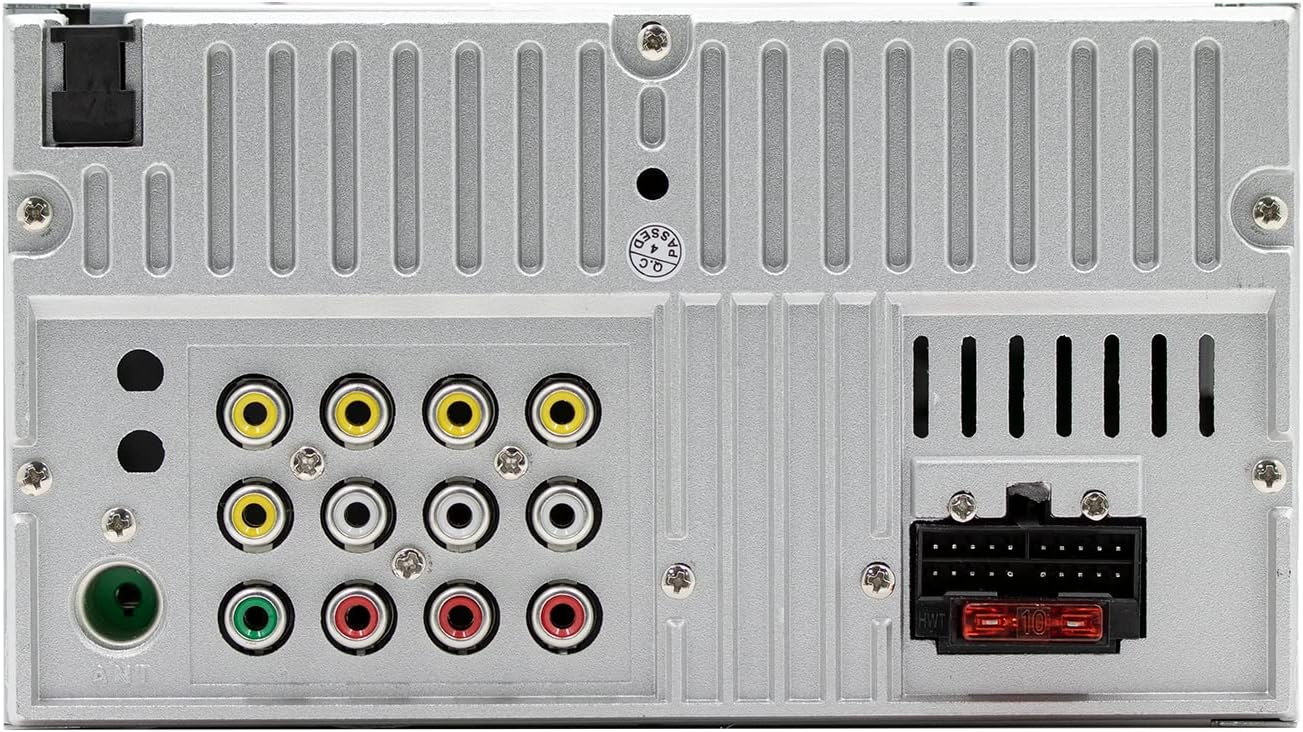
Figure 2: Rear panel connections of the Blaupunkt Lemon 122, illustrating power, speaker, video, and antenna inputs/outputs.
- Power (Yellow): Connect to constant 12V power supply.
- Accessory (Red): Connect to switched 12V accessory power.
- Ground (Black): Connect to vehicle chassis ground.
- Speaker Wires: Connect to corresponding vehicle speakers (e.g., Front Left +, Front Left -).
- Antenna: Connect to vehicle's radio antenna.
- Reverse Camera Input: Connect to a compatible rear view camera for automatic display when reversing.
Mounting the Unit
Use the provided mounting brackets and screws to secure the car stereo into the vehicle's dashboard opening. Ensure the unit is firmly seated and does not vibrate during driving.
Operating Instructions
Power On/Off
Press the Power/Volume knob to turn the unit on or off. Rotate the knob to adjust the volume.
Touchscreen Interface
Navigate through menus and select functions by touching the icons on the 6.5-inch display. Swipe gestures may be used for certain functions.
Radio (AM/FM)
Select the 'Radio' source. Use the touchscreen controls to scan for stations, manually tune, and save up to 30 preset stations.
DVD/CD Playback
Insert a DVD or CD into the disc slot. The unit will automatically switch to the DVD/CD source and begin playback. Use the on-screen controls for playback functions (play, pause, skip, stop).
USB/TF Card Playback
Insert a USB drive into the front USB port or a TF card into the designated slot. Select the 'USB' or 'TF Card' source. The unit will display compatible media files (MP3, WMA, MP4, AVI, etc.) for selection and playback.

Figure 3: Front panel of the Blaupunkt Lemon 122, showing the USB and AUX ports for media input.
Bluetooth Connectivity
To pair your smartphone:
- Enable Bluetooth on your smartphone.
- On the Lemon 122, select the 'Bluetooth' source.
- Search for available devices on your phone and select 'Blaupunkt Lemon 122'.
- Confirm the pairing code if prompted.
Once paired, you can stream audio and make/receive hands-free calls through the car stereo.
Mirror Link Functionality
Mirror Link allows you to display your smartphone's screen directly on the Lemon 122's touchscreen. This feature requires a compatible smartphone and a USB connection. Follow the on-screen prompts on the stereo and your phone to establish the connection.

Figure 4: The Mirror Link feature in action, showing a smartphone screen mirrored onto the Blaupunkt Lemon 122 display.
Audio Settings (Equalizer)
Access the audio settings menu to adjust sound preferences. The unit includes multiple preset equalizer modes such as POP, CLASSIC, ROCK, and JAZZ to optimize your listening experience.
Rear View Camera
If a rear view camera is connected, the display will automatically switch to the camera feed when the vehicle is put into reverse gear.
Remote Control
The included remote control provides convenient access to various functions, including power, volume, source selection, track/station navigation, and menu controls.
Maintenance
Cleaning the Unit
Use a soft, dry cloth to clean the touchscreen and the unit's exterior. For stubborn marks, a slightly damp cloth with mild detergent can be used, followed by a dry wipe. Avoid abrasive cleaners or solvents.
Disc Care
Handle discs by their edges to avoid fingerprints. Keep discs clean and free from scratches. Store discs in their cases when not in use.
Software Updates
Periodically check the official Blaupunkt website for any available software or firmware updates for your Lemon 122 model. Follow the provided instructions carefully for any update procedures.
Troubleshooting
| Problem | Possible Cause | Solution |
|---|---|---|
| No power | Incorrect wiring; Blown fuse; Vehicle battery low | Check power and ground connections; Replace fuse; Check vehicle battery. |
| No sound | Volume too low; Speaker wires disconnected; Incorrect audio settings | Increase volume; Check speaker connections; Verify audio output settings. |
| Bluetooth connection issues | Device not paired; Bluetooth off on phone; Interference | Ensure Bluetooth is enabled on both devices; Re-pair the device; Move closer to the unit. |
| Mirror Link not working | Incorrect USB cable; Incompatible phone; App not installed/running | Use a high-quality USB cable; Check phone compatibility; Ensure Mirror Link app is running on phone. |
| Disc read error | Dirty or scratched disc; Incompatible disc format | Clean the disc; Try a different disc; Ensure disc format is supported. |
Specifications
- Display: 6.5-inch Touch Screen
- Power Output: 4 x 50W Max (200 watts total)
- Connectivity: Bluetooth, USB, TF Card, AUX In, Mirror Link
- Media Compatibility: DVD/VCD/CD/CR-R/CD-RW/MP4/AVI/DIVX/XVID/RM/FLV/MP3/WMA/APE/FLAC
- Radio Tuner: AM/FM with 30 Channel Presets
- Equalizer Presets: POP/CLASSIC/ROCK/JAZZ
- Special Features: Rear View Camera Input, 7 Color Button Lights
- Control Method: Remote, Touch
- Audio Output Mode: Stereo
- Surround Sound Channel Configuration: 2
- Manufacturer: Blaupunkt
- Model Number: Lemon 122
- UPC: 815592028345
Warranty and Support
Warranty Information
The Blaupunkt Lemon 122 Multimedia Car Stereo is covered by a 1 Year Limited Manufacturer's Warranty from the date of purchase. This warranty covers defects in materials and workmanship under normal use. It does not cover damage caused by improper installation, accident, misuse, abuse, neglect, or unauthorized modification.
Customer Support
For technical assistance, warranty claims, or further information, please refer to the official Blaupunkt website or contact their customer support directly. Keep your proof of purchase for warranty service.


