Product Overview
The RunSTAR 8 Electrodes Smart Body Composition Analyzer is designed to provide accurate and comprehensive insights into your body's composition. Utilizing advanced electrical Bio-Impedance Measurement Technology with 8 electrodes, this scale offers more precise data by directly measuring your limbs and torso, surpassing traditional body weight scales.
Key Features:
- More Accurate Data: Acquires and analyzes real body composition data by directly measuring limbs and torso.
- 20 Essential Measurements: Provides data on BMI, body fat, subcutaneous fat, body water, protein, BMR, bone mass, body age, and more.
- Progress Tracking: The Starfit app offers detailed charts and historical data to monitor body composition changes over time.
- Unlimited Users: Starfit App supports up to 24 user profiles for family and friends, with easy sync to Apple Health, Health Connect, and Fitbit.
- Extra Large Display Screen: Intuitive display shows 8 essential body composition metrics directly on the scale.

The RunSTAR 8 Electrodes Smart Body Composition Analyzer, showcasing its sleek design, handlebar, and accompanying app interface.

A close-up of the scale's large display, highlighting 8 key body composition data points at a glance.
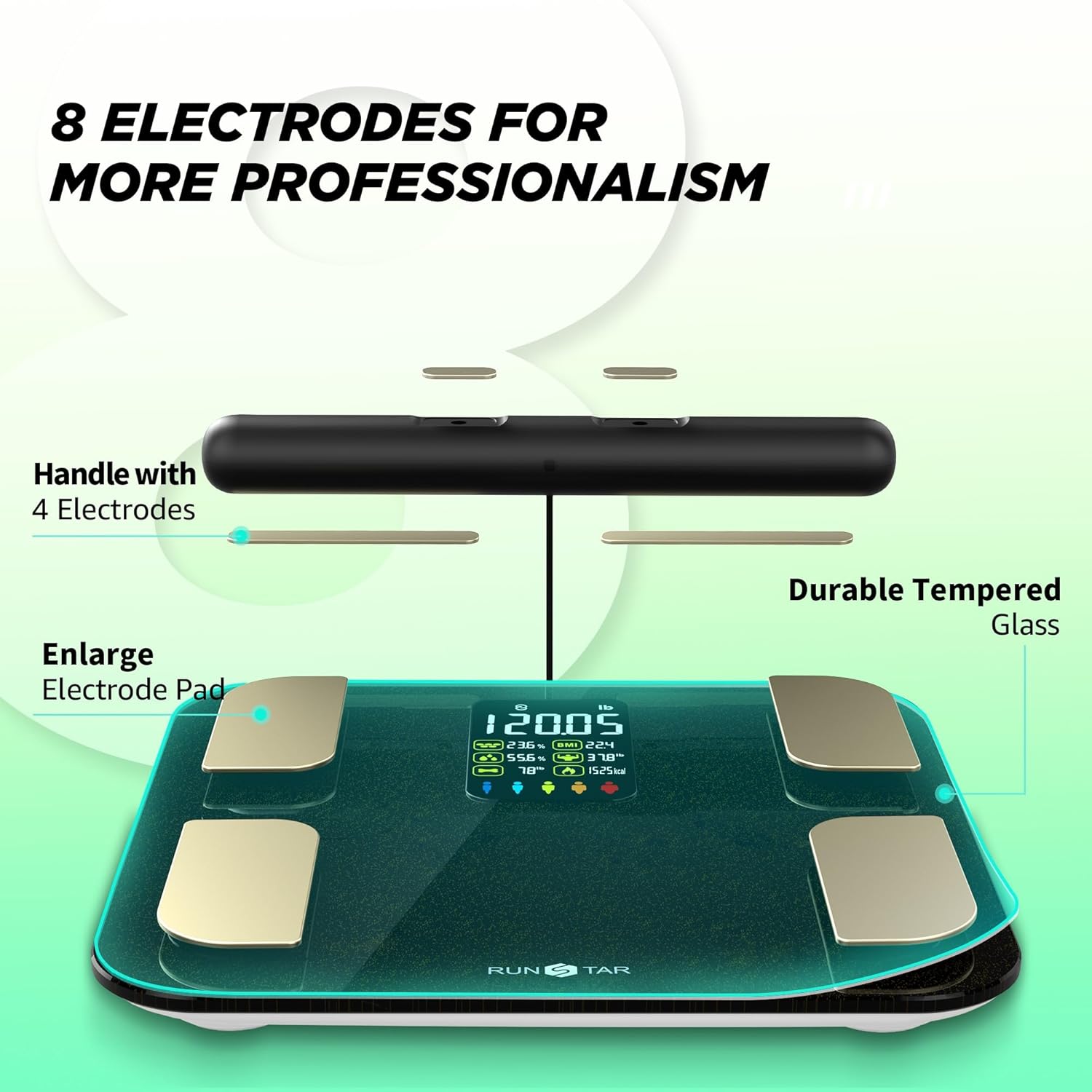
Illustration detailing the 8 electrodes on the scale platform and the handlebar for comprehensive body analysis.

A visual representation of the 20 comprehensive body composition metrics measured by the scale, divided into 5 body segments.
Setup Guide
1. Unpacking and Initial Preparation
Carefully remove the scale and all accessories from the packaging. Ensure all components are present: the main scale unit, the handlebar with coiled cable, and the USB-C charging cable.
2. Charging the Device
The RunSTAR scale features a rechargeable Lithium Polymer battery. Before first use, fully charge the scale using the provided USB-C cable. Connect the cable to the Type-C port located on the underside of the scale. A full charge typically lasts for 30 days of normal use. Note: Fast chargers are not supported.

The scale's Type-C charging port, indicating its rechargeable nature for convenience.
3. App Installation and Connection (Starfit App)
To unlock the full potential of your RunSTAR scale and access all 20 body composition measurements, download the 'Starfit' app from your device's app store (available on Apple App Store and Google Play Store). Follow these steps to connect:
- Download and complete registration within the Starfit app.
- Navigate to "Account" and then "My Devices" within the app.
- Tap the "+" icon in the upper right corner, then select the "Bluetooth" logo to begin searching for smart devices.
- Step onto the scale to activate it. The scale's screen will display "0.0" or your weight.
- Locate "Runstar-RX" (the scale's Bluetooth name) in the app's search results and tap to connect. A connected logo will appear on the scale's screen upon successful pairing.
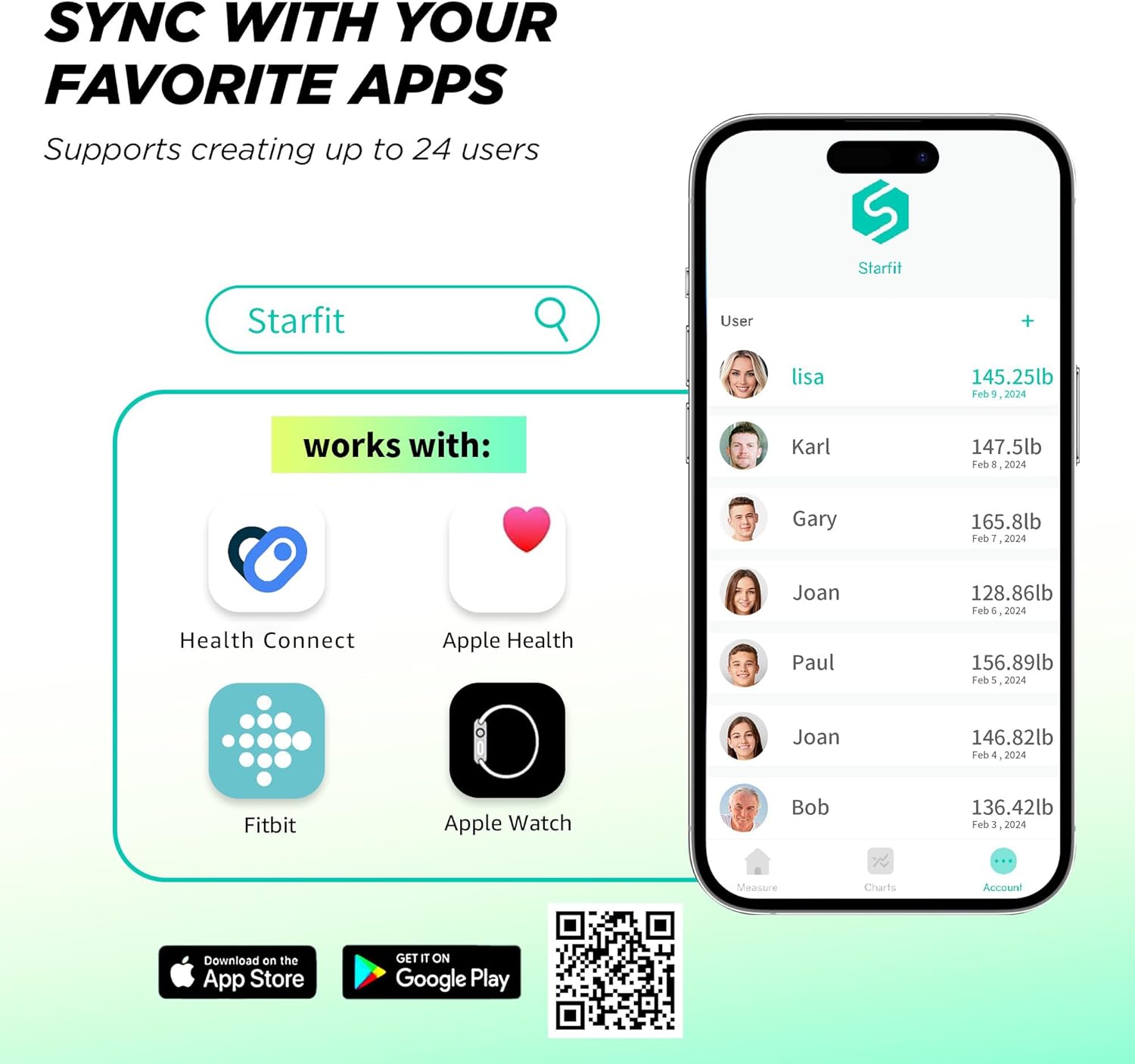
The Starfit app interface, demonstrating its compatibility with popular fitness applications like Apple Health, Health Connect, Fitbit, and Apple Watch.
4. Scale Placement
For accurate measurements, place the scale on a hard, flat, and clean floor. Avoid carpets or uneven surfaces, as this can affect readings.

Visual guide for placing the scale on a flat, hard surface for optimal accuracy.
Operating Instructions
1. Taking a Measurement
Ensure your feet are bare and dry. Gently step onto the scale, positioning your feet correctly on the electrode pads. Pull up the handlebar with both hands, holding it at a 45-degree angle to your body, ensuring your thumbs and fingers are on the electrode sheets.

Correct barefoot placement on the scale's electrode pads for accurate readings.
2. Reading Measurements
After weighing, the scale's large colorful display screen will show 8 essential body composition metrics. For more detailed information and all 20 indicators, open the Starfit app on your connected smartphone. The app will automatically sync the data from your measurement.

The scale's vibrant display provides clear, easy-to-read body composition data.
3. Understanding Your Data
The Starfit app provides a comprehensive body composition analysis report. You can view detailed charts, track changes over days, weeks, months, or years, and even generate printable reports for your records or to share with a healthcare professional.

A detailed overview of the 20 body indicators and a sample body composition analysis report available through the app.

The Starfit app allows users to trace and visualize their body transformation progress over time with intuitive charts.
4. Multiple Users
The Starfit app allows you to create and manage up to 24 user profiles, making it ideal for families or shared environments. Each user can have their own individual profile to track their progress.

The scale supports up to 24 individual user profiles within the Starfit app, perfect for family use.
Maintenance
Cleaning
The scale features a 6mm durable tempered glass surface, which is easy to clean. Use a soft, damp cloth to wipe down the surface. Avoid abrasive cleaners or harsh chemicals that could damage the glass or electrodes.

The scale is constructed with 6mm durable tempered glass, ensuring longevity and easy cleaning.
Storage
When not in use, you can gently lay the handlebar on top of the scale. The product also includes an adhesive hook for wall mounting the handlebar, considering the length of the coiled cable.

The RunSTAR scale features enlarged electrode pads for a larger sensing area and more accurate measurements, compared to smaller scales.
Troubleshooting
App Connection Issues
If you experience difficulty connecting the Starfit app to the scale, ensure Bluetooth is enabled on your smartphone and the scale is activated by stepping on it. Re-check the pairing steps in the Setup Guide. If issues persist, try restarting both your phone and the scale.
Inconsistent Readings
For accurate results, always place the scale on a hard, flat surface. Ensure your feet are bare and dry, and positioned correctly on all electrode pads. Hold the handlebar steady at the recommended 45-degree angle. Avoid moving during the measurement process.
Battery Issues
If the scale is not turning on or holding a charge, ensure it is fully charged using the provided USB-C cable. If the issue continues, refer to the full Instructions for Use (IFU) PDF for further troubleshooting or contact customer support.
Product Specifications
| Feature | Detail |
|---|---|
| Brand | runstar |
| Model | FG2001 |
| Color | Black |
| Material | Tempered Glass |
| Weight Limit | 400 Pounds |
| Display Type | LED |
| Special Feature | Rechargeable |
| Item Weight | 5.27 Pounds |
| Product Dimensions | 16.8 x 13 x 2.12 inches |
| UPC | 860007976544 |
| Batteries | 1 Lithium Polymer batteries required. |
Warranty and Support
Warranty Information
RunSTAR products typically come with a manufacturer's warranty. For specific details regarding your product's warranty period and coverage, please refer to the documentation included in your product packaging or visit the official RunSTAR store.
Customer Support
For additional support, troubleshooting, or inquiries, please visit the official RunSTAR store online: RunSTAR Amazon Store. You may also find detailed instructions in the Instructions for Use (IFU) PDF.


