
Roinvou N2042
Roinvou Single Din Car Stereo Radio User Manual
Model: N2042
Introduction
This manual provides detailed instructions for the installation, operation, and maintenance of your Roinvou Single Din Car Stereo Radio. Please read this manual thoroughly before using the product to ensure proper functionality and safety. This car stereo offers a range of features including Wired Carplay & Android Auto, Phone Mirror Link, Bluetooth, FM Radio, and support for a backup camera.
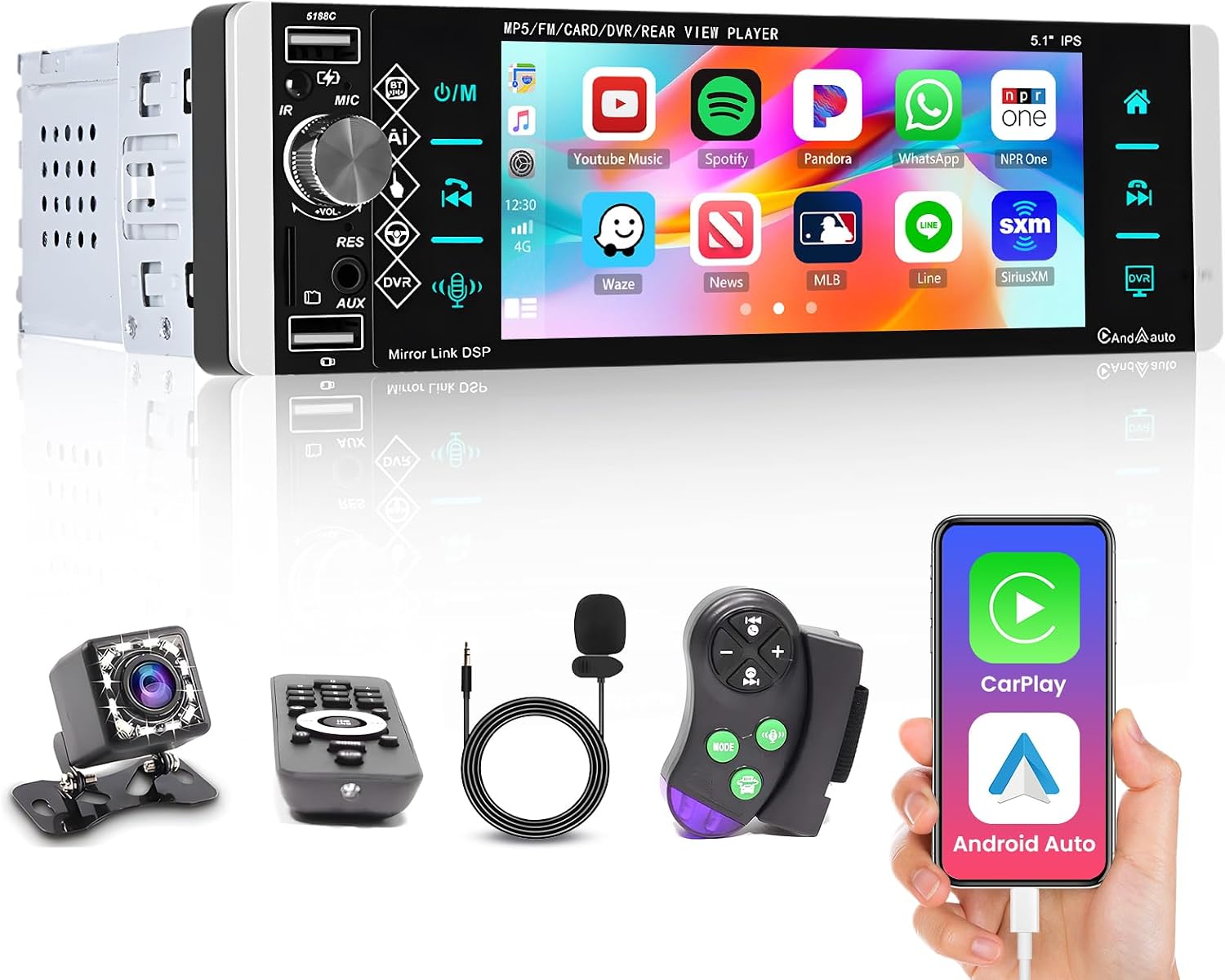
Image: The Roinvou Single Din Car Stereo unit shown with its various included accessories, such as the backup camera, remote control, external microphone, and wiring harnesses.
Setup
What's in the Box
Upon unboxing, verify that all components are present:
- Power Cable
- Horn Cable
- Microphone
- Rear View Camera
- User Manual (this document)
- Remote Controller
- Steering Wheel Controller

Image: A diagram illustrating the dimensions of the Roinvou Single Din Car Stereo, showing its length, width, and height in millimeters.
Installation Guidelines
The Roinvou Single Din Car Stereo is designed for universal single DIN car compatibility. It comes with a universal bare wire harness for straightforward installation. Professional installation is recommended for optimal performance and to avoid damage.
Key connections include:
- Power Cable: Connect to vehicle's power supply.
- Horn Cable: For audio output.
- USB Ports: Dual USB ports, one for fast charging and the other for connecting external devices like a microphone or USB drive.
- AUX Port: For auxiliary audio input.
- Rear View Camera Input: Dedicated input for the included backup camera.
- Steering Wheel Control (SWC) Input: For connecting to your vehicle's steering wheel controls.

Image: The rear panel of the car stereo, displaying various input/output ports and a label with product marketing name 'Car Player', model 'N2042', and IC '29149-N2042'.
Operating Instructions
Wired Carplay & Android Auto
This car stereo supports wired Apple Carplay and Android Auto. Connect your smartphone via its original USB data cable to access navigation, contacts, email, notifications, and music directly on the stereo's 5.1-inch touch screen. This feature allows for safe and focused driving while utilizing your phone's capabilities.

Image: The car stereo display showing the Apple Carplay interface on the top and Android Auto interface on the bottom, demonstrating smartphone integration.
Video: A demonstration of the A2905 model's Mirror Link, Android Auto, and Carplay functionalities. This video is provided by the seller, Roinvou.
Phone Mirror Link
The car radio supports mirror link functionality for both Android (version 10.1 and below) and iOS phones (version 13.4 and below). By connecting your phone's original USB data cable, you can synchronize your phone's screen to the 5.1-inch touch screen of the car stereo, allowing you to view and interact with your phone's content directly on the larger display.

Image: The car stereo displaying a mirrored phone screen, with icons indicating compatibility for both Android and iOS devices via wired connection.
Built-in Bluetooth & FM Radio
The single DIN car radio features built-in Bluetooth 4.2, enabling hands-free calling, voice functions, phonebook synchronization, and Bluetooth music playback. The integrated FM/RDS radio allows you to preset up to 18 common stations, providing access to news, real-time traffic, and weather forecasts.

Image: The car stereo screen showing the FM radio interface with frequency display and the Bluetooth calling interface with a dial pad.
Multifunctional Player
The car stereo supports original steering wheel button study, allowing you to control the unit conveniently without taking your hands off the wheel. It offers multiple EQ sound options for a customized listening experience and multi-color button backlight settings to match your vehicle's interior or personal preference. The package includes a remote control and an external microphone for enhanced usability.

Image: The car stereo display showing the intelligent voice assistant feature with various voice commands, and illustrations of a tachograph, USB drive, and mobile phone charging, indicating the multiple USB interfaces.
Rear View Camera Support
An included backup camera with waterproof and night vision functions automatically displays the rear view image on the car stereo screen when you engage reverse gear, aiding in safer parking and maneuvering.

Image: The car stereo screen displaying a high-definition video, emphasizing its 1080p HD video playback capability and support for various video formats.
Maintenance
To ensure the longevity and optimal performance of your Roinvou car stereo, follow these general maintenance guidelines:
- Cleaning: Use a soft, dry cloth to clean the screen and exterior. Avoid abrasive cleaners or solvents.
- Software Updates: Check the manufacturer's website periodically for any available firmware updates to improve performance and add new features.
- Cable Connections: Periodically check all wiring connections to ensure they are secure and free from corrosion.
- Environmental Conditions: Avoid exposing the unit to extreme temperatures, direct sunlight for prolonged periods, or excessive moisture.
Troubleshooting
If you encounter issues with your Roinvou car stereo, refer to the following common problems and solutions:
| Problem | Possible Cause | Solution |
|---|---|---|
| No Power | Loose power connection, blown fuse. | Check power cable connections. Inspect and replace fuses if necessary. |
| No Sound Output | Incorrect speaker wiring, volume too low, mute activated. | Verify speaker connections. Increase volume. Check if mute function is active. |
| Carplay/Android Auto Not Working | Incorrect USB cable, unsupported phone OS version, app issues. | Ensure you are using the phone's original USB data cable. Check phone OS version compatibility (Android 10.1/iOS 13.4 or below). Restart phone and stereo. |
| Mirror Link Issues | Incompatible phone model/OS, unstable USB connection. | Confirm phone compatibility. Ensure a stable wired connection. |
| Backup Camera Not Displaying | Incorrect camera wiring, faulty camera, reverse trigger not connected. | Check camera power and video input connections. Ensure reverse trigger wire is correctly connected to the vehicle's reverse light circuit. |
If problems persist after attempting these solutions, please contact Roinvou customer support for further assistance. You can find contact information on the Roinvou Store page.
Specifications
| Feature | Detail |
|---|---|
| Product Dimensions | 7.4 x 4.65 x 2.28 inches |
| Item Weight | 1.68 pounds |
| ASIN | B09WXNJHJ3 |
| Date First Available | March 31, 2022 |
| Manufacturer | Roinvou |
| Country of Origin | China |
| Brand | Roinvou |
| Connectivity Technology | Bluetooth, USB |
| Controller Type | Android |
| Special Feature | Touchscreen |
| Compatible Devices | Smartphone |
| Connector Type | USB 2.0 |
| Audio Output Mode | Stereo |
| Surround Sound Channel Configuration | 5.1 |
| Video encoding | MKV / RMVB / AVI / MP4 / MDV, etc. |
| Color | Black |
Warranty & Support
For warranty information and customer support, please refer to the documentation included with your product or visit the official Roinvou Store on Amazon. Protection plans are also available for purchase to extend coverage beyond the standard warranty period.
- 2-Year Protection Plan: $6.99
- 3-Year Protection Plan: $8.99
- Complete Protect: $16.99/month (covers all eligible past and future purchases)
Related documentsN2042

Ask a question about this manual
Ask about setup, troubleshooting, compatibility, parts, safety, or missing instructions. Manuals+ will review the question and use this page’s manual context to help answer it.