
Introduction
This manual provides detailed instructions for the NORTH EDGE Hornet Digital Watch. Please read this manual thoroughly to understand the watch's functions and ensure proper use and maintenance. The Hornet watch is designed for sports and outdoor activities, featuring multiple digital functions and a robust build.

Image: Front view of the NORTH EDGE Hornet Digital Watch, displaying its digital and analog time, and various indicators.
Button Functions
The NORTH EDGE Hornet watch features several buttons for navigation and function control. Refer to the image below for button identification.
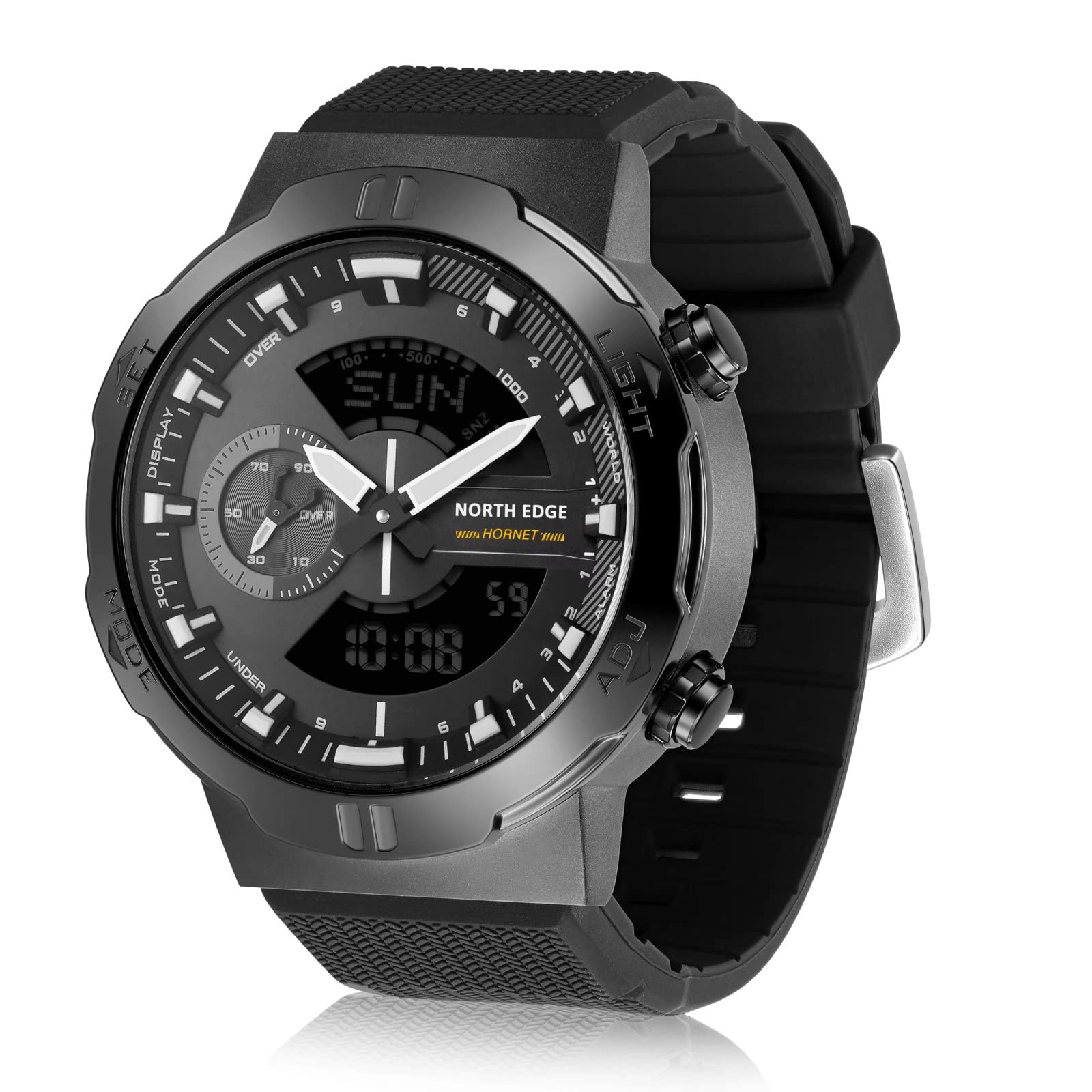
Image: Close-up of the NORTH EDGE Hornet watch face, showing the 'SET', 'DISPLAY', 'MODE', 'LIGHT', 'WORLD', and 'ADJ' buttons around the bezel.
- MODE Button: Used to cycle through different operational modes (Time, Stopwatch, Countdown, Alarm, World Time).
- SET Button: Used to enter and exit setting modes for time, date, alarm, etc.
- ADJ (Adjust) Button: Used to adjust values when in a setting mode or to start/stop functions.
- LIGHT Button: Activates the backlight for illumination in low-light conditions.
- DISPLAY Button: Changes the display format or view within certain modes.
- WORLD Button: Specifically for World Time mode adjustments.
Setup
Initial Power On and Battery
The NORTH EDGE Hornet watch comes with a CR2430 battery pre-installed. The watch should power on automatically. If the display is blank, the battery may need to be activated or replaced. Refer to the Maintenance section for battery replacement information.
Setting Time and Date
- In Timekeeping Mode, press and hold the SET button until the display flashes, indicating setting mode.
- Use the MODE button to cycle through the settings: seconds, hour, minute, year, month, day.
- Use the ADJ button to increase the flashing value. Hold ADJ to rapidly advance the value.
- Once all settings are correct, press the SET button again to exit the setting mode.
Operating Modes
The watch features multiple operational modes. Press the MODE button to cycle through them:

Image: Icons representing the watch's functions: Stopwatch, Speed, Countdown, World Time, Waterproof 50m, Alarm, Backlit, Lap Time and Split Time.
Timekeeping Mode
This is the default mode, displaying the current time, date, and day of the week. Use the DISPLAY button to switch between 12-hour and 24-hour formats.
Stopwatch Mode
To measure elapsed time:
- Navigate to Stopwatch Mode using the MODE button.
- Press the ADJ button to start the stopwatch.
- Press ADJ again to stop the stopwatch.
- Press the SET button to reset the stopwatch to zero.
Lap Time and Split Time
The stopwatch function includes lap and split time measurement for tracking multiple segments.
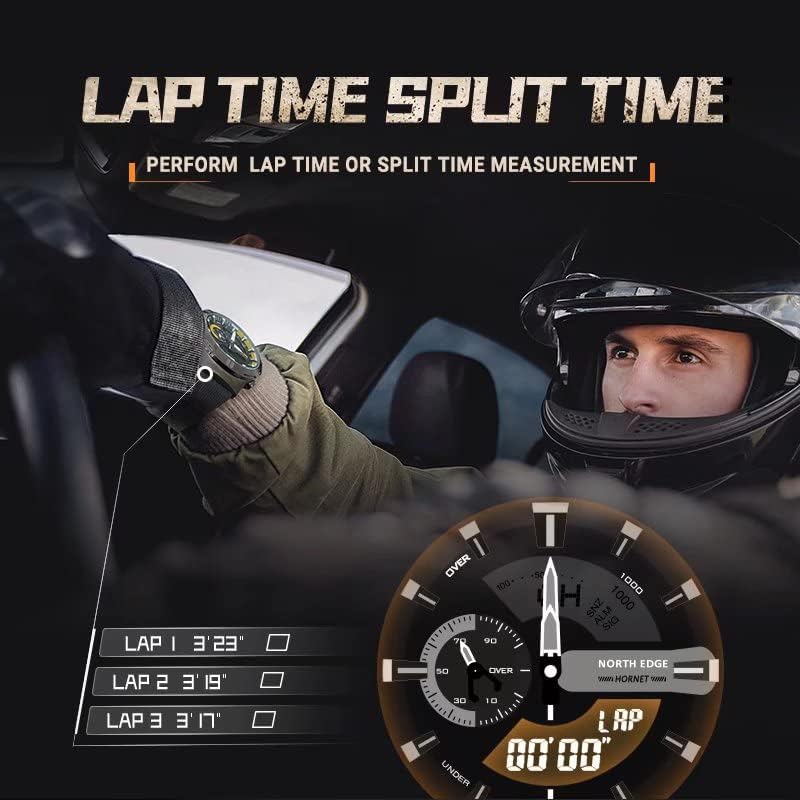
Image: A person wearing the NORTH EDGE Hornet watch, with an overlay showing "LAP TIME SPLIT TIME" and examples of recorded lap times (LAP 1 3'23", LAP 2 3'19", LAP 3 3'17").
- In Stopwatch Mode, press ADJ to start.
- Press DISPLAY to record a lap time without stopping the main timer. The lap time will be shown briefly.
- Repeat DISPLAY for subsequent lap times.
- Press ADJ to stop the stopwatch.
- Press SET to reset.
Speed Measurement
The watch can estimate real-time speed based on elapsed time and a pre-set distance.

Image: A person wearing a helmet, with an overlay showing "SPEED REAL-TIME SPEED READING" and the watch displaying "TIME:02'39" and "SPEED:70KM/H".
- Enter Speed Measurement Mode (refer to specific instructions in the full manual if available, typically accessed via MODE button).
- Set the distance for measurement (e.g., 1 km, 1 mile).
- Start the timer when you begin your activity.
- The watch will calculate and display your speed based on the elapsed time and pre-set distance.
Countdown Timer Mode
To set and use the countdown timer:
- Navigate to Countdown Timer Mode using the MODE button.
- Press and hold SET to enter setting mode.
- Use MODE to select hours, minutes, or seconds. Use ADJ to set the desired time.
- Press SET to confirm and exit setting mode.
- Press ADJ to start or pause the countdown.
- An alarm will sound when the countdown reaches zero.
Alarm Mode
To set an alarm:
- Navigate to Alarm Mode using the MODE button.
- Press and hold SET to enter alarm time setting mode.
- Use MODE to select hours or minutes. Use ADJ to set the desired alarm time.
- Press SET to confirm and exit setting mode.
- Press ADJ to toggle the alarm ON/OFF. An alarm indicator will appear when active.
World Time Mode
View the current time in different major cities around the world.

Image: A person driving, wearing the NORTH EDGE Hornet watch, with an overlay showing "WORLD TIME WATCH THE WORLD" and the watch displaying a city code (LON for London) and time (1:08).
- Navigate to World Time Mode using the MODE button.
- Use the WORLD button to cycle through different city codes/time zones.
- The watch will display the current time for the selected city.
Backlight
Press the LIGHT button to illuminate the display for a few seconds, improving visibility in dark environments.
Maintenance
Cleaning
Wipe the watch case and strap with a soft, dry cloth. For stubborn dirt, a slightly damp cloth can be used, followed by drying. Avoid using chemical cleaners or abrasive materials.
Water Resistance (50M / 164 Feet)
The NORTH EDGE Hornet watch is water-resistant up to 50 meters (164 feet). This means it is suitable for short periods of recreational swimming, showering, and washing hands. It is not suitable for diving, snorkeling, or high-pressure water activities. Do not operate buttons while the watch is submerged or wet, as this can compromise the water seal.
Battery Replacement
The watch uses one CR2430 battery. When the display becomes dim or functions become erratic, it may be time to replace the battery. Battery replacement should ideally be performed by a qualified watch technician to ensure the water resistance seal is properly maintained. If replacing yourself, ensure the new battery is inserted correctly and the case back is securely fastened.
Storage
When not in use for extended periods, store the watch in a cool, dry place away from direct sunlight and extreme temperatures. Avoid strong magnetic fields.
Troubleshooting
- Blank Display: Check battery. If recently replaced, ensure it's inserted correctly. If not, the battery may be depleted.
- Incorrect Time/Date: Re-enter time setting mode and adjust as per the "Setting Time and Date" section.
- Buttons Unresponsive: Ensure the watch is not in a locked mode (if applicable, though not specified for this model). Try a soft reset by pressing all four side buttons simultaneously for a few seconds (if this does not work, do not force). If issues persist, battery replacement may be necessary.
- Water Inside Watch: Immediately take the watch to a professional for inspection and repair to prevent further damage. Avoid exposing it to water until repaired.
Specifications
| Feature | Detail |
|---|---|
| Model Name | HORNET |
| Display Type | Digital |
| Movement Type | Automatic (Note: This contradicts "Digital" and "CR2430 battery". Given it's a digital watch with a CR2430 battery, it's likely Quartz/Digital. "Automatic" may refer to a feature or be a misclassification.) |
| Power Source | CR2430 Battery (1 required, included) |
| Water Resistance Depth | 50 Meters (164 Feet) |
| Case Material | Metal |
| Band Material | Rubber |
| Case Diameter | 39.5 Millimetres |
| Case Thickness | 8.5 Millimetres |
| Band Width | 24 Millimetres |
| Product Dimensions | 10 x 10 x 7 cm; 240 g |
| Included Components | Warranty Card/Manual |
Note on Movement Type: While listed as "Automatic" in some specifications, the presence of a CR2430 battery and digital display indicates a Quartz/Digital movement. "Automatic" may refer to a feature or be a misclassification.
Warranty and Support
The NORTH EDGE Hornet watch typically includes a warranty card. Please refer to the warranty card provided with your purchase for specific terms, conditions, and duration of the warranty.
For technical support, service, or further inquiries, please contact the retailer or the official NORTH EDGE customer service channels. Contact information is usually provided in the packaging or on the manufacturer's official website.


