
Introduction
Thank you for choosing the Chuboor P03-Grey Handheld Vacuum Cleaner. This manual provides essential information for the safe and efficient operation, maintenance, and troubleshooting of your new device. Please read it thoroughly before first use and keep it for future reference.
Safety Instructions
- Ensure the vacuum is fully charged before initial use.
- Do not use the vacuum to pick up water or other liquids.
- Keep hair, loose clothing, fingers, and all body parts away from openings and moving parts.
- Do not pick up burning or smoking materials, such as cigarettes, matches, or hot ashes.
- Do not use without the dust cup and filter in place.
- Store the vacuum in a dry place when not in use.
- This appliance is not intended for use by persons (including children) with reduced physical, sensory or mental capabilities, or lack of experience and knowledge, unless they have been given supervision or instruction concerning use of the appliance by a person responsible for their safety.
Package Contents
Verify that all items listed below are included in your package:
- Chuboor P03-Grey Handheld Vacuum Cleaner
- Brush Nozzle
- Crevice Nozzle
- Blowing Hose
- USB-C Charging Cable
- Extra Filter
- Storage Bag
- User Manual (this document)

Image: The Chuboor P03-Grey Handheld Vacuum Cleaner shown with its various accessories, including nozzles, charging cable, and storage bag.
Product Overview
Familiarize yourself with the components of your Chuboor P03-Grey Handheld Vacuum Cleaner.

Image: A detailed diagram highlighting the main parts of the vacuum cleaner, including the dustbin, filter assembly, power indicator, and one-touch key.
- Dustbin: Transparent container for collecting dust and debris. Capacity: 150ml.
- Filter Assembly: Consists of metal filter, HEPA filter, and sponge filter for triple filtration.
- Power Indicator: Displays battery level and charging status.
- One-Touch Key: Activates and deactivates the vacuum, and switches between suction modes.
- Charging Port: USB-C port located at the bottom for charging.
Setup
1. Initial Charging
- Before first use, fully charge the vacuum cleaner.
- Connect the USB-C charging cable to the charging port at the bottom of the vacuum.
- Connect the other end of the USB-C cable to a compatible USB power adapter (not included).
- The power indicator lights will illuminate during charging and turn off when fully charged (approximately 3-4 hours).

Image: The vacuum cleaner connected to a USB-C cable for charging, demonstrating the charging process.
2. Attaching Accessories
Select the appropriate nozzle for your cleaning task and firmly attach it to the vacuum's suction inlet.
- Brush Nozzle: Ideal for cleaning carpets, upholstery, and pet hair.
- Crevice Nozzle: Perfect for reaching narrow gaps, corners, and tight spaces in cars or furniture.
- Blowing Hose: Can be used for blowing dust out of hard-to-reach areas or inflating small items.
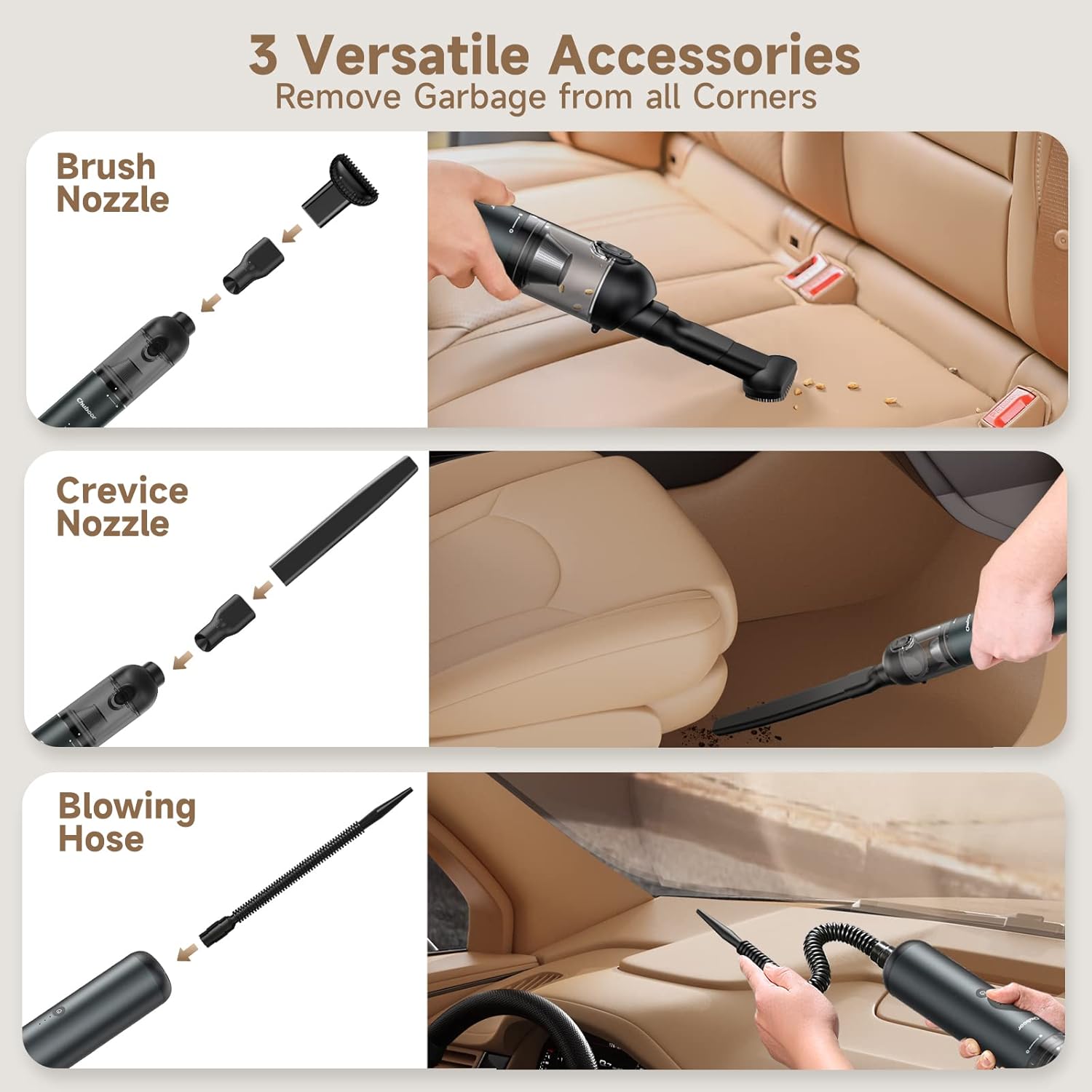
Image: The handheld vacuum shown with its three versatile accessories: brush nozzle, crevice nozzle, and blowing hose, demonstrating their application in different cleaning scenarios.
Operating Instructions
1. Power On/Off and Suction Modes
- Power On: Press the power button once to turn on the vacuum in Standard Mode (10,000Pa suction). The power indicator lights will show the current battery level.
- Strongest Suction Mode: Press the power button a second time to activate Powerful Mode (16,000Pa suction).
- Power Off: Press the power button a third time to turn off the vacuum.
Video: An official product video demonstrating the Chuboor 16000Pa Handheld Vacuum in action, showcasing its powerful suction and ease of use for various cleaning tasks.
2. Cleaning Tips
- For general dust and light debris, use Standard Mode to conserve battery life.
- For stubborn dirt, pet hair, or larger particles, switch to Powerful Mode.
- Use the appropriate attachment for the surface and type of debris.
- Regularly check the dustbin and empty it when full to maintain optimal suction.

Image: A visual representation of the vacuum's high power suction, showing it effectively picking up various types of debris like dust, cat litter, hair, leaves, sand, food residue, and confetti.
Maintenance
Regular maintenance ensures the longevity and performance of your vacuum cleaner.
1. Emptying the Dustbin
- Ensure the vacuum is turned off.
- Slide the button down on the dustbin to release and open it.
- Empty the collected debris into a trash bin.
- Close the dustbin securely until it clicks into place.

Image: A close-up of the vacuum's one-touch empty design, showing how to slide the button to release the dustbin for easy disposal of contents.
2. Cleaning the Filters
The triple filtration system (metal, HEPA, sponge) is washable and reusable.
- Twist the dustbin counter-clockwise to detach it from the main body.
- Carefully remove the metal filter, followed by the HEPA and sponge filters.
- Rinse all filter components under running water until clean. Do not use harsh detergents.
- Allow all filters to air dry completely for at least 24 hours before reassembling. Ensure they are completely dry to prevent damage to the motor.
- Reassemble the filters in reverse order and reattach the dustbin to the vacuum.

Image: The washable filter components, including the metal mesh and pleated HEPA filter, shown being rinsed under water.
Troubleshooting
If you encounter any issues, refer to the following common problems and solutions:
| Problem | Possible Cause | Solution |
|---|---|---|
| Vacuum does not turn on. | Low battery; Power button not pressed correctly. | Charge the vacuum fully. Press and hold the power button for 1 second. |
| Weak suction. | Full dustbin; Clogged filter; Blocked nozzle/hose. | Empty the dustbin. Clean or replace the filters. Check and clear any blockages in the nozzle or hose. |
| Battery not charging. | Faulty charging cable/adapter; Loose connection. | Ensure the USB-C cable is securely connected. Try a different USB power adapter. |
| Unusual noise during operation. | Debris stuck in the fan/motor; Loose parts. | Turn off the vacuum and check for any foreign objects. If the issue persists, contact customer support. |
Specifications
| Feature | Detail |
|---|---|
| Brand | Chuboor |
| Model Number | P03 |
| Suction Power | Max 16,000 Pa |
| Motor Horsepower | 135 Watts |
| Wattage | 120 Watts |
| Battery Runtime | Up to 30 minutes |
| Charging Time | 3-4 hours |
| Dustbin Capacity | 150 Milliliters |
| Filter Type | Foam (Triple Filtration: Metal, HEPA, Sponge) |
| Noise Level | 75 Decibels |
| Item Weight | 1.3 Pounds |
| Power Source | Battery Powered |
| Connectivity Technology | USB-C |
| Special Features | Compact, Lightweight, Portable, Cordless |
Warranty and Support
Chuboor products are designed and manufactured to the highest quality standards. For specific warranty information, please refer to the warranty card included in your product packaging or visit the official Chuboor website. If you have any questions, concerns, or require technical assistance, please contact Chuboor customer support through the retailer where you purchased the product or via the contact information provided on the official Chuboor website.
For more information, visit the Chuboor Store on Amazon.


