
Introduction
The Garmin Forerunner® 255 Music is a GPS running smartwatch designed to provide advanced training insights, music storage, and comprehensive health monitoring. This manual provides essential information for setting up, operating, maintaining, and troubleshooting your device.
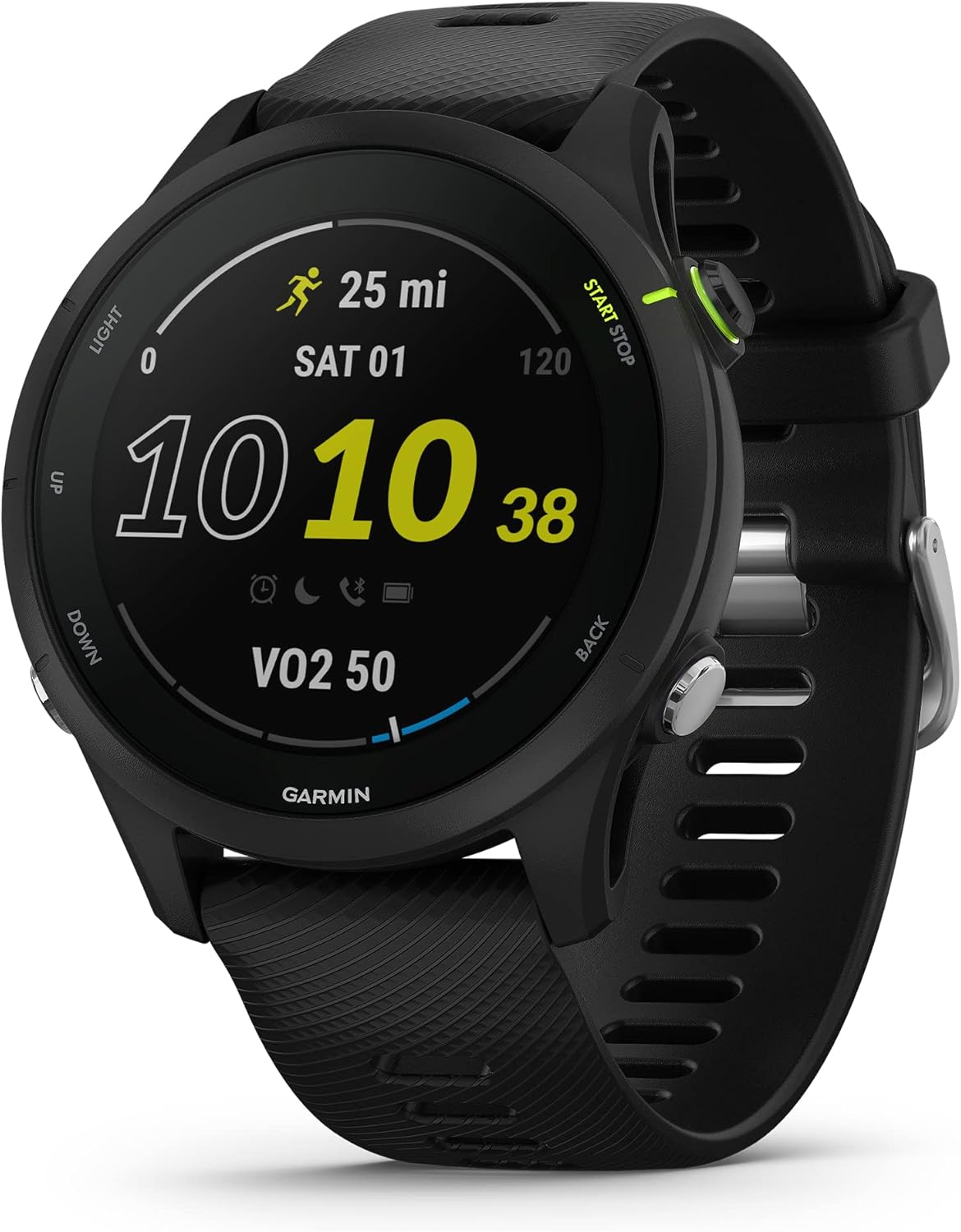
Image: The Garmin Forerunner 255 Music smartwatch in black, showcasing its display with running data and the physical buttons on its side.
Safety Information
WARNING: This product contains chemicals known to the State of California to cause cancer and birth defects or other reproductive harm. For more information, visit www.P65Warnings.ca.gov.
Always consult with a medical professional before beginning any exercise program. The data and information provided by this device are intended to be a close estimation of your activity and metrics tracked but may not be precisely accurate and are not intended for diagnosis or monitoring of any medical condition.
What's in the Box
- Garmin Forerunner 255 Music Smartwatch
- Charging/data Cable
- Documentation (Quick Start Guide, Safety and Product Information)
Setup
Charging the Device
Before first use, fully charge your Forerunner 255 Music. Connect the charging/data cable to the charging port on the back of the watch and plug the USB end into a power source (e.g., computer USB port or USB wall adapter). A full charge provides up to 14 days of battery life in smartwatch mode and up to 30 hours in GPS mode.

Image: The Garmin Forerunner 255 Music smartwatch screen showing battery life and usage statistics.
Initial Power-On and Pairing
- Press and hold the LIGHT button (top left) to power on the device.
- Follow the on-screen prompts to select your language and initial settings.
- Download the Garmin Connect app on your smartphone from your app store.
- Open the Garmin Connect app and follow the instructions to pair your Forerunner 255 Music. This will sync your watch with your phone for data transfer, smart notifications, and more.

Image: A user interacting with the Garmin Connect mobile application on a smartphone, showing various health and fitness metrics.
Operating the Device
Button Functions
- LIGHT: Press to turn on/off backlight. Hold to access controls menu (Garmin Pay, music controls, phone connection, etc.).
- UP: Press to scroll up through widgets and menus. Hold to view menu options for the current screen.
- DOWN: Press to scroll down through widgets and menus. Hold to view music controls.
- START/STOP: Press to select an option or start/stop an activity. Hold to view the activity menu.
- BACK: Press to return to the previous screen. Hold to return to the watch face.
Key Features
Music Storage and Playback
The Forerunner 255 Music allows you to download up to 500 songs, including playlists from Spotify, Amazon Music, or Deezer (subscription may be required). Connect your wireless headphones to the watch for phone-free listening during activities.

Image: The Garmin Forerunner 255 Music smartwatch screen showing the Amazon Music logo, indicating music playback capability.

Image: A close-up of the Garmin Forerunner 255 Music smartwatch on a wrist, showing the Spotify app interface on its display.
Garmin Pay™ Contactless Payments
Make quick, secure payments directly from your wrist with Garmin Pay. Set up your supported credit or debit cards in the Garmin Connect app, then access Garmin Pay from the controls menu on your watch.

Image: The Garmin Forerunner 255 Music smartwatch screen showing a virtual credit card, illustrating the Garmin Pay contactless payment feature.

Image: Two Garmin Forerunner smartwatches, one black and one white, side-by-side, both showing the Garmin Pay contactless payment screen.
Morning Report & HRV Status
Receive a personalized morning report summarizing your sleep, recovery, HRV (Heart Rate Variability) status, and daily workout suggestions as soon as you wake up. HRV status provides insight into your overall wellness and training performance.

Image: The Garmin Forerunner 255 Music smartwatch screen showing a "Good Morning" report with sleep duration, temperature, and a personalized greeting.

Image: A person wearing the Garmin Forerunner 255 Music smartwatch, with the watch face displaying the Morning Report, showing sleep and recovery data.

Image: A close-up of the Garmin Forerunner 255 Music smartwatch on a wrist, showing the Heart Rate Variability (HRV) status screen.
Training Features
- Daily Suggested Workouts: Receive personalized workout recommendations that adapt to your performance and recovery.
- Race Widget: Plan your race-day strategy with performance predictions based on course details, weather, and your current fitness.
- Built-in Sports Apps: Access over 30 activity profiles, including triathlon, cycling, swimming, and open-water swimming.
- Garmin Coach: Get free adaptive training plans for 5K, 10K, and half-marathons.
- Training Status: Evaluates your recent exercise history and performance to indicate if you're undertraining, overdoing it, or training productively.
- Wrist-Based Running Power: When paired with a Running Dynamics Pod or HRM-Pro monitor (sold separately), measure the power you're applying to the road.

Image: The Garmin Forerunner 255 Music smartwatch screen showing a race widget with details for an upcoming marathon, including date and time.

Image: A person wearing the Garmin Forerunner 255 Music smartwatch, with the watch face displaying the Race Widget, showing race details and predictions.

Image: A person on a running track, holding a water bottle, with the Garmin Forerunner 255 Music smartwatch on their wrist displaying a daily suggested workout.

Image: A close-up of the Garmin Forerunner 255 Music smartwatch on a wrist, showing a Garmin Coach training plan with "Speed Repeats" scheduled.

Image: A person with hands on hips, wearing a white Garmin Forerunner 255 Music smartwatch, demonstrating the training status feature.
Health Monitoring
- Wrist-Based Heart Rate: Continuously samples your heart rate, providing alerts for abnormal readings and gauging workout intensity.
- Body Battery™ Energy Monitoring: Tracks your body's energy levels throughout the day, helping you optimize activity and rest times.
- Improved Sleep Monitoring and Sleep Score: Provides a detailed breakdown of your sleep stages, Pulse Ox, respiration, and a sleep score for overall sleep quality.
- Recovery Time: Estimates how long you need to recover before your next high-effort workout based on training load, stress, sleep, and daily activities.
- Women's Health Tracking: Use the Garmin Connect app to track menstrual cycles or pregnancy, log symptoms, and receive exercise/nutrition education.

Image: A person sitting with the Garmin Forerunner 255 Music smartwatch on their wrist, showing the wrist-based heart rate monitor displaying current heart rate.

Image: A person bending down, with the Garmin Forerunner 255 Music smartwatch on their wrist, demonstrating the Body Battery energy monitoring feature.

Image: A white Garmin Forerunner 255 Music smartwatch displaying detailed sleep monitoring data, including sleep duration, score, and quality.

Image: A close-up of the Garmin Forerunner 255 Music smartwatch on a wrist, showing the recovery time screen with a countdown in hours.

Image: A person wearing the Garmin Forerunner 255 Music smartwatch, demonstrating the women's health tracking feature.
Connectivity & Smart Features
- Multi-band GPS with SatIQ™ Technology: Ensures superior positioning accuracy in various environments while optimizing battery life.
- Smart Notifications: Receive emails, texts, and alerts directly on your watch when paired with your smartphone.
- Safety and Tracking Features: If you feel unsafe or if the watch detects an incident, Assistance and incident detection features can send a message with your location to emergency contacts (requires pairing with a compatible smartphone).

Image: A close-up of the Garmin Forerunner 255 Music smartwatch on a wrist, showing the SatIQ technology settings for GPS accuracy.

Image: A person wearing the Garmin Forerunner 255 Music smartwatch, with the watch face displaying a smart notification.

Image: A person tying shoelaces, with the Garmin Forerunner 255 Music smartwatch on their wrist, demonstrating the safety and tracking features.
Maintenance
Cleaning the Device
Regularly clean your watch and band to prevent buildup of sweat, dirt, and other debris. Rinse the watch with fresh water after exposure to sweat or chlorine. For general cleaning, use a soft, damp cloth. Avoid harsh chemicals or abrasive materials that could damage the watch.
Battery Care
- Avoid exposing the watch to extreme temperatures (hot or cold) for extended periods.
- Charge the device regularly, but avoid leaving it fully charged or fully depleted for long durations.
- Use only the provided Garmin charging cable.
Software Updates
Garmin periodically releases software updates to improve performance and add new features. Connect your watch to the Garmin Connect app or Garmin Express on your computer to check for and install available updates.
Troubleshooting
Common Issues and Solutions
- Watch not turning on: Ensure the watch is fully charged. Connect it to the charging cable and a power source for at least 15 minutes.
- GPS not acquiring signal: Ensure you are outdoors with a clear view of the sky. Remain stationary for a few minutes. Syncing with Garmin Connect can also help update satellite data.
- Music not playing/transferring: Verify your music service subscription is active. Ensure your headphones are properly paired. Check available storage on the watch.
- Smart notifications not appearing: Confirm Bluetooth is enabled on both your watch and smartphone. Ensure the Garmin Connect app is running in the background and notifications are enabled in both the app and your phone's settings.
- Watch not syncing with Garmin Connect: Check your phone's Bluetooth connection. Restart both your watch and smartphone. Ensure the Garmin Connect app is up to date.
Resetting the Device
If your device is unresponsive or experiencing persistent issues, you may need to perform a soft reset or a factory reset. Consult the official Garmin support documentation for detailed instructions on performing these resets, as a factory reset will erase all user data.
Specifications
| Feature | Specification |
|---|---|
| Model Number | 010-02641-20 |
| Product Dimensions | 1.8 x 1.8 x 0.5 inches |
| Item Weight | 1.7 ounces |
| Display Size | 1.3 Inches (33.02 mm) diameter |
| Battery Type | Lithium Ion (included) |
| Battery Life (Smartwatch Mode) | Up to 14 days |
| Battery Life (GPS Mode) | Up to 30 hours |
| Memory Storage Capacity | 4 GB |
| Connectivity | Bluetooth, USB |
| GPS | Yes (Multi-band with SatIQ™ Technology) |
| Water Rating | 5 ATM (Swim-proof) |
| Operating System | Proprietary OS |
Warranty and Support
For detailed warranty information, product support, and additional resources, please visit the official Garmin support website or refer to the documentation included with your product.
Official User Manual (PDF): Download Here
Garmin Support: support.garmin.com