
1. Introduction
This manual provides essential information for the safe and efficient operation of your Auna Silver Star Mini Internet Radio. Please read it thoroughly before using the device and retain it for future reference.
2. Safety Information
Observe the following safety guidelines to prevent damage to the device or injury to yourself:
- Ensure the power supply voltage matches the rating label on the device.
- Do not expose the device to rain, moisture, or extreme temperatures.
- Avoid placing the device near heat sources or in direct sunlight.
- Do not open the casing; refer all servicing to qualified personnel.
- Keep the device away from strong magnetic fields.
- Disconnect the power plug during thunderstorms or when not in use for extended periods.
3. Package Contents
Verify that all items are present in the packaging:
- 1 x Auna Silver Star Mini Internet DAB+/FM Radio
- 1 x Remote Control
- 1 x Power Supply Unit
- 1 x User Manual (this document)
4. Product Overview
The Auna Silver Star Mini is a versatile internet radio featuring DAB+, FM, Wi-Fi, Bluetooth, and USB connectivity. It combines powerful audio performance with an elegant design.

Figure 4.1: Front view of the Auna Silver Star Mini Internet Radio, showcasing its speaker, display, and control buttons. The unit features a wooden frame and a black aluminum control surface.
4.1. Key Features
- Connectivity: AUX input, Line output, USB port, Wi-Fi, Bluetooth.
- Audio Output: 8 watts RMS.
- Display: 2.8" (7 cm) HCC (High Contrast and Color) display.
- Tuners: DAB+ and FM tuners.
- Control: App control (Air Music Control), remote control included.
- Standards: UPnP/DLNA support.
- Design: Aluminum control surface with a wooden frame.
- Additional Functions: Alarm function.

Figure 4.2: Close-up of the 2.8-inch HCC display and control buttons, including Standby, Dimmer, Alarm, Sleep, Menu, Fav, and Navigation knob. The display shows icons for Wi-Fi, time, and "Internet Radio" mode.
4.2. Rear Panel Connections
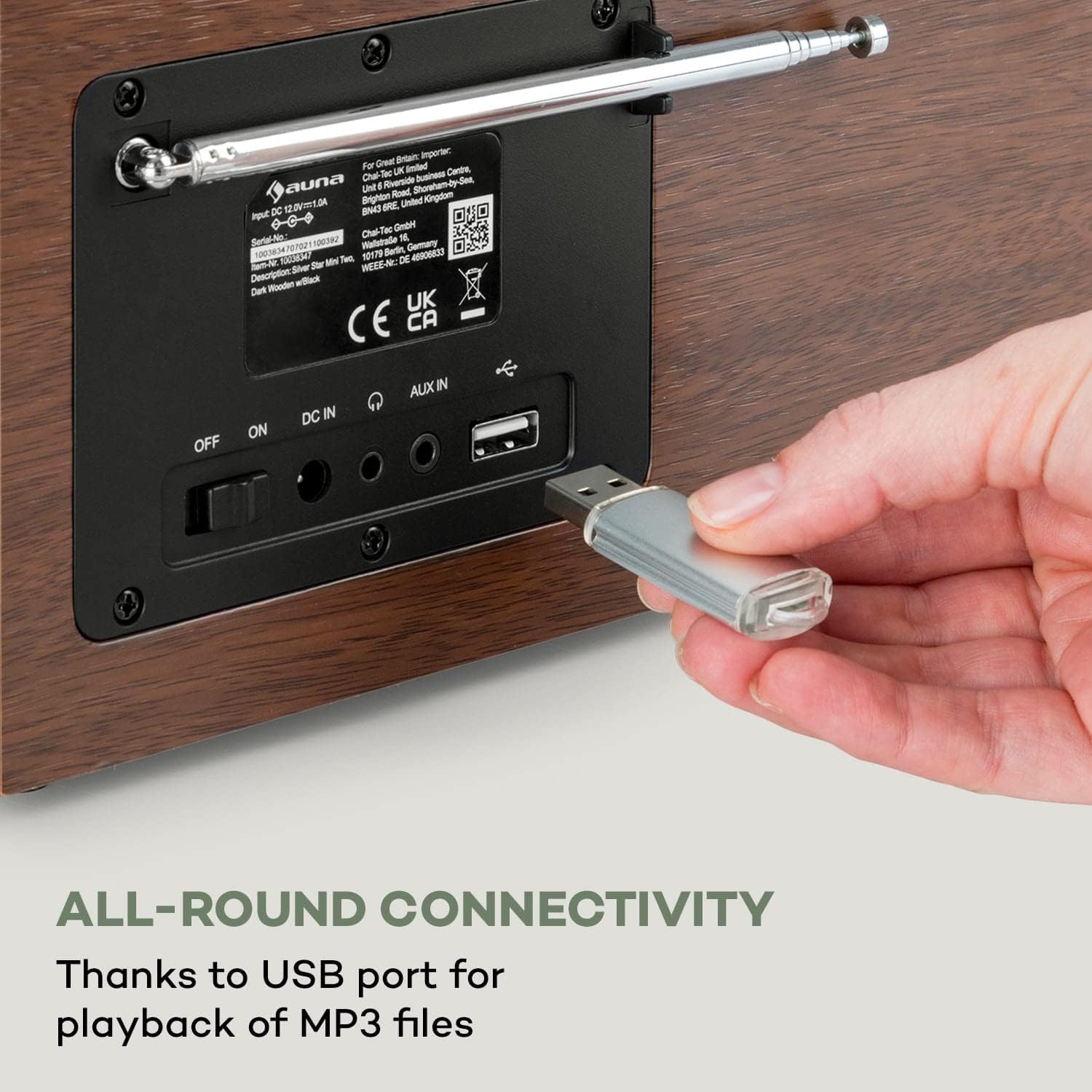
Figure 4.3: The rear panel of the radio, illustrating the power switch (OFF/ON), DC IN port, AUX IN, Line Out, and a USB port for MP3 file playback. An antenna is also visible.
- OFF/ON Switch: Main power switch.
- DC IN: Power adapter connection.
- AUX IN: 3.5mm jack for connecting external audio devices.
- Line Out: 3.5mm jack for connecting to external amplifiers or speakers.
- USB Port: For playing MP3 files from a USB storage device.
- Antenna: Extendable antenna for FM and DAB+ reception.
5. Setup
5.1. Initial Connection
- Connect the power supply unit to the DC IN port on the rear of the radio.
- Plug the power supply unit into a wall outlet (220-240 V~ | 50/60 Hz).
- Switch the main power switch on the rear panel to the "ON" position.
- The radio will power on and display the startup screen.
5.2. Network Configuration (Wi-Fi)
To access internet radio stations and app control, connect the device to your Wi-Fi network:
- On the radio's display, navigate to the "Settings" menu.
- Select "Network" or "Wi-Fi Setup".
- The radio will scan for available Wi-Fi networks. Select your network from the list.
- Enter your Wi-Fi password using the navigation knob and buttons. Confirm your selection.
- Once connected, a Wi-Fi icon will appear on the display.
6. Operating Instructions
6.1. Basic Operation
- Power On/Off: Use the main switch on the rear or the Standby button on the front panel/remote.
- Volume Control: Use the "Vol +" and "Vol -" buttons or the navigation knob on the front, or the volume buttons on the remote control.
- Navigation: Use the navigation knob to scroll through menus and lists. Press the knob to confirm selections.
- Menu Button: Access the main menu.
- Fav Button: Access your favorite stations/presets.
- Dimmer: Adjust display brightness.
- Alarm: Set alarms.
- Sleep: Set a sleep timer.
6.2. Remote Control
The included remote control provides convenient access to all functions.

Figure 6.1: The Auna Silver Star Mini radio displayed alongside its remote control, highlighting the convenience of app and remote operation.
Refer to the remote control diagram in the quick start guide for specific button functions.
7. Connectivity
7.1. Internet Radio (Wi-Fi)
Once connected to Wi-Fi, you can access thousands of internet radio stations worldwide. Navigate to the "Internet Radio" option in the main menu to browse stations by genre, location, or search.
7.2. Bluetooth Functionality
The radio features built-in Bluetooth for wireless audio streaming from compatible devices.
- Select "Bluetooth" mode on the radio.
- Enable Bluetooth on your smartphone, tablet, or laptop.
- Search for "Auna Silver Star Mini" in your device's Bluetooth settings and pair.
- Once paired, you can stream audio wirelessly to the radio.

Figure 7.1: A hand holding a smartphone, illustrating the wireless and practical Bluetooth function for streaming audio from mobile devices.
7.3. USB Playback
Insert a USB storage device containing MP3 files into the USB port on the rear panel. The radio will automatically detect the device and allow you to browse and play your music files.
7.4. AUX Input
Connect external audio sources (e.g., MP3 players, CD players) to the AUX IN port using a 3.5mm audio cable. Select "AUX" mode on the radio to play audio from the connected device.
8. DAB+ and FM Radio
8.1. DAB+ Radio
DAB+ (Digital Audio Broadcasting Plus) offers digital radio with improved sound quality and additional information. Extend the antenna for optimal reception.
- Select "DAB+" mode from the main menu.
- The radio will automatically scan for available DAB+ stations.
- Use the navigation knob to select a station from the list.
8.2. FM Radio
For traditional FM radio reception, extend the antenna fully.
- Select "FM" mode from the main menu.
- Use the navigation controls to tune to a desired frequency or initiate an auto-scan for stations.
- Save your favorite FM stations as presets using the "Fav" button.
9. App Control (Air Music Control)
The Auna Silver Star Mini can be controlled via the "Air Music Control" app, available for smartphones and tablets. This app allows for comprehensive control and music streaming via UPnP/DLNA standards.
- Ensure your radio is connected to your Wi-Fi network.
- Download the "Air Music Control" app from your device's app store (e.g., Apple App Store, Google Play Store).
- Launch the app and follow the on-screen instructions to connect to your radio.
- Once connected, you can control playback, browse stations, and manage settings from your mobile device.

Figure 9.1: A user interacting with the Air Music Control app on a smartphone, demonstrating the maximum control options available through the application.
10. Maintenance
10.1. Cleaning
- Always disconnect the power before cleaning.
- Wipe the exterior surfaces with a soft, dry cloth.
- Do not use abrasive cleaners, waxes, or solvents.
10.2. Storage
If storing the device for an extended period, disconnect it from power and store it in a cool, dry place, away from direct sunlight and extreme temperatures.
11. Troubleshooting
| Problem | Possible Cause | Solution |
|---|---|---|
| No power | Power cable not connected; main switch off. | Check power cable connection; ensure main switch is ON. |
| No sound | Volume too low; incorrect source selected. | Increase volume; select the correct input source (e.g., Internet Radio, DAB+, FM, Bluetooth, USB, AUX). |
| Cannot connect to Wi-Fi | Incorrect password; network out of range; router issue. | Verify password; move radio closer to router; restart router. |
| Poor DAB+/FM reception | Antenna not extended; weak signal. | Fully extend the antenna; reposition the radio for better signal. |
| Bluetooth pairing fails | Device not in pairing mode; radio not discoverable. | Ensure both devices are in pairing mode; check device list on radio. |
12. Specifications
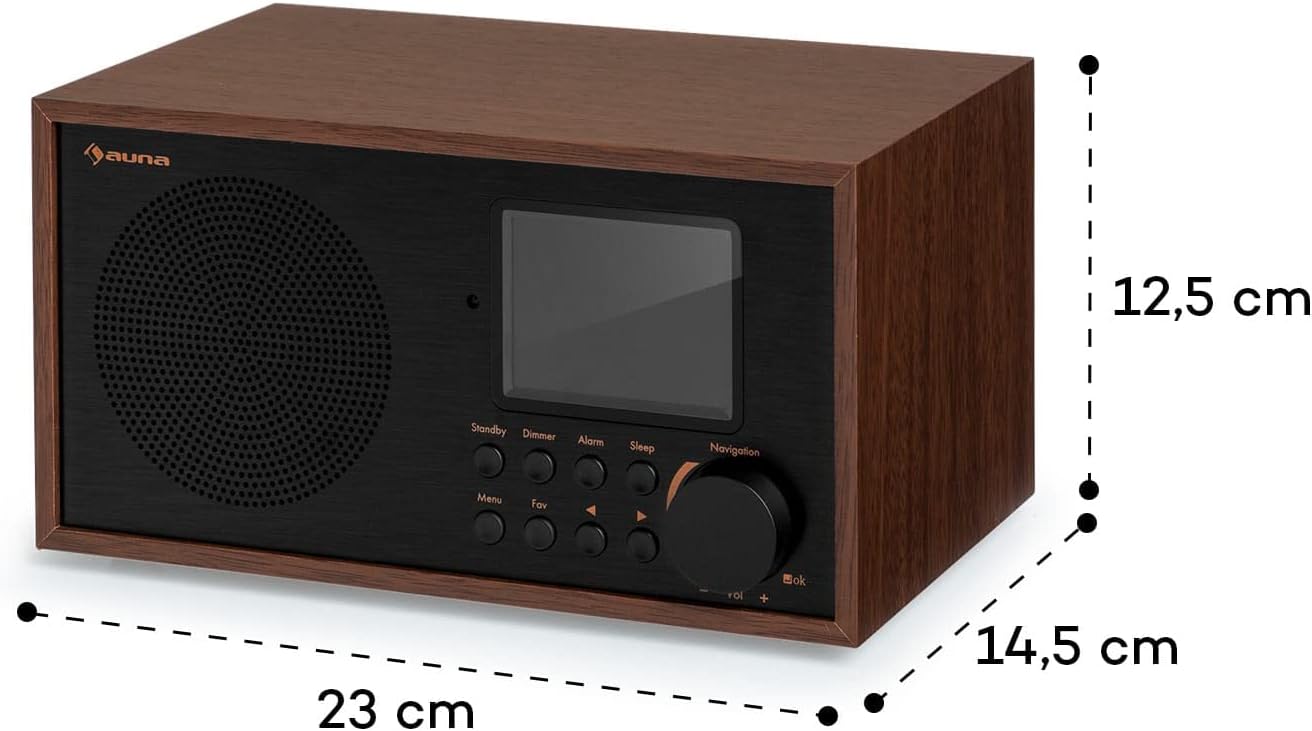
Figure 12.1: Diagram illustrating the dimensions of the Auna Silver Star Mini Internet Radio: 23 cm (width), 12.5 cm (height), and 14.5 cm (depth).
| Feature | Detail |
|---|---|
| Brand | Auna |
| Model Number | 10038350 |
| Part Number | WD778B |
| Dimensions (WxHxD) | 23 x 12.5 x 15.5 cm |
| Weight | 1.6 kg |
| Power Output | 8 watts RMS (Max 10 Watt) |
| Power Supply | 220-240 V~ | 50/60 Hz |
| Display | 2.8" (7 cm) HCC (High Contrast and Color) |
| Tuner Technology | Digital (DAB+, FM) |
| Radio Bands Supported | FM (87.5 MHz), DAB+ |
| Connectivity | Wi-Fi, Bluetooth, USB, AUX-in, Line-out |
| Special Features | Built-in clock, Alarm function, App control (Air Music Control), UPnP/DLNA standard |
| Material | Aluminum control surface with wooden frame |
13. Warranty and Support
Auna products are designed and manufactured to the highest quality standards. For warranty information and technical support, please refer to the warranty card included with your product or visit the official Auna website. Keep your proof of purchase for any warranty claims.

