
Amazon Basics AM6117-EU
Amazon Basics Air Purifier User Manual
Model: AM6117-EU
Introduction
Thank you for choosing the Amazon Basics Air Purifier. This device is designed to improve your indoor air quality by effectively filtering airborne particles. Featuring a 3-stage filtration system, it captures pet hairs, dander, smoke, odors, and larger dust particles, as well as 99.97% of 0.3 micron particles. This manual provides essential information for the safe and efficient operation, maintenance, and troubleshooting of your air purifier.
Important Safety Instructions
- Read all instructions before operating the appliance.
- Do not operate any fan with a damaged cord or plug. Discard fan or return to an authorized service facility for examination and/or repair.
- Do not run cord under carpeting. Do not cover cord with throw rugs, runners, or similar coverings. Do not route cord under furniture or appliances. Arrange cord away from traffic area and where it will not be tripped over.
- Always unplug the air purifier before moving it, opening the grille, changing filters, cleaning, or whenever it is not in use.
- Do not use outdoors.
- This appliance is intended for household use only.
- Do not use the air purifier in wet or damp environments, such as bathrooms.
- Keep the air purifier away from heat sources and direct sunlight.
- Ensure the air inlets and outlets are not blocked.
- Do not insert fingers or foreign objects into any openings.
Product Overview
Familiarize yourself with the components of your Amazon Basics Air Purifier.

Figure 1: Front view of the Amazon Basics Air Purifier, showcasing its sleek white design and perforated lower section for air intake.
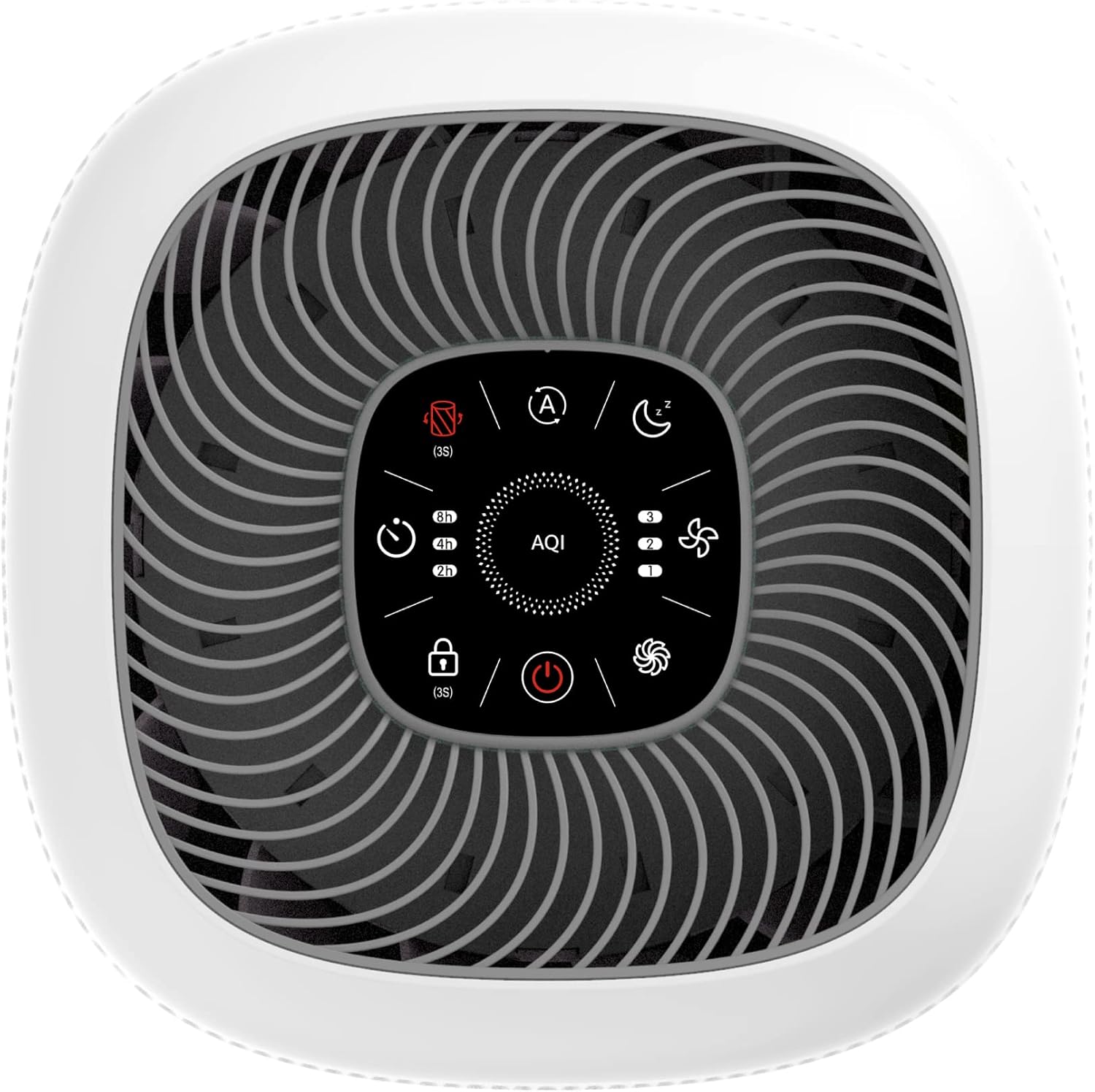
Figure 2: Top view of the air purifier, highlighting the intuitive touch control panel with various function icons and the central AQI display.

Figure 3: Diagram illustrating the 3-stage True HEPA Filtration System, composed of a pre-filter, True HEPA filter, and activated carbon filter, designed to capture 99.97% of airborne contaminants as small as 0.3 microns.

Figure 4: Dimensions of the air purifier, measuring approximately 10.8 inches (27.4 cm) in width and depth, and 20.5 inches (52.1 cm) in height.
Setup
- Unpack the Air Purifier: Carefully remove the air purifier and all packaging materials from the box.
- Remove Filter Packaging: Before first use, open the bottom cover of the air purifier and remove the plastic packaging from the filter. Reinsert the filter and securely close the bottom cover.
- Placement: Place the air purifier on a firm, level surface. Ensure there is at least 15 cm (6 inches) of space around all sides of the unit for optimal air circulation. Avoid placing it directly against walls or furniture.
- Connect to Power: Plug the power cord into a standard electrical outlet.
Operating Instructions
The air purifier features a touch control panel for easy operation.

Figure 5: Detailed view of the touch control panel, showing icons for Power, Child Lock, Timer, Filter Change Reminder, Auto Mode, Sleep Mode, Fan Speeds, and Turbo Mode, along with the AQI display.
- Power Button (⏻): Touch to turn the unit ON or OFF.
- Auto Mode (A): Press to activate Auto Mode. The intelligent air quality sensor will detect real-time air quality and automatically adjust the fan speed (AQI display changes color: Blue for Good, Orange for Moderate, Red for Poor).
- Sleep Mode (☾): Touch to enter Sleep Mode. The fan operates at its lowest speed (approx. 30 dB) and all indicator lights dim for undisturbed sleep.
- Fan Speed (⌁): Cycle through 3 fan speeds (1, 2, 3) to manually adjust purification intensity.
- Turbo Mode (⌁ with swirl): Press and hold the Fan Speed button for 3 seconds to activate Turbo Mode for maximum purification.
- Timer (◷): Set the operating time for 2, 4, or 8 hours. The unit will automatically turn off after the selected duration.
- Child Lock (🔒): Press and hold for 3 seconds to activate or deactivate the Child Lock. This prevents accidental changes to settings.
- Filter Change Reminder (⌽): This indicator light will illuminate when it's time to replace the filter. After replacing the filter, press and hold this button for 3 seconds to reset the filter life counter.
Maintenance
Regular maintenance ensures optimal performance and extends the life of your air purifier.
- Filter Replacement:
- The filter should be changed every 6-8 months, depending on usage and air quality.
- When the filter change reminder light illuminates, it's time to replace the filter.
- To purchase replacement filters, search for ASIN B09W9LXLF6.
- To replace: Unplug the unit, open the bottom cover, remove the old filter, insert the new filter (ensure correct orientation), close the cover, and then plug in the unit. Press and hold the Filter Change Reminder button for 3 seconds to reset.
- Cleaning the Exterior:
- Always unplug the air purifier before cleaning.
- Wipe the exterior surfaces with a soft, dry cloth.
- Do not use abrasive cleaners, waxes, or solvents.
- Cleaning the Air Quality Sensor:
- Periodically clean the air quality sensor located on the side of the unit (refer to Figure 6).
- Use a dry cotton swab to gently clean the sensor lens and dust inlet.

Figure 6: Close-up view showing the Amazon Basics logo and the air quality sensor vent on the side of the unit.
Troubleshooting
| Problem | Possible Cause | Solution |
|---|---|---|
| Unit does not turn on. | Not plugged in; power outlet malfunction; power button not pressed. | Ensure the power cord is securely plugged into a working outlet. Press the power button firmly. |
| Weak airflow or no air purification. | Filter is dirty or clogged; filter packaging not removed; air inlets/outlets blocked. | Check and replace the filter if necessary. Ensure all filter packaging is removed. Clear any obstructions from air inlets and outlets. |
| Unusual noise. | Unit not on a level surface; foreign object inside; filter not installed correctly. | Place the unit on a flat, stable surface. Unplug and check for any foreign objects. Reinstall the filter correctly. |
| Filter Change Reminder light remains on after filter replacement. | Filter life counter not reset. | After replacing the filter, press and hold the Filter Change Reminder button for 3 seconds to reset. |
| Air quality indicator always shows 'Poor'. | Sensor is dirty or blocked; high levels of pollutants in the environment. | Clean the air quality sensor. Ensure the room is adequately ventilated or allow the purifier more time to clean the air. |
Specifications
| Feature | Detail |
|---|---|
| Brand | Amazon Basics |
| Model Number | AM6117-EU |
| Color | White |
| Coverage Area | Up to 48 m² (CADR 400 m³/h) |
| Filtration System | 3-stage (Pre-filter, True HEPA, Activated Carbon) |
| Particle Retention Size | 99.97% of 0.3 Micrometer particles |
| Noise Level | As low as 28 dB (Sleep Mode) |
| Controller Type | Button Control (Touch Panel) |
| Product Dimensions | 10.79 x 10.79 x 21.5 inches (27.4 x 27.4 x 54.6 cm) |
| Item Weight | 3.1 pounds (1.4 kg) |
| UPC | 840095886871 |
| Date First Available | October 24, 2022 |
Warranty and Support
This Amazon Basics product is covered by a limited warranty. Please refer to the warranty information provided at the time of purchase or visit the Amazon Basics official website for details regarding warranty terms and conditions.
For technical support, troubleshooting assistance, or to inquire about replacement parts, please contact Amazon customer service through your purchase platform or the Amazon Basics support page. Have your product model number (AM6117-EU) and purchase details ready when contacting support.
Related documentsAM6117-EU


Ask a question about this manual
Ask about setup, troubleshooting, compatibility, parts, safety, or missing instructions. Manuals+ will review the question and use this page’s manual context to help answer it.