
XTAR XTAR VC2SL
XTAR VC2SL Battery Charger User Manual
Model: XTAR VC2SL | Brand: XTAR
1. Introduction
The XTAR VC2SL is a versatile and intelligent two-slot battery charger designed for a wide range of rechargeable batteries, including Li-ion and Ni-MH/Ni-Cd types. It features an intuitive LCD display that provides real-time charging information, a USB output function for charging external devices, and advanced safety protections. This manual provides detailed instructions for safe and efficient operation of your VC2SL charger.
2. Safety Information
- Only charge compatible battery types as listed in the specifications. Charging incompatible batteries may cause damage or injury.
- Do not attempt to charge non-rechargeable batteries.
- Ensure correct battery polarity when inserting batteries into the charger. Reverse polarity can damage the charger and battery.
- Do not leave the charger unattended while in use, especially during the initial charging phase.
- Keep the charger away from water, moisture, and high temperatures.
- Do not disassemble or modify the charger. This will void the warranty and may pose a safety risk.
- Keep out of reach of children.
- If the charger emits smoke, unusual odors, or excessive heat, immediately disconnect it from the power source.
3. Package Contents
- XTAR VC2SL Battery Charger
- USB Type-C Cable
- User Manual

Image: Contents of the XTAR VC2SL package, including the charger, USB cable, and user manual.
4. Product Overview
The XTAR VC2SL charger features two independent charging slots, an intelligent LCD display, and both Type-C input and USB-A output ports.

Image: Front view of the XTAR VC2SL charger, showing the two battery slots, the LCD display, and the included USB-C cable.
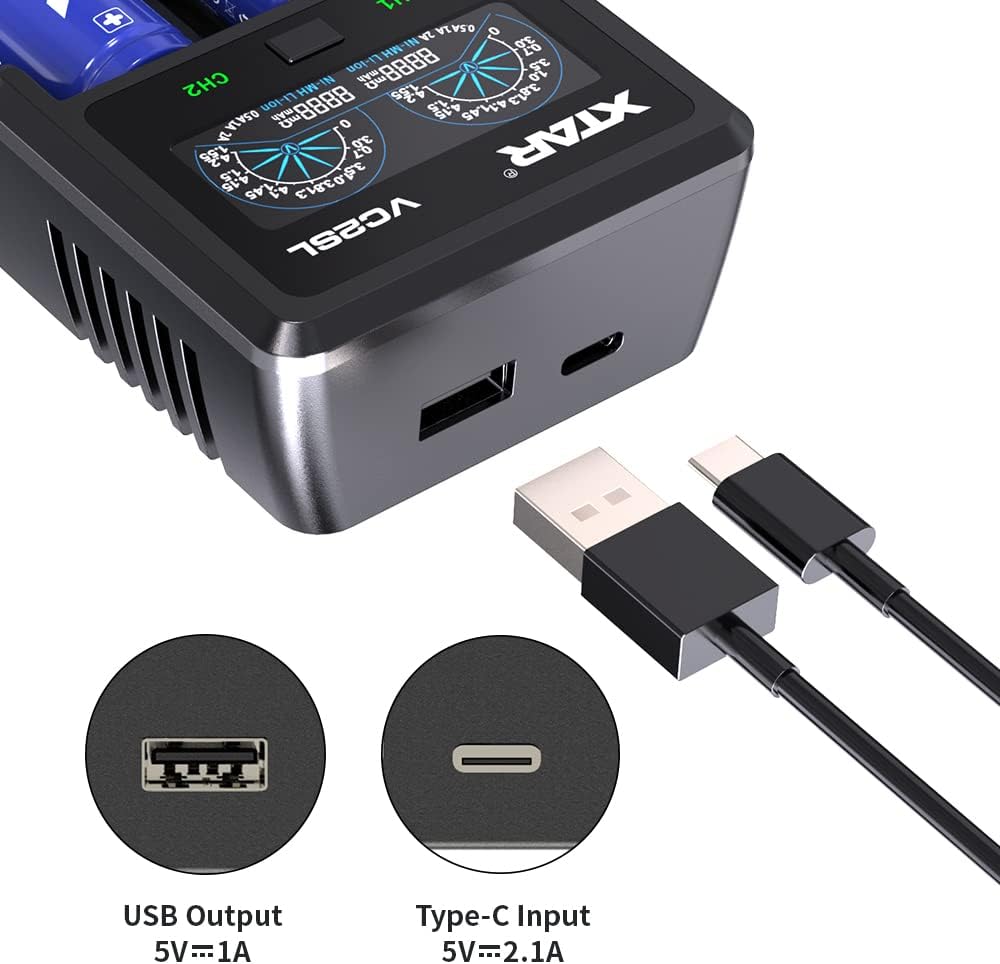
Image: A close-up view of the XTAR VC2SL charger's side, highlighting the USB-A output port and the USB Type-C input port.

Image: Detailed view of the XTAR VC2SL's smart LCD display, indicating battery voltage, charged capacity, charging current, and battery type for each channel, along with red and green LED indicators.
5. Setup
- Connect the provided USB Type-C cable to the charger's Type-C input port.
- Connect the other end of the USB cable to a compatible USB power adapter (e.g., 5V/2.1A wall adapter, computer USB port, power bank).
- The LCD display will light up, indicating the charger is ready for use.
6. Operating Instructions
6.1 Inserting Batteries
Carefully insert one or two compatible rechargeable batteries into the charging slots, ensuring the correct polarity (+ and - ends) matches the indicators on the charger. The charger will automatically detect the battery type and begin charging.

Image: The XTAR VC2SL charger demonstrating compatibility with various battery sizes, including 3.6V/3.7V Li-ion (10440 to 26650) and 1.2V Ni-MH/Ni-Cd (AAAA, AAA, AA, A, SC, C) batteries.
6.2 Understanding the LCD Display
The intelligent LCD display provides real-time information for each charging channel. You can switch between different display modes by pressing the button located between the two charging slots.
- CAP (Charged Capacity): Displays the accumulated capacity charged into the battery in mAh.
- CCR (Real-time Charging Current): Shows the current charging rate in mA.
- IR (Internal Resistance): Indicates the internal resistance of the battery in mΩ.
- Voltage: Displays the current voltage of the battery.
- Battery Type: Indicates whether the detected battery is Li-ion or Ni-MH/Ni-Cd.

Image: The XTAR VC2SL's LCD display cycling through Charged Capacity (CAP), Real-time Charging Current (CCR), and Internal Resistance (IR) modes, demonstrating the information available to the user.
6.3 Charging Process
The charger automatically selects the optimal charging current for your batteries, with a maximum of 2A for a single slot. The display will show the charging progress. Once charging is complete, the display will indicate "FULL" and the LED will turn green.

Image: Visual representation of the XTAR VC2SL's high-speed charging capability, showing estimated charging times for 3000mAh (1.5 hours), 1100mAh (0.7 hours), and 3600mAh (2 hours) batteries.
6.4 USB Output Function (Power Bank)
The VC2SL can function as a power bank. Insert a charged Li-ion battery into slot 1, then connect your external device (e.g., smartphone) to the USB-A output port using a USB cable. The charger will provide 5V/1A output to charge your device. This function includes Power-Path Management, allowing simultaneous charging of the internal battery and the external device.
Video: Demonstration of the XTAR VC2SL charger's USB output function, showing it charging a smartphone while a battery is inserted.
6.5 0V Activation Function
The VC2SL features a 0V activation function that can revive over-discharged Li-ion batteries. If an over-discharged battery is inserted, the charger will attempt to activate it before beginning the normal charging cycle.
6.6 Reverse Polarity Protection
The charger is equipped with reverse polarity protection. If a battery is inserted incorrectly, the screen will display "Err" to alert you, preventing damage to both the charger and the battery.
7. Maintenance
- Clean the charger and charging slots regularly with a soft, dry cloth. Do not use abrasive cleaners or solvents.
- Store the charger in a cool, dry place away from direct sunlight and extreme temperatures.
- When not in use for extended periods, disconnect the charger from the power source.
8. Troubleshooting
| Problem | Possible Cause | Solution |
|---|---|---|
| Charger display is off. | No power connection or faulty cable. | Ensure the USB Type-C cable is securely connected to both the charger and the power source. Try a different USB port or power adapter. |
| Display shows "Err" after inserting battery. | Incorrect battery polarity or incompatible battery. | Re-insert the battery ensuring correct polarity. Verify the battery type is compatible with the charger. |
| Battery not charging or charging slowly. | Poor contact, damaged battery, or insufficient power input. | Ensure batteries are properly seated. Check for battery damage. Use a power adapter with sufficient output (e.g., 5V/2.1A). |
| Charger feels hot during operation. | Normal operation, or poor ventilation. | Some heat is normal during charging. Ensure the charger is placed in a well-ventilated area and not covered. If excessively hot, disconnect immediately. |
9. Specifications
- Model: XTAR VC2SL
- Input: 5V 2.1A (Type-C)
- Output (Charging): Max 2A per slot
- Output (USB Power Bank): 5V 1A (USB-A)
- Compatible Batteries:
- 3.6V/3.7V Li-ion/IMR/INR/ICR: 10440, 14500, 14650, 16340, 17500, 17670, 18350, 18490, 18500, 18650, 18700, 20700, 21700, 22650, 25500, 26650 (Note: Can charge protected 20700/21700 batteries)
- 1.2V Ni-MH/Ni-Cd: AAAA, AAA, AA, A, SC, C
- Display: Intelligent LCD
- Dimensions: 6.26 x 4.84 x 1.57 inches
- Weight: 7 ounces (0.2 Kilograms)
- Color: Black
10. Warranty and Support
XTAR products are manufactured to high-quality standards. For warranty information, technical support, or customer service inquiries, please refer to the contact information provided on the XTAR official website or contact your retailer.
Please retain your purchase receipt as proof of purchase for warranty claims.
Related documentsXTAR VC2SL


Ask a question about this manual
Ask about setup, troubleshooting, compatibility, parts, safety, or missing instructions. Manuals+ will review the question and use this page’s manual context to help answer it.