
Introduction
The Wouxun KG-905G Plus is a professional-grade GMRS two-way radio designed for reliable communication. This manual provides essential information for setting up, operating, and maintaining your radio, ensuring optimal performance and longevity. It features Bluetooth audio, USB-C charging, and a rugged IP66 build, making it suitable for various environments and activities.
Package Contents
Upon unpacking, please verify that all items listed below are present and in good condition:
- Wouxun KG-905G Plus Radio
- 2600 mAh Li-Ion Battery with USB-C Charging Port
- Removable Antenna
- Belt Clip
- Wrist Strap
- Desktop Charger
- AC Cord
- Owner's Manual (this document)

Image: Contents of the Wouxun KG-905G Plus package, including the radio, battery, antenna, desktop charger, AC cord, belt clip, wrist strap, and user manual.
Product Overview
Familiarize yourself with the various components and controls of your KG-905G Plus radio:
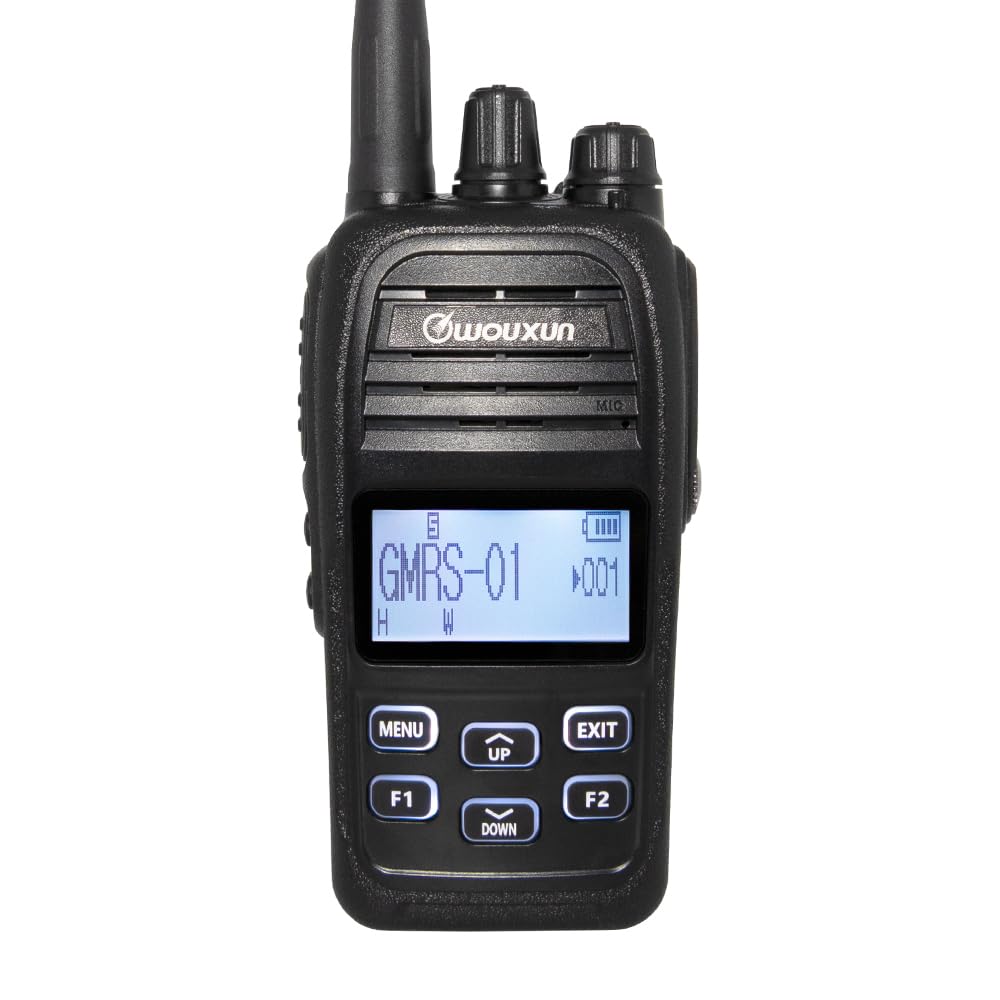
Image: Front view diagram of the Wouxun KG-905G Plus radio, highlighting and labeling its key components and controls for easy identification.
- Antenna: For transmitting and receiving radio signals.
- Channel Knob: Rotates to select desired GMRS channels.
- Power/Volume Knob: Turns the radio on/off and adjusts speaker volume.
- RX/TX LED (Green/Red): Indicates receiving (green) or transmitting (red) status.
- Earphone Jack: Connects compatible audio accessories.
- Transmit PTT Key: Press and hold to transmit, release to receive.
- Speaker: Outputs received audio.
- Microphone: Captures your voice for transmission.
- S1 Key (Short Press/Long Press): Programmable function key.
- S2 Key (Short Press/Long Press): Programmable function key.
- Display: Shows channel number, battery status, and other radio information.
- Menu/Enter: Accesses the radio's menu and confirms selections.
- Up/Down Keys: Navigates through menu options and adjusts settings.
- Exit/Cancel: Exits menu or cancels current operation.
- F1 Key (Short Press/Long Press): Programmable function key.
- F2 Key (Short Press/Long Press): Programmable function key.
Setup
1. Battery Installation and Charging
- Align the battery pack with the grooves on the back of the radio.
- Slide the battery upwards until it clicks into place.
- To charge, connect the AC cord to the desktop charger and plug it into a power outlet. Place the radio (with battery) into the desktop charger. The charging indicator will illuminate.
- Alternatively, the 2600 mAh Li-Ion battery features a built-in USB-C port. Connect a standard USB-C cable (not included) to the battery and a USB power source for direct charging.
- Ensure the battery is fully charged before first use.
2. Antenna Attachment
- Screw the antenna clockwise onto the connector at the top of the radio until it is finger-tight. Do not overtighten.
3. Belt Clip and Wrist Strap Attachment
- Attach the belt clip to the designated area on the back of the radio using the provided screws.
- Thread the wrist strap through the loop on the side or top of the radio.
Operating Instructions
1. Power On/Off and Volume Adjustment
- To power on, rotate the Power/Volume knob clockwise until you hear a click.
- To power off, rotate the Power/Volume knob counter-clockwise until you hear a click.
- Adjust the volume by rotating the Power/Volume knob while the radio is on.
2. Channel Selection
- Rotate the Channel Knob at the top of the radio to select one of the 22 GMRS simplex channels or 8 GMRS repeater channels.
- The selected channel number will be displayed on the LCD.
3. Transmitting and Receiving
- To transmit, press and hold the Transmit PTT Key on the side of the radio. Speak clearly into the microphone. The RX/TX LED will glow red.
- Release the PTT Key to stop transmitting and return to receive mode. The RX/TX LED will glow green when receiving a signal.

Image: Side view of the Wouxun KG-905G Plus radio, illustrating the location of the Push-To-Talk (PTT) key and the two programmable side keys (S1 and S2).
4. Menu Navigation and Programmable Keys
- Press the MENU key to enter the radio's menu.
- Use the UP and DOWN keys to navigate through menu options.
- Press MENU again to confirm a selection or enter a sub-menu.
- Press the EXIT key to return to the previous menu or exit the menu entirely.
- The S1, S2, F1, and F2 keys are programmable. Refer to the advanced settings section (or PC programming software) for assigning specific functions to short and long presses of these keys.
5. Bluetooth Audio
- The KG-905G Plus supports Bluetooth audio for hands-free operation.
- To pair with a compatible Bluetooth headset, access the Bluetooth menu option (refer to your radio's on-screen menu for exact steps).
- Follow the pairing instructions provided with your Bluetooth headset.
6. CTCSS/DCS Tones
- To reduce interference and communicate with specific groups, you can set CTCSS (Continuous Tone-Coded Squelch System) or DCS (Digital Coded Squelch) tones.
- Access the CTCSS/DCS settings through the radio's menu. You can set standard and non-standard tones, split tones, and perform tone scans to match existing group settings.
7. Display Customization
- The professional LCD allows for user-defined channel names and 7 selectable backlight colors.
- You can set different backlight colors for transmit, receive, and standby modes for quick visual identification. Adjust these settings in the radio's menu.

Image: A collection of Wouxun KG-905G Plus radios, each demonstrating a different customizable backlight color on its display, including blue, red, purple, green, light blue, yellow, and white.
8. Additional Features
The KG-905G Plus includes several advanced features:
- VOX: Voice-activated transmission for hands-free communication.
- Channel Scan: Scans through channels to find active transmissions.
- Priority Scan: Monitors a priority channel while scanning others.
- Timeout Timer (TOT): Limits transmission duration to prevent accidental long transmissions.
- Selectable Power: Adjust transmit power (high/low) to conserve battery or extend range.
- Wide/Narrow Bandwidth: Selects appropriate bandwidth for communication.
- Voltage Meter: Displays current battery voltage.
- English Voice Prompts: Provides audible feedback for operations.
- FM Radio: Built-in FM broadcast receiver.
- Stopwatch: Integrated timing function.
- PC Programmable: Customize radio settings and channels using optional PC software and cable.
Maintenance
Cleaning
- Wipe the radio's surface with a soft, damp cloth. Do not use harsh chemicals or abrasive cleaners.
- Ensure the earphone jack and USB-C port covers are securely closed to maintain IP66 water resistance.
Battery Care
- Avoid overcharging or completely discharging the Li-Ion battery for extended periods.
- Store the battery in a cool, dry place when not in use.
Water Resistance (IP66)
The KG-905G Plus is rated IP66, meaning it is dust-tight and protected against powerful water jets. While it can withstand rain and splashes, it is not designed for submersion. Always ensure all port covers are sealed to maintain water resistance.
Troubleshooting
- No Power: Ensure the battery is properly installed and charged. Check the Power/Volume knob is turned on.
- Cannot Transmit: Verify the PTT key is fully pressed. Check if the channel is busy or if a timeout timer has been activated. Ensure the antenna is securely attached.
- Cannot Receive: Adjust the volume. Check if the squelch level is set too high. Ensure you are on the correct channel and CTCSS/DCS settings match the transmitting party.
- Poor Audio Quality: Check antenna connection. Ensure you are within range of the other radio or repeater. Adjust volume.
- Bluetooth Pairing Issues: Ensure the radio's Bluetooth is enabled and in pairing mode. Check that the headset is also in pairing mode and within range.
Specifications
| Feature | Specification |
|---|---|
| Brand | Wouxun |
| Model Number | KG-905G |
| Color | Black |
| Number of Channels | 16 (Pre-programmed GMRS channels, up to 400 custom channels via PC programming) |
| Frequency Range | 462 MHz - 467 MHz (GMRS) |
| Talking Range Maximum | 5 Miles (Varies based on terrain and conditions) |
| Water Resistance Level | IP66 (Dust-tight, protected against powerful water jets) |
| Compatible Devices | PC (for programming), standard power sources, audio accessories |
| Connectivity Protocol | GMRS, Bluetooth |
| Tuner Type | UHF |
| Battery | 2600 mAh Li-Ion with USB-C charging |
| Manufacturer | QUANZHOU Wouxun Electronics Co., Ltd |
Warranty Information
The Wouxun KG-905G Plus radio comes with a 1-year Wouxun manufacturer warranty. This warranty covers defects in materials and workmanship under normal use. Please retain your proof of purchase for warranty claims. For specific terms and conditions, refer to the official Wouxun warranty policy or contact customer support.
Support
For technical assistance, troubleshooting beyond this manual, or warranty inquiries, please contact Wouxun customer support. Contact information can typically be found on the official Wouxun website or on the packaging of your product.


