
1. Introduction
The XTAR SP100 Portable 100W Solar Panel is designed to convert solar energy into electricity, providing a reliable power source for various portable power stations and electronic devices. Its compact, foldable design and high-efficiency monocrystalline cells make it suitable for outdoor activities and off-grid power needs.
2. Product Features
- High Conversion Efficiency: Utilizes premium monocrystalline solar cells with up to 23% conversion efficiency.
- Durable Construction: Features a 7-layer build from surface to back, including ETFE-laminated case for extended lifespan and IP65 waterproof rating (resistant to rain and splashing water, not submersion).
- Versatile Compatibility: Equipped with a default 8mm male connector for power stations, a built-in 9.8 ft power cord, and EU4S DC Multi-ports supporting PD3.0 output up to 45W.
- Adjustable Kickstands: Includes two kickstands for optimal angling towards the sun, maximizing energy capture.
- Portable Design: Foldable and lightweight for easy transport and setup.

Figure 1: Detailed diagram showcasing the advanced seven-layer construction of the XTAR SP100's monocrystalline solar cells, designed for high conversion efficiency and durability.
Video 1: Official product video demonstrating the features, setup, and usage of the XTAR SP100 Solar Panel, including its portability and compatibility with various power stations.
3. Package Contents
The XTAR SP100 package includes the following items:
- XTAR SP100 Solar Panel (2 units for 2-Pack)
- EU4S Charger
- 8mm Splitter
- User Manual
4. Setup
- Unfold the Solar Panel: Carefully unfold the XTAR SP100 solar panel on a flat surface in direct sunlight.
- Position for Optimal Sunlight: Extend the integrated kickstands on the back of the panel. Adjust the angle of the panel to ensure it is perpendicular to the sun's rays for maximum efficiency.
- Connect to Power Station: Locate the built-in 9.8 ft power cord. Connect the 8mm male connector to your compatible power station. If using multiple panels, connect them using the provided 8mm splitter.
- Connect Devices (Optional): For direct device charging, use the EU4S DC Multi-ports (USB-A, USB-C PD3.0) to connect your mobile phones, tablets, or laptops.

Figure 2: XTAR SP100 solar panels deployed in an outdoor setting, highlighting their suitability for various recreational activities such as RV travel, camping, and sailing.

Figure 3: Two XTAR SP100 solar panels shown connected to a power station via an 8mm male connector and a splitter, demonstrating how multiple panels can be linked for increased power input.
5. Operating Instructions
Once the solar panel is set up and connected, it will automatically begin generating power when exposed to sufficient sunlight. Ensure the panel is not shaded by trees, buildings, or other obstructions to maximize power output.
- Monitoring Charge: Most compatible power stations will display the incoming wattage. Monitor this to ensure optimal solar input.
- Device Charging: Use the EU4S charger for direct charging of USB-compatible devices. The PD3.0 port offers fast charging for compatible devices.
- Parallel Connection: For higher power demands, connect two XTAR SP100 panels in parallel using the provided splitter to double the power output to your power station.

Figure 4: This image illustrates the XTAR SP100 solar panel's built-in 9.8 ft power cord and its compatibility with multiple devices and power stations through different connectors.
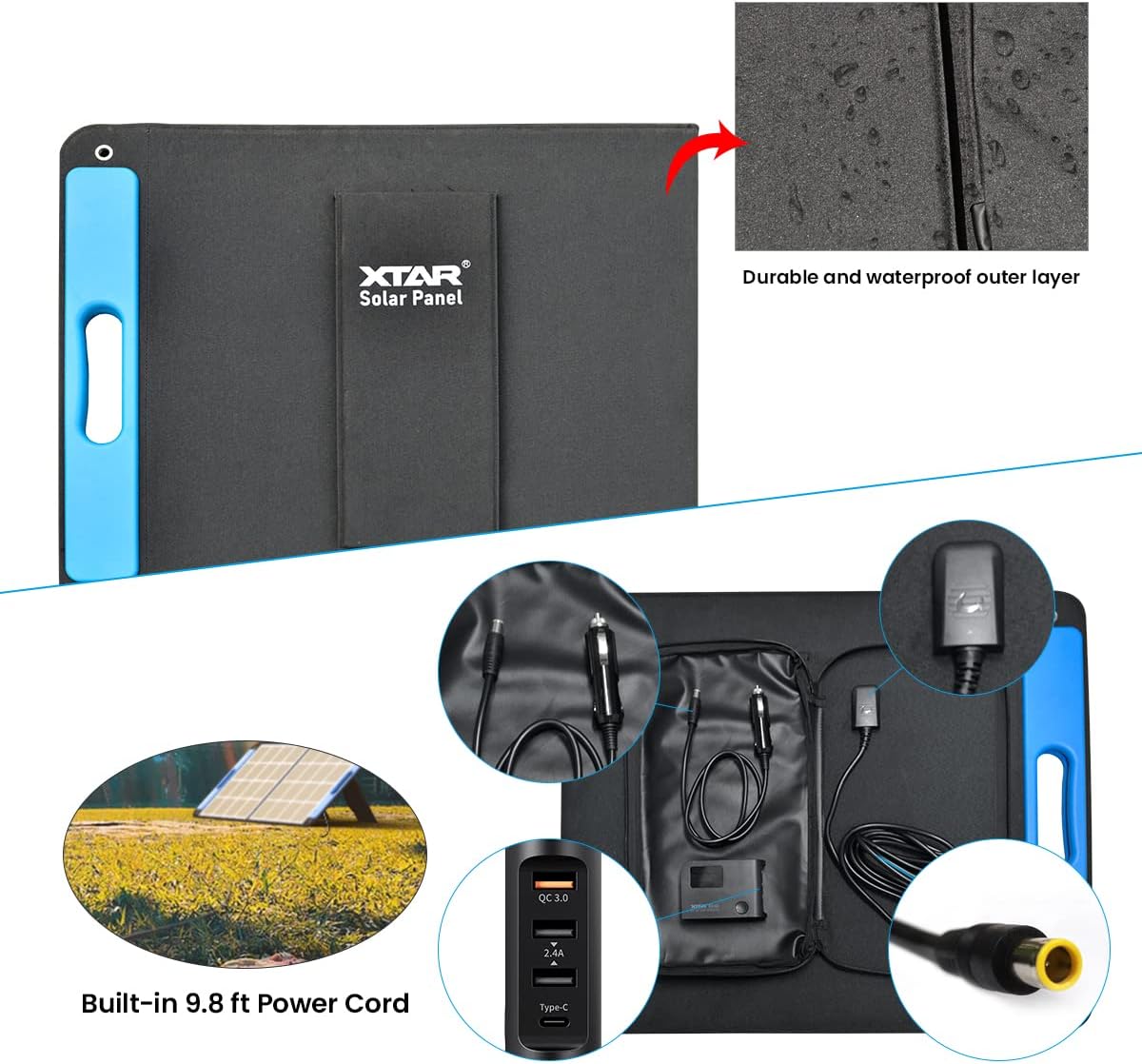
Figure 5: A close-up of the integrated storage pouch on the XTAR SP100, showing the neatly stored 9.8 ft power cord and the EU4S DC multi-ports, including a PD3.0 45W output for versatile charging.
6. Maintenance
- Cleaning: Regularly wipe the solar panel surface with a soft, damp cloth to remove dust, dirt, or debris that may reduce efficiency. Avoid abrasive cleaners or harsh chemicals.
- Storage: When not in use, fold the solar panel and secure it with the Velcro strap. Store it in a dry, cool place away from direct sunlight and extreme temperatures.
- Inspection: Periodically check cables and connectors for any signs of wear, damage, or corrosion. Ensure all connections are secure before use.
7. Troubleshooting
- Low Power Output:
- Ensure the panel is in direct sunlight and not shaded.
- Adjust the panel angle to face the sun directly.
- Clean the panel surface to remove any dirt or dust.
- Check all cable connections for proper seating.
- No Power Output:
- Verify that the solar panel is connected correctly to the power station.
- Confirm that the power station is turned on and configured to accept solar input.
- Inspect cables and connectors for visible damage.
- Ensure sufficient sunlight is available; the panel may not generate power in very low light conditions.
8. Specifications

Figure 6: A visual representation of the XTAR SP100 solar panel's physical dimensions and a summary of its technical specifications.
| Specification | Value |
|---|---|
| Peak Power | 100W |
| Working Voltage | 17.6V |
| Working Current | 6.25A |
| Open Circuit Voltage | 23.76V |
| Short Circuit Current | 7.5A |
| Cell Efficiency | 23% |
| Operating Temperature Range | -10~65°C |
| Folded Size | 620*536*30 mm (24.4 x 21.1 x 1.2 inches) |
| Unfolded Size | 1236*536*15 mm (48.6 x 21.1 x 0.6 inches) |
| Net Weight | 4.4 kg (9.7 lbs) |
| Material | Monocrystalline Silicon |
| Waterproof Rating | IP65 |
9. Warranty and Support
XTAR provides a 24-month friendly customer support for the SP100 solar panel. For any issues or inquiries, please contact XTAR customer service through the retailer where the product was purchased or visit the official XTAR website for support information.