
Facmogu S-288
Facmogu S-288 Home Audio Amplifier User Manual
Model: S-288
Introduction
Thank you for choosing the Facmogu S-288 4-Channel Bluetooth 5.0 Home Audio Amplifier. This amplifier is designed to provide high-fidelity stereo sound for your home entertainment system, supporting multiple audio input methods including Bluetooth, USB, SD card, FM radio, and AUX. With its compact design and powerful output, it is ideal for various audio setups, including home theater and karaoke applications. This manual provides detailed instructions for setup, operation, maintenance, and troubleshooting to ensure optimal performance and longevity of your device.
Safety Information
Please read and understand all safety instructions before operating this device. Keep this manual for future reference.
- Power Supply: Use only the provided power adapter. Ensure the power supply voltage matches the requirements specified on the amplifier.
- Ventilation: Do not block any ventilation openings. Ensure adequate airflow around the unit to prevent overheating.
- Water and Moisture: Do not expose the unit to rain, moisture, or excessive humidity. Do not place objects filled with liquids, such as vases, on the unit.
- Heat Sources: Keep the unit away from heat sources such as radiators, heat registers, stoves, or other apparatus (including amplifiers) that produce heat.
- Cleaning: Unplug the unit from the power outlet before cleaning. Use a dry cloth for cleaning. Do not use liquid cleaners or aerosol cleaners.
- Servicing: Do not attempt to service this product yourself. Refer all servicing to qualified service personnel.
- Placement: Place the unit on a stable, flat surface. Avoid placing it in direct sunlight or near strong magnetic fields.
Product Overview
Familiarize yourself with the components and controls of your Facmogu S-288 amplifier.
Front Panel

Image: Detailed diagram showing the front and rear panels of the Facmogu S-288 amplifier with labeled components.
- USB Input: For connecting USB flash drives.
- SD Card Slot: For inserting SD memory cards.
- Function Display Window: Shows current mode, track information, and FM frequency.
- Mode Switch: Toggles between input modes (Bluetooth, AUX, USB, SD, FM).
- Previous Song / Play-Pause / Next Song Buttons: Control media playback.
- Tone Adjustment (Treble/Bass): Knobs to adjust high and low frequencies.
- Volume Adjustment: Main knob to control the overall output volume.
- Microphone Input (MIC1): 6.35mm jack for connecting a microphone.
- Microphone Volume Adjustment (MIC.VOL): Knob to control microphone volume.
- Music Rhythm Lights: Visual indicators that synchronize with music.
Rear Panel
- Audio Input Interface (RCA): For connecting external audio sources via RCA cables (e.g., CD player, DVD player).
- Speaker Output Terminals: Four sets of terminals for connecting speakers (FR+, FR-, FL+, FL-, SR+, SR-, SL+, SL-). Supports speaker impedance of 4-8Ω.
- FM Antenna Input (FM.ANT): For connecting the included FM antenna.
- Power Input (DC 12V/3.5A): For connecting the power adapter.
Remote Control
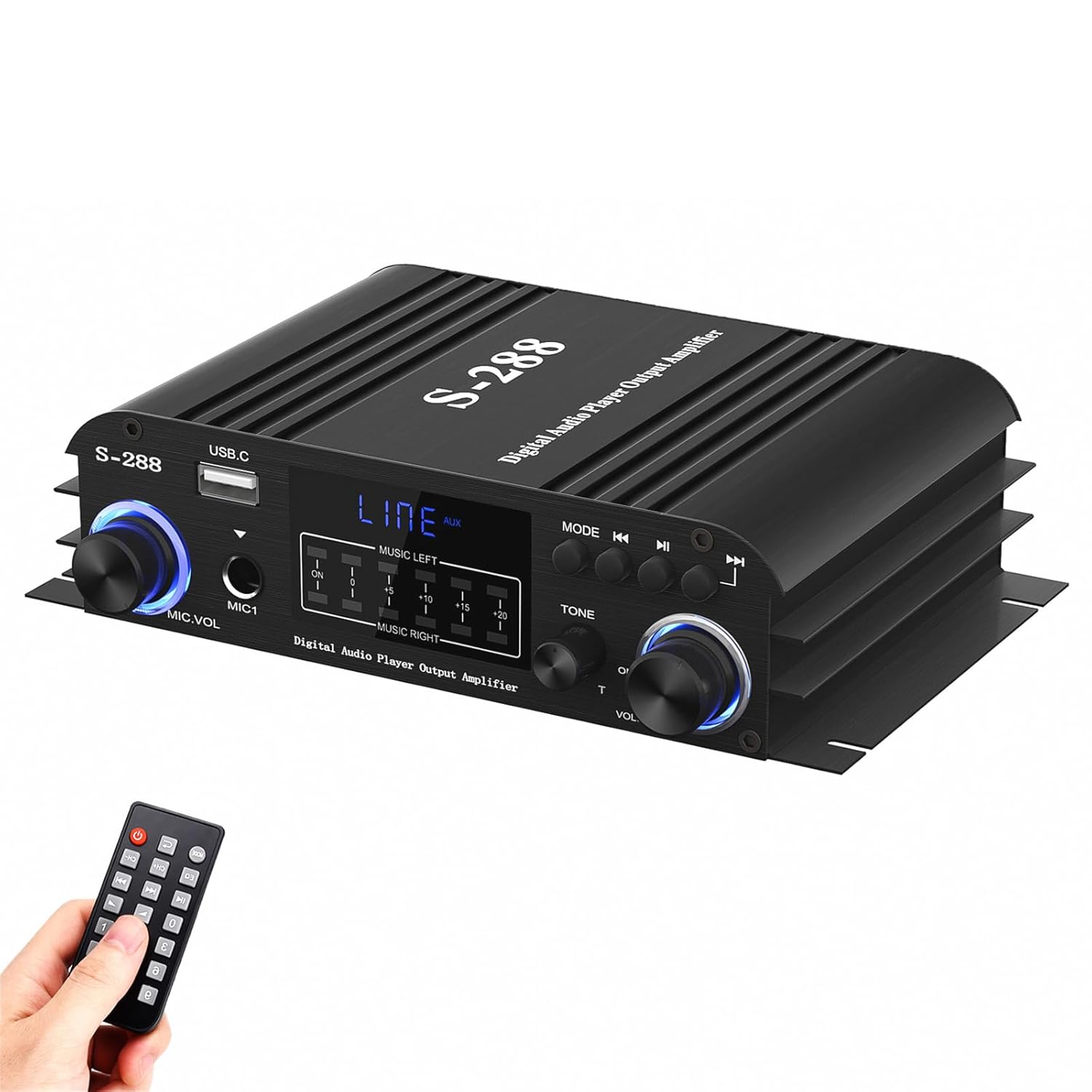
Image: The Facmogu S-288 amplifier shown with its included remote control. The remote allows for convenient adjustment of settings from a distance.
The included remote control allows you to operate the amplifier from a distance, providing convenience for changing modes, adjusting volume, and controlling playback.
Setup
Follow these steps to set up your Facmogu S-288 amplifier:
- Connecting Speakers:
Connect your passive speakers to the speaker output terminals on the rear panel. Ensure correct polarity (+ to + and - to -) for each speaker. The amplifier supports four speakers (Front Right, Front Left, Surround Right, Surround Left) with an impedance of 4-8Ω. Securely fasten the speaker wires.
- Connecting Audio Sources:
- AUX Input: Use an RCA cable to connect external audio devices (e.g., CD player, DVD player, TV audio output) to the "AUDIO INPUT" RCA jacks on the rear panel.
- USB/SD Card: Insert a USB flash drive or SD card (FAT32 format only) into the respective slots on the front panel.
- FM Antenna: Connect the included FM antenna to the "FM.ANT" port on the rear panel for radio reception. Extend the antenna for better signal.
- Microphone: For karaoke or public address, connect a microphone to the "MIC1" input on the front panel.
- Power Connection:
Connect the provided power adapter to the "POWER INPUT" DC 12V/3.5A jack on the rear panel, then plug the adapter into a standard wall outlet. The unit will power on automatically or can be turned on using the power button/remote.

Image: The Facmogu S-288 amplifier connected wirelessly to a smartphone, demonstrating its Bluetooth connectivity for audio streaming.
Operating Instructions
Power On/Off
Once connected to power, the amplifier will typically power on. Use the power button on the front panel or the remote control to toggle power.
Volume Control
Rotate the large "VOLUME" knob on the front panel clockwise to increase volume and counter-clockwise to decrease it. You can also use the volume buttons on the remote control.
Input Selection
Press the "MODE" button on the front panel or remote control to cycle through available input sources: Bluetooth, AUX, USB, SD, and FM.
- Bluetooth Mode:
When in Bluetooth mode, the display will indicate "Bluetooth". On your device (smartphone, tablet, PC), enable Bluetooth and search for "S-288". Select it to pair. Once paired, you can stream audio wirelessly. Keep the device within 30ft/10m (15ft/5m for TV/PC) for optimal connection.
- USB/SD Card Mode:
Insert a USB flash drive or SD card with audio files (FAT32 format) into the corresponding slot. The amplifier will automatically switch to USB/SD mode and begin playback. Use the Previous/Next Song and Play/Pause buttons to control playback.
- FM Radio Mode:
Ensure the FM antenna is connected. In FM mode, the display will show the frequency. Use the Previous/Next Song buttons to scan for stations. The frequency range is 87.5-108MHz.
- AUX Mode:
When an external device is connected via the RCA audio input, select AUX mode. The display will show "LINE AUX".
Tone Adjustment
Use the "TONE" knobs (Treble and Bass) on the front panel to adjust the audio's high and low frequencies according to your preference.
Microphone Usage (Karaoke)
Connect a microphone to the "MIC1" input. Adjust the microphone's volume using the "MIC.VOL" knob. This feature is suitable for karaoke or public address applications.
Music Rhythm Lights
The front panel features music rhythm lights that synchronize with the audio playback, providing a dynamic visual effect.
Maintenance
Proper maintenance ensures the longevity and optimal performance of your amplifier.
- Cleaning: Always unplug the amplifier before cleaning. Use a soft, dry cloth to wipe the exterior. Do not use abrasive cleaners, waxes, or solvents.
- Dust: Regularly dust the unit, especially the ventilation openings, to prevent dust buildup which can lead to overheating.
- Storage: If storing the amplifier for an extended period, disconnect it from power and store it in a cool, dry place away from direct sunlight and extreme temperatures.
Troubleshooting
If you encounter issues with your Facmogu S-288 amplifier, refer to the following common problems and solutions:
| Problem | Possible Cause | Solution |
|---|---|---|
| No power | Power adapter not connected or faulty; power outlet issue. | Ensure power adapter is securely connected to the amplifier and a working power outlet. Try a different outlet. |
| No sound output | Incorrect input mode; loose speaker connections; low volume; faulty audio source. | Select the correct input mode. Check all speaker wire connections for proper polarity and tightness. Increase the volume. Test with a different audio source. |
| Bluetooth connection unstable or fails | Device too far; interference; amplifier not in pairing mode. | Ensure your device is within the operating range (30ft/10m, 15ft/5m for TV/PC). Reduce obstacles between devices. Re-enter Bluetooth mode on the amplifier and re-pair. |
| USB/SD card not playing | Incorrect file format; card not FAT32; corrupted files; card not inserted correctly. | Ensure USB drive/SD card is formatted to FAT32. Check if audio files are supported. Reinsert the card/drive. |
| Poor FM radio reception | Antenna not connected or extended; weak signal area. | Ensure the FM antenna is properly connected and fully extended. Try repositioning the antenna or the amplifier for better signal. |
| Distorted sound | Volume too high; incorrect tone settings; faulty audio source or speakers. | Reduce the volume. Adjust Treble and Bass knobs. Test with a different audio source or speakers to isolate the issue. |
Specifications
| Feature | Detail |
|---|---|
| Model Number | S-288 |
| Brand | Facmogu |
| Output Power (RMS) | 45W x 4 Channels |
| Peak Power | 600W |
| Bluetooth Version | 5.0 |
| Bluetooth Operating Range | Up to 30ft/10m (15ft/5m for TV/PC) |
| Audio Inputs | Bluetooth, 3.5mm AUX (via RCA), USB, SD Card, FM Antenna |
| USB/SD Card Format | FAT32 only |
| FM Frequency Range | 87.5-108MHz |
| Harmonic Distortion | ≤ 0.4% |
| Speaker Impedance | 4-8Ω |
| Voltage | 12 Volts (DC 12V/3.5A) |
| Dimensions (L x W x H) | Approx. 6.9 x 4.1 x 1.8 inches (175mm x 105mm x 45mm) |
| Weight | Approx. 1.9 Pounds |
| Mounting Type | Surface Mount |

Image: The Facmogu S-288 amplifier with its dimensions labeled, alongside a list and images of included accessories: power adapter, power amplifier, remote control, manual, and FM receiver line.
Warranty and Support
Facmogu provides a one-year warranty for this product. If you encounter any problems or have questions regarding the Facmogu S-288 amplifier, please do not hesitate to contact our customer support. Our team is dedicated to assisting you with any queries or issues you may have.
For support, please refer to the contact information provided with your purchase or visit the official Facmogu store page on Amazon: Facmogu Store.
Related Documents - S-288
 |
White's AF108 Mine Detector Operator's Manual Operator's manual for the White's Electronics AF-108 Mine Detector Set, providing comprehensive instructions on its operation, maintenance, and demolition procedures. |
 |
HEKA Favorit Pro-Touch Incubator Operating Manual | Setup, Operation & Maintenance Guide Comprehensive operating manual for HEKA Favorit Pro-Touch incubators, covering setup, operation, maintenance, and troubleshooting to ensure optimal egg incubation results. |
 |
White's Electronics TH-35 Mine Detector Maintenance Manual Comprehensive maintenance manual for the White's Electronics TH-35 Mine Detector, covering organizational, direct, general support, and depot maintenance procedures, shipment, storage, and troubleshooting. Includes diagrams and component details. |
 |
HEKA Brutgeräte Katalog 2025/26: Alles für Geflügelzucht & Tierhaltung Der HEKA Katalog 2025/26 präsentiert eine breite Palette an hochwertigen Brutgeräten, Kükenaufzuchtboxen und Zubehör für Geflügel, Tauben und Kleintiere. Entdecken Sie innovative Technologie und deutsche Qualität für erfolgreiche Zuchtergebnisse. |
 |
C&C Lighting LED FLEX Sheet Technical Data Sheet Detailed technical data sheet for the C&C Lighting Flex LED Light Sheet. Features include ultra-thin design, flexible PCB, uniform illumination, RGBW and single color options, low-voltage DC operation, and cuttable structure for versatile architectural and commercial applications. Includes installation guides, ordering information, and troubleshooting tips. |
 |
Uline Cut Resistant Glove Guide: Selecting the Right Gloves A comprehensive guide from Uline on selecting cut-resistant gloves based on ANSI cut levels, typical applications, liner materials (Dyneema/HPPE and Kevlar), coating types (Polyurethane, Nitrile, Latex), gauge, and abrasion resistance. Features a product catalog with detailed specifications. |
Ask a question about this manual
Ask about setup, troubleshooting, compatibility, parts, safety, or missing instructions. Manuals+ will review the question and use this page’s manual context to help answer it.