
FACOI 206
FACOI Smart Watch User Manual
Model: 206
Introduction
This manual provides detailed instructions for the FACOI Smart Watch, Model 206. It covers setup, operation, maintenance, and troubleshooting to help you maximize your device's potential. This smart watch is designed for both men and women, offering comprehensive features including call management, activity tracking, and health monitoring, compatible with both Android phones and iPhones.
What's in the Box
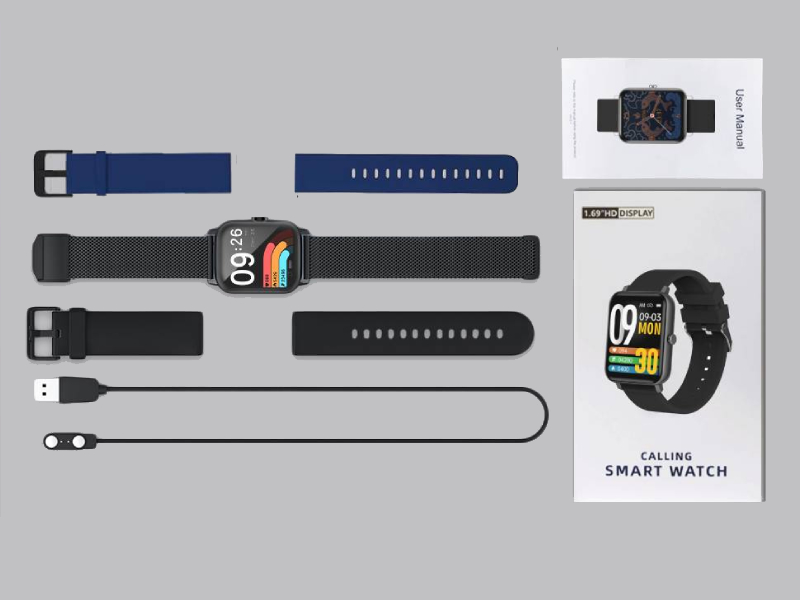
Image: The FACOI Smart Watch package contents, showing the smartwatch unit, a blue silicone strap, a black silicone strap, a black mesh strap, a magnetic charging cable, and the user manual.
- FACOI Smart Watch Unit
- Silicone Watch Straps (typically 2-3, e.g., black, blue)
- Magnetic Charging Cable
- User Manual
Setup
1. Charging the Smart Watch
Before first use, fully charge your smart watch. Connect the magnetic charging cable to the charging points on the back of the watch. Plug the USB end into a standard USB power adapter (not included) or a computer USB port. The watch display will indicate charging status. A full charge typically takes about 2 hours.
2. Installing Watch Straps
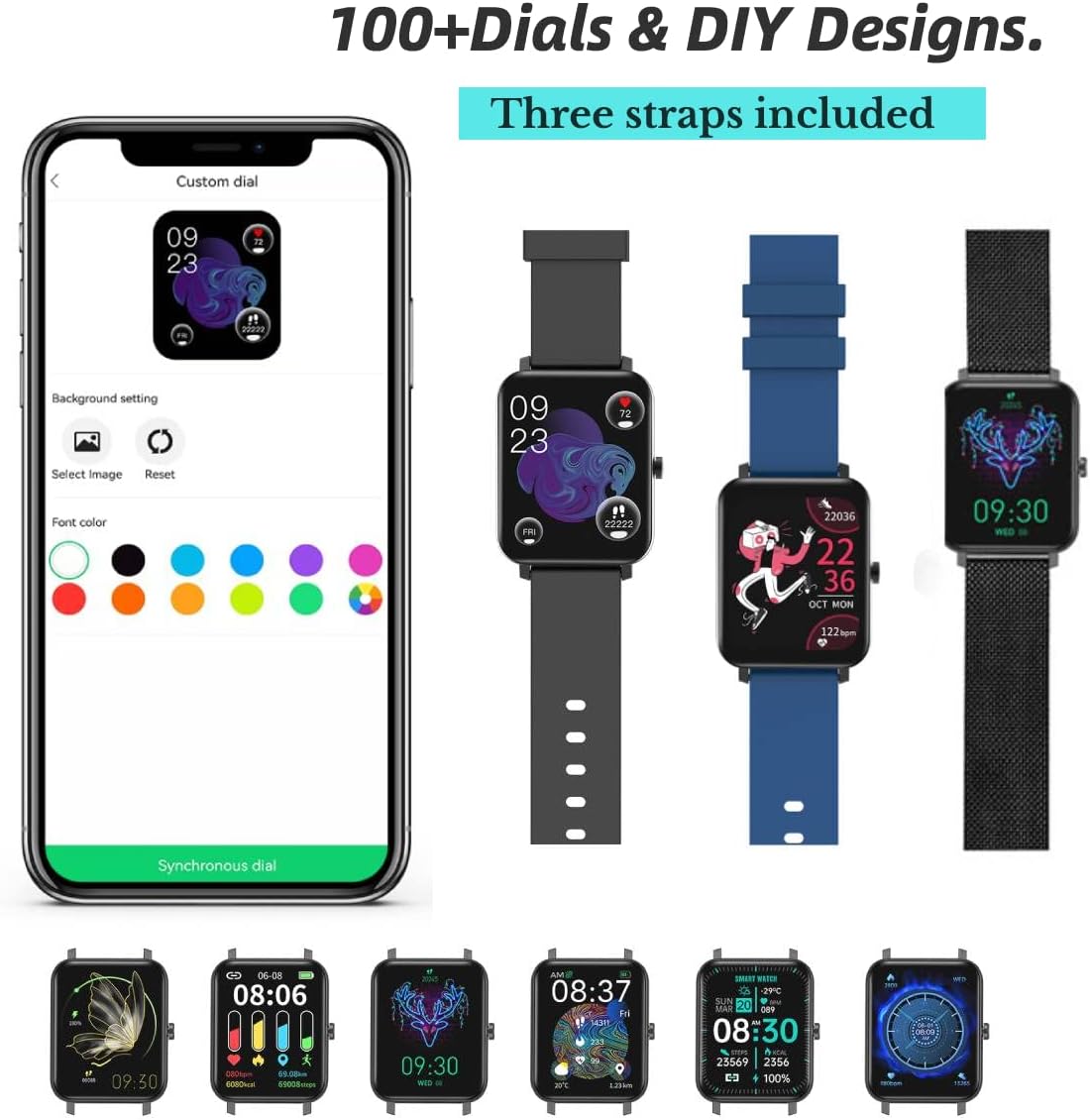
Image: The FACOI Smart Watch with multiple strap options, demonstrating how different straps can be attached to the watch body.
The FACOI Smart Watch comes with interchangeable straps. To attach a strap, align the spring bar with the lug holes on the watch body and push the pin inward to secure it. Release the pin once aligned in the hole. Ensure both ends of the strap are securely fastened before wearing.
3. Pairing with Your Smartphone
- Download the App: Scan the QR code provided in the quick start guide or search for "Glory Fit" in your smartphone's app store (App Store for iOS, Google Play Store for Android). Install the application.
- Enable Bluetooth: Ensure Bluetooth is enabled on your smartphone.
- Open Glory Fit App: Launch the Glory Fit app and follow the on-screen instructions to create an account or log in.
- Add Device: In the app, navigate to the "Device" or "My Device" section and select "Add Device." The app will search for nearby smart watches.
- Connect: Select "FACOI Smart Watch" or the corresponding device name from the list. Confirm the pairing request on both your phone and the watch if prompted.
- Permissions: Grant necessary permissions (e.g., notifications, location, contacts) to the app for full functionality.
Once successfully paired, the watch will synchronize time and data with your smartphone.
Operating Instructions
Basic Navigation

Image: A visual representation of the smart watch's user interface, displaying different screens for various functions.
- Touchscreen: Swipe left/right to navigate between main screens (e.g., activity data, heart rate). Swipe up/down to access quick settings or notifications. Tap to select an icon or option.
- Side Button: Press the side button to wake the screen, return to the main watch face, or access the app menu.
Bluetooth Call and Message Reminders

Image: The smart watch displaying an incoming call, a dialpad for making calls, and notifications from social media applications.
- Making Calls: Once paired via Bluetooth, you can dial numbers directly from the watch's dialpad or select contacts synchronized from your phone.
- Receiving Calls: When an incoming call arrives, the watch will display the caller ID. You can answer or reject calls directly from the watch. The watch features a built-in speaker and microphone for hands-free communication.
- Message Notifications: The watch will display notifications from various apps (e.g., SMS, WhatsApp, Facebook, Twitter) once enabled in the Glory Fit app.
Customizing Watch Faces
The Glory Fit app offers over 100 watch faces and allows for DIY designs. In the app, navigate to the "Dial Settings" or "Watch Face" section to browse and apply new watch faces. You can also upload your own photos to create custom backgrounds.
Health Monitoring

Image: The smart watch displaying real-time health metrics such as blood pressure, blood oxygen saturation, heart rate, and sleep duration, along with a graph of heart rate recording.
- Heart Rate Monitoring: The watch continuously monitors your heart rate. View real-time data on the watch or detailed historical data in the app.
- Blood Oxygen (SpO2) Monitoring: Measure your blood oxygen levels on demand.
- Blood Pressure Monitoring: Provides an estimate of your blood pressure. Note: This device is not a medical device and should not be used for medical diagnosis or treatment.
- Sleep Tracking: The watch automatically tracks your sleep patterns, including deep sleep, light sleep, and awake time. Review your sleep quality and duration in the Glory Fit app.
- Sedentary Reminder: The watch can remind you to move if you have been inactive for too long.
Activity Tracking and Sports Modes

Image: The smart watch being used during various activities, highlighting its waterproof capabilities and the extensive list of supported sports modes.
- Pedometer: Tracks your daily steps, distance covered, and calories burned.
- Sports Modes: The watch supports 24 different sports modes, including Running, Walking, Cycling, Jump Rope, Badminton, Table Tennis, Tennis, Mountain Climbing, Basketball, Football, Baseball, Volleyball, Cricket, Rugby, Hockey, Dancing, Spinning, Yoga, Sit-ups, Indoor Run, Gymnastics, Rowing, Jumping Jacks, and Free Training. Select the appropriate mode before starting your workout for accurate tracking.
Other Features
- Stopwatch: Access the stopwatch function from the watch menu for timing activities.
Image: The stopwatch interface on the smart watch.
- Remote Camera Control: Use the watch as a remote shutter for your phone's camera.

Image: The smart watch displaying the camera shutter icon, used to remotely trigger a phone's camera.
- Weather Forecast: View current weather conditions and forecasts directly on your watch after synchronization with the app.
Image: The smart watch screen showing the current temperature and weather conditions.
- Music Control: Control music playback on your smartphone (play, pause, skip tracks) directly from the watch.
Maintenance
- Water Resistance (IP67): The watch is IP67 waterproof, meaning it is resistant to splashes, rain, and brief immersion in water (up to 1 meter for 30 minutes). It is suitable for daily use and activities like washing hands or light rain. It is not recommended for hot showers, saunas, or diving. Avoid prolonged exposure to water.
- Cleaning: Regularly clean the watch and straps with a soft, dry cloth. If necessary, use a slightly damp cloth and mild soap, then dry thoroughly. Avoid harsh chemicals or abrasive materials.
- Battery Care: To prolong battery life, avoid fully discharging the watch frequently. Charge it when the battery level is low. Store the watch in a cool, dry place when not in use for extended periods.
Troubleshooting
| Problem | Possible Solution |
|---|---|
| Watch does not turn on or respond. | Ensure the watch is fully charged. Connect it to the charger for at least 30 minutes. If unresponsive, try a soft reset by pressing and holding the side button for 10-15 seconds. |
| Cannot pair with smartphone. |
|
| Inaccurate health data (HR, BP, SpO2). | Ensure the watch is worn snugly on your wrist, about one finger's width from the wrist bone. Avoid excessive movement during measurements. Remember, this device is not a medical instrument. |
| Notifications are not received. |
|
| Short battery life. | Frequent use of features like Bluetooth calls, continuous heart rate monitoring, and bright screen settings can drain the battery faster. Reduce screen brightness, disable unnecessary notifications, and turn off continuous monitoring if not needed. |
Specifications
| Feature | Detail |
|---|---|
| Model Name | T8pro (Item model number: 206) |
| Brand | FACOI |
| Screen Size | 1.69 Inches (Visible screen diagonal: 2" / 5 cm) |
| Operating System | Android (Compatible with Android and iOS) |
| Connectivity Technology | Bluetooth |
| Special Features | Sleep Monitor, 3 Watch Straps, Multisport Tracker, Sedentary Reminder, Phone Call |
| Water Resistance | IP67 |
| Battery Type | Lithium Ion (1 required, included) |
| Product Dimensions | 9.64 x 1.38 x 0.46 inches |
| Item Weight | 0.176 ounces / 5 Grams |
Warranty and Support
For warranty information and technical support, please refer to the official FACOI website or contact their customer service directly. You may also find additional resources and FAQs on the product's Amazon listing page or within the Glory Fit application.
A digital version of the user manual is available for download: User Manual (PDF)
Related documents206


Ask a question about this manual
Ask about setup, troubleshooting, compatibility, parts, safety, or missing instructions. Manuals+ will review the question and use this page’s manual context to help answer it.