
pecron E3000
Pecron E3000 Portable Power Station User Manual
Model: E3000 (E2000LFP with 2pcs 200W Solar Panels)
1. Introduction
This user manual provides comprehensive instructions for the safe and efficient operation, maintenance, and troubleshooting of your Pecron E3000 Portable Power Station. Please read this manual thoroughly before using the product and retain it for future reference.
Important Safety Information
- Do not disassemble, repair, or modify the unit. Incorrect reassembly may cause fire or electric shock.
- Do not place the unit near fire or expose it to heat. Keep out of direct sunlight.
- Do not charge, use, or store the unit in a bathroom or in an area exposed to rain or moisture.
- Use only the original or certified accessories.
- Ensure proper ventilation during use and charging to prevent overheating.
- Keep out of reach of children and pets.
- In case of fire, use a dry powder fire extinguisher. Water may cause electric shock.
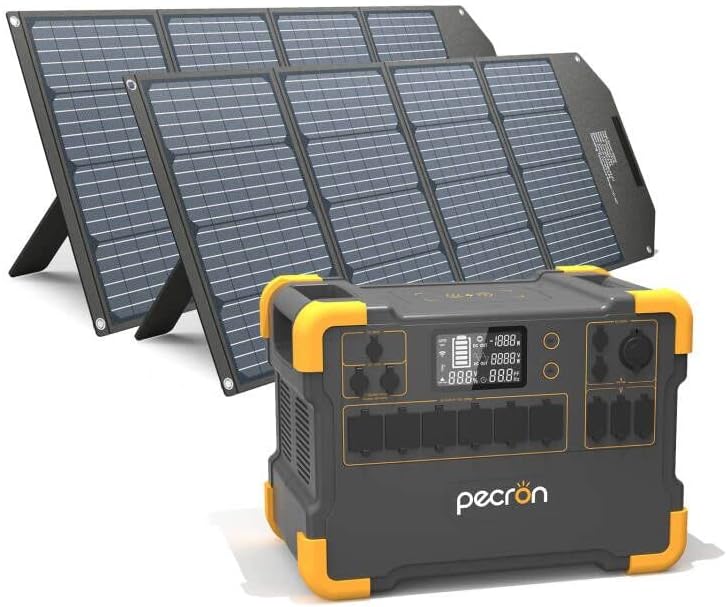
Figure 1.1: Pecron E3000 Portable Power Station with included 200W solar panels.
2. Product Overview & Components
The Pecron E3000 is a high-capacity portable power station designed for various applications, from outdoor camping to emergency home backup. It features a robust design and multiple output ports to power a wide range of devices.
Key Features:
- Massive Capacity: 3108Wh battery capacity, suitable for extended use.
- High Output Power: 2000W rated power (4000W surge) with 110V Pure-sine wave inverter.
- Versatile Outputs: 16 output ports including 6x AC outlets, 6x USB ports (up to PD 100W), 1x Cigar port, 2x DC ports, and 1x 15W wireless charger.
- Multiple Recharging Options: Supports wall outlet, dual wall outlet, solar panel, generator, car socket, and combined wall + solar charging.
- Efficient Solar Charging: Dual independent 600W (PV 32V~95V) MPPT charge controllers and one step-up 100W (PV 18V) MPPT charge controller.
- Safety & Reliability: Built-in Battery Management System (BMS) for protection against short circuit, overload, and overheat. UL-Certified Automotive-Grade Batteries.
Component Identification:

Figure 2.1: Front and side view of the Pecron E3000 with labeled ports and dimensions.
- AC 110V Output Port: Standard household outlets for AC appliances.
- Adapter & PV Charging Port: Input for AC adapter and solar panel charging.
- 12V PV & Car Charging Port: Input for 12V solar panels and car charging.
- Wireless Charger: For compatible wireless charging devices.
- LCD Display: Shows battery level, input/output power, and status indicators.
- DC12V/USB & Wireless Charging Switch: Button to activate DC, USB, and wireless charging outputs.
- AC Output Switch: Button to activate AC outputs.
- DC 12V10A Cigar Port: Standard car cigarette lighter port.
- DC 12V(5525) Output Port: DC output for specific devices.
- USB/Type-C Output Port: USB-A and USB-C ports for charging mobile devices.

Figure 2.2: Overview of Pecron E3000's massive capacity and key functionalities.
3. Setup
3.1 Unboxing and Initial Inspection
Upon receiving your Pecron E3000, carefully open the packaging and remove all components. Verify that all items listed in the "What You Get" section of the product description are present:
- Pecron E3000 Portable Power Station
- 2 Pcs 200W Solar Panels
- Accessory Pack
- AC Power Adapter
- 5-Pin Aviation Plug To MC4 Solar Charging Cable (2x)
- Car Charger Cable
- User Manual (this document)
Inspect the unit and accessories for any signs of damage. If any components are missing or damaged, contact Pecron customer service immediately.
3.2 Initial Charging
Before first use, it is recommended to fully charge the Pecron E3000. This ensures optimal battery performance and calibration.
- Connect the AC Power Adapter to the "Adapter & PV Charging Port" on the power station.
- Plug the AC Power Adapter into a standard wall outlet (110V AC).
- The LCD display will indicate charging status. A full charge via wall outlet typically takes 5-6 hours.
Alternatively, you can use solar panels for initial charging, though this may take longer depending on sunlight conditions.
4. Operation
4.1 Turning On/Off
- To turn on the unit: Press and hold the main power button (usually located near the LCD display) for a few seconds until the display illuminates.
- To turn off the unit: Press and hold the main power button again until the display turns off.
4.2 Activating Output Ports
Individual output sections (AC, DC/USB) have their own activation buttons to conserve power when not in use.
- AC Outputs: Press the "AC Output Switch" button to enable the AC outlets. The AC indicator on the display will light up. Press again to turn off.
- DC/USB/Wireless Outputs: Press the "DC12V/USB & Wireless Charging Switch" button to enable the DC, USB, and wireless charging ports. The corresponding indicators will light up. Press again to turn off.
4.3 Connecting Devices
Once the desired output ports are activated, plug your devices into the appropriate ports. The LCD display will show the real-time output wattage.

Figure 4.1: Examples of devices and their estimated runtimes when powered by the Pecron E3000.
Note: The total power consumption of connected devices should not exceed the E3000's rated output of 2000W. If the load exceeds 2000W, the power station will automatically shut down to prevent damage.
4.4 Recharging the Power Station
The Pecron E3000 offers multiple ways to recharge:

Figure 4.2: Six different methods for recharging your Pecron E3000.
- Wall Outlet (AC Adapter): Connect the included AC adapter to the "Adapter & PV Charging Port" and plug into a standard wall outlet. (Approx. 5-6 hours)
- Dual Wall Outlet: Using two AC adapters (second adapter sold separately), connect both to the appropriate input ports for faster charging. (Approx. 2-3 hours)
- Solar Panel: Connect compatible solar panels (like the included 200W panels) to the "Adapter & PV Charging Port" or "12V PV & Car Charging Port" using the provided MC4 cables. Ensure the solar panel's open circuit voltage (Voc) does not exceed 95V for the main MPPT inputs. (Approx. 5-6 hours with 4x 200W solar panels)
- Generator: Connect the AC adapter to a generator's AC output. (Approx. 5-6 hours with 1 adapter, 2-3 hours with 2 adapters)
- Car Socket: Use the included car charger cable to connect to your vehicle's 12V cigarette lighter socket. (Approx. 31 hours)
- Wall + Solar: Combine AC wall charging with solar panel charging for the fastest recharge time. (Approx. 3-4 hours with wall + 200W solar panel*3)
The E3000 features dual built-in MPPT charge controllers, supporting up to 1200W max solar input. For optimal solar charging, position panels directly towards the sun.
5. Maintenance
5.1 Storage
- Store the Pecron E3000 in a cool, dry place, away from direct sunlight, heat sources, and moisture.
- For long-term storage, charge the unit to approximately 50-80% every 3-6 months to maintain battery health.
- Avoid storing in extreme temperatures (below 0°C or above 40°C).
5.2 Cleaning
- Ensure the unit is turned off and disconnected from all power sources before cleaning.
- Use a soft, dry, lint-free cloth to wipe the exterior of the power station.
- Do not use abrasive cleaners, solvents, or immerse the unit in water.
- Keep the ventilation openings clear of dust and debris.
5.3 Battery Care
- The Pecron E3000 uses UL-Certified Automotive-Grade Batteries for durability and safety.
- Avoid completely draining the battery frequently, as this can reduce its lifespan.
- Charge the unit fully before significant use.
- If the unit will not be used for an extended period, charge it to 50-80% and recharge every 3-6 months.
6. Troubleshooting
| Problem | Possible Cause | Solution |
|---|---|---|
| Unit does not turn on. | Battery is completely drained. | Connect to AC power and charge for at least 30 minutes before attempting to turn on. |
| AC output not working. | AC output not activated; Overload protection triggered; Device power exceeds 2000W. | Press the "AC Output Switch" button. Reduce the total wattage of connected devices. Restart the unit. |
| DC/USB/Wireless output not working. | DC/USB/Wireless output not activated; Overload protection triggered. | Press the "DC12V/USB & Wireless Charging Switch" button. Reduce the load. Restart the unit. |
| Solar charging is slow or not working. | Insufficient sunlight; Panels not properly connected; Panel voltage too high/low; Dirty panels. | Ensure panels are in direct sunlight and angled correctly. Check all cable connections. Verify panel voltage is within acceptable range (32V-95V for main MPPT). Clean solar panels. |
| Unit is overheating. | Poor ventilation; Excessive load. | Ensure ventilation vents are clear. Reduce the load on the power station. Move to a cooler environment. |
If the problem persists after attempting these solutions, please contact Pecron customer service for further assistance.
7. Specifications
| Feature | Specification |
|---|---|
| Model Name | E2000LFP with 2pcs 200W solar panels (E3000 Series) |
| Battery Capacity | 3108Wh |
| Rated Power | 2000W (Surge 4000W) |
| AC Output Voltage | 110V AC |
| AC Output Type | Pure Sine Wave |
| USB Ports | 6x (including PD 100W) |
| DC Ports | 2x DC ports, 1x Cigar port |
| Wireless Charging | 15W |
| Solar Input (MPPT) | Dual 600W (PV 32V~95V), One 100W (PV 18V) |
| Max Solar Input | 1200W |
| Dimensions (L x W x H) | 16"L x 10"W x 11"H |
| Item Weight | 56 Pounds |
| Included Solar Panels | 2 Pcs 200W Monocrystalline Solar Panels |
| Solar Panel Fold Dimension | 705x470x60mm |
| Solar Panel Unfold Dimension | 2086x705x25mm |
| Solar Panel Weight | 17.6 lbs (each) |
| Solar Panel Connector | MC4 |
| Solar Panel Waterproof Rating | IPX4 (Resistant to water splashes) |
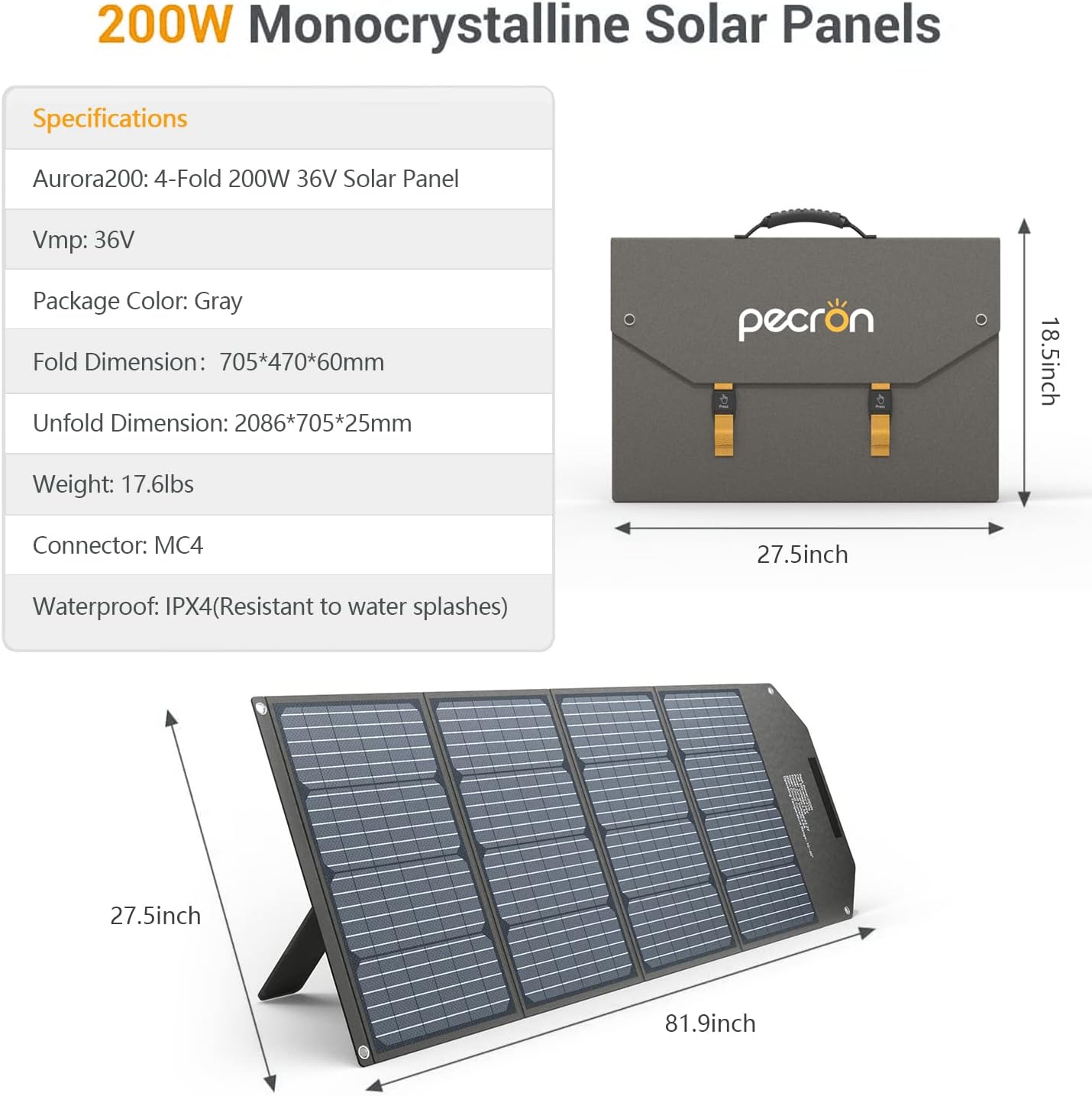
Figure 7.1: Detailed specifications for the included 200W Monocrystalline Solar Panels.
8. Warranty & Support
8.1 Warranty Information
The Pecron E3000 Portable Power Station comes with a 12-month worry-free warranty from the date of purchase. This warranty covers manufacturing defects and workmanship under normal use. It does not cover damage caused by misuse, accidents, unauthorized modifications, or natural disasters.
Please retain your proof of purchase for warranty claims.
8.2 Customer Support
For any questions, technical assistance, or warranty claims, please contact Pecron customer service. Our team is available 24 hours a day, 7 days a week to provide friendly and prompt support.
You can find contact information on the official Pecron website or through your purchase platform.
For more information, visit the official Pecron store: Pecron Amazon Store
Related documentsE3000


Ask a question about this manual
Ask about setup, troubleshooting, compatibility, parts, safety, or missing instructions. Manuals+ will review the question and use this page’s manual context to help answer it.