
1. Introduction
This manual provides comprehensive instructions for the ZIYOU LANG T60 60% Mechanical Gaming Keyboard. Designed for both gaming and efficient work, this compact keyboard features a 62-key layout, tactile brown mechanical switches, and customizable RGB backlighting. Please read this manual thoroughly to ensure proper use and to maximize your experience with the product.

Image 1: ZIYOU LANG T60 60% Mechanical Gaming Keyboard with detachable USB-C cable and a close-up of a brown mechanical switch.
2. Product Overview
- Compact 60% Layout: The T60 features a 62-key design, offering a compact form factor that saves desk space while retaining essential functions.
- Mechanical Brown Switches: Equipped with brown mechanical switches, the keyboard provides a tactile typing experience with a subtle bump and quiet operation, suitable for both gaming and typing tasks. These switches are rated for 50 million keystrokes with an actuation force of 60 +/- 20 grams and a travel distance of 2.0 +/- 0.6 mm.
- RGB Backlighting: Enjoy 18 distinct RGB backlight effects. Each LED offers 256 levels of PWM, allowing for adjustable brightness and flow speed to personalize your setup.
- Durable ABS Keycaps: The keycaps are manufactured using a two-color injection molding process from high-quality ABS material. This ensures excellent touch, high wear resistance, and prevents legends from fading, even in low-light conditions.
- Full Anti-Ghosting: All keys are designed with anti-ghosting technology, ensuring that every keystroke is registered accurately, even during rapid, simultaneous key presses.
- Detachable USB-C Cable: The keyboard connects via a detachable USB-C to USB-A cable, enhancing portability and simplifying storage. It supports plug-and-play functionality, requiring no additional drivers.
- Wide Compatibility: The T60 is compatible with various operating systems and devices, including Windows 7/8/10/11/2000/XP, Vista, Mac OS, PS4, and Xbox One.

Image 2: Key features of the ZIYOU LANG T60 keyboard.

Image 3: ZIYOU LANG T60 keyboard suitable for both work and gaming.
3. Setup
- Connect the Cable: Insert the USB-C end of the provided cable into the port on the keyboard.
- Connect to Device: Plug the USB-A end of the cable into an available USB port on your computer (Windows, Mac, Linux) or gaming console (PS4, Xbox One).
- Plug and Play: The keyboard is plug-and-play, meaning no additional drivers are required for basic functionality. Your operating system should automatically detect and configure the device.
- Console Compatibility Note: For PS4 and Xbox One, an adapter may be required for full functionality (adapter not included).

Image 4: Detachable USB-C cable connection.

Image 5: Device compatibility icons.
4. Operating Instructions
4.1. Backlight Control
The ZIYOU LANG T60 keyboard offers 18 different RGB backlight effects. Use the following key combinations with the Fn key to control the backlighting:
- Fn + \|: Turn backlight on/off.
- Fn + Tab: Switch between different RGB backlight modes.
- Fn + Enter: Change the backlight color within certain modes.
- Fn + ↑ / ↓: Adjust backlight brightness.
- Fn + ← / →: Adjust backlight speed/direction (for dynamic modes).
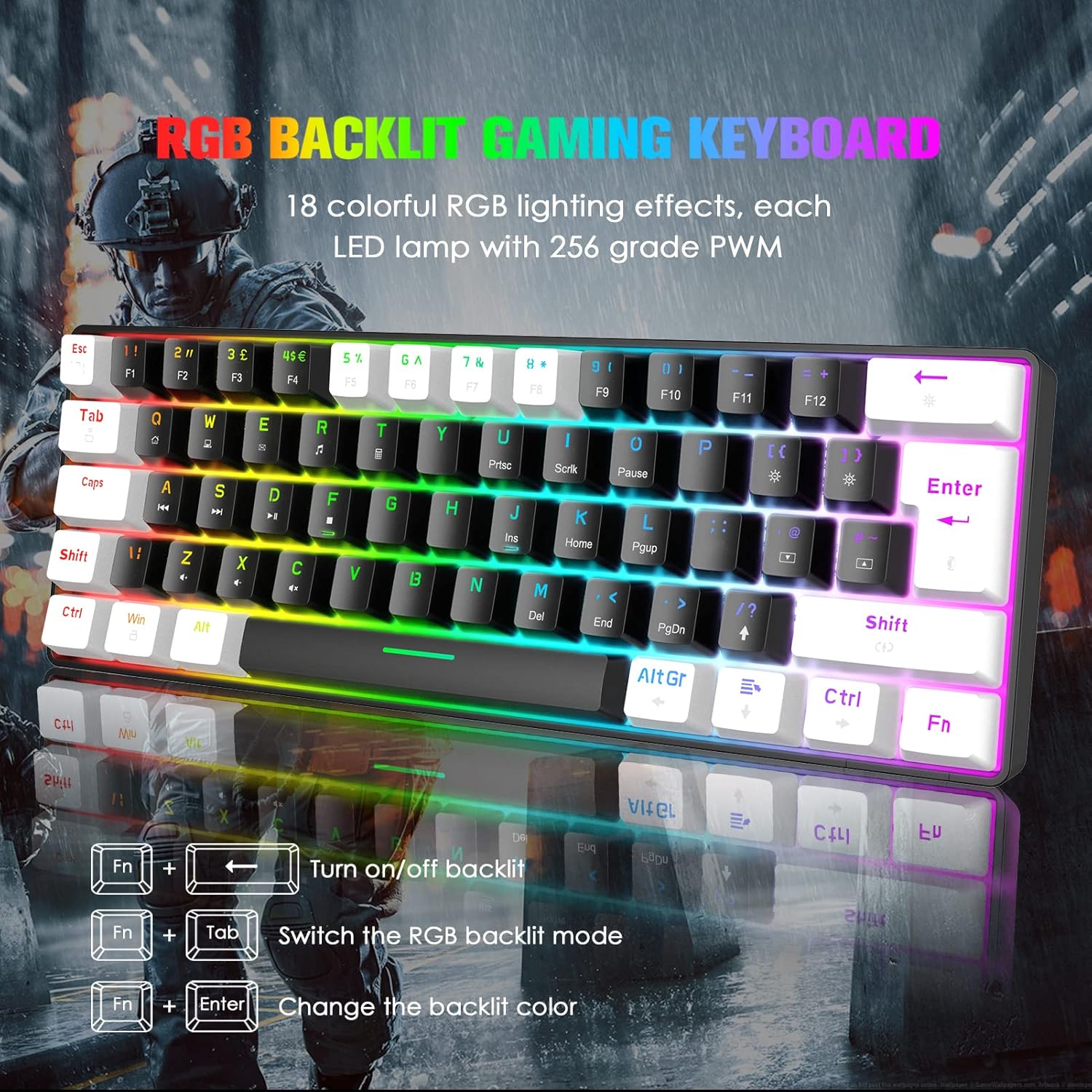
Image 6: RGB backlight control functions.
4.2. Multimedia Functions
Access various multimedia and system functions using the Fn key in combination with other keys. The keyboard supports 12 multimedia function keys for quick access:
- Fn + F1-F12: These keys typically correspond to multimedia controls (e.g., play/pause, volume up/down, mute) or system functions (e.g., open browser, email). Refer to the keycap legends for specific functions.

Image 7: Multimedia function key combinations.
5. Maintenance
To ensure the longevity and optimal performance of your ZIYOU LANG T60 keyboard, follow these maintenance guidelines:
- Cleaning Keycaps: Use a soft, damp cloth to wipe down the keycaps. For deeper cleaning, keycaps can be carefully removed using a keycap puller (not included) and cleaned with mild soap and water. Ensure they are completely dry before reattaching.
- Cleaning Switches: Use compressed air to remove dust and debris from between the keycaps and switches. Avoid spraying liquids directly into the switches.
- Cable Care: Handle the detachable USB-C cable with care. Avoid sharp bends or excessive pulling to prevent damage.
- Storage: When not in use, store the keyboard in a clean, dry environment away from direct sunlight and extreme temperatures.
6. Troubleshooting
If you encounter issues with your ZIYOU LANG T60 keyboard, please refer to the following common troubleshooting steps:
- Keyboard Not Responding:
- Ensure the USB-C cable is securely connected to both the keyboard and your device.
- Try connecting the keyboard to a different USB port on your device.
- Test the keyboard on another computer or device to rule out a system-specific issue.
- Restart your computer or device.
- Backlight Not Working:
- Press Fn + \| to ensure the backlight is turned on.
- Adjust backlight brightness using Fn + ↑.
- Ensure the keyboard is receiving sufficient power from the USB port.
- Keys Not Registering or Double-Typing:
- Clean any debris or dust from around the affected switch using compressed air.
- If the issue persists, it may indicate a faulty switch.
- Incorrect Key Layout (e.g., @ and " swapped):
- This often indicates an incorrect language or keyboard layout setting in your operating system. Adjust your system's keyboard settings to the correct layout (e.g., UK English).
7. Specifications
| Feature | Detail |
|---|---|
| Model Number | T60 |
| Dimensions (L x W x H) | 34.2 x 11.2 x 4.7 cm (13.46 x 4.41 x 1.85 inches) |
| Weight | 660 grams (1.46 lbs) |
| Key Count | 62 keys |
| Keyboard Layout | 60% Compact |
| Switch Type | Brown Mechanical Switches |
| Actuation Force | 60 +/- 20 grams |
| Key Travel | 2.0 +/- 0.6 mm |
| Keycap Material | ABS Two-color Injection |
| Backlight | RGB (18 effects, 256 PWM levels) |
| Connectivity | Wired (Detachable USB-C to USB-A) |
| Compatibility | Windows, Mac OS, PS4, Xbox One |
8. Warranty and Support
Information regarding product warranty and availability of spare parts is not provided in the current product data. For any support inquiries, please refer to the seller or the point of purchase.