
Cuifati CUIFATIywqr0emxu88079
HRD-700 Portable Shortwave Radio User Manual
Model: CUIFATIywqr0emxu88079 | Brand: Cuifati
1. Introduction
The HRD-700 Portable Shortwave Radio is a versatile and compact device designed for comprehensive radio reception and music playback. It supports multiple frequency bands including FM, MW, SW, WB (NOAA Weather Band), and features Bluetooth 5.0 connectivity and memory card playback. Its portable design makes it ideal for various indoor and outdoor activities.

Image 1.1: Front view of the HRD-700 Portable Shortwave Radio with its telescopic antenna extended.
Key Features:
- Full Band Reception: Capable of receiving FM, MW, SW, and WB (NOAA Weather Band) frequencies.
- Bluetooth 5.0 Connectivity: Seamlessly connect to Bluetooth-enabled devices for audio streaming.
- Memory Card Support: Play audio files directly from a memory card (TF card).
- Automatic Search & Store: Features coding pulley switch tuning with automatic station search and storage.
- Long-lasting Battery: Equipped with a 1000mAh battery for extended use.
- Sleep Timer: Customizable sleep timer function (10-70 minutes).
- Powerful Audio: Features a 3W diaphragm horn for clear and loud sound output.
- Portable Design: Compact and lightweight, designed for easy carrying.
2. Product Components
Before using your HRD-700 radio, please ensure all components are present in the packaging.
What's in the Box:
- HRD-700 Portable Shortwave Radio Unit
- USB Type-C Charging Cable (Power Cord)
- Carrying Pouch
- User Manual (this document)
3. Controls and Functions
Familiarize yourself with the various parts and controls of your HRD-700 radio for optimal operation.

Image 3.1: Detailed diagram of the HRD-700 radio highlighting key components and their functions.
| Component | Function |
|---|---|
| Tie Rod Antenna | Extend for improved FM, SW, and WB reception. |
| Rotating Tuning Button | Used for manual tuning of radio frequencies. |
| Display | Shows frequency, mode, battery status, and other information. |
| FM Road Pulley | Another control for tuning, possibly for fine-tuning FM. |
| External Speakers | Audio output for listening to radio or music. |
| Type C Charging Port | Connect the USB Type-C cable for charging the internal battery. |
| Lanyard Hole | Attachment point for a lanyard or wrist strap for portability. |
| TF Card Jack | Insert a TF (microSD) card for playing stored audio files. |
| Battery Cover | Access point for the internal battery. |
| Mode Selection Switch | Switch between Radio (Channel Reception), BT (Bluetooth Reception), and M.Play (TF Card Mode). |
4. Setup
4.1 Charging the Battery
The HRD-700 radio comes with a built-in 1000mAh rechargeable lithium battery. Before first use, it is recommended to fully charge the battery.
- Locate the Type C Charging Port on the radio.
- Connect one end of the provided USB Type-C charging cable to the radio's charging port.
- Connect the other end of the USB cable to a standard USB power adapter (not included) or a computer's USB port.
- The display will indicate charging status. Once fully charged, the indicator will change or turn off.

Image 4.1: The HRD-700 radio with an illustration of its high-capacity 1000mAh lithium battery, emphasizing improved battery life.
4.2 Inserting a Memory Card (Optional)
If you wish to play audio files from a memory card, follow these steps:
- Locate the TF Card Jack on the side or back of the radio.
- Gently insert a compatible TF (microSD) card into the slot until it clicks into place. Ensure the card is inserted in the correct orientation.
- To remove, gently push the card inwards until it springs out.
5. Operating Instructions
5.1 Powering On/Off and Volume Control
- To power on the radio, locate the power button/switch and press/slide it to the ON position.
- To power off, press/slide the power button/switch to the OFF position.
- Adjust the volume using the dedicated volume control knob or buttons. The radio features a 3W speaker capable of over 120 decibels.
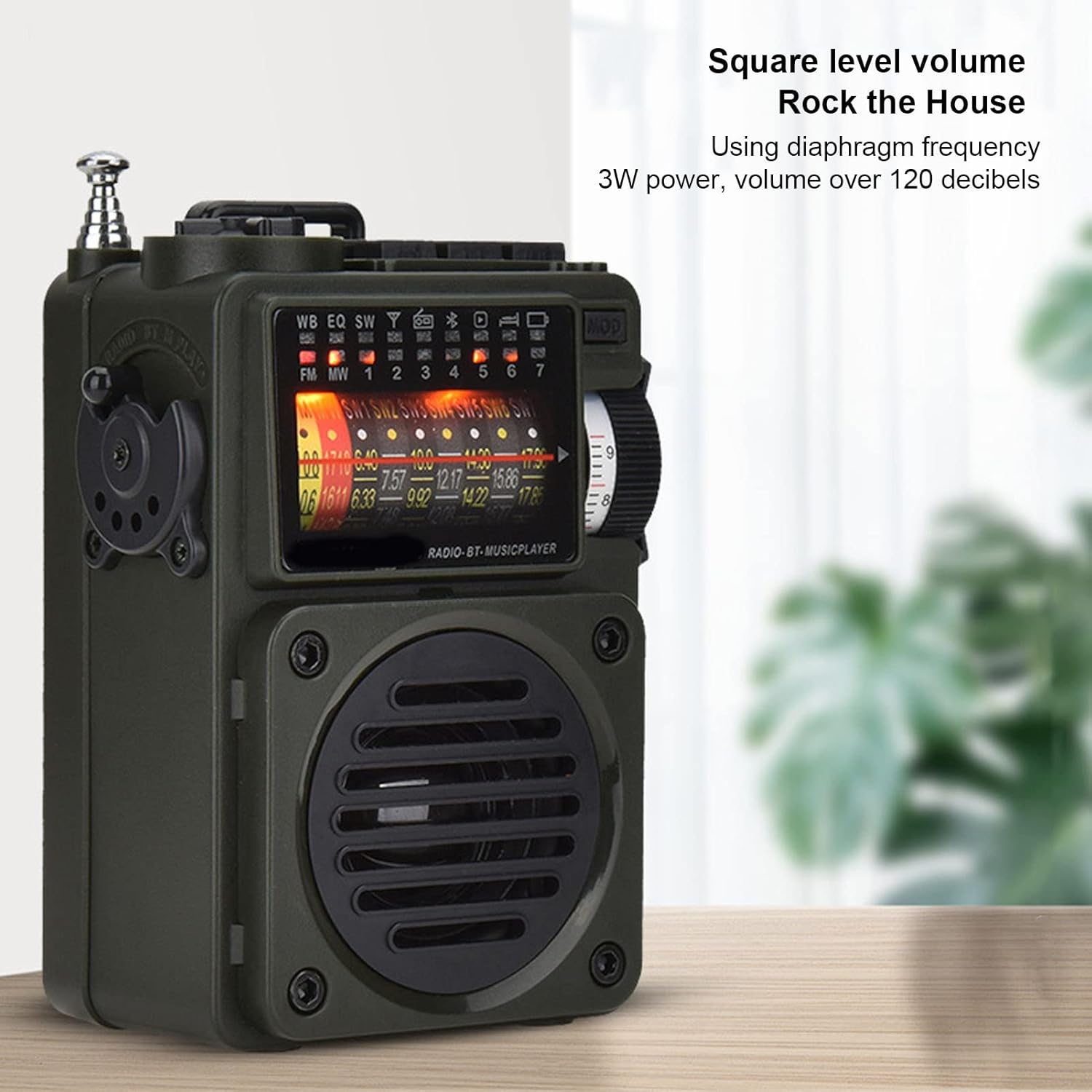
Image 5.1: The HRD-700 radio demonstrating its powerful sound output, suitable for filling a room.
5.2 Radio Reception (FM/MW/SW/WB)
The HRD-700 supports a wide range of radio bands.
- Select Mode: Use the Mode Selection Switch to select "Radio" mode.
- Extend Antenna: For optimal reception on FM, SW, and WB bands, fully extend the Tie Rod Antenna.
- Tuning:
- Manual Tuning: Use the Rotating Tuning Button or FM Road Pulley to manually scan for stations.
- Automatic Search: Press the designated button (refer to display icons for "Auto Search") to automatically scan and store available stations.
- Station Recall: After automatic search, use the tuning controls to cycle through stored stations.

Image 5.2: The HRD-700 radio's display showing various frequency bands (FM, MW, SW, WB) and tuning indicators.
5.3 Bluetooth Music Playback
Connect your smartphone or other Bluetooth devices to the HRD-700 for wireless audio streaming.
- Select Mode: Use the Mode Selection Switch to select "BT" (Bluetooth) mode. The radio will enter pairing mode, indicated by a flashing Bluetooth icon on the display.
- Enable Bluetooth: On your device (e.g., smartphone), enable Bluetooth and search for available devices.
- Pair: Select "HRD-700" from the list of found devices. Once connected, the Bluetooth icon on the radio's display will become solid.
- Play Music: Start playing music on your connected device. Audio will now play through the HRD-700 radio.

Image 5.3: The HRD-700 radio demonstrating its wireless Bluetooth connectivity with a smartphone, offering a stable connection up to 10 meters.
5.4 Memory Card (TF Card) Playback
Play your favorite audio files directly from a TF card.
- Insert Card: Ensure a TF card with audio files is properly inserted into the TF Card Jack (refer to Section 4.2).
- Select Mode: Use the Mode Selection Switch to select "M.Play" (Memory Play) mode.
- Playback: The radio will automatically begin playing audio files from the TF card. Use the radio's controls (e.g., next/previous track buttons, if available) to navigate your music.
5.5 Sleep Timer Function
The sleep timer allows you to set a duration after which the radio will automatically turn off.
- Access the sleep timer setting through the radio's menu or a dedicated button (refer to display icons or specific buttons).
- Adjust the sleep timer duration between 10 and 70 minutes.
- Confirm your selection. The radio will power off automatically after the set time.
6. Maintenance
6.1 Cleaning
- Wipe the exterior of the radio with a soft, dry cloth.
- Do not use abrasive cleaners, waxes, or solvents as they may damage the finish.
- Avoid getting moisture into any openings.
6.2 Storage
- When not in use for extended periods, store the radio in a cool, dry place, away from direct sunlight and extreme temperatures.
- It is advisable to partially charge the battery before long-term storage and recharge it every few months to maintain battery health.
- Use the provided carrying pouch to protect the radio from dust and scratches.
7. Troubleshooting
If you encounter issues with your HRD-700 radio, please refer to the following common problems and solutions.
| Problem | Possible Cause | Solution |
|---|---|---|
| Radio does not power on. | Battery is depleted. | Charge the radio using the provided USB Type-C cable. |
| Poor radio reception. | Antenna not extended; weak signal area; interference. | Fully extend the telescopic antenna. Move to an area with better signal. Avoid sources of electronic interference. |
| Bluetooth not connecting. | Radio not in BT mode; device Bluetooth off; too far from radio. | Ensure radio is in "BT" mode. Turn on Bluetooth on your device. Keep devices within 10 meters (32.8 feet). Try re-pairing. |
| No sound from memory card. | Card not inserted correctly; radio not in M.Play mode; unsupported file format. | Re-insert the TF card. Switch to "M.Play" mode. Ensure audio files are in a compatible format. |
| Display is blank or flickering. | Low battery; internal issue. | Charge the radio. If the problem persists, contact customer support. |
8. Specifications
| Feature | Detail |
|---|---|
| Brand | Cuifati |
| Model Number | CUIFATIywqr0emxu88079 |
| Connectivity Technology | Bluetooth |
| Bluetooth Version | 5.0 (up to 10m/32.8ft stable connection range) |
| Tuner Technology | FM, AM |
| Radio Bands Supported | SW, FM, AM, WB (NOAA Weather Band) |
| Power Source | Battery Powered (1000mAh internal battery) |
| Speaker Output | 3W (over 120 decibels) |
| Display Technology | LCD |
| Special Feature | Portable, Memory Card Playback, Sleep Timer |
| Item Weight | 7.7 ounces |
| Package Dimensions | 5.47 x 5 x 2.05 inches |
| Country of Origin | China |
9. Warranty and Support
Cuifati products are manufactured to high-quality standards. For any questions, technical support, or warranty inquiries, please contact the seller or manufacturer directly through your purchase platform.
Please retain your proof of purchase for any warranty claims.
For more information, you may visit the Cuifati Store on Amazon.
Ask a question about this manual
Ask about setup, troubleshooting, compatibility, parts, safety, or missing instructions. Manuals+ will review the question and use this page’s manual context to help answer it.