
1. Introduction
Thank you for choosing the MuGo Smart Watch. This manual provides detailed instructions on how to set up, operate, and maintain your device. The MuGo Smart Watch is designed to help you monitor your health, track your fitness activities, and stay connected.

Figure 1.1: MuGo Smart Watch (Pink variant) with its display showing time, heart rate, distance, calories, and steps.
2. What's in the Box
Upon unboxing your MuGo Smart Watch, please ensure all components are present:
- MuGo Smart Watch (P36A)
- Magnetic Charging USB Cable
- User Manual (this document)
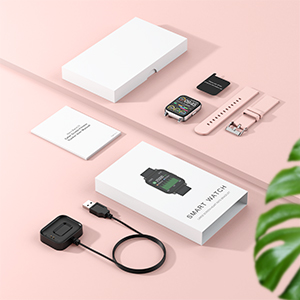
Figure 2.1: Packaging contents including the smart watch, charging cable, and manual.
3. Setup
3.1 Charging the Device
Before first use, fully charge your MuGo Smart Watch. Connect the magnetic charging USB cable to the charging points on the back of the watch and plug the USB end into a compatible power source (e.g., computer USB port, USB wall adapter).
- Charging Time: Approximately 2 hours for a full charge.
- Typical Usage: Up to 7 days of continuous use.
- Standby Time: Over 30 days.
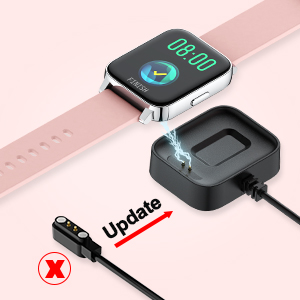
Figure 3.1: The magnetic charging cable connecting to the back of the smart watch.
3.2 Downloading the App
To unlock the full functionality of your smart watch, download and install the free "HeroBand III" app on your smartphone. The app is available for both iOS and Android devices.
3.3 Pairing via Bluetooth
Once the app is installed, open it and follow the on-screen instructions to bind your smart watch to your phone via Bluetooth. Ensure Bluetooth is enabled on your smartphone during the pairing process.
4. Operating Instructions
4.1 Display and Customization
The MuGo Smart Watch features a 1.69-inch LCD full touch screen with 300 PPI and 240x280 HD resolution, ensuring clear visibility of your data. You can adjust the screen brightness with 5 available levels for optimal viewing in various lighting conditions.
- Brightness Adjustment: Navigate through settings on the watch to select your preferred brightness level.
- Custom Watch Faces: Personalize your watch face by choosing from various pre-installed options or uploading your own photos via the HeroBand III app.

Figure 4.1: Examples of customizable watch faces, allowing users to personalize the display with their own photos.
4.2 Health Monitoring
The smart watch provides comprehensive health data to help you stay informed about your well-being:
- Real-time Heart Rate Monitoring: Continuously tracks your heart rate throughout the day.
- Blood Oxygen Measurement: Measures your SpO2 levels.
- Sleep Stage Tracking: Monitors your sleep patterns and stages (deep sleep, light sleep, awake time).
- Stress Status Data: Provides insights into your stress levels.

Figure 4.2: The watch displaying heart rate and sleep duration, indicating its health monitoring capabilities.
4.3 Activity Tracking
Track your daily activities and exercise performance with precision:
- 8 Exercise Modes: Supports walking, running, cycling, skipping, badminton, basketball, football, and swimming.
- Step Counter: Accurately records your daily steps.
- Distance Walked: Calculates the distance covered during your activities.
- Calories Burned: Estimates calorie expenditure based on your activity.

Figure 4.3: The smart watch interface showing different sports modes and activity tracking metrics like steps, distance, and calories.
4.4 Phone Features
Stay connected and manage your phone's functions directly from your wrist:
- SMS Alerts: Receive notifications for incoming text messages.
- Incoming Call Notifications: Get alerts for phone calls.
- Social Media Notifications: Receive alerts from platforms like Facebook, WhatsApp, and more.
- Music Controller: Control music playback on your connected smartphone.
- Camera Control: Remotely trigger your phone's camera shutter.

Figure 4.4: Visual representation of the smart watch's phone features, including camera control, music control, sedentary reminder, and menstrual cycle reminder.
4.5 Other Functions
The MuGo Smart Watch includes additional practical tools:
- Alarm Clocks: Set multiple alarms for reminders.
- Stopwatch: For timing activities.
- Timer: For countdowns.
- Deep Breather Guide: Assists with relaxation exercises.
- Sedentary Reminder: Alerts you to move after periods of inactivity.
- Weather Forecast: Displays current weather conditions.
- Women's Health Care: Provides physiological cycle reminders.
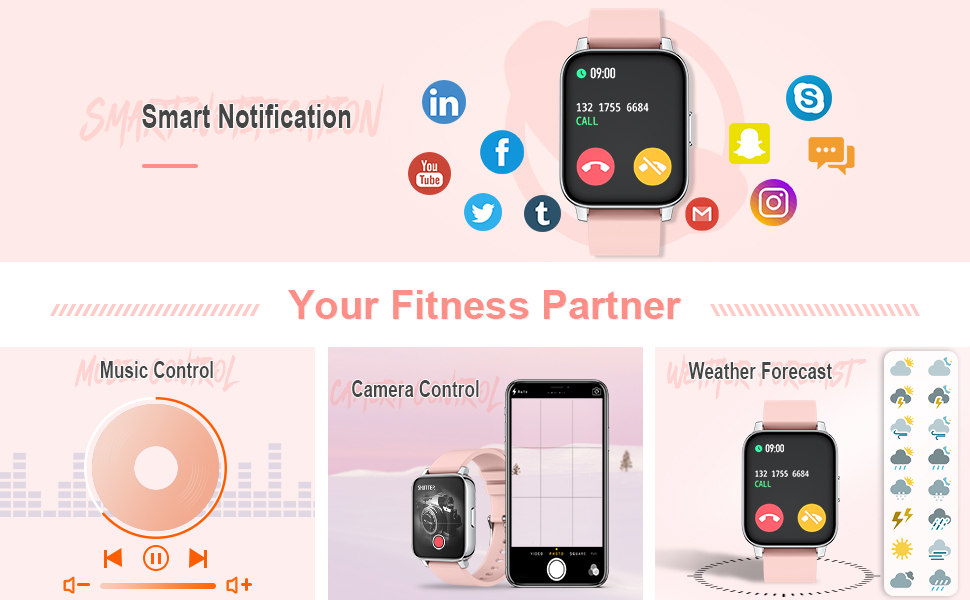
Figure 4.5: The watch showing smart notifications from various apps, music control, camera control, and weather forecast.
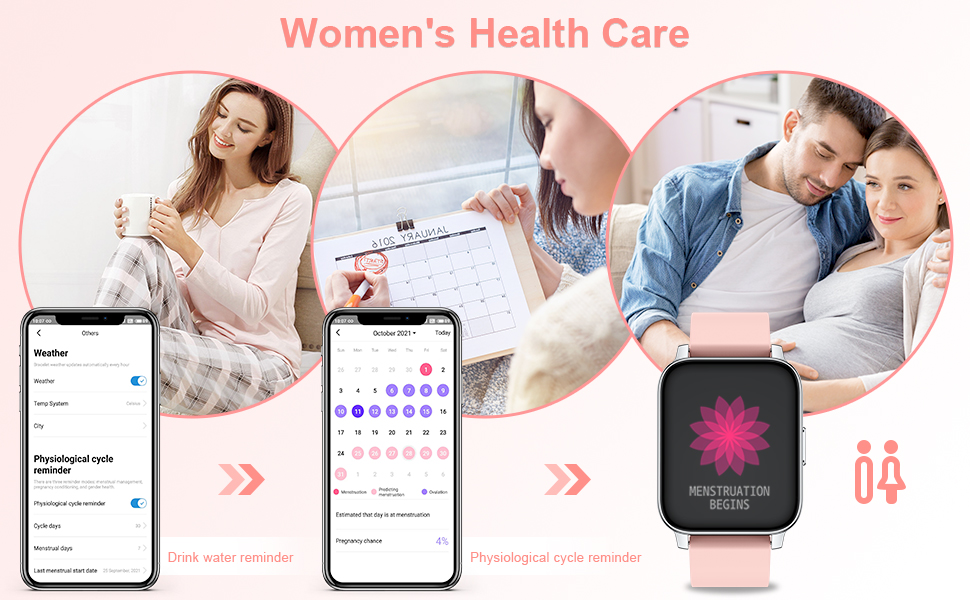
Figure 4.6: The watch and app interface illustrating the women's health care features, including physiological cycle and drink water reminders.
5. Maintenance
5.1 Waterproof Rating
The MuGo Smart Watch has an IP67 waterproof rating. This means it is protected against dust and can withstand immersion in water up to 1 meter for up to 30 minutes. You can wear it while washing hands, bathing, and swimming.
Note: The smartwatch does not prevent damage from hot water. Avoid exposing the watch to hot water, steam, or saunas.

Figure 5.1: The smart watch being used during swimming, demonstrating its IP67 waterproof capability.
5.2 Cleaning and Care
To maintain the watch's performance and appearance:
- Wipe the watch and band regularly with a soft, dry cloth.
- If the watch gets wet, dry it thoroughly before charging or prolonged storage.
- Avoid using harsh chemicals or abrasive materials for cleaning.
- The band is changeable, allowing for easy replacement if needed.
6. Troubleshooting
If you encounter any issues with your MuGo Smart Watch, please refer to the following common solutions:
- Watch not turning on: Ensure the watch is fully charged. Connect it to the magnetic charging cable and allow it to charge for at least 30 minutes before attempting to power it on.
- Unable to pair with phone:
- Ensure Bluetooth is enabled on your smartphone.
- Make sure the HeroBand III app is installed and open.
- Restart both your watch and smartphone.
- Ensure the watch is within Bluetooth range of your phone.
- Inaccurate health data:
- Ensure the watch is worn snugly on your wrist, not too loose or too tight.
- Clean the sensor on the back of the watch.
- Keep your arm still during measurements.
- Notifications not appearing:
- Check notification settings within the HeroBand III app to ensure they are enabled for desired applications.
- Ensure your phone's notification settings allow the HeroBand III app to send notifications.
- Verify that the watch is properly connected via Bluetooth.
For persistent issues, please contact MuGo customer support.
7. Specifications
| Feature | Description |
|---|---|
| Model Number | P36A |
| Display | 1.69-inch LCD Full Touch Screen |
| Resolution | 240 x 280 HD (300 PPI) |
| Dimensions | 1.57 x 1.38 x 0.39 inches |
| Item Weight | 1.76 ounces (50 Grams) |
| Battery Type | Lithium Polymer (1 included) |
| Charging Time | Approx. 2 hours |
| Typical Usage Time | 7 days |
| Standby Time | 30+ days |
| Connectivity | Bluetooth, Wireless |
| GPS | No GPS |
| Waterproof Rating | IP67 |
| Manufacturer | MuGo |
| Country of Origin | China |
| First Available Date | March 25, 2022 |
8. Official Product Video
Video 8.1: Official product video for the MuGo P36A Smart Fitness Watch. This video provides a visual overview of the watch's features, including its display, health monitoring capabilities, activity tracking, and various functions. It highlights the different color options and the ease of use.
9. Warranty and Support
For warranty information or technical support, please refer to the contact details provided with your product packaging or visit the official MuGo website. Keep your purchase receipt as proof of purchase for warranty claims.