
Audizio Metz
Audizio Metz Stereo System User Manual
Model: Metz
1. Introduction
The Audizio Metz Stereo System is a versatile micro-set designed to provide a rich audio experience through various sources. It features DAB+ and FM radio for digital and analog broadcasts, Bluetooth connectivity for wireless streaming, a CD player for your disc collection, and a USB port for MP3 playback. Equipped with two Hi-Fi speakers featuring a bass-reflex system, it delivers clear and powerful sound. The included remote control offers convenient operation, and additional features like a headphone jack, AUX input, alarm, and sleep timer enhance its functionality for any room in your home.
2. Important Safety Instructions
Please read these safety instructions carefully before operating the unit and retain them for future reference. Incorrect use may result in electric shock, fire, or other hazards.
- Power Source: Ensure the power supply voltage matches the rating label on the unit. Only use the provided power adapter.
- Water and Moisture: Do not expose the unit to rain, moisture, dripping, or splashing. Do not place objects filled with liquids, such as vases, on the unit.
- Ventilation: Ensure adequate ventilation. Do not block any ventilation openings. Maintain a minimum distance around the unit for sufficient ventilation.
- Heat: Do not place the unit near heat sources such as radiators, heat registers, stoves, or other apparatus (including amplifiers) that produce heat.
- Cleaning: Unplug the unit from the wall outlet before cleaning. Use a soft, dry cloth only. Do not use liquid cleaners or aerosol cleaners.
- Servicing: Do not attempt to service this product yourself. Refer all servicing to qualified service personnel.
- Placement: Place the unit on a stable, flat surface. Avoid placing it in direct sunlight or in environments with extreme temperatures or humidity.
3. Package Contents
Carefully unpack your Audizio Metz Stereo System and ensure all items are present and in good condition:
- Audizio Metz Main Unit
- 2 x Hi-Fi Speakers
- Remote Control
- Power Adapter
- User Manual (this document)
4. Product Overview
Familiarize yourself with the components and controls of your Audizio Metz Stereo System.

Image 4.1: The Audizio Metz Stereo System, including the main unit, two speakers, and the remote control.
4.1. Main Unit Front Panel

Image 4.2: Front panel of the main unit, showing the bright LCD display and control buttons.
- STANDBY Button: Powers the unit on or off.
- CD/USB Button: Selects CD or USB source.
- DAB/FM Button: Selects DAB+ or FM radio source.
- BT/AUX Button: Selects Bluetooth or AUX input source.
- MENU/INFO/SCAN Button: Accesses menu, displays information, or initiates scan.
- ENTER Button: Confirms selections.
- SKIP/TUNE Buttons (◀◀ / ▶▶): Navigates tracks/stations or tunes frequency.
- PLAY/PAUSE Button (▶/██): Plays or pauses playback.
- STOP Button (█): Stops playback.
- VOLUME Knob: Adjusts the volume level.
- LCD Display: Shows current status, track information, radio station, etc.
- HEADPHONE Jack: 3.5mm output for headphones.
- AUDIO IN (AUX) Jack: 3.5mm input for external audio devices.
- USB Port: For connecting USB storage devices for MP3 playback.
4.2. Main Unit Rear Panel & Connections
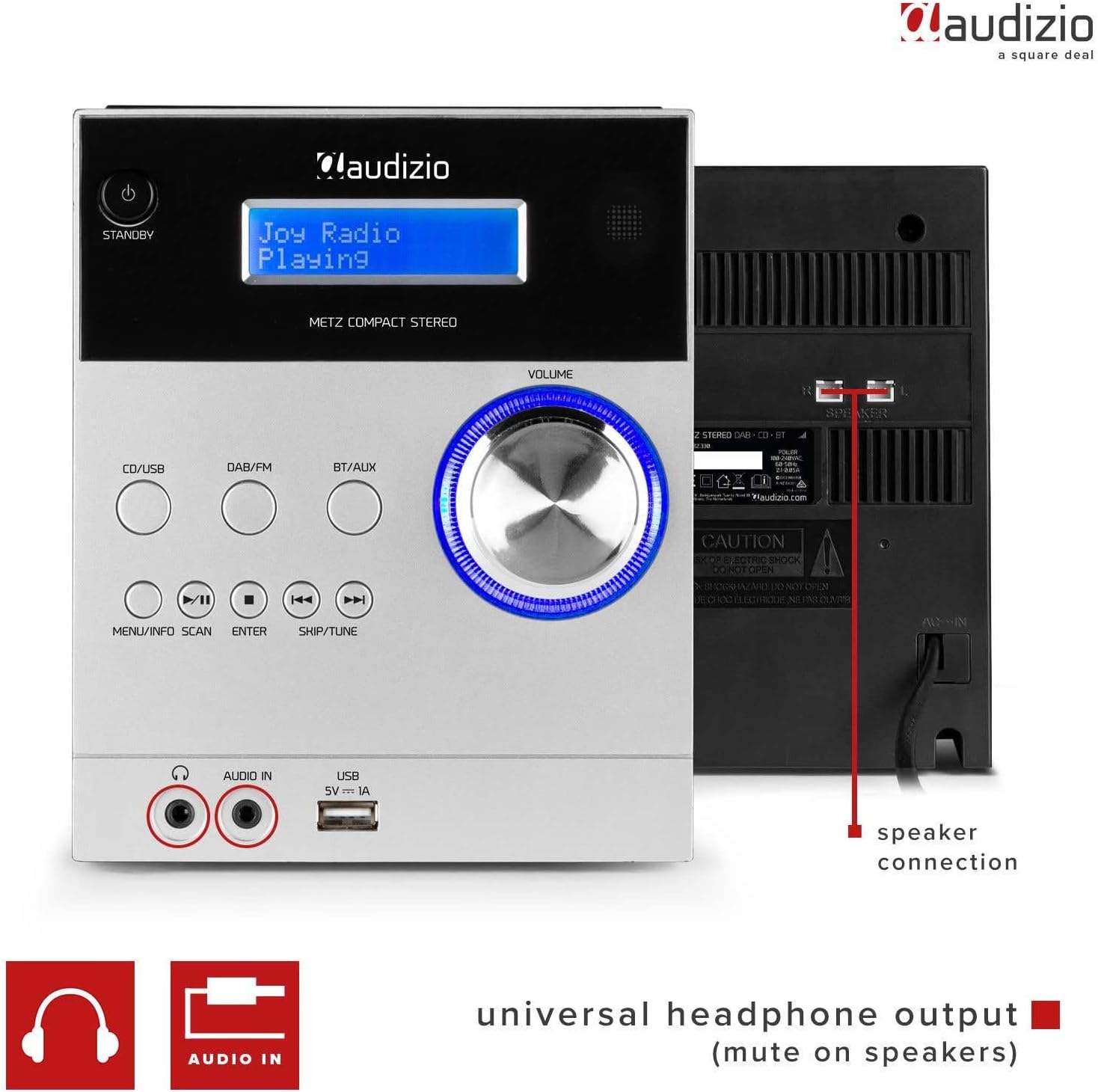
Image 4.3: Rear panel showing speaker connections and power input, along with front panel ports.
- SPEAKER Terminals: Connect the included Hi-Fi speakers.
- POWER Input: Connect the provided power adapter.
4.3. Top-Loading CD Player

Image 4.4: The top-loading CD compartment for disc playback.
The CD player is located on the top of the main unit. Gently open the lid to insert or remove a CD.
4.4. Remote Control
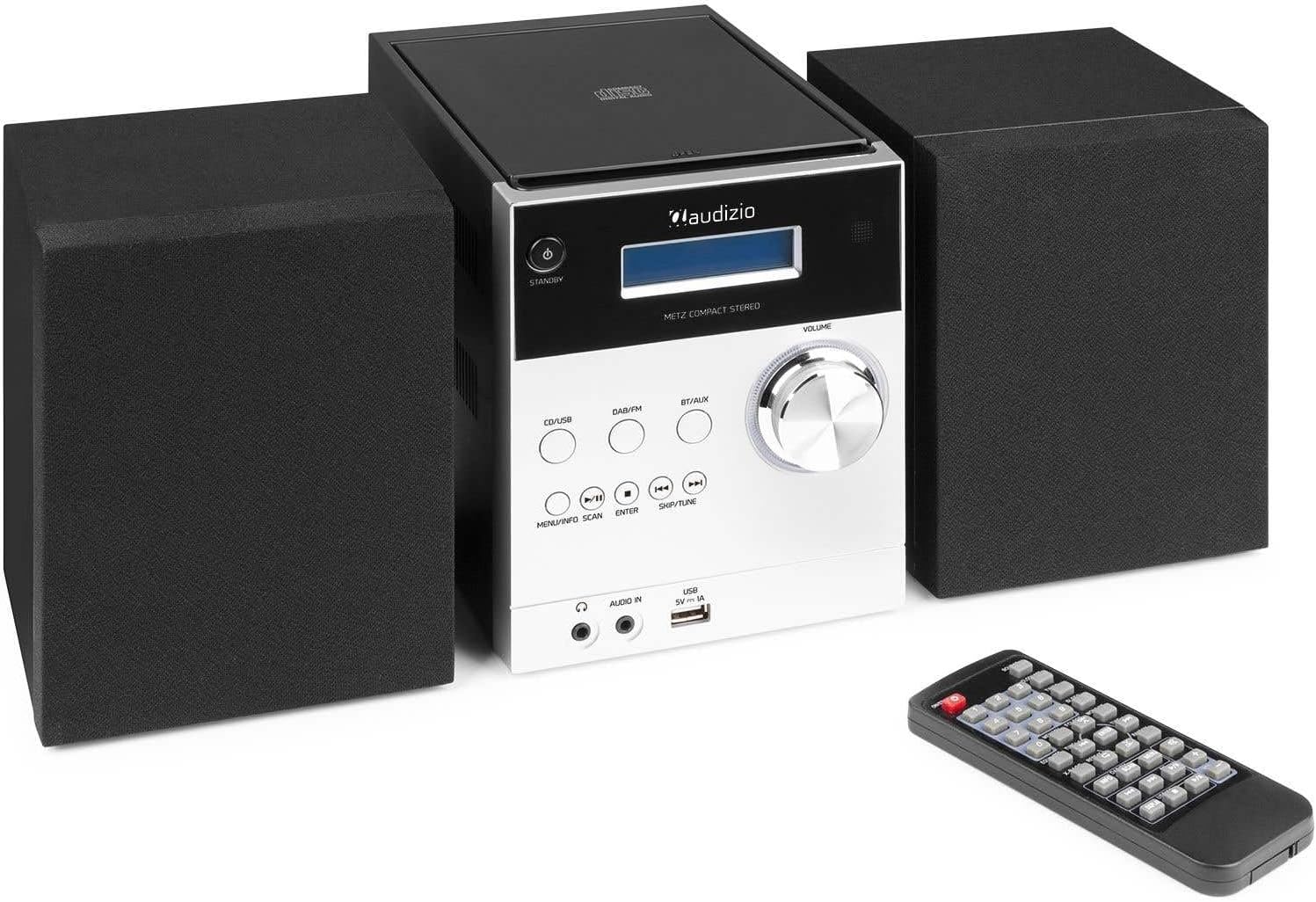
Image 4.5: The remote control for convenient operation of the stereo system.
The remote control provides full functionality for operating the stereo system from a distance. Refer to the remote control diagram in the quick start guide for specific button functions.
5. Setup
Follow these steps to set up your Audizio Metz Stereo System:
- Placement: Place the main unit and speakers on a stable, flat surface. For optimal stereo sound, position the speakers to the left and right of the main unit, facing the listening area.
- Speaker Connection: Connect the speaker wires from each speaker to the corresponding SPEAKER terminals on the rear of the main unit. Ensure correct polarity (+ to + and - to -).
- Antenna Connection: For optimal DAB+ and FM radio reception, extend the telescopic antenna fully. If reception is poor, try repositioning the antenna or the unit.
- Power Connection: Connect the power adapter to the DC IN port on the rear of the main unit, then plug the adapter into a wall outlet.
- Initial Power On: Press the STANDBY button on the front panel or remote control to turn on the unit. The LCD display will light up.
6. Operating Instructions
6.1. General Operation
- Power On/Off: Press the STANDBY button.
- Volume Adjustment: Rotate the VOLUME knob or use the VOL +/- buttons on the remote.
- Source Selection: Press CD/USB, DAB/FM, or BT/AUX buttons on the front panel or remote to switch between input sources.
6.2. DAB+ Radio
- Press the DAB/FM button to select DAB+ mode.
- The unit will automatically scan for available DAB+ stations upon first use. To initiate a manual scan, press and hold the SCAN button (or MENU/INFO/SCAN).
- Use the SKIP/TUNE buttons to navigate through the list of available stations.
- Press ENTER to select a station.
- Storing Presets: Tune to your desired station, then press and hold the MEMORY button on the remote. Use the SKIP/TUNE buttons to select a preset number (1-10), then press ENTER to confirm.
- Recalling Presets: In DAB+ mode, press the PRESET button on the remote, then use the number buttons or SKIP/TUNE to select your desired preset.
6.3. FM Radio
- Press the DAB/FM button repeatedly to select FM mode.
- Auto Scan: Press and hold the SCAN button (or MENU/INFO/SCAN) to automatically scan and store available FM stations.
- Manual Tuning: Press the SKIP/TUNE buttons briefly to fine-tune the frequency. Press and hold to auto-seek the next strong station.
- Storing Presets: Tune to your desired station, then press and hold the MEMORY button on the remote. Use the SKIP/TUNE buttons to select a preset number (1-10), then press ENTER to confirm.
- Recalling Presets: In FM mode, press the PRESET button on the remote, then use the number buttons or SKIP/TUNE to select your desired preset.
6.4. Bluetooth Mode

Image 6.1: The system ready for Bluetooth streaming from a mobile device.
- Press the BT/AUX button repeatedly to select Bluetooth mode. The display will show "Bluetooth" or "BT Pairing".
- On your mobile device (smartphone, tablet, etc.), enable Bluetooth and search for new devices.
- Select "Audizio Metz" from the list of available devices.
- Once paired, the unit will confirm the connection. You can now play music from your device, and it will stream wirelessly to the stereo system.
- Use your device or the system's controls (Play/Pause, Skip) to manage playback.
6.5. CD Player
- Press the CD/USB button repeatedly to select CD mode.
- Gently open the CD compartment lid on top of the main unit.
- Place a CD (label side up) onto the spindle and close the lid. The unit will read the CD.
- Playback will usually start automatically. If not, press the PLAY/PAUSE button.
- Use the SKIP/TUNE buttons to skip tracks.
- Press PLAY/PAUSE to pause, and STOP to stop playback.
- Repeat/Random: Use the corresponding buttons on the remote control to activate repeat (single track/all) or random playback modes.
6.6. USB MP3 Player
- Insert a USB flash drive containing MP3 files into the USB port on the front panel.
- Press the CD/USB button repeatedly to select USB mode. The unit will automatically scan and begin playing MP3 files.
- Use the SKIP/TUNE buttons to navigate between tracks.
- Press PLAY/PAUSE to pause, and STOP to stop playback.
- Folder Navigation: If your USB drive has folders, use the FOLDER buttons on the remote to navigate between them.
6.7. AUX Input
- Connect an external audio device (e.g., smartphone, MP3 player) to the AUDIO IN (AUX) jack on the front panel using a 3.5mm audio cable (not included).
- Press the BT/AUX button repeatedly to select AUX mode.
- Start playback on your external device. The audio will be routed through the stereo system.
- Adjust the volume using the system's VOLUME knob or the external device's volume control.
6.8. Headphone Output
Connect headphones to the HEADPHONE jack on the front panel. When headphones are connected, the speakers will automatically mute, allowing for private listening.
6.9. Clock, Sleep Timer & Alarm Function
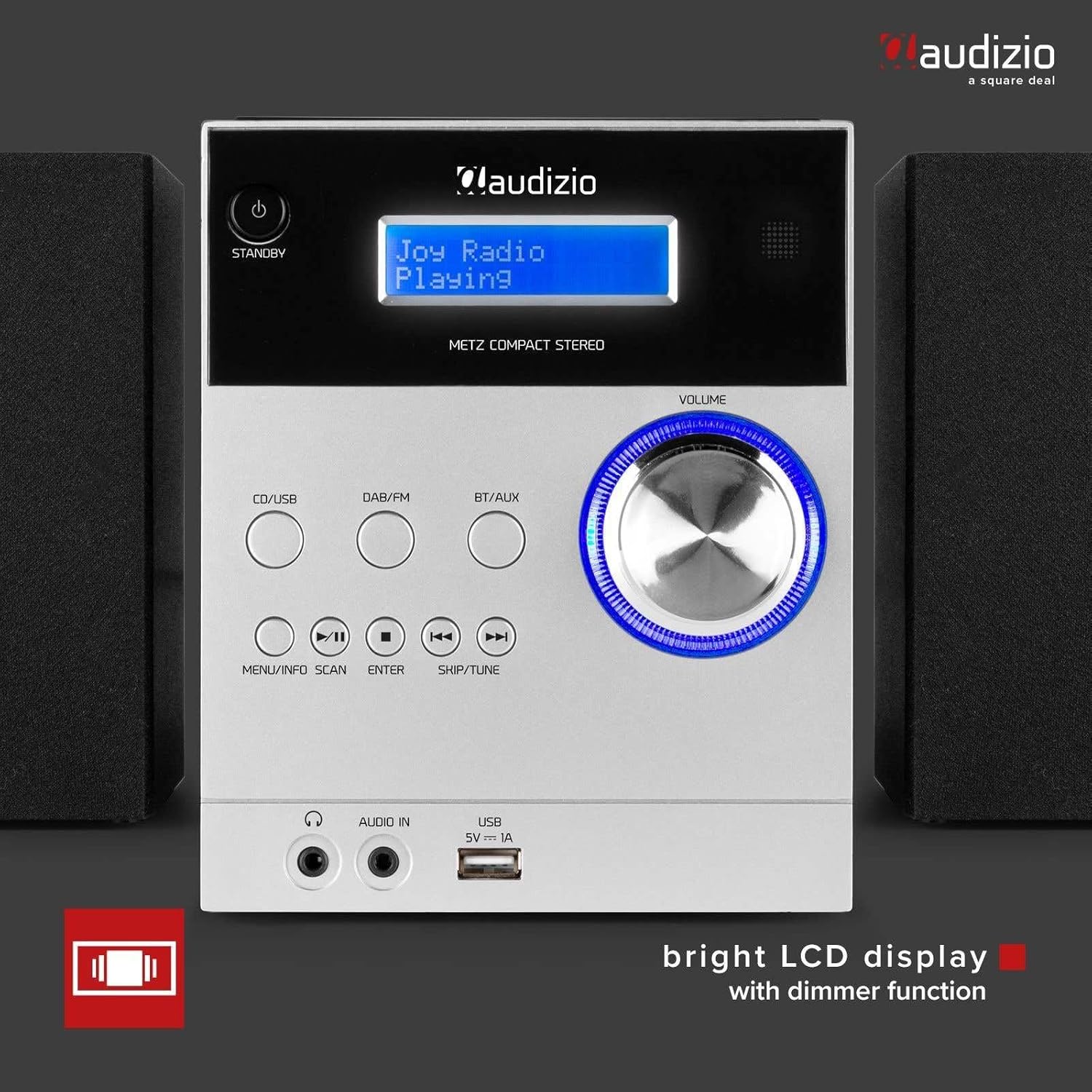
Image 6.2: The system displaying clock information, indicating alarm and sleep timer capabilities.
- Setting the Clock: Refer to the detailed instructions in the full manual for setting the time. This is typically done via the MENU button.
- Sleep Timer: Press the SLEEP button on the remote repeatedly to cycle through sleep timer options (e.g., 15, 30, 60, 90 minutes, OFF). The unit will automatically turn off after the selected duration.
- Alarm Function: The unit features an alarm function. Consult the full manual for detailed steps on setting and activating the alarm, including alarm source (radio/buzzer) and volume.
7. Maintenance
7.1. Cleaning the Unit
- Always unplug the unit from the power outlet before cleaning.
- Use a soft, dry, lint-free cloth to wipe the exterior surfaces.
- Do not use abrasive cleaners, waxes, or solvents as they may damage the finish.
7.2. CD Lens Care
If the CD player experiences reading errors, the lens may be dirty. Use a commercially available CD lens cleaner disc to clean the lens. Do not touch the lens directly.
8. Troubleshooting
If you encounter any issues with your Audizio Metz Stereo System, please refer to the following table for common problems and solutions.
| Problem | Possible Cause | Solution |
|---|---|---|
| No power | Power adapter not connected; Power outlet not working. | Ensure the power adapter is securely connected to the unit and a working wall outlet. |
| No sound | Volume too low; Speakers not connected; Headphones connected; Incorrect source selected. | Increase volume; Check speaker connections; Disconnect headphones; Select the correct input source. |
| Poor radio reception (DAB+/FM) | Antenna not extended; Weak signal; Interference. | Extend the telescopic antenna fully; Try repositioning the unit or antenna; Move away from other electronic devices. |
| Bluetooth pairing failure | Bluetooth not enabled on device; Unit not in pairing mode; Device too far. | Ensure Bluetooth is enabled on your device; Select BT mode on the unit; Keep devices within 10 meters. |
| CD/USB not playing | CD inserted incorrectly/dirty/scratched; USB format not supported; USB drive corrupted. | Reinsert CD correctly, clean it; Ensure USB is FAT32 format and contains MP3 files; Try a different USB drive. |
| Remote control not working | Batteries depleted; Obstruction between remote and unit; Remote not pointed at sensor. | Replace remote control batteries; Remove any obstructions; Point remote directly at the unit's sensor. |
9. Specifications
| Brand | Audizio |
| Model | Metz |
| Color | Aluminum |
| Power Output | 30W |
| DAB+ Presets | 10 |
| FM Presets | 10 |
| Bluetooth Version | Yes (Bluetooth compatible) |
| CD Compatibility | CD, CD-R, CD-RW |
| USB Playback | MP3 format support |
| Headphone Jack | 3.5mm |
| AUX Line Input | 3.5mm |
| Power Supply | 230Vac/50Hz |
| Main Unit Dimensions (W x H x D) | 140 x 210 x 175mm |
| Speaker Dimensions (per speaker, W x H x D) | 130 x 125 x 175mm |
| Total Weight (set) | 2.5kg |
10. Warranty and Support
The Audizio Metz Stereo System comes with a standard manufacturer's warranty. For specific warranty terms and conditions, please refer to the warranty card included with your product or visit the official Audizio website. For technical support, troubleshooting assistance beyond this manual, or spare parts inquiries, please contact your retailer or the Audizio customer service department.
Spare Parts Availability: 2 Years
Related documentsMetz


Ask a question about this manual
Ask about setup, troubleshooting, compatibility, parts, safety, or missing instructions. Manuals+ will review the question and use this page’s manual context to help answer it.