
1. Important Safety Instructions
Please read all instructions carefully before using this appliance. Failure to follow these instructions may result in electric shock, fire, or serious injury.
- This appliance is for household use only. Do not use outdoors or on wet surfaces.
- Do not allow to be used as a toy. Close attention is necessary when used by or near children.
- Use only as described in this manual. Use only manufacturer's recommended attachments.
- Do not use with damaged cord or plug. If appliance is not working as it should, has been dropped, damaged, left outdoors, or dropped into water, return it to a service center.
- Do not pull or carry by cord, use cord as a handle, close a door on cord, or pull cord around sharp edges or corners. Do not run appliance over cord. Keep cord away from heated surfaces.
- Do not unplug by pulling on cord. To unplug, grasp the plug, not the cord.
- Do not handle plug or appliance with wet hands.
- Do not put any object into openings. Do not use with any opening blocked; keep free of dust, lint, hair, and anything that may reduce air flow.
- Keep hair, loose clothing, fingers, and all parts of body away from openings and moving parts.
- Do not pick up anything that is burning or smoking, such as cigarettes, matches, or hot ashes.
- Do not use to pick up flammable or combustible liquids, such as gasoline, or use in areas where they may be present.
- Do not pick up toxic material (e.g., chlorine bleach, ammonia cleaner, drain cleaner).
- Do not use without dust cup and/or filters in place.
- Turn off all controls before unplugging.
- Use extra care when cleaning on stairs.
- Do not charge the unit outdoors.
- Recharge only with the charger specified by the manufacturer. A charger that is suitable for one type of battery pack may create a risk of fire when used with another battery pack.
- Under abusive conditions, liquid may be ejected from the battery; avoid contact. If contact accidentally occurs, flush with water. If liquid contacts eyes, additionally seek medical help. Liquid ejected from the battery may cause irritation or burns.
2. Package Contents
Verify that all items are included in your package:
- 1x Oraimo Handheld Vacuum Cleaner
- 1x Crevice Nozzle for Corner Cleaning
- 1x 2-in-1 Anti-Static Pet Hair Brush Nozzle
- 1x Extended Flexible Hose
- 2x HEPA Filters (one pre-installed, one spare)
- 1x Power Adapter
- 1x Cleaning Brush
- 1x User Manual (this document)
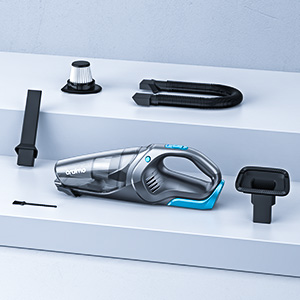
Image: Oraimo Handheld Vacuum and its complete set of accessories, including various nozzles, filters, and charging cable.
3. Product Overview
Familiarize yourself with the components of your Oraimo Handheld Vacuum:

Image: The Oraimo Handheld Vacuum Cleaner, highlighting its ergonomic handle, transparent dustbin, power button, and LED light.
Key Features:
- Strong Suction: 7.5Kpa suction power with a 100W motor for effective cleaning.
- Detachable Battery: 2200mAh removable battery for flexible charging.
- LED Light: Integrated LED light to illuminate dark areas during cleaning.
- Versatile Attachments: Includes a crevice nozzle, flexible hose, and a 2-in-1 pet hair brush.
- Dual Filtration: HEPA and stainless steel dual filtration system.
4. Setup
4.1 Battery Installation
The Oraimo Handheld Vacuum features a detachable battery for convenience.
- Align the battery pack with the battery compartment at the bottom of the vacuum.
- Slide the battery into place until it clicks securely.

Image: The detachable battery being inserted into the vacuum, illustrating both direct charging and separate battery charging methods.
4.2 Charging the Battery
Before first use, fully charge the vacuum for optimal performance. The battery can be charged while attached to the vacuum or separately.
- Connect the power adapter to the charging port on the vacuum or directly to the detachable battery.
- Plug the adapter into a power outlet.
- The charging indicator lights will show the charging status. A full charge typically takes 3-4 hours.
5. Operating Instructions
5.1 Powering On/Off
To prevent accidental activation, the vacuum features a soft start motor.
- To turn on: Press and hold the power button for 3 seconds. The power indicator lights will illuminate.
- To turn off: Press the power button once.
5.2 Using Attachments
Select the appropriate attachment for your cleaning task:
- Crevice Nozzle: Ideal for narrow gaps, corners, and hard-to-reach areas like car seats or sofa crevices.
- 2-in-1 Pet Hair Brush Nozzle: Features an anti-static strip for fabric surfaces and a silicone brush for carpets, effectively removing pet hair without tangling.
- Extended Flexible Hose: Provides extended reach and flexibility for cleaning car floor mats, under furniture, or other awkward spots.

Image: The Oraimo Handheld Vacuum displayed with its multiple attachments: a standard suction nozzle, a crevice nozzle, and a flexible hose.

Image: The Oraimo Handheld Vacuum demonstrating the 2-in-1 anti-static brush effectively removing pet hair from a carpeted surface.
Video: This video demonstrates the Oraimo OHV-103 Handheld Vacuum's ease of maneuverability and portability, showcasing its use in various household and car cleaning scenarios.
Video: This video highlights how the Oraimo handheld vacuum is ideal for cleaning pet hair, demonstrating its effectiveness on different surfaces.
5.3 Using the LED Light
The integrated LED light helps illuminate dark areas for thorough cleaning.
- To turn on the LED light: Press the dedicated light button located near the power button.
- To turn off the LED light: Press the light button again.

Image: The Oraimo Handheld Vacuum's bright LED light effectively illuminating a dark car interior, making hidden dirt visible for cleaning.
6. Maintenance
Regular maintenance ensures optimal performance and extends the lifespan of your vacuum.
6.1 Emptying the Dustbin
Empty the dustbin after each use or when it reaches the MAX fill line.
- Ensure the vacuum is turned off.
- Press the dustbin release buttons on both sides of the vacuum.
- Carefully detach the dustbin from the main unit.
- Hold the dustbin over a trash receptacle and open the dustbin lid to empty contents.
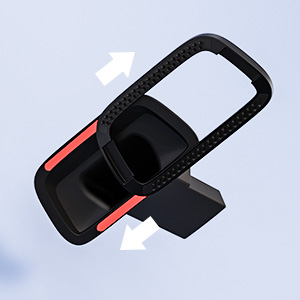
Image: A hand removing the filter assembly from the transparent dustbin of the Oraimo Handheld Vacuum, illustrating the emptying process.
6.2 Cleaning the Filters
The Oraimo Handheld Vacuum uses a HEPA and stainless steel dual filtration system. Both filters are washable.
- After emptying the dustbin, twist and pull out the filter assembly.
- Separate the stainless steel mesh filter from the HEPA filter.
- Rinse both filters under running water until clean. Do not use harsh detergents.
- Allow both filters to air dry completely for at least 24 hours before reassembling and placing back into the vacuum. Ensure they are completely dry to prevent mold and maintain suction power.
- The package includes a spare HEPA filter for convenience.
6.3 Cleaning Attachments
Wipe attachments with a damp cloth as needed. Ensure they are dry before storage.
7. Troubleshooting
| Problem | Possible Cause | Solution |
|---|---|---|
| Vacuum does not turn on. | Battery is not charged or not properly installed. | Ensure battery is fully charged and securely installed. Press and hold power button for 3 seconds. |
| Low suction power. | Dustbin is full, filters are clogged, or attachment is blocked. | Empty dustbin. Clean or replace filters. Check attachments for blockages. |
| Battery not charging. | Charger not properly connected or power outlet issue. | Ensure charger is securely plugged into both the vacuum/battery and the wall outlet. Try a different outlet. |
| Vacuum turns off unexpectedly. | Battery is low or vacuum is overheating. | Recharge the battery. Allow the vacuum to cool down if it has been used continuously for a long period. |
8. Specifications
| Feature | Detail |
|---|---|
| Brand | Oraimo |
| Model Name | UltraCleaner H3 |
| Model Number | OHV-103 |
| Suction Power | 7.5 Kpa |
| Motor Wattage | 100 Watts |
| Battery Capacity | 2200 mAh (Detachable Lithium-Ion) |
| Charging Time | 3-4 Hours |
| Filter Type | HEPA Filter (Washable) |
| Noise Level | 78 Decibels |
| Item Weight | 1.15 Kilograms |
| Dimensions (L x W x H) | 16.73" x 7.68" x 6.1" |
| Hose Length | 21.65 Inches |
| Recommended Uses | Bare Floor, Carpet, Furniture, Hard Floor, Sofa, Car |
9. Warranty and Support
The Oraimo Handheld Vacuum OHV-103 comes with a Lifetime Warranty.
For any product inquiries, technical support, or warranty claims, please contact Oraimo customer service through the official website or your purchase platform. Please retain your proof of purchase for warranty validation.


