
Introduction
Welcome to the user manual for your MOBILLA MBUDS 101 True Wireless Stereo (TWS) Earbuds. These earbuds are designed to provide a superior audio experience with features like extended playback time, touch controls, IPX4 water resistance, and voice assistant compatibility. This manual will guide you through the setup, operation, maintenance, and troubleshooting of your MBUDS 101 earbuds to ensure optimal performance and enjoyment.
1. Setup
1.1 Initial Charging
Before first use, fully charge your MBUDS 101 earbuds and their charging case. The earbuds offer up to 5 hours of non-stop playtime per charge, with the charging case providing an additional 16 hours, totaling 21 hours of playback time.
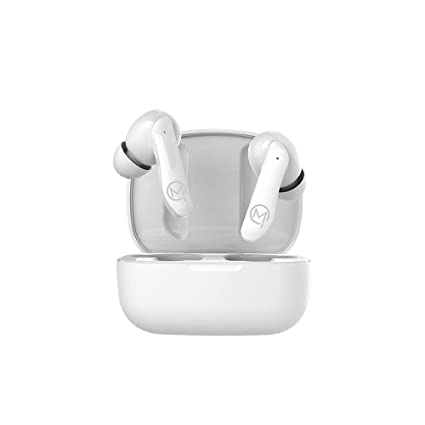
Image: MOBILLA MBUDS 101 TWS Earbuds in their charging case, highlighting the 21-hour total playback time.
1.2 Pairing with a Device
- Ensure the earbuds are charged.
- Open the charging case. The earbuds will automatically enter pairing mode.
- On your smartphone, tablet, or other Bluetooth-enabled device, go to the Bluetooth settings.
- Search for available devices and select "MOBILLA MBUDS 101" from the list.
- Once connected, you will hear an audio prompt, and the earbuds will be ready for use.
2. Operating Instructions
2.1 Touch Controls
The MBUDS 101 earbuds feature intuitive touch controls for managing music playback and calls.
- Play/Pause Music: Single tap on either earbud.
- Next Track: Double tap on the right earbud.
- Previous Track: Double tap on the left earbud.
- Answer/End Call: Single tap on either earbud during an incoming call.
- Reject Call: Press and hold either earbud for 2 seconds during an incoming call.
- Activate Voice Assistant: Triple tap on either earbud.
2.2 Voice Assistant
The MBUDS 101 supports voice assistants like Google Assistant and Siri. Activate your device's voice assistant with a triple tap on either earbud, then speak your command.

Image: A user holding a MOBILLA MBUDS 101 earbud, illustrating the integration of voice assistant features.
2.3 Music Playback
Enjoy high-quality audio with the 10mm dynamic drivers. The True Wireless Stereo design ensures an untangled and immersive listening experience. Use the touch controls to manage your music.

Image: A person using MOBILLA MBUDS 101 earbuds during exercise, emphasizing the wireless freedom.
3. Maintenance
3.1 Cleaning
To maintain optimal sound quality and hygiene, regularly clean your earbuds. Use a soft, dry, lint-free cloth to wipe the earbuds and charging case. Do not use abrasive cleaners or immerse the earbuds in liquid.
3.2 Water Resistance (IPX4)
The MBUDS 101 earbuds are IPX4 water-resistant, meaning they are protected against splashing water from any direction. This makes them suitable for workouts and light rain. However, they are not designed for submersion in water or exposure to heavy rain. Avoid using them in saunas, steam rooms, or while swimming.

Image: The MOBILLA MBUDS 101 charging case demonstrating its IPX4 splash-proof rating.
3.3 Storage
When not in use, store your earbuds in their charging case to protect them from dust, damage, and to keep them charged.
4. Troubleshooting
| Issue | Possible Cause | Solution |
|---|---|---|
| Earbuds not pairing | Low battery; not in pairing mode; previously paired with another device. | Ensure earbuds are charged. Place them back in the case, then open the lid to re-enter pairing mode. Turn off Bluetooth on other devices. |
| No sound from one earbud | One earbud not connected; low battery; debris blocking speaker. | Place both earbuds back in the case, close, then reopen. Ensure both are charged. Clean the speaker mesh gently. |
| Charging issues | Dirty charging contacts; faulty cable/adapter. | Clean charging contacts on earbuds and case. Try a different charging cable and adapter. |
| Voice assistant not responding | Incorrect gesture; device not connected; voice assistant not enabled on phone. | Ensure triple tap gesture is performed correctly. Verify earbuds are connected to your device. Check your phone's settings for voice assistant activation. |
5. Specifications
| Brand | MOBILLA |
| Model Name | MBUDS 101 |
| Ear Placement | In Ear |
| Form Factor | In Ear |
| Wireless Technology Type | Bluetooth |
| Audio Driver Type | Dynamic Driver (10mm) |
| Battery Playtime | Up to 21 Hours (with charging case) |
| Water Resistance Level | IPX4 (Water Resistant) |
| Control Method | Touch, Voice |
| Product Features | Microphone Included, Sweatproof |
| Compatible Devices | Smartphones, Tablets, Smart Speakers |
| Box Contents | Earbuds, Charging Case, Cable, Ear Cushions |
6. Warranty Information
The MOBILLA MBUDS 101 TWS Earbuds come with a 365-day warranty on the main product from the date of purchase. Please retain your proof of purchase for warranty claims. The warranty covers manufacturing defects but does not cover damage caused by misuse, accidents, or unauthorized modifications.
7. Support
For further assistance, technical support, or warranty inquiries regarding your MOBILLA MBUDS 101 TWS Earbuds, please refer to the contact information provided with your product packaging or visit the official MOBILLA website.