
1. Introduction
This manual provides essential instructions for the proper setup, operation, and maintenance of your TODO Under Desk Treadmill Remote Control. This remote is designed as a replacement for the original remote control of the TODO Under Desk Treadmill, specifically compatible with Model AD-4000.
Please read this manual thoroughly before using the remote control to ensure safe and efficient operation.
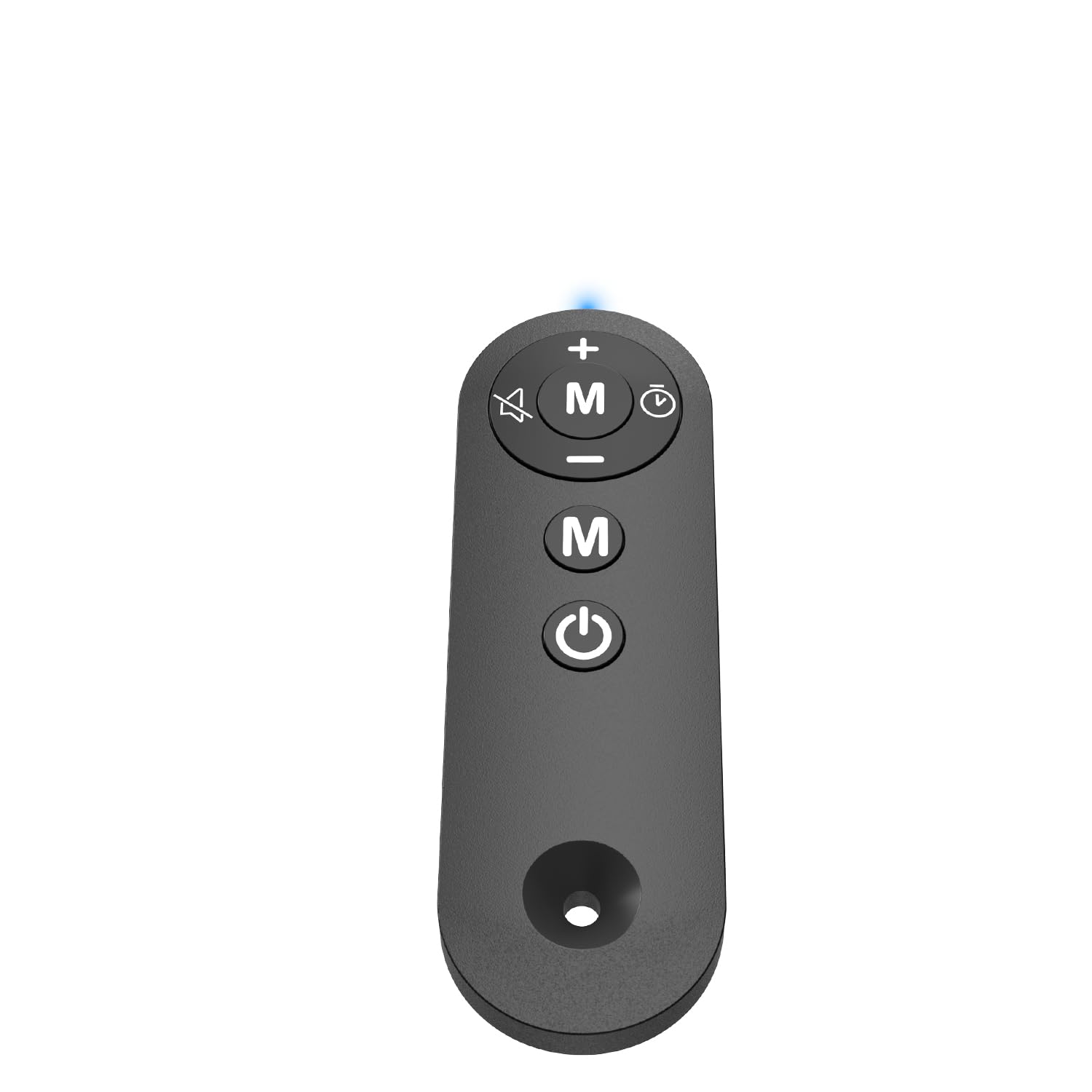
Figure 1: TODO Under Desk Treadmill Remote Control
2. Product Overview
The TODO Remote Control is a compact and portable device designed for convenient operation of your compatible under-desk treadmill. It features intuitive buttons for speed adjustment, mode selection, and power control.
2.1. Remote Control Features
- Material: Acrylonitrile Butadiene Styrene (ABS) for durability.
- Connectivity: Infrared (IR) technology for reliable communication with the treadmill.
- Sensitive Buttons: Responsive controls for precise adjustments.
- Portable Design: Lightweight and easy to handle.
Video 1: Overview of the Treadmill Remote Control. This video demonstrates the physical features and button layout of the remote control.
3. Setup
3.1. Battery Installation
The remote control requires two AAA batteries (not included). To install the batteries:
- Locate the battery compartment cover on the back of the remote control.
- Slide the cover open.
- Insert two AAA batteries, ensuring correct polarity (+ and -).
- Close the battery compartment cover securely.
Video 2: Treadmill Remote Control Replacement. This video illustrates the process of opening the battery compartment and inserting batteries.
3.2. Initial Use
Before first use, remove the insulating plastic sheet located on the side of the remote control. Once removed, the indicator light in front of the remote should illuminate with a blue light, confirming the remote is ready for use.
Video 3: Treadmill Remote Control Replacement. This video demonstrates the removal of the insulating plastic sheet and the remote's activation.
4. Operating Instructions
Point the remote control directly at the treadmill's receiver for optimal performance. The remote allows you to control various functions of your TODO Under Desk Treadmill.
4.1. Button Functions
- Power Button (On/Off): Press to turn the treadmill on or off.
- '+' Button: Increases the treadmill speed.
- '-' Button: Decreases the treadmill speed.
- 'M' Button (Mode): Cycles through different operating modes or programs on the treadmill.
Video 4: Walking Pad Remote Replacement. This video demonstrates the functionality of the remote control buttons with a compatible treadmill.
5. Specifications
| Brand | TODO |
| Model Name | REMOTE |
| Product Dimensions | 1.97"D x 0.79"W x 0.28"H |
| Item Weight | 0.07 Pounds |
| Material | Acrylonitrile Butadiene Styrene (ABS) |
| Connectivity Technology | Infrared |
| Power Source | Battery Powered (2x AAA, not included) |
| Included Components | Remote Control |
6. Troubleshooting
6.1. Remote Not Responding
- Check Battery: Ensure batteries are correctly installed and have sufficient charge. Replace if necessary.
- Remove Insulating Strip: Verify that the plastic insulating strip has been completely removed from the battery compartment.
- Line of Sight: Ensure there is a clear line of sight between the remote control and the treadmill's receiver. Obstructions can block the infrared signal.
- Compatibility: Confirm that your treadmill is a TODO brand, specifically Model AD-4000. This remote is designed for this specific model.
6.2. Indicator Light Not On
- Check battery installation and charge.
- Ensure the insulating plastic sheet is removed.
7. Maintenance
To ensure the longevity and proper functioning of your remote control:
- Keep the remote clean and dry. Wipe with a soft, damp cloth if necessary.
- Avoid dropping the remote or subjecting it to strong impacts.
- Store in a cool, dry place away from direct sunlight and extreme temperatures.
- If the remote will not be used for an extended period, remove the batteries to prevent leakage.
8. Warranty and Support
For warranty information or technical support, please refer to the documentation provided with your TODO Under Desk Treadmill or contact TODO customer service directly. Contact information can typically be found on the manufacturer's website or on the original product packaging.

Figure 2: TODO Brand Logo


