Introduction
This user manual provides comprehensive instructions for the MATCOM GCBLTV02ADBBT Smart TV Remote Control. This remote is designed as a direct replacement for various ChangHong CHIQ UHD TV models, including U43H7A, U50H7A, U55H7A, U58H7A, L32H7S, L40H7S, L43H7S, and U58H7S. It offers full functionality without the need for complex programming.

Figure 1: MATCOM GCBLTV02ADBBT Remote Control in hand, showcasing its ergonomic design.
Setup
The MATCOM GCBLTV02ADBBT remote control is designed for immediate use with compatible TV models. No complex programming or setup procedures are required.
Battery Installation
- Locate the battery compartment on the back of the remote control.
- Slide open the battery cover.
- Insert two (2) AAA alkaline batteries, ensuring the positive (+) and negative (-) terminals align correctly with the indicators inside the compartment.
- Close the battery cover securely.
Once batteries are installed, the remote control is ready to operate your compatible TV.
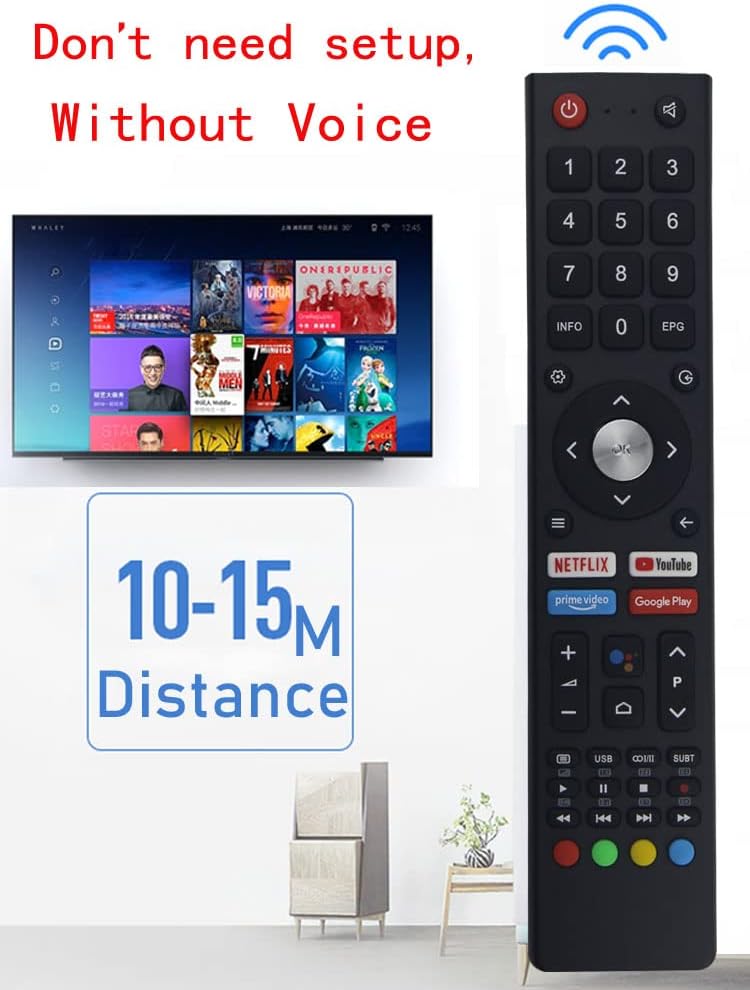
Figure 2: The remote control operates without setup and has an effective range of 10-15 meters.
Operating Instructions
The MATCOM GCBLTV02ADBBT remote control features a standard layout for intuitive navigation and control of your Smart TV.
Button Functions

Figure 3: Overview of the remote control's button layout.
- Power Button (●): Turns the TV on or off.
- Mute Button (🔇): Mutes or unmutes the TV sound.
- Number Buttons (0-9): Directly select channels or input numerical data.
- INFO Button: Displays information about the current program or input.
- EPG Button: Accesses the Electronic Program Guide.
- Navigation Pad (Up, Down, Left, Right, OK): Navigates menus and confirms selections.
- Back Button (↵): Returns to the previous screen or menu.
- Home Button (⌂): Accesses the TV's main home screen or Smart TV interface.
- Volume Up/Down (+/-): Adjusts the TV volume.
- Channel Up/Down (P+/P-): Changes TV channels.
- Netflix Button: Direct access to the Netflix application.
- YouTube Button: Direct access to the YouTube application.
- Prime Video Button: Direct access to the Prime Video application.
- Google Play Button: Direct access to the Google Play Store.
- Media Control Buttons (Play, Pause, Stop, Rewind, Fast Forward, Previous, Next): Controls media playback.
- Colored Buttons (Red, Green, Yellow, Blue): Functionality varies depending on the TV menu or application.
Maintenance
Cleaning the Remote Control
To maintain the remote control's performance and appearance, follow these cleaning guidelines:
- Use a soft, dry cloth to wipe the surface of the remote control.
- For stubborn dirt, slightly dampen the cloth with water or a mild, non-abrasive cleaner. Avoid excessive moisture.
- Do not use harsh chemicals, solvents, or abrasive cleaning pads, as these can damage the remote's finish or internal components.
Battery Replacement
Replace batteries when the remote control's responsiveness decreases or it stops functioning. Always replace both batteries at the same time with new ones of the same type (AAA alkaline).
- Remove old batteries from the compartment.
- Dispose of used batteries responsibly according to local regulations.
- Insert new batteries as described in the "Battery Installation" section.
Troubleshooting
| Problem | Possible Cause | Solution |
|---|---|---|
| Remote control not responding. |
|
|
| Specific buttons not working. |
|
|
| TV not responding to remote, but remote's IR light flashes. |
|
|
Specifications
- Model Number: GCBLTV02ADBBT
- Brand: MATCOM
- Compatible Devices: ChangHong CHIQ UHD Televisions (U43H7A, U50H7A, U55H7A, U58H7A, L32H7S, L40H7S, L43H7S, U58H7S)
- Power Source: 2 x AAA Batteries (not included)
- Color: Black
- Item Weight: 2.39 ounces (approx. 67.7 grams)
- Package Dimensions: 8.35 x 1.85 x 0.83 inches (approx. 21.2 x 4.7 x 2.1 cm)
- Special Feature: Ergonomic design
- Max Number of Supported Devices: 1
Warranty and Support
This MATCOM remote control is designed for reliable performance. For any issues not covered in the troubleshooting section, please refer to the retailer's return policy or contact MATCOM customer support.
- Return Policy: Typically 30 days from purchase, as per retailer's terms.
- Manufacturer: MATCOM
- For further assistance, please visit the official MATCOM website or contact their customer service channels.