
Introduction
The VXSCAN F04 Underground Cable Locator is designed to assist in quickly and accurately locating break-points and tracing underground and wall-through cables. This manual provides comprehensive instructions for its safe and effective use, helping you save time and money on cable maintenance.
What's in the Box?

The package includes the VXSCAN F04 Transmitter, Receiver, a storage bag, user manual, brief user manual, screwdriver, 2.5mm headphone, and two 9V 6LR61 high-quality batteries.
- 1x Storage bag
- 1x User manual
- 1x Brief user manual
- 1x Screwdriver
- 1x Transmitter
- 1x Receiver
- 1x 2.5mm headphone
- 2x 9V 6LR61 high-quality batteries
Product Features

The VXSCAN F04 offers adjustable signal strength, precise cable break detection, an integrated LED flashlight for low-light conditions, and external earphone support for clear audio feedback.
- Save Time and Money: Swiftly and precisely locate break-points and trace underground and wall-through cables, enabling independent cable maintenance.
- Upgraded Version, Underground Wire Tracer: Powered by high-performance 9V batteries, offering a detection length of up to 1000 feet and a depth within 3 feet under normal conditions.
- Enhanced Efficiency in Noisy Environments: Equipped with 3.5 mm headphones to minimize external noise interference, ensuring optimal efficiency and accuracy. Signal strength and receiver sensitivity are adjustable.
Product Components

Detailed view of the VXSCAN F04 components, including the Transmitter and Receiver units with their respective controls and indicators.
Transmitter Components:
- Potentiometer
- Transmitting Signal Indicator Lamp
- Power Indicator Light
- Signal Emission Key
- Power Switch Button
- Transmitter Clip Connecting Wire (Red and Black)
Receiver Components:
- LED Flashlight
- Transmitting Signal Indicator Lamp
- Headphone Jack
- Volume Keys
- Power Indicator Light
- Power Switch Button
- Flashlight Switch Button
- Receiver Probe
Setup

Proper battery installation is crucial for device functionality. Ensure the 9V batteries are inserted with correct polarity as indicated inside the battery compartment.
- Install Batteries: Open the battery compartments on both the Transmitter and Receiver units. Insert two 9V batteries into each unit, ensuring correct polarity.
- Power On: Hold the power button on both the Transmitter and Receiver for at least 3 seconds to turn them on. The power indicator light should illuminate.
- Prepare for Tracing: For optimal signal, especially when tracing longer or deeper lines, connect the black clip of the transmitter to a properly installed ground stake inserted into the earth. The red clip will connect to the cable you wish to trace.
Operating Instructions

Connect the transmitter to the cable and ground, then use the receiver to detect the signal.
- Connect Transmitter: Clip the red line of the transmitter to the cable you intend to detect. The black line can be connected to a ground stake for enhanced signal, though it is not always strictly necessary for detection.
- Adjust Power: Adjust the transmitter’s power to an appropriate level. Start with a higher setting if the cable is deep or long.
- Locate Cable with Receiver: Slowly move the receiver probe close to the area where you suspect the cable is located. The receiver will emit an audible sound (e.g., 'BIBIBI') when it detects the signal from the cable.
- Trace the Wire: Continue moving the receiver along the path of the cable. The sound will be strongest directly over the wire.
- Identify Breakpoints: A significant weakening or complete cessation of the sound indicates a potential breakpoint in the cable.
- Adjust Sensitivity: In noisy environments or for more precise tracing, adjust the SIGNAL STRENGTH knob on the receiver to control the signal strength. You can also turn down the TRANSMIT strength or the RECEIVER sensitivity knob to narrow the detection range and accurately locate the line.

Move the receiver probe along the suspected path of the underground wire. A continuous 'BIBIBI' sound indicates the presence of the wire. When the sound stops or becomes intermittent, it signifies a potential break in the wire.
Applications

The F04 is versatile and can be used for detecting pet fence cables, pipeline cables, underground irrigation cables, and various cables within construction areas.
The VXSCAN F04 is suitable for a variety of applications, including:
- Detecting Pet Fence cables
- Locating Pipeline cables
- Tracing Underground Irrigation cables
- Identifying cables in construction areas

The F04 can detect wires up to 1000 feet in length and approximately 3 feet in depth.
Important Considerations
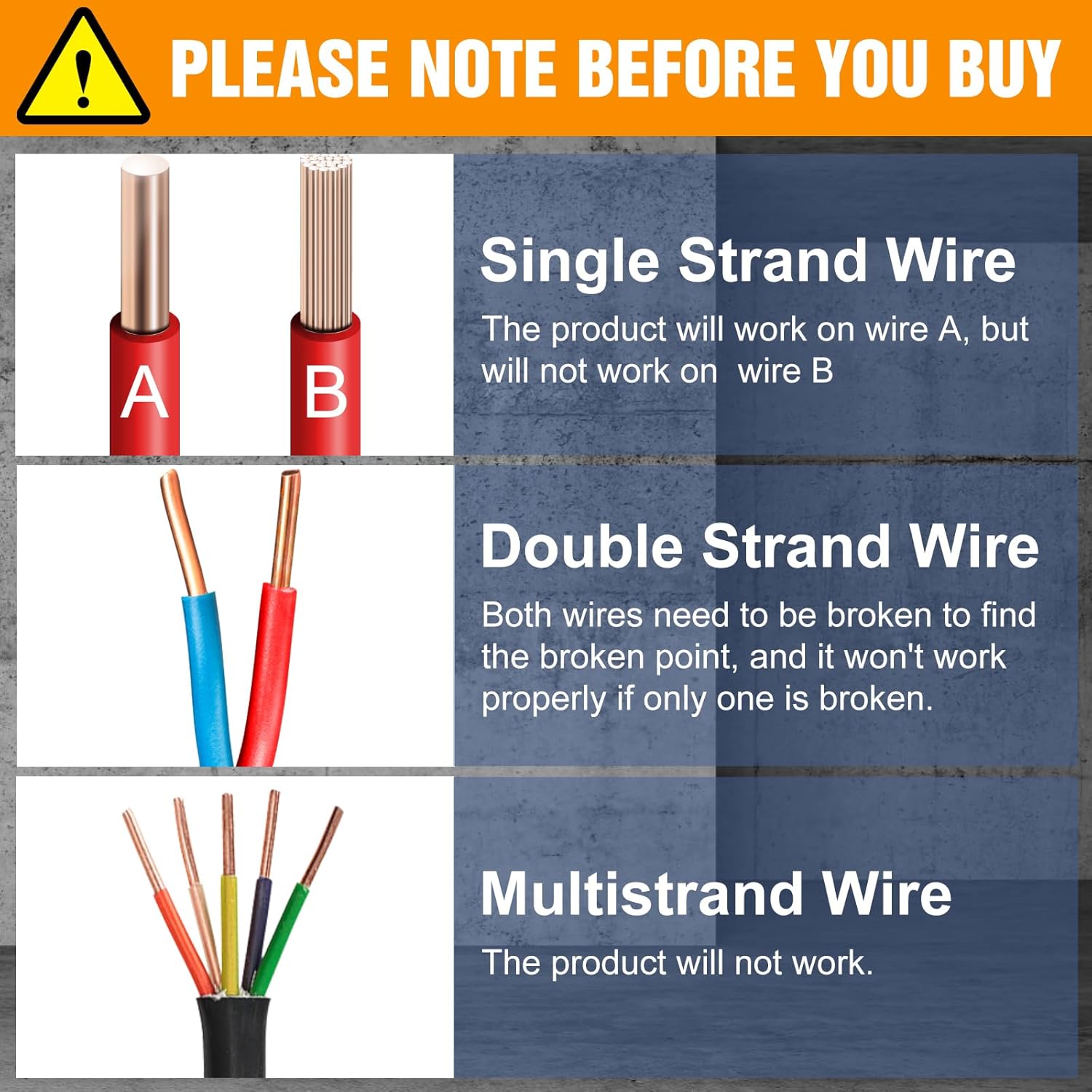
The VXSCAN F04 is effective for locating single-strand and parallel double-strand wires. It is not designed for use with multistrand wires. For double-strand wires, if a breakpoint is not found on one line, try testing the other line.

For optimal signal strength and accuracy, especially when tracing longer or deeper lines, ensure the black clip of the transmitter is connected to a properly installed ground stake.
- The Underground Cable Locator is designed for single-strand or parallel double-strand wires. It is not suitable for multistrand wires.
- For double-strand wires, if you don't find a breakpoint on one line, you may need to try testing the other line.
Maintenance
To ensure the longevity and optimal performance of your VXSCAN F04 Underground Cable Locator, follow these maintenance guidelines:
- Cleaning: Wipe the units with a soft, dry cloth after each use. Avoid using abrasive cleaners or solvents.
- Storage: Store the device in a cool, dry place, away from direct sunlight and extreme temperatures. Use the provided storage bag to protect it from dust and physical damage.
- Battery Care: Remove batteries if the device will not be used for an extended period to prevent leakage and damage.
- Inspection: Periodically inspect the cables and clips for any signs of wear or damage. Replace any damaged components immediately.
Troubleshooting
If you encounter issues with your VXSCAN F04, refer to the following common problems and solutions:
| Problem | Possible Cause | Solution |
|---|---|---|
| Line cannot be detected or signal is weak. | Low battery power. | Check battery power. If low, replace with new 9V batteries. |
| Line cannot be detected or signal is weak. | Transmit power not adjusted to maximum. | Adjust transmit power to maximum. Then, slowly turn down the power to locate the line more precisely. |
| Line cannot be detected or signal is weak. | No ground stake connected (for black clip). | Make a ground stake and connect the black clip on the transmitter to it. This can significantly enhance the signal. |
| Detection range is too large or inaccurate. | Transmitter/receiver power settings too high for precise location. | After initially finding the cable with maximum power, gradually reduce the power of both the transmitter and receiver to narrow the detection range and accurately pinpoint the line. |
| Interference sound / Unclear signal. | External noise or environmental interference. | Use the included 3.5mm headphones to minimize external noise. Adjust SIGNAL STRENGTH knob or TRANSMIT strength/RECEIVER sensitivity to filter out distractions. Try changing the testing location if possible. |
If you have followed all the above steps and still cannot detect the line or resolve the issue, please feel free to contact VXSCAN customer support for further assistance.
Specifications
| Specification | Value |
|---|---|
| Model Number | VXSCAN F04 |
| Power Source | Battery Powered (2 x 9V batteries included) |
| Detection Length | Up to 1000 feet |
| Detection Depth | Within 3 feet |
| Color | Orange |
| Item Weight | 1 Pounds |
| Style | Circuit Testers |
Warranty & Support
VXSCAN is committed to providing high-quality diagnostic products and repair tools. Our goal is to offer professional, simple, practical, cost-effective, and efficient solutions to our customers.
For any product-related inquiries, technical support, or warranty claims, please refer to the contact information provided with your purchase or visit the official VXSCAN website. Providing better service to our customers is our eternal goal.


