
Introduction
This manual provides detailed instructions for the installation, operation, and maintenance of your Marine Audio MA112 AM/FM/USB Compact Bluetooth Stereo. Please read this manual thoroughly before using the product to ensure proper function and to prevent damage.
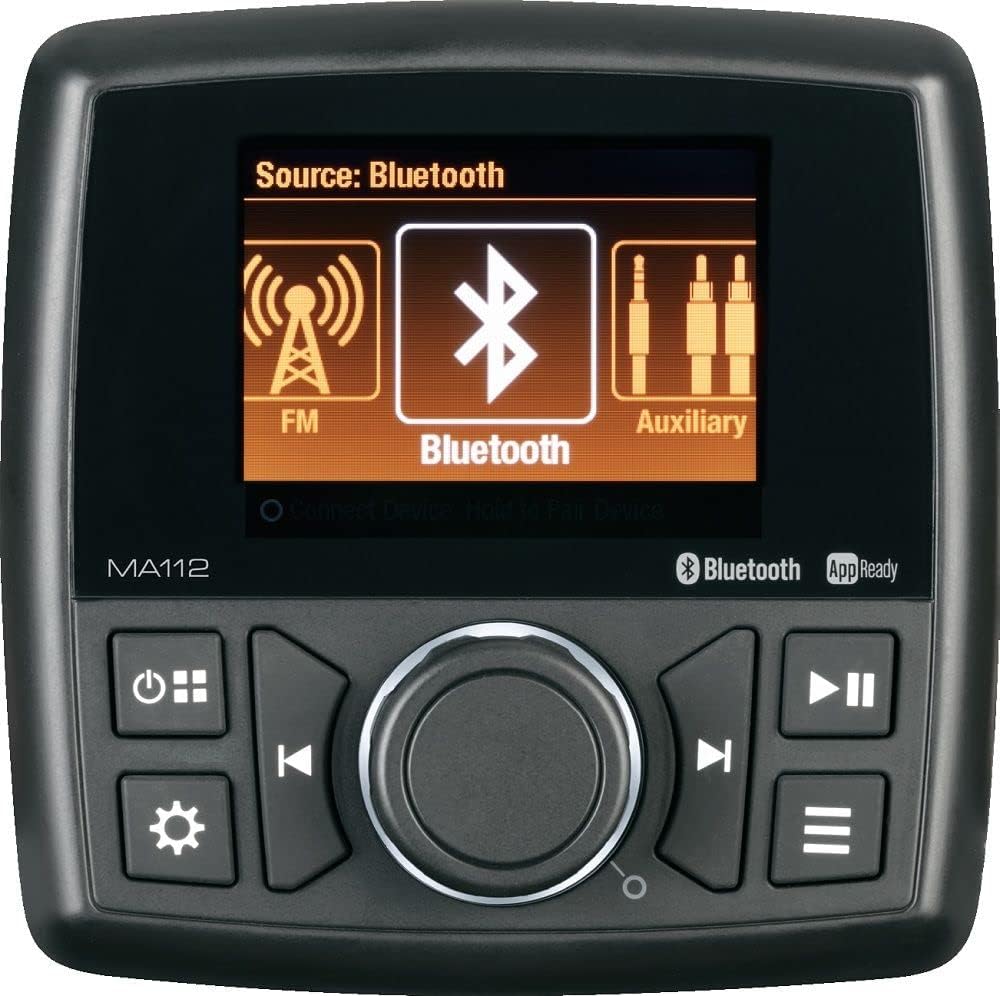
Image: Front view of the MA112 stereo unit, highlighting its compact design, digital display, and intuitive control layout including the central rotary knob, source selection, power, and track controls.
Safety Information
- Always ensure proper ventilation around the unit to prevent overheating.
- Do not expose the unit to extreme temperatures, direct sunlight for prolonged periods, or excessive moisture.
- Disconnect the power supply before performing any maintenance or installation procedures.
- Use only specified power sources and wiring to avoid electrical hazards.
- Consult a qualified professional for installation if you are unsure about any steps.
Package Contents
Verify that all items listed below are included in your package:
- MA112 Stereo Unit
- Mounting Bracket
- Mounting Hardware (screws, nuts, washers)
- Wiring Harness
- User Manual (this document)

Image: Diagram illustrating the MA112 stereo unit along with its mounting bracket, two threaded studs, and four nuts and washers, representing the typical package contents.
Installation & Setup
Mounting
Choose a suitable location for mounting the MA112 unit, ensuring it is protected from direct water exposure and has adequate ventilation. Use the provided mounting bracket and hardware to secure the unit firmly. Ensure there is enough space behind the unit for wiring connections.
Wiring Connections
Connect the wiring harness to the corresponding ports on the MA112 unit and to your vehicle's power supply, speakers, and other audio components. Pay close attention to positive and negative terminals to avoid short circuits or damage. Refer to the wiring diagram (not provided in this manual, typically found on the unit or separate sheet) for specific connections.
- Red Wire: +12V Accessory (Switched Power)
- Yellow Wire: +12V Constant (Battery Power)
- Black Wire: Ground
- Speaker Wires: Connect to your speakers (ensure correct polarity).
- Antenna: Connect your AM/FM antenna.
Initial Power On
Once all connections are secure, turn on your vehicle's ignition or power source. Press the power button on the MA112 unit. The display should illuminate, indicating successful power-up.
Operating Instructions
Basic Controls
The MA112 features a user-friendly interface with a central rotary knob and dedicated buttons for various functions.
- Power Button: Press to turn the unit on/off.
- Source Button: Cycle through available audio sources (AM, FM, USB, Bluetooth, Auxiliary).
- Rotary Knob: Turn to adjust volume. Press to select menu options.
- Menu/Settings Button: Access audio settings and system configurations.
- Track/Tune Buttons: Navigate tracks (USB/Bluetooth) or tune radio stations (AM/FM).
- Play/Pause Button: Control playback for USB and Bluetooth sources.
Source Selection
Press the 'Source' button repeatedly to cycle through the available audio modes: AM Radio, FM Radio, USB, Bluetooth, and Auxiliary Input. The current source will be displayed on the screen.
Bluetooth Pairing
- Select 'Bluetooth' as the audio source.
- On your mobile device, search for available Bluetooth devices.
- Select 'MA112' from the list.
- Once paired, the unit will confirm the connection, and you can stream audio from your device.
USB Playback
Insert a USB flash drive containing compatible audio files into the USB port. The unit will automatically switch to USB mode and begin playback. Use the track buttons to navigate through files.
App Control
The MA112 supports app control. Download the official Marine Audio app from your device's app store. Once installed and connected via Bluetooth, the app provides an intuitive interface for controlling various functions of the stereo.
Audio Settings
Press the 'Menu/Settings' button to access audio adjustments such as Bass, Treble, Balance, Fader, and Equalizer presets. Use the rotary knob to navigate and adjust settings.
Maintenance
To ensure the longevity and optimal performance of your MA112 stereo, follow these maintenance guidelines:
- Cleaning: Use a soft, dry cloth to wipe the unit's surface. For stubborn dirt, dampen the cloth slightly with water. Avoid using harsh chemicals or abrasive cleaners.
- Connections: Periodically check all wiring connections to ensure they are secure and free from corrosion.
- Storage: If storing the unit for an extended period, ensure it is in a cool, dry place, away from direct sunlight and extreme temperatures.
Troubleshooting
If you encounter issues with your MA112 stereo, refer to the table below for common problems and their solutions.
| Problem | Possible Cause | Solution |
|---|---|---|
| No Power | Loose power connection; Blown fuse; Vehicle battery low. | Check wiring harness connections; Replace fuse; Charge vehicle battery. |
| No Sound | Volume too low; Mute activated; Loose speaker wires; Incorrect source selected. | Increase volume; Deactivate mute; Check speaker connections; Select correct source. |
| Bluetooth Not Connecting | Unit not in pairing mode; Device too far; Previous connection interfering. | Ensure MA112 is in Bluetooth mode; Move device closer; Forget MA112 on device and re-pair. |
| USB Playback Error | Unsupported file format; Corrupt USB drive; USB drive not properly inserted. | Ensure files are compatible; Try a different USB drive; Re-insert USB drive firmly. |
Specifications
Detailed technical specifications for the Marine Audio MA112 stereo unit:

Image: Technical drawing of the MA112 unit showing front, side, and top dimensions, alongside a table detailing general and performance specifications.
| General Specifications | |
|---|---|
| Power System | 12 VDC |
| Operating Voltage Range | 10V to 16V |
| Current Draw @ 12V (Idle) | 145 mA |
| Current Draw @ 12V (Nominal) | 1 A |
| Current Draw @ 12V (Maximum) | 8.5 A |
| Operating Temperature Range | -4°F to 149°F (-20°C to 65°C) |
| Storage Temperature Range | -22°F to 158°F (-30°C to 70°C) |
| Maximum Relative Humidity | 100% |
| Overall Dimensions | 4.5" H x 4.5" L x 4.4" D |
| Product Weight (unpackaged) | 1.4 lbs. |
| Performance Specifications | |
|---|---|
| FM Sensitivity | <5µV |
| AM Sensitivity | <63µV |
| Output Power (RMS) | 15 W x 4 |
| Output Power (Maximum) | 40 W x 4 |
| Total Harmonic Distortion | 1 % |
| Applied Test Suite | ASA ES0001 |
| Regulatory Certifications | FCC Part 15; CE; RoHS |
Warranty and Support
The Marine Audio MA112 Compact Bluetooth Stereo is covered by a manufacturer's warranty against defects in materials and workmanship. Please refer to the warranty card included with your product for specific terms and conditions, including the warranty period and claim procedures.
For technical support, troubleshooting assistance, or warranty claims, please contact Marine Audio customer service. Contact information can typically be found on the manufacturer's official website or on the product packaging.
When contacting support, please have your product model number (MA112) and purchase information readily available.


