1. Important Safety Instructions
Please read all instructions carefully before using this appliance. Failure to follow these instructions may result in electric shock, fire, or serious injury.
- Always unplug the vacuum cleaner from the power outlet before cleaning or performing maintenance.
- Do not use the vacuum cleaner to pick up water or any other liquids. This appliance is designed for dry vacuuming only.
- Do not pick up flammable or combustible materials, such as gasoline, or use in areas where they may be present.
- Do not pick up anything that is burning or smoking, such as cigarettes, matches, or hot ashes.
- Keep hair, loose clothing, fingers, and all parts of the body away from openings and moving parts.
- Do not operate the vacuum cleaner with a damaged cord or plug. If the appliance is not working as it should, has been dropped, damaged, left outdoors, or dropped into water, return it to a service center.
- Use only as described in this manual. Use only manufacturer's recommended attachments.
- Do not pull or carry by cord, use cord as a handle, close a door on cord, or pull cord around sharp edges or corners. Do not run appliance over cord. Keep cord away from heated surfaces.
- Do not unplug by pulling on cord. To unplug, grasp the plug, not the cord.
- This appliance is not intended for use by persons (including children) with reduced physical, sensory or mental capabilities, or lack of experience and knowledge, unless they have been given supervision or instruction concerning use of the appliance by a person responsible for their safety.
- Children should be supervised to ensure that they do not play with the appliance.
2. Product Overview
The CROMA 1200 Watts Dry Vacuum Cleaner is designed for efficient dry cleaning of various surfaces, particularly hard floors. It features a powerful motor, a dust bag full indicator, and a washable HEPA filter for improved air quality.
2.1 Included Components
- Main Vacuum Unit
- Flexible Hose
- Telescopic Wand
- Floor Brush
- Crevice Nozzle
- User Manual
2.2 Key Features
- Powerful 1200 Watts Motor: Provides strong suction for effective cleaning.
- Dust Bag Full Indicator: Automatically alerts you when the dust bag needs emptying.
- Low Sound Operation: Engineered for a quieter cleaning experience (approx. 60-78 dB).
- Wheels: For easy maneuverability around your home.
- Washable HEPA Filter: Captures small dust particles and allergens, ensuring cleaner expelled air.
- 1.5m Cord Re-winder: One-touch automatic cord retraction for convenient storage.
- 1.5L Dust Cup Capacity: Sufficient capacity for typical household cleaning tasks.
2.3 Product Visuals

Figure 1: The CROMA 1200 Watts Dry Vacuum Cleaner with its main unit, flexible hose, and floor brush attachment.
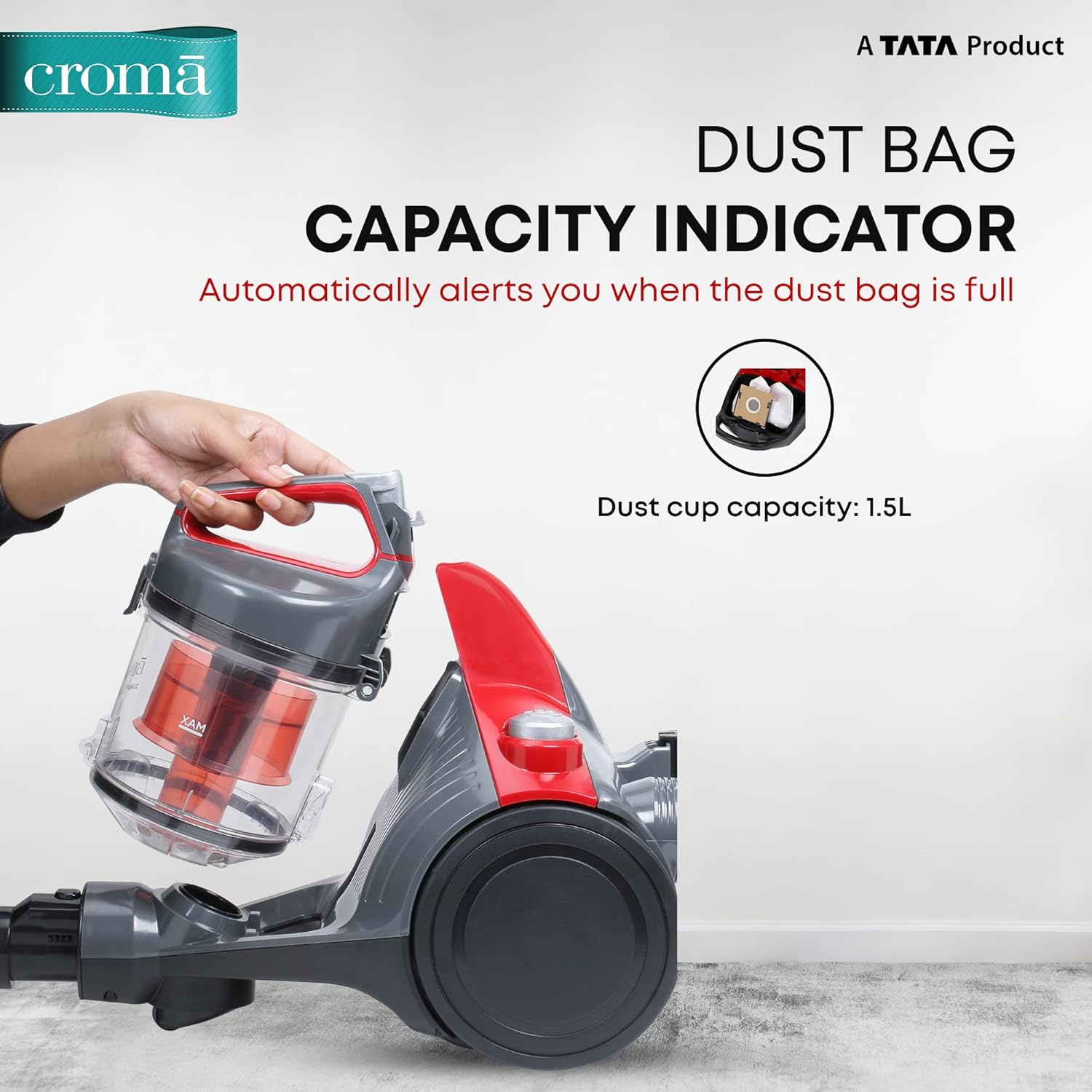
Figure 2: Illustration of the dust bag capacity indicator and the removable dust cup. The indicator automatically alerts when the dust bag is full.

Figure 3: Close-up view of the advanced dry vacuum cleaner's internal mechanism, highlighting its effective cleaning system.

Figure 4: The vacuum cleaner's design emphasizing convenience, including the one-touch 1.5m cord re-winder and its relatively low noise output.

Figure 5: Rear view of the vacuum cleaner, showing the washable HEPA filter compartment, which ensures ultra-clean expelled air by capturing small dust particles.

Figure 6: The CROMA Dry Vacuum Cleaner in a typical home environment, illustrating its powerful cleaning capabilities and durable ABS design.

Figure 7: Details on the vacuum cleaner's quiet operation (A+ content indicates 78 dB noise level) and its in-built 1.2L dust tank capacity.

Figure 8: Features for effortless convenience, including the HEPA filter for allergen capture, the automatic dust bag indicator, and the one-touch cord re-winder.

Figure 9: Demonstrating powerful cleaning at home or office, with the vacuum's cyclone technology and 1200W motor ensuring thorough dirt removal.
3. Setup
Follow these steps to set up your vacuum cleaner for first use:
- Unpack: Carefully remove all components from the packaging. Retain packaging for future storage or transport.
- Attach Hose: Insert the flexible hose into the suction inlet on the main unit until it clicks securely into place.
- Assemble Wand and Brush:
- Connect the telescopic wand to the handle end of the flexible hose.
- Attach the desired cleaning attachment (e.g., floor brush or crevice nozzle) to the end of the telescopic wand.
- Check Dust Container: Ensure the dust container is properly installed and empty before use.
- Power Connection: Extend the power cord and plug it into a suitable electrical outlet.
4. Operating Instructions
Operating your CROMA vacuum cleaner is straightforward:
- Power On: Press the power button (Push Button control) located on the main unit to start the vacuum cleaner.
- Adjust Suction (if applicable): Some models may have a suction control slider on the hose handle. Adjust as needed for different surfaces.
- Cleaning: Move the floor brush or chosen attachment slowly over the surface to be cleaned. For hard floors, ensure the brush setting is appropriate.
- Dust Bag Full Indicator: Monitor the dust bag full indicator. When it changes color or illuminates, it's time to empty the dust container.
- Power Off: After cleaning, press the power button again to turn off the vacuum cleaner.
- Cord Re-winder: Press the cord re-winder button to automatically retract the power cord into the unit for neat storage. Guide the cord manually to prevent tangling.
Note: This vacuum cleaner is recommended for use on hard floors. While it can be used on low-pile carpets, its primary design is for dry hard floor cleaning.
5. Maintenance
Regular maintenance ensures optimal performance and extends the life of your vacuum cleaner.
5.1 Emptying the Dust Container
- Ensure the vacuum cleaner is unplugged from the power outlet.
- Locate the dust container release button/latch, usually near the handle of the dust cup.
- Carefully remove the dust container from the main unit.
- Position the dust container over a waste bin and open its bottom lid to empty the collected dust and debris.
- Close the lid securely and re-attach the dust container to the vacuum cleaner until it clicks into place.
5.2 Cleaning the Washable HEPA Filter
The HEPA filter should be cleaned regularly, especially if you notice reduced suction or increased dust in the exhaust air.
- Unplug the vacuum cleaner.
- Remove the dust container as described above. The HEPA filter is typically located within or near the dust container.
- Carefully remove the HEPA filter. Tap it gently over a waste bin to dislodge loose dust.
- Rinse the filter under cool running water until the water runs clear. Do not use detergents or hot water.
- Allow the filter to air dry completely for at least 24 hours before re-installing it. Do not use a hairdryer or other heating devices.
- Once completely dry, re-insert the filter into its compartment and re-attach the dust container.
Important: Do not operate the vacuum cleaner without the HEPA filter properly installed and dry.
5.3 Cleaning Attachments and Exterior
- Wipe the exterior of the vacuum cleaner with a soft, damp cloth. Do not use abrasive cleaners or solvents.
- Check the floor brush and other attachments for tangled hair or debris. Remove any obstructions to ensure efficient cleaning.
6. Troubleshooting
Before contacting customer support, please refer to the following troubleshooting guide for common issues:
| Problem | Possible Cause | Solution |
|---|---|---|
| Vacuum cleaner does not turn on. |
|
|
| Reduced suction power. |
|
|
| Unusual noise during operation. |
|
|
| Dust escaping from the vacuum cleaner. |
|
|
7. Specifications
| Feature | Detail |
|---|---|
| Brand | CROMA |
| Model | CRSHAF503sVC12 |
| Type | Dry Vacuum Cleaner |
| Motor Power | 1200 Watts |
| Dust Cup Capacity | 1.5 Liters |
| Filter Type | Washable HEPA Filter |
| Noise Level | 60 dB |
| Cord Length | 1.5m (with auto re-winder) |
| Control Type | Push Button |
| Recommended Use | Hard Floor |
| Included Accessories | Brush, Nozzle, User Manual |
| Color | Red & Black |
| Item Weight | 5 kg 500 g |
8. Warranty and Support
Your CROMA 1200 Watts Dry Vacuum Cleaner comes with a 2-Year Warranty from the date of purchase, as indicated in the product title.
This warranty covers manufacturing defects and issues arising from normal use. Please retain your purchase receipt as proof of purchase for warranty claims.
For technical assistance, warranty claims, or to locate an authorized service center, please contact CROMA customer support. Refer to the contact information provided on the product packaging or the official CROMA website.
Online Support: Visit the official CROMA website for FAQs, product registration, and further support resources. CROMA Store on Amazon