
1. Product Overview
The BOMGE 6-channel powered audio mixer and amplifier (Model U-550P) is a compact and powerful solution for various audio needs, including home karaoke, studio recording, and live performances. It integrates a mixer, amplifier, and audio interface into a single unit, offering comprehensive control over your sound. Key features include multiple input channels, built-in effects, phantom power, and versatile connectivity options.

Figure 1.1: Front view of the BOMGE 6-Channel Powered Audio Mixer and Amplifier.
2. What's in the Box
Upon opening the package, please verify that all components are present and in good condition:
- 1 x BOMGE 6-Channel Powered Audio Mixer
- 1 x Power Adapter (DC18V 3A)
- 1 x Type-C Cable
- 1 x User Manual

Figure 2.1: Contents included in the product packaging, showing the mixer, power adapter, Type-C cable, and manual.
3. Setup Guide
3.1 Power Supply
The BOMGE mixer supports multiple power supply methods for flexibility:
- Standard Power Adapter: Connect the included DC18V 3A power adapter to the mixer's power input. This method supports the full 100W + 100W amplification.
- USB Power (5V 2A): For scenarios where the power amplifier module is not needed, the mixer can be powered via a 5V 2A power adapter, computer USB port, or a power bank. This allows for use as a pure mixer without amplification.

Figure 3.1: Diagram illustrating various power supply options, including standard power adapter, computer USB, and power bank.
3.2 Connecting Speakers
The mixer can connect to both passive and active speakers:
- Passive Speakers: Use the dedicated speaker outputs (4-16Ω) on the rear of the mixer. These outputs are powered by the internal amplifier. Connect one pair of passive speakers (5-8 inch recommended).
- Active Speakers: Use the unpowered Left Out and Right Out (XLR or 1/4'' Main) or RCA stereo outputs to connect to active speakers or an external power amplifier.
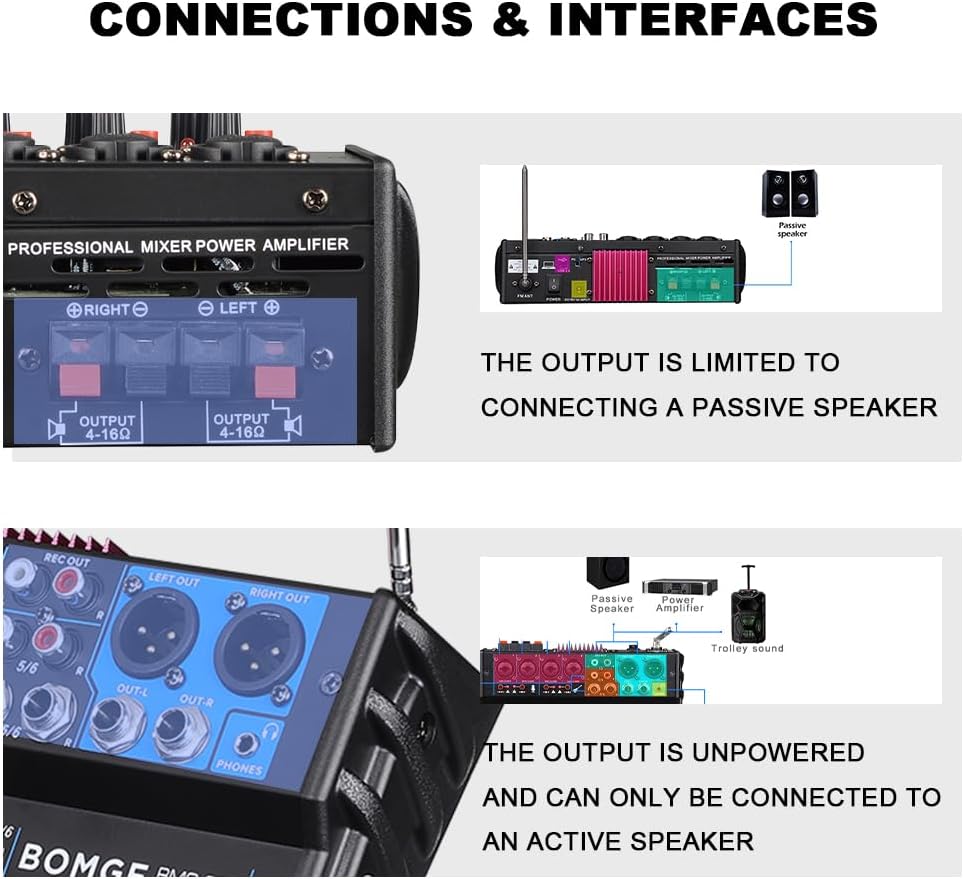
Figure 3.2: Close-up view of the speaker output terminals, showing connections for passive speakers.
3.3 Connecting Microphones
The mixer features 4 Mic/Line input channels, each with independent 48V phantom power for condenser microphones. It supports various microphone types:
- Condenser Microphones: Connect via XLR and activate the 48V phantom power switch for the respective channel.
- Dynamic Microphones: Connect via XLR or 1/4'' jack.
- Wireless Microphones: Connect the receiver output to a Mic/Line input.

Figure 3.3: Illustration of different microphone types (condenser, dynamic, wireless) connected to the mixer's input channels.
3.4 Connecting Other Devices
The mixer offers broad compatibility with various audio sources:
- Smartphones/Tablets: Connect via Bluetooth for wireless audio streaming or use a 3.5mm to RCA cable for wired connection to the stereo input. This is ideal for recording, live broadcasting, or singing along.
- Computers (PC/Mac): Connect via USB for audio playback and recording. The mixer functions as a sound card/audio interface.
- USB Flash Drives: Insert a USB drive into the USB port for MP3 playback or recording.
- Musical Instruments: Connect guitars, electronic organs, or drum kits to the appropriate Mic/Line or stereo inputs.
- DVD Players/Portable Audio Players: Connect to the RCA input.
Figure 3.4: Overview of various devices that can be connected to the mixer, including computers, smartphones, instruments, and audio players.
4. Operating Instructions
4.1 Channel Controls
Each input channel (Mic/Line 1-4, Stereo 5/6) features the following controls:
- GAIN: Adjusts the input sensitivity for the connected device.
- HIGH: Treble equalization control.
- BASS: Bass equalization control.
- FX: Controls the amount of effect applied to the channel.
- PEAK LED: Illuminates when the input signal is too high, indicating potential clipping. Reduce the GAIN if this light is consistently on.
- LEVEL: Adjusts the output level of the individual channel to the main mix.
4.2 Master Controls
- MAIN MIX LEVEL: Controls the overall output volume of the main mix.
- PHONES LEVEL: Adjusts the volume for the headphone output.
- DSP Effects: The mixer includes 16 DSP effects. Use the 'PROGRAM' knob to select an effect and the 'PARAMETER' knob to adjust its specific parameters. The 'EFF' knob controls the overall effect send level.
4.3 USB/Bluetooth/MP3/FM Functions
The integrated media player supports various modes:
- USB Mode: Insert a USB flash drive for MP3 playback. Use the control buttons (Play/Pause, Skip Tracks) to navigate.
- Bluetooth Mode: Activate Bluetooth on your device and pair with the mixer (look for 'BMG-XXX'). The wireless range is approximately 15ft.
- FM Radio Mode: The long FM antenna and advanced DSP chips ensure a stable radio signal. Use the controls to scan and select FM stations.
4.4 Audio Recording
The mixer has a built-in sound card and audio interface, allowing direct recording:
- To PC: Connect the mixer to your computer via USB. The mixer will be recognized as an audio input/output device. Use your preferred recording software.
- To USB Disk: Insert a USB flash drive into the USB port and use the recording function on the mixer's media player interface.
- To Mobile Phone: Connect your smartphone for direct recording, live broadcasting, or singing applications.
Video 4.1: An official product video demonstrating the BOMGE 6-Channel Powered Audio Sound Mixer Amplifier's features, including connections for passive speakers, various microphones (condenser, dynamic, wireless), smartphone connectivity for recording and live broadcasting, and the FM radio function. The video also includes a test record demonstrating audio quality with music and microphone input.
5. Maintenance
To ensure the longevity and optimal performance of your BOMGE mixer, follow these maintenance guidelines:
- Cleaning: Use a soft, dry cloth to clean the exterior of the unit. Avoid using abrasive cleaners, solvents, or waxes.
- Storage: Store the mixer in a cool, dry place away from direct sunlight, extreme temperatures, and high humidity.
- Ventilation: Ensure proper ventilation around the unit to prevent overheating. Do not block the ventilation openings.
- Cable Management: Keep cables organized and avoid sharp bends or excessive tension to prevent damage to connectors and ports.
6. Troubleshooting
If you encounter issues with your BOMGE mixer, refer to the following common problems and solutions:
| Problem | Possible Cause | Solution |
|---|---|---|
| No sound output | Incorrect connections, low volume levels, faulty cables, power issue. | Check all cable connections (speakers, inputs, power). Ensure all volume knobs (channel, main mix, phones) are turned up. Test with different cables. Verify power adapter is correctly connected and unit is on. |
| Humming or buzzing noise | Ground loop, faulty cables, interference from other electronics. | Ensure all equipment is plugged into the same power outlet or power strip. Use balanced cables (XLR) where possible. Move the mixer away from other electronic devices. Test different cables. |
| Microphone not working or low gain | 48V phantom power off (for condenser mics), incorrect gain setting, faulty microphone/cable. | For condenser microphones, ensure 48V phantom power is activated for the specific channel. Increase the channel's GAIN knob. Test with a different microphone and cable. |
| Bluetooth connection issues | Out of range, interference, incorrect pairing. | Ensure your Bluetooth device is within 15ft of the mixer. Turn off and on Bluetooth on both devices. Forget the device on your phone and re-pair. |
| USB playback/recording not working | Unsupported file format, faulty USB drive, incorrect mode. | Ensure audio files are in a supported format (e.g., MP3). Try a different USB drive. Verify the mixer is in the correct USB mode for playback or recording. |
7. Specifications
| Feature | Detail |
|---|---|
| Brand | BOMGE |
| Model Number | U-550P |
| Number of Channels | 6 |
| Output Wattage | 100 Watts (Peak 100W + 100W) |
| Item Weight | 2.98 pounds (1350 Grams) |
| Product Dimensions | 7.3 x 8.9 x 2.2 inches (7.3"D x 8.9"W x 2.2"H) |
| Body Material | Metal |
| Color | Blue, Black |
| Connectivity Technology | RCA, Bluetooth, USB |
| Hardware Interface | 1/4-inch Audio, Bluetooth 4.0, 3.5mm Audio, USB 3.0, USB 2.0 Type B |
| Compatible Devices | PC, Phone, Mac, Speaker, Mic |
| Power Source | Corded Electric |
| Voltage | 105 Volts (AC) |
| Country of Origin | Switzerland |
8. Warranty and Support
BOMGE products are designed for reliability and performance. For warranty information and technical support, please refer to the official BOMGE website or contact their customer service directly. You can also find additional resources and product information on the BOMGE Amazon Store.
A detailed User Guide in PDF format is available for download: Download User Guide (PDF)
