
LANDXCAPE LX796
LANDXCAPE LX796 Robotic Mower User Manual
Comprehensive instructions for the LANDXCAPE LX796 Robotic Mower, covering setup, operation, maintenance, troubleshooting, and specifications for efficient lawn care up to 400m² with its automatic mulching system.
Introduction
Thank you for choosing the LANDXCAPE LX796 Robotic Mower. This manual provides essential information for the safe and efficient operation, installation, and maintenance of your robotic mower. Please read this manual thoroughly before using the product and keep it for future reference.

Image: The LANDXCAPE LX796 Robotic Mower with its charging station, power adapter, spare blades, boundary wire, pegs, and hex key.
Safety Instructions
Always follow basic safety precautions to reduce the risk of fire, electric shock, and personal injury. This includes, but is not limited to:
- Read all instructions carefully before operation.
- Keep hands and feet away from the cutting blades.
- Do not operate the mower in wet conditions or rain. The LX796 does not have a rain sensor.
- Ensure the boundary wire is correctly installed to prevent the mower from leaving the designated area.
- Turn off the mower and remove the battery before performing any maintenance or cleaning.
- Keep children and pets away from the working area of the mower.
- Do not lift or carry the mower while it is operating.
- Use only original replacement parts and accessories.
Setup and Installation
Proper installation is crucial for the optimal performance of your robotic mower. The LX796 is designed for easy setup.
1. Unpacking and What's Included
Carefully unpack all components and ensure everything is present. The package typically includes:
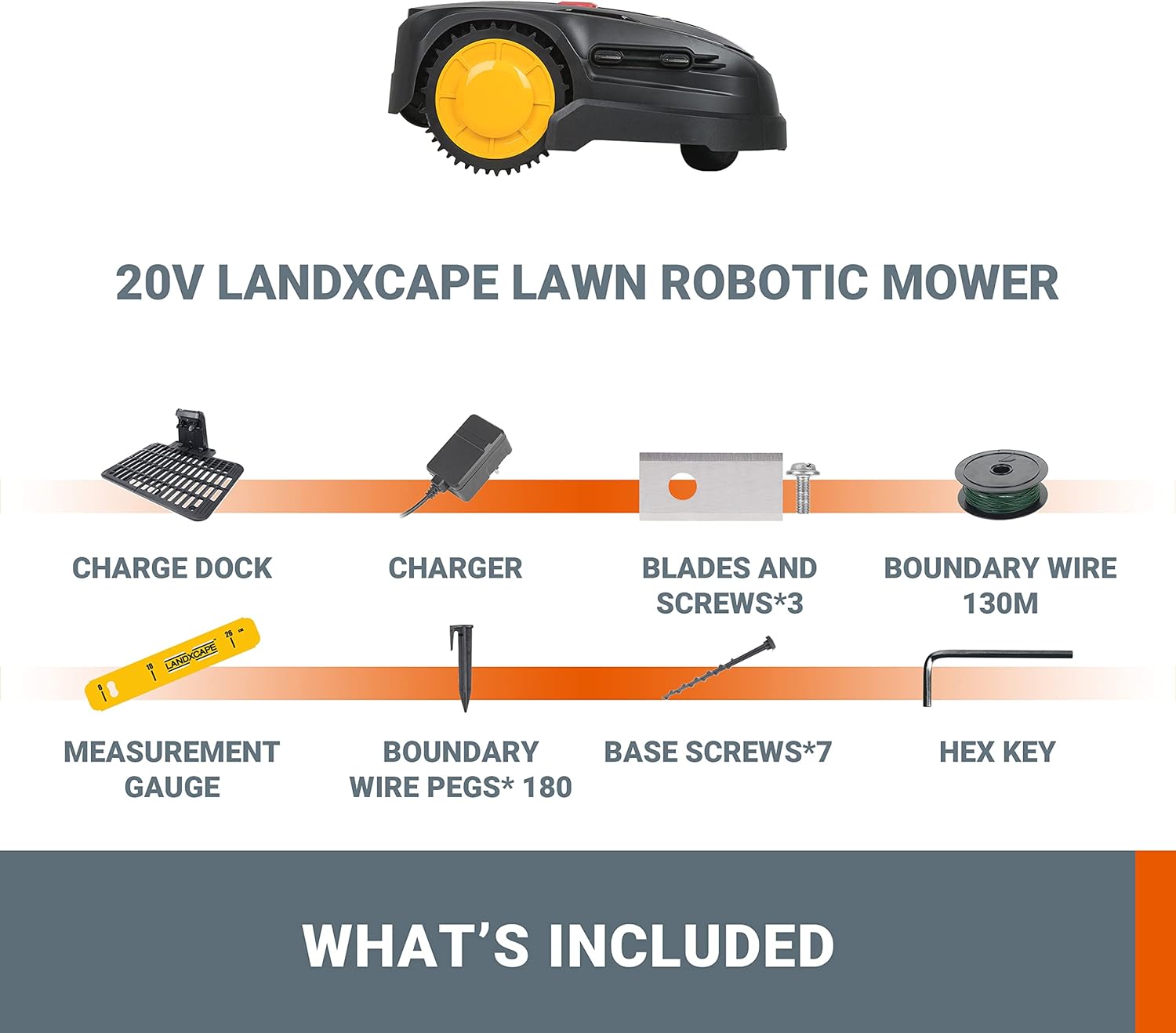
Image: A visual representation of the LANDXCAPE LX796 Robotic Mower's included parts: Charge Dock, Charger, Blades and Screws (x3), Boundary Wire (130m), Measurement Gauge, Boundary Wire Pegs (x180), Base Screws (x7), and Hex Key.
- LANDXCAPE LX796 Robotic Mower
- Charging Dock
- Power Adapter/Charger
- Boundary Wire (130 meters)
- Boundary Wire Pegs (180 pieces)
- Replacement Blades and Screws (3 sets)
- Measurement Gauge
- Base Screws (7 pieces)
- Hex Key
2. Charging Dock Placement
Select a suitable location for the charging dock. It should be on a flat surface, preferably in the shade, and close to an outdoor power outlet. Ensure there is enough clear space around the dock for the mower to easily enter and exit.

Image: The robotic mower approaching its charging dock, indicating automatic charging functionality.
3. Boundary Wire Installation
The boundary wire defines the mowing area. Lay the wire around the perimeter of your lawn, securing it with the provided pegs. Maintain a specific distance from obstacles like walls, fences, and flowerbeds as indicated by the measurement gauge. Connect both ends of the boundary wire to the charging dock.
- Use the measurement gauge to ensure correct spacing from edges.
- For corners, avoid sharp 90-degree angles; use gentle curves.
- Ensure the wire is taut and securely pegged to the ground. Over time, the wire will become covered by grass.
- Connect the wire ends to the designated terminals on the charging dock.

Image: An aerial view of the robotic mower following a boundary wire laid out in a complex pattern on a green lawn, demonstrating its ability to navigate defined areas.
4. Initial Charge
Before first use, ensure the mower is fully charged. Place the mower manually into the charging dock. The LED display will indicate charging status.
Operating Instructions
The LANDXCAPE LX796 is designed for fully automated lawn maintenance.
1. Starting the Mower (Plug and Play)
The LX796 features a simple "Plug and Play" operation. To start mowing:
- Ensure the mower is in its charging dock and fully charged.
- Press the START button on the LED digital display.
- Confirm with the OK button.
- The robotic mower will begin its mowing cycle automatically.

Image: A detailed view of the mower's LED digital display and control buttons, showing the sequence for starting operation (START then OK).

Image: An illustration highlighting the LED digital display for system information and the immediate stop button on the robotic mower.
2. Automatic Mowing and Mulching System
The LX796 operates automatically within the defined boundary. It uses a 3-blade cutting system and mulches the grass clippings, returning nutrients to your lawn. This system provides shade to the soil, helping it retain moisture and protecting it from the sun.

Image: A close-up view of the robotic mower's cutting deck, illustrating its 3-blade cutting and mulching system in action on a lawn.
3. Navigating Narrow Passages
The patented cutting technology allows the LX796 to navigate narrow passages effectively, ensuring complete coverage of your lawn, even in complex layouts.

Image: The robotic mower operating in a confined space between a lawn and a stone wall, demonstrating its ability to navigate narrow paths.
4. Stopping the Mower
To stop the mower at any time, press the large red STOP button located on the top of the unit. This will immediately halt the blades and the mower's movement.
5. Security Features
The mower includes security features, such as a PIN code, to prevent unauthorized use. Refer to the specific instructions on setting and using your PIN code for enhanced security.

Image: The robotic mower's LED display showing a time and a lock icon, indicating active security features.
Maintenance
Regular maintenance ensures the longevity and optimal performance of your LANDXCAPE LX796 Robotic Mower.
1. Cleaning
- Before cleaning, always turn off the mower and remove the battery if accessible, or ensure it is disconnected from the charging dock.
- Use a soft brush or cloth to remove grass clippings, dirt, and debris from the mower's body, wheels, and cutting deck.
- Do not use high-pressure washers or immerse the mower in water.
- Clean the charging contacts on both the mower and the charging dock regularly.

Image: A hand lifting the robotic mower to reveal its underside, indicating the area for cleaning and blade inspection.
2. Blade Replacement
For best cutting results, inspect the blades regularly and replace them when they become dull or damaged. The LX796 uses a 3-blade system.
- Ensure the mower is turned off and disconnected from power.
- Carefully turn the mower upside down.
- Using the provided hex key, unscrew the old blades.
- Attach new blades with new screws, ensuring they are securely fastened.
- Always replace all blades simultaneously for balanced cutting.
3. Battery Care
The LX796 is powered by a battery. For optimal battery life:
- Store the mower in a dry, frost-free environment during winter months.
- Ensure the battery is fully charged before long-term storage.
- Avoid completely draining the battery frequently.
Troubleshooting
This section addresses common issues you might encounter with your LANDXCAPE LX796 Robotic Mower.
| Problem | Possible Cause | Solution |
|---|---|---|
| Mower does not start or turn on. |
|
|
| Mower gets stuck frequently. |
|
|
| Poor cutting performance. |
|
|
| Mower does not return to charging dock. |
|
|
Technical Specifications
Below are the key technical specifications for the LANDXCAPE LX796 Robotic Mower:
| Feature | Detail |
|---|---|
| Model Number | LX796 |
| Brand | LANDXCAPE |
| Recommended Lawn Area | Up to 400 m² |
| Power Source | Battery Powered (Electric) |
| Battery Type | 1 A - included |
| Motor Type | Brushless |
| Cutting System | 3-Blade Mulching System |
| Cutting Width | 16 Centimeters |
| Operating Mode | Automatic |
| Product Dimensions (L x W x H) | 51P x 35l x 21H centimeters (59 x 49 x 28 cm; 5 kilograms for package) |
| Item Weight | 5 Kilograms |
| Color | Black, Yellow, Red |
| Assembly Required | Yes |
Warranty and Support
Information regarding the specific warranty period and detailed support contact information for the LANDXCAPE LX796 Robotic Mower is not available in the provided product data. Please refer to the product packaging or the manufacturer's official website for warranty details and customer service contacts.
For technical assistance or spare parts, it is recommended to contact the retailer or the LANDXCAPE customer support directly.
Related documentsLX796


Ask a question about this manual
Ask about setup, troubleshooting, compatibility, parts, safety, or missing instructions. Manuals+ will review the question and use this page’s manual context to help answer it.