
Introduction
This manual provides detailed instructions for the installation, operation, and maintenance of your Run Bison 4 Inch Recessed LED Commercial Downlight. This fixture features adjustable wattage (9W/12W/15W) and three selectable color temperatures (3000K/4000K/5000K), 0-10V dimming capability, and is IC rated for direct contact with insulation. Please read this manual thoroughly before installation and retain it for future reference.
Safety Information
- WARNING: Risk of electric shock. Disconnect power at the fuse or circuit breaker before installing or servicing.
- This product must be installed in accordance with the applicable installation code by a person familiar with the construction and operation of the product and the hazards involved.
- Ensure all electrical connections are made correctly and securely.
- Do not modify the fixture. Any modifications may void the warranty and create safety hazards.
- Suitable for wet locations.
- IC Rated: Suitable for direct contact with insulation.
Package Contents
Verify that all components are present before beginning installation:
- LED Commercial Downlight
- J-Box
- Installation accessories (wire nuts, safety cable)
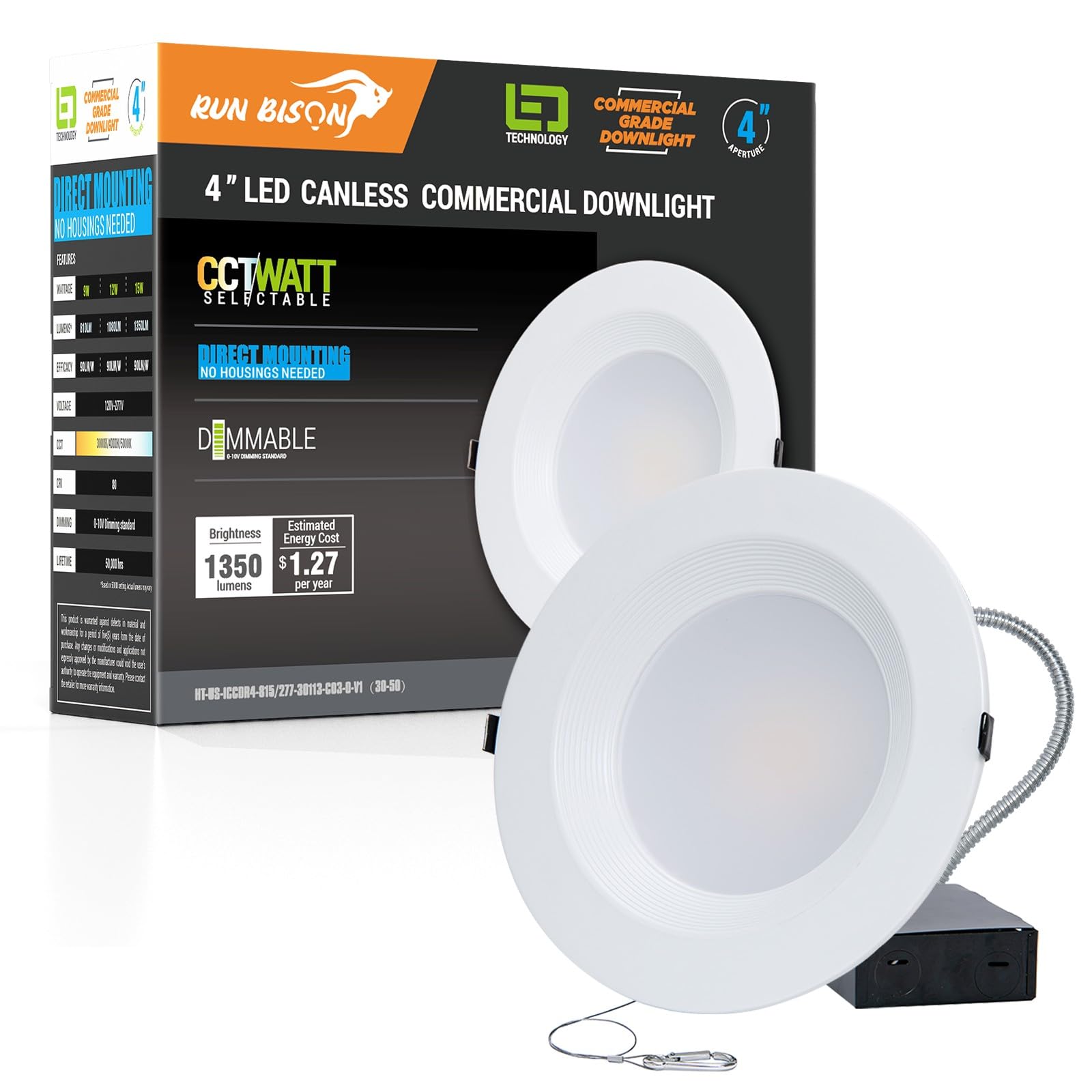
The Run Bison 4 Inch Recessed LED Commercial Downlight with its integrated J-Box and installation accessories.
Setup and Installation
Follow these steps for proper installation:
- Turn off power: Ensure the power supply to the installation area is completely disconnected at the circuit breaker.
- Cut the hole: Use a hole saw to cut a 4.25-inch diameter hole in the ceiling at the desired location.
- Prepare the J-Box: Open the junction box and remove the required accessories.
- Make electrical connections: Connect the building's electrical wires to the downlight's J-Box wires using the provided wire nuts. Refer to the wiring diagram below.
- Secure the J-Box: Place the J-Box inside the ceiling opening.
- Install the downlight: Gently push the downlight into the ceiling opening. The spring-loaded clips will secure the fixture in place.
- Restore power: Turn the power back on at the circuit breaker.
This video demonstrates the simple installation process for the LED commercial downlight.

Diagram illustrating the required hole cut size (4.25 inches) and trim size (5.06 inches) for installation. Confirm these measurements before cutting.

Detailed wiring connections for the downlight. Connect the black line wire to the voltage supply, white neutral wire to the neutral line, green ground wire to the supply ground, and purple/pink wires for 0-10V dimming.

The downlight features spring-loaded clips for secure mounting and a junction box to protect wire connections.
Operating Instructions
Your Run Bison LED Commercial Downlight offers adjustable settings for optimal lighting.
Color Temperature and Wattage Selection
Before final installation into the ceiling, locate the switches on the side of the fixture's J-Box. These switches allow you to select your preferred color temperature and wattage output.
- Color Temperature (CCT): Choose between 3000K (Warm White), 4000K (Cool White), or 5000K (Daylight).
- Wattage: Select from 9W, 12W, or 15W to adjust brightness.

Switches located on the fixture allow selection of color temperature (3000K, 4000K, 5000K) and wattage (9W, 12W, 15W).
0-10V Dimming
This downlight is compatible with 0-10V dimmers, allowing for smooth dimming from 10% to 100% brightness. Ensure you use a compatible 0-10V dimmer for optimal performance.
This video illustrates the 0-10V dimming capability of the downlight.

Compatibility chart for 0-10V dimmers, indicating suitable and unsuitable dimmer types. Consult an electrician if unsure.
Maintenance
The Run Bison LED Commercial Downlight requires minimal maintenance.
- Cleaning: Ensure power is off before cleaning. Wipe the fixture with a soft, damp cloth. Do not use abrasive cleaners or solvents.
- No User-Serviceable Parts: There are no user-serviceable parts inside the fixture. Do not attempt to open or repair it.
Troubleshooting
If you experience issues with your downlight, refer to the following common problems and solutions:
| Problem | Possible Cause | Solution |
|---|---|---|
| Light does not turn on | No power, loose wiring, faulty switch | Check circuit breaker. Verify all wire connections are secure. Test the switch. |
| Light flickers | Incompatible dimmer, loose wiring, voltage fluctuations | Ensure a compatible 0-10V dimmer is used. Check wiring connections. Consult an electrician for voltage issues. |
| Dimming not working | Incorrect dimmer type, improper wiring of dimmer leads | Confirm dimmer is 0-10V compatible. Verify purple and pink dimmer wires are correctly connected. |
If the problem persists, please contact customer support or a qualified electrician.
Specifications

Key specifications of the 4-inch LED commercial downlight, including input voltage, brightness range, wattage options, and expected lifetime.
| Feature | Detail |
|---|---|
| Model Number | HT-US-ICCDR4-815/277-30113-C03-0-V1 |
| Size | 4 inch |
| Input Voltage | 120-277V / 60Hz |
| Wattage | Adjustable: 9W / 12W / 15W |
| Luminous Flux | 810 LM (9W) / 1080 LM (12W) / 1350 LM (15W) |
| Color Temperature | Selectable: 3000K / 4000K / 5000K |
| Dimming | 0-10V Dimmable (10%-100%) |
| CRI | >80 |
| Lifetime | 50,000 Hours |
| Material | Aluminum, PMMA |
| Certifications | UL, ENERGY STAR, ETL |
| Installation Type | Recessed |
| Indoor/Outdoor Usage | Outdoor (Wet Location Rated) |
| Item Dimensions (L x W x H) | 5.12"L x 5.12"W x 2.48"H |
Warranty and Support
This Run Bison LED Commercial Downlight is covered by a 5-year limited manufacturer's warranty.
For technical guidance, replacement service, or any inquiries, please contact Run Bison customer support. You can find more information and contact details on the official Run Bison store page: Run Bison Store.