
1. Important Safety Information
Please read all instructions carefully before using the Eumspo G3 Bluetooth Headset. Keep this manual for future reference.
- Do not expose the headset or charging case to extreme temperatures, moisture, or corrosive materials.
- Avoid dropping or subjecting the device to strong impacts.
- Do not attempt to disassemble or modify the headset or charging case. This may void the warranty and cause damage.
- Keep out of reach of children and pets.
- Use only the provided charging cable and a certified power adapter.
- Prolonged exposure to loud sounds may cause hearing damage. Adjust volume to a safe level.
2. Product Overview
The Eumspo G3 Bluetooth Headset is designed for clear communication and extended use. It features Bluetooth 5.0 connectivity, dual-mic noise cancellation, and a portable charging case.

Figure 2.1: Eumspo G3 Bluetooth Headset and Charging Case.

Figure 2.2: Headset components and controls, including the Multi-Function Button (MFB), Power On/Off, Dual-Mic Noise Cancelling, and Volume controls.
3. What's in the Box
The package typically includes:
- Eumspo G3 Bluetooth Headset
- Charging Case
- USB Charging Cable
- User Manual
- Ear tips/ear hooks
4. Setup
4.1 Charging the Headset and Case
Before first use, fully charge the headset and its charging case.
- Place the headset into the charging case. Ensure it is properly seated.
- Connect the charging case to a power source using the provided USB cable.
- The LED indicator on the charging case will show the charging status. A full charge is indicated when the display shows 100.

Figure 4.1: The charging case provides power to the headset and displays the charge level.
4.2 Pairing with a Device
Follow these steps to pair your Eumspo G3 headset with your smartphone or other Bluetooth-enabled device:
- Take the headset out of the charging case. It will automatically enter pairing mode.
- On your device, enable Bluetooth.
- Search for available Bluetooth devices and select "G3" to connect.
- Once connected, the headset will indicate successful pairing.
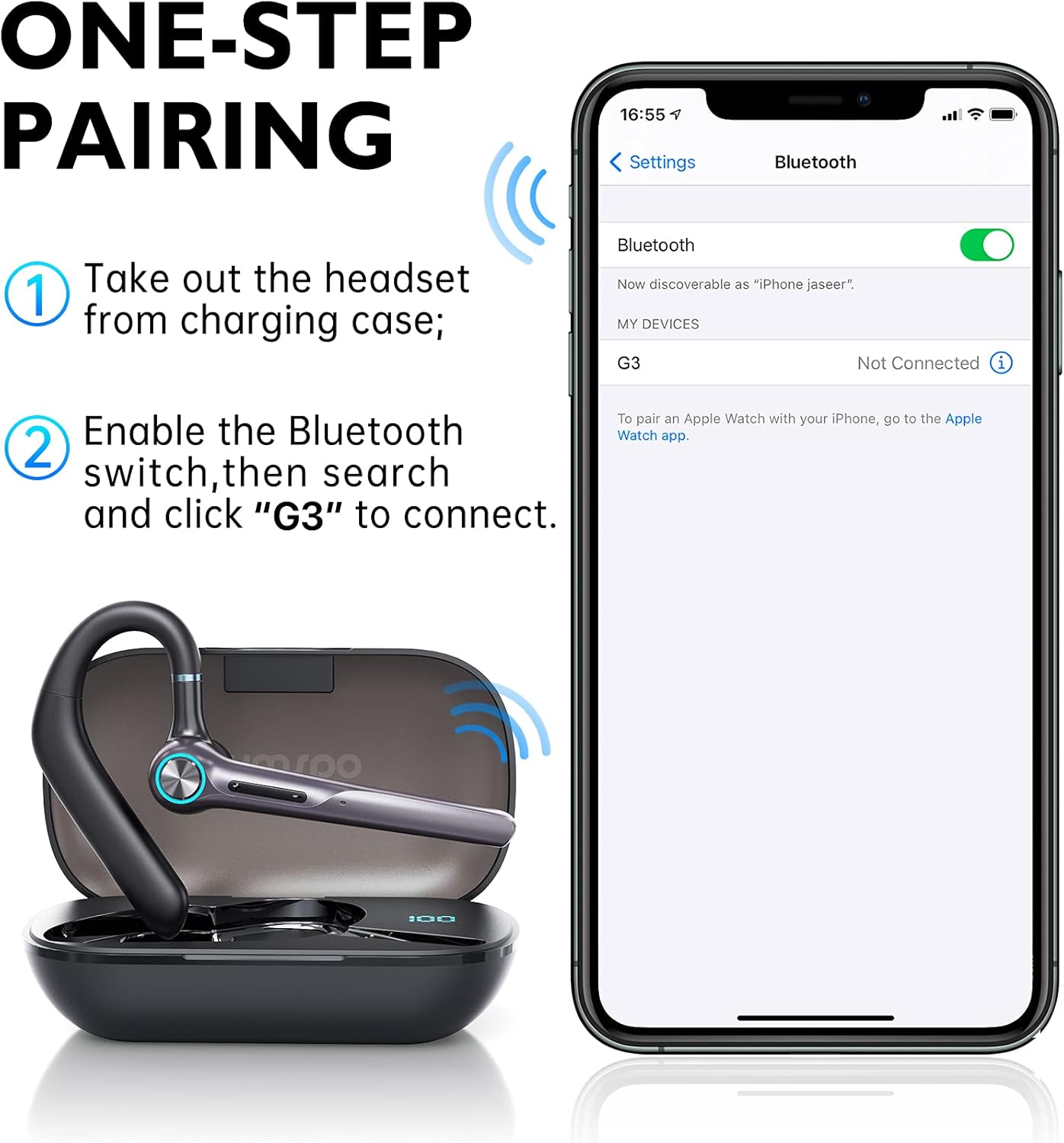
Figure 4.2: Visual guide for one-step pairing with a mobile device.
Video 4.1: An overview of the Eumspo G3 Bluetooth Noise-Cancelling Headset, demonstrating key features and usage.
5. Operating Instructions
5.1 Wearing the Headset
The Eumspo G3 headset is designed for comfortable wear on either ear.
- Adjust the ear hook to fit securely over your ear.
- The headset can rotate 180 degrees to switch between the right and left ear.
- The earpiece can also rotate 270 degrees for optimal positioning and comfort.

Figure 5.1: The headset can be worn on either the right or left ear and adjusted for fit.
5.2 Basic Functions (Calls & Music)
The Multi-Function Button (MFB) and volume buttons control various headset operations.
- Power On/Off: Press and hold the Power On/Off button.
- Answer/End Call: Click the MFB button once.
- Reject Call: Long press the MFB button for 3 seconds.
- Redial Last Number: Click the MFB button twice.
- Play/Pause Music: Click the MFB button once.
- Volume Up: Click the "+" button once.
- Volume Down: Click the "-" button once.
- Next Track: Long press the "+" button.
- Previous Track: Long press the "-" button.
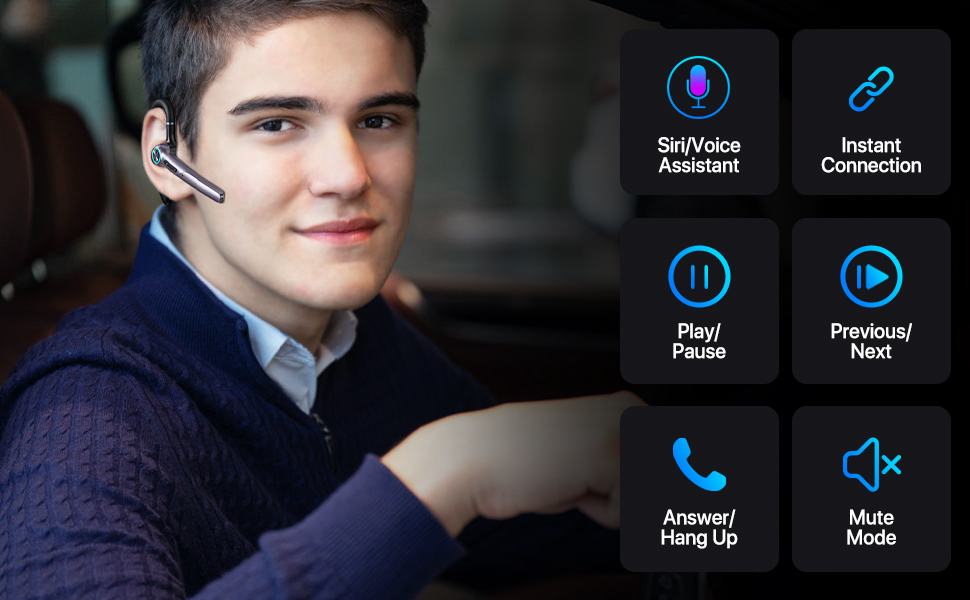
Figure 5.2: Detailed view of headset controls for various functions.
6. Maintenance
6.1 Cleaning
Regular cleaning helps maintain the headset's performance and hygiene.
- Wipe the headset and charging case with a soft, dry, lint-free cloth.
- Do not use abrasive cleaners, alcohol, or chemical solvents.
- Clean the ear tips regularly with a damp cloth and allow them to dry completely before reattaching.
6.2 Storage
When not in use, store the headset in its charging case to protect it from dust and damage.
- Store in a cool, dry place away from direct sunlight.
- If storing for an extended period, charge the headset and case periodically to maintain battery health.
7. Troubleshooting
If you encounter issues with your Eumspo G3 headset, refer to the following common solutions:
| Problem | Solution |
|---|---|
| Headset does not power on. | Ensure the headset is charged. Place it in the charging case and connect the case to power. |
| Cannot pair with device. | Make sure Bluetooth is enabled on your device. Ensure the headset is in pairing mode (taken out of the case). Forget previous pairings on your device and try again. Move closer to the device. |
| No sound or poor sound quality. | Check the volume levels on both the headset and your connected device. Ensure the headset is properly seated in your ear. Re-pair the headset with your device. |
| Charging case not charging. | Verify the charging cable and power adapter are working correctly. Ensure the cable is securely connected to both the case and the power source. |
| MFB button unresponsive. | Some users have reported intermittent issues with the MFB button. Try resetting the headset by placing it back in the charging case and taking it out again. If the issue persists, contact customer support. |
8. Specifications
| Feature | Detail |
|---|---|
| Brand | Eumspo |
| Model Number | G3 |
| Connectivity Technology | Bluetooth v5.0, Wireless |
| Ear Placement | In Ear |
| Noise Control | Active Noise Cancellation |
| Battery Average Life | 48 Hours (with charging case) |
| Charging Case Capacity | 400mAh |
| Compatible Devices | Android and iOS Smartphones, Laptops, Tablets |
| Water Resistance Level | Waterproof |
| Material | Plastic |
| Dimensions | 5.67 x 3.07 x 1.54 inches |
| Weight | 4.97 ounces |
9. Warranty Information
Eumspo products typically come with a limited warranty. Please refer to the product packaging or the official Eumspo website for specific warranty terms and conditions. Keep your proof of purchase for warranty claims.
10. Support
For further assistance, technical support, or customer service, please contact Eumspo through their official support channels. Details can usually be found on the product packaging or their website.
