
1. Introduction
The Garmin tactix 7 Tactical GPS Watch is a robust and versatile device designed for demanding environments. It combines advanced tactical features with comprehensive health and performance tracking, precise outdoor navigation, and extended battery life. This manual provides detailed instructions to help you set up, operate, and maintain your tactix 7 watch and its accompanying power bundle accessories.

Image 1.1: The Garmin tactix 7 Tactical GPS Watch Power Bundle, including the watch, screen protectors, portable charger, and USB charging cable.
2. Setup and Initial Use
2.1. Charging the Device
Before first use, fully charge your Garmin tactix 7 watch and the included PlayBetter portable charger. Connect the watch to a USB power source using the provided USB charging cable. The portable charger can be charged via its USB input port.

Image 2.1: The PlayBetter portable charger included in the power bundle, used for on-the-go charging of your watch.
2.2. Powering On/Off
- To power on: Press and hold the LIGHT button until the screen activates.
- To power off: Press and hold the LIGHT button until the control menu appears, then select Power Off.
2.3. Applying Screen Protectors
The power bundle includes HD screen protector films. Clean the watch screen thoroughly before carefully applying the film to ensure a bubble-free installation. Refer to the screen protector packaging for specific application instructions.

Image 2.2: The Garmin tactix 7 watch with a screen protector applied, enhancing durability and protecting the display.
2.4. Pairing with Your Smartphone
To unlock full smartwatch functionality, pair your tactix 7 with your smartphone using the Garmin Connect app. Enable Bluetooth on your phone and follow the on-screen instructions in the app and on the watch.
3. Operating the Garmin tactix 7
3.1. Basic Navigation: Buttons and Touchscreen
The tactix 7 features both traditional button controls and a responsive touchscreen display. You can navigate menus, select options, and interact with maps using either method or a combination of both.
- LIGHT: Press to turn on/off backlight; hold to access controls menu.
- UP-MENU: Press to scroll up; hold to access menu options.
- DOWN: Press to scroll down.
- START-STOP: Press to start/stop activities; select options.
- BACK-LAP: Press to return to previous screen; mark a lap during activities.
3.2. Tactical Features
The tactix 7 is equipped with specialized tactical functions for various operational needs.
- Built-in LED Flashlight: A multi-LED flashlight provides quick access to a bright, steady beam in either green or white light to help guide your way in low-light conditions.

Image 3.1: The tactix 7 watch displaying its built-in green LED flashlight, useful for low-light situations.
- Night Vision Capability: Easily switch between daytime view and nighttime view with a screen that can be read by night vision goggles.

Image 3.2: The tactix 7 watch screen optimized for night vision, showing a simplified display for tactical use.
- Stealth Mode: While keeping the watch operational, stealth mode stops storing and sharing your GPS position and disables wireless connectivity and communication.

Image 3.3: The tactix 7 watch displaying 'Stealth Mode: On', indicating disabled GPS and wireless communication.
- Kill Switch: If security becomes an issue, the kill switch wipes the device of all user memory.

Image 3.4: The tactix 7 watch displaying 'Kill Switch Activated', indicating the device's memory is being wiped.
- Jumpmaster Mode: Provides guidance for high-altitude military jumps.
- Waypoint Projection: Allows you to project new waypoints based on your current location and a specified distance and bearing.
3.3. Precise Outdoor Navigation
The tactix 7 offers advanced navigation capabilities to keep you on course.
- Preloaded Maps: Comes with preloaded TopoActive and ski maps for detailed outdoor navigation.
- Multi-GNSS and Multi-band Support: Utilizes multiple global navigation satellite systems (GPS, GLONASS, Galileo) and multi-band frequency support for superior positional accuracy in challenging environments.
- Navigation Sensors: Integrated compass, altimeter, and barometer provide essential environmental data.
- Direct-to Navigation: Navigate straight to a location or waypoint in the worldwide aeronautical database. Or choose the Nearest function to activate a path to a nearby airport.

Image 3.5: The tactix 7 watch displaying a direct-to navigation screen, showing bearing and distance to a target.
3.4. Comprehensive Health and Performance Tracking
Monitor your physical condition and training progress with the watch's extensive health features.
- Sports Apps: Over 30 built-in sports apps for various activities, including running, cycling, swimming, and more.
- Performance Metrics: Track endurance, stamina, training load, and recovery time.
- Heart Rate Monitor: Integrated optical heart rate sensor on the back of the watch provides continuous heart rate data.
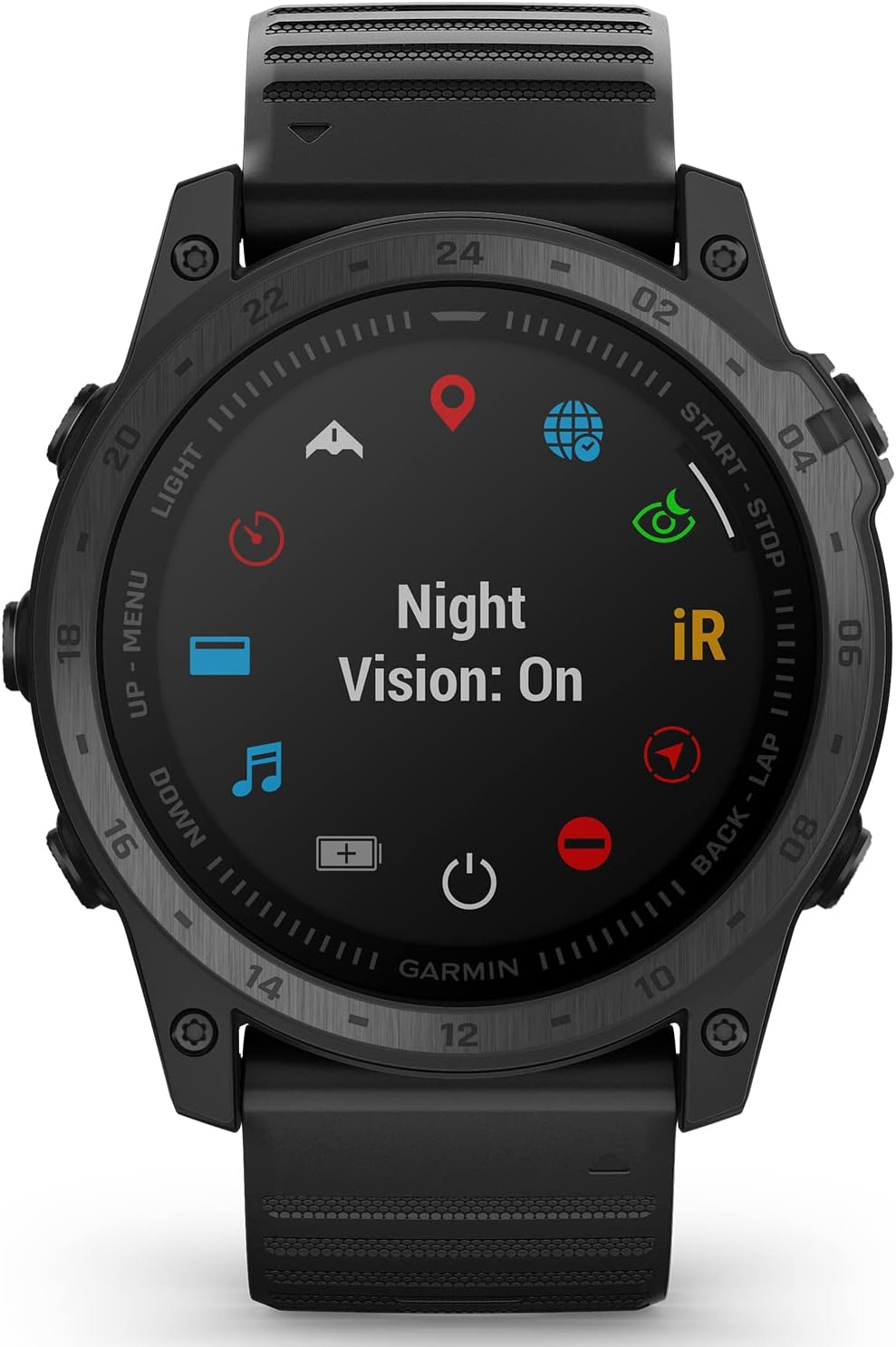
Image 3.6: The rear view of the Garmin tactix 7 watch, highlighting the optical heart rate sensor.
- Garmin Pay: Make contactless payments directly from your watch (where supported).
3.5. Battery Life
The tactix 7 offers impressive battery performance, with up to 28 days in smartwatch mode on a single charge.
4. Maintenance
4.1. Cleaning Your Watch
Regularly clean your watch to ensure optimal performance and hygiene. Use a soft, damp, lint-free cloth to wipe the watch and strap. Avoid harsh chemicals or abrasive materials. Rinse with fresh water after exposure to sweat, saltwater, or dirt.
4.2. Charging Best Practices
- Always use the original Garmin charging cable.
- Ensure the charging contacts on the watch and cable are clean and dry before charging.
- Avoid exposing the watch to extreme temperatures during charging.
4.3. Screen Protector Care
The applied screen protector helps guard against scratches. If the protector becomes damaged or excessively scratched, replace it with a new one from the included 4-pack to maintain screen clarity.
5. Troubleshooting
If you encounter issues with your Garmin tactix 7 watch, consider the following common solutions:
- Watch not turning on: Ensure the watch is fully charged. Connect it to a power source for at least 30 minutes.
- Connectivity issues (Bluetooth/GPS): Ensure Bluetooth is enabled on your phone and watch. Try restarting both devices. For GPS, ensure you are in an open area with a clear view of the sky.
- Inaccurate readings (Heart Rate/GPS): Ensure the watch is worn snugly on your wrist, just above the wrist bone. For GPS, ensure multi-GNSS is enabled in settings for improved accuracy.
- Short battery life: Review your watch settings. Features like always-on display, frequent GPS usage, and continuous heart rate monitoring can significantly impact battery life. Adjust settings to optimize.
- Watch unresponsive: Perform a soft reset by holding the LIGHT button for 15 seconds until the watch powers off, then power it back on.
For more detailed troubleshooting or persistent issues, please refer to the official Garmin support website or contact Garmin customer service.
6. Specifications
| Feature | Specification |
|---|---|
| Item Weight | 3.14 ounces |
| Product Dimensions | 2 x 0.58 x 2 inches |
| Item Model Number | 010-02704-00 (Watch), Z05 (Charger) |
| Batteries | 1 Lithium Ion battery required (included) |
| Display Size | 1.4 Inches |
| Battery Life (Smartwatch Mode) | Up to 28 days |
| Connectivity Technology | Bluetooth, USB, Wi-Fi |
| Map Type | Topographical |
| Mounting Type | Wrist Mount |
7. Warranty and Support
7.1. Warranty Information
The Garmin tactix 7 Tactical GPS Watch comes with a Garmin 1-Year Manufacturer Warranty. Please retain your proof of purchase for warranty claims. For detailed terms and conditions, refer to the warranty documentation provided with your product or visit the official Garmin website.
7.2. Customer Support
For additional support, product registration, software updates, or to access FAQs and troubleshooting guides, please visit the official Garmin support website. You can also find contact information for customer service there.