1. Introduction
The Fenix BC26R is a high-performance USB-C rechargeable bicycle light designed for various cycling conditions. It offers powerful illumination, a wide beam angle, and convenient features for an enhanced riding experience. This manual provides detailed instructions for the proper setup, operation, and maintenance of your BC26R bike light.
2. Product Overview
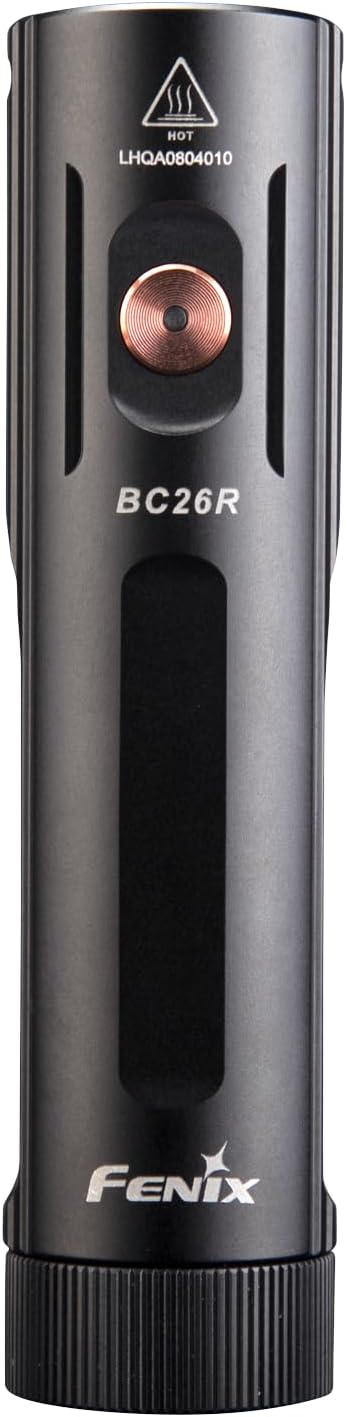
Figure 2.1: Front view of the Fenix BC26R USB-C Rechargeable Bike Light.
The Fenix BC26R features a durable aluminum housing, a single operating button, and a USB-C charging port. It is designed for easy attachment and detachment from your bicycle handlebars using its quick-release mount.
3. Setup
3.1 Package Contents
Verify that your package contains the following items:
- Fenix BC26R Bike Light
- USB-C Charging Cable
- Quick-Release Bike Mount
- LumenTac Organizer (if included in bundle)
3.2 Battery Installation
The Fenix BC26R uses a removable 21700 lithium-ion battery. To install or replace the battery:
- Unscrew the tail cap of the light counter-clockwise.
- Insert the 21700 battery with the positive (+) terminal facing towards the head of the light.
- Screw the tail cap back on clockwise until it is securely tightened.

Figure 3.1: Fenix BC26R with battery compartment open.
3.3 Mounting the Bike Light
The quick-release bike mount allows for easy attachment and removal of the light from your handlebars.
- Attach the quick-release mount to your bicycle handlebar. Ensure it is securely fastened and positioned to direct the light forward.
- Align the Fenix BC26R light with the mount.
- Press the light firmly into the mount until it clicks into place.
- To remove, press the release tab on the mount and slide the light forward.

Figure 3.2: Quick-release mount mechanism.
4. Operation
4.1 Power On/Off
- To Turn On: Press and hold the operating button for 0.5 seconds.
- To Turn Off: Press and hold the operating button for 0.5 seconds.
4.2 Mode Selection
With the light turned on, single-click the operating button to cycle through the brightness modes in the following order: Low → Med → High → Turbo.
To activate the Flash mode, press and hold the operating button for 1.2 seconds. Single-click to return to the previously used constant lighting mode.
4.3 Charging
The Fenix BC26R features a USB-C charging port for convenient recharging.
- Locate the USB-C charging port on the side of the light.
- Connect the provided USB-C charging cable to the light and to a USB power source (e.g., wall adapter, power bank, computer).
- The charging indicator will show the charging status. A full charge typically takes approximately 4 hours.
- Once charging is complete, disconnect the cable and ensure the port cover is securely closed to maintain water resistance.

Figure 4.1: Fenix BC26R connected for USB-C charging.
5. Maintenance
5.1 General Care
- Regularly inspect the light for any signs of damage or wear.
- Keep the threads and O-rings clean. Lubricate O-rings periodically with silicone grease to maintain water resistance.
- Store the light in a cool, dry place when not in use. Remove the battery if storing for extended periods.
5.2 Cleaning
Clean the body of the light with a soft cloth. For the lens, use a lens cleaning cloth to avoid scratches. Do not use abrasive cleaners or solvents.
6. Troubleshooting
6.1 Common Issues
- Light not turning on: Check if the battery is inserted correctly with the positive (+) terminal facing the head. Ensure the tail cap is fully tightened. The battery may be depleted; try charging it.
- Intermittent operation or flickering: This could be due to loose battery contact or dirty contacts. Clean the battery contacts and ensure the tail cap is tight.
- Reduced battery life: Ensure the battery is fully charged. Extreme temperatures can affect battery performance. Consider replacing the battery if it's old or frequently used.
If problems persist, please refer to the Warranty & Support section for assistance.
7. Specifications
7.1 Technical Parameters

Figure 7.1: Fenix BC26R Technical Specifications.
| Feature | Detail |
|---|---|
| Brand | Fenix |
| Model Number | BC26R |
| Light Output Maximum | 1600 Lumens |
| Number of Settings | 4 (plus Flash) |
| Power Source | Battery Powered (21700 Li-ion) |
| Charging Port | USB-C |
| Material | Aluminum |
| Water Resistance Level | Waterproof (IP68) |
| Item Weight | 5.47 Ounces |
| Mounting Type | Handlebar Mount (Quick-Release) |
| Color | Black |
8. Warranty & Support
Fenix products are manufactured with high-quality materials and craftsmanship. For detailed warranty information and customer support, please refer to the official Fenix website or contact your authorized Fenix dealer. Keep your purchase receipt for warranty claims.


