
1. Introduction
This manual provides detailed instructions for the Rampage KM-R92 CHEAT-X USB Mini Keyboard, Mouse, and Switch Combo Gaming Set. It covers setup, operation, maintenance, and troubleshooting to ensure optimal performance and longevity of your gaming peripherals. Please read this manual thoroughly before using the product.
2. Package Contents
Please verify that all items are present in your package. If any items are missing or damaged, contact your retailer for assistance.
- Rampage KM-R92 CHEAT-X Mini Gaming Keyboard
- Rampage CHEAT-X Gaming Mouse
- Additional Mechanical Switches (Quantity may vary)
- User Manual (This document)
3. Setup
Follow these steps to connect your Rampage KM-R92 CHEAT-X Gaming Set to your computer.
3.1 System Requirements
- Operating System: Windows, macOS, Linux, Chrome OS
- Available USB Port
3.2 Connecting the Devices
- Locate an available USB port on your computer.
- Plug the USB connector of the Rampage KM-R92 CHEAT-X Mini Gaming Keyboard into the USB port.
- Plug the USB connector of the Rampage CHEAT-X Gaming Mouse into another available USB port.
- Your operating system should automatically detect and install the necessary drivers. This is a plug-and-play device.
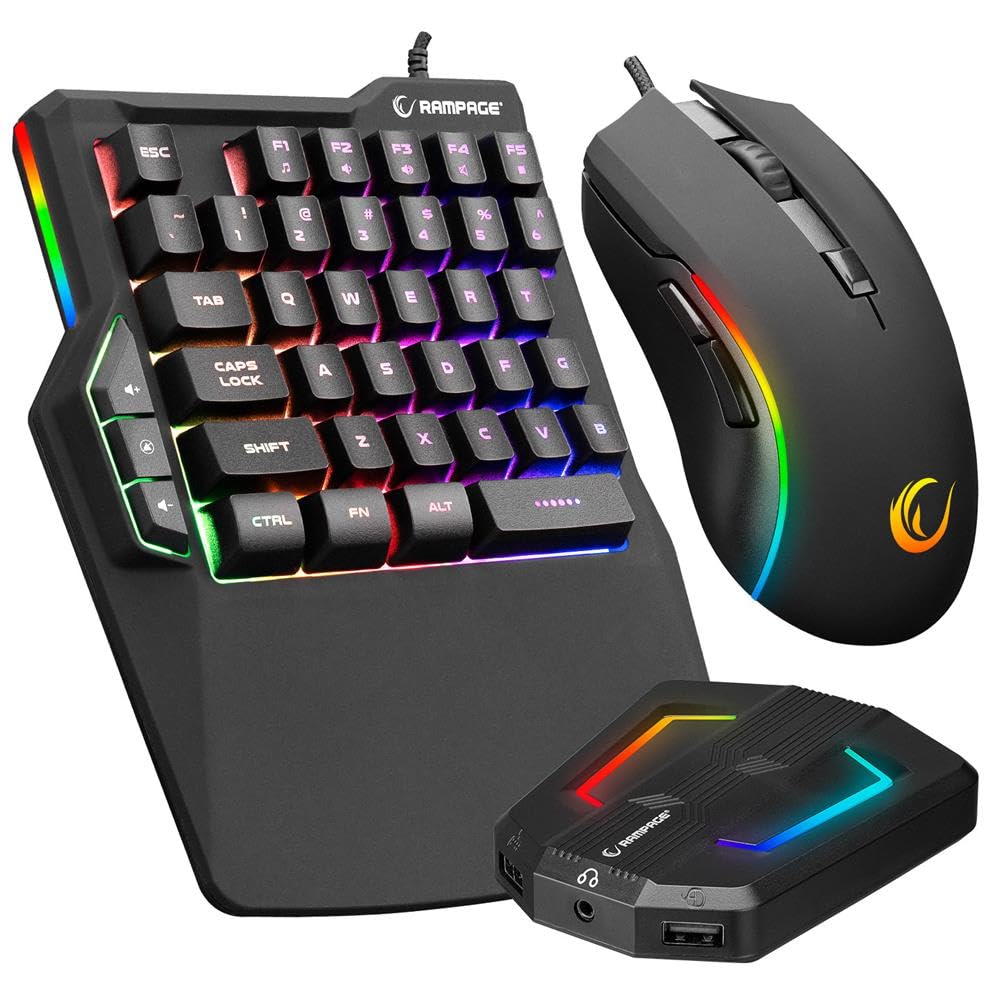
Figure 1: Rampage KM-R92 CHEAT-X Keyboard and Mouse Combo. This image displays the compact gaming keyboard and the ergonomic gaming mouse, both connected via USB cables.
4. Operating Instructions
4.1 Keyboard Functions
The Rampage KM-R92 CHEAT-X Mini Gaming Keyboard features a QWERTY layout with mechanical keys, providing tactile feedback and durability for gaming and typing.
- Standard Key Functions: All standard QWERTY keys operate as expected.
- Function Keys (Fn): Some keys may have secondary functions accessible by pressing the Fn key simultaneously with the desired key. Refer to the keycap legends for specific functions.
- Mechanical Switches: The keyboard uses mechanical switches designed for responsiveness and a long lifespan.
4.2 Mouse Functions
The Rampage CHEAT-X Gaming Mouse offers adjustable sensitivity and dynamic lighting for an enhanced gaming experience.
- DPI Adjustment: The mouse features adjustable DPI (Dots Per Inch) settings. Press the DPI button (usually located near the scroll wheel) to cycle through available sensitivities: 1200, 1800, 2400, and 3600 DPI.
- 7-Color Breathing Light: The mouse is equipped with a 7-color breathing light effect that cycles automatically. This feature is aesthetic and cannot be manually configured.
- Durability: The mouse buttons are rated for 3 million clicks, ensuring long-term reliability.
5. Maintenance
Proper maintenance helps extend the life of your gaming set.
- Cleaning: Use a soft, dry cloth to wipe down the surfaces of the keyboard and mouse. For stubborn dirt, slightly dampen the cloth with water or a mild cleaning solution. Avoid harsh chemicals or abrasive materials.
- Dust Removal: Use compressed air to remove dust and debris from between the keyboard keys and mouse crevices.
- Storage: When not in use, store the devices in a clean, dry environment away from direct sunlight and extreme temperatures.
- Cable Care: Avoid bending or twisting the USB cables excessively to prevent internal damage.
6. Troubleshooting
If you encounter issues with your Rampage KM-R92 CHEAT-X Gaming Set, refer to the following common solutions.
| Problem | Possible Cause | Solution |
|---|---|---|
| Keyboard/Mouse not responding | Loose USB connection, faulty USB port, driver issue. | Ensure USB cables are securely plugged in. Try a different USB port. Restart your computer. |
| Mouse cursor erratic or unresponsive | Dirty sensor, unsuitable surface, DPI setting too low/high. | Clean the mouse sensor. Use a mouse pad or a smooth, non-reflective surface. Adjust DPI settings. |
| Mouse lighting not working | Power issue, device not properly connected. | Ensure the mouse is connected to a powered USB port. The lighting is automatic and cannot be turned off. |
| Keys not registering | Debris under keycap, faulty switch. | Use compressed air to clear debris. If a switch is faulty, contact support for potential replacement or repair. |
If the problem persists after trying these solutions, please contact Rampage customer support.
7. Specifications
Detailed technical specifications for the Rampage KM-R92 CHEAT-X Gaming Set.
- Brand: Rampage
- Model: KM-R92 CHEAT-X
- Color: Black
- Connectivity Technology: USB (Wired)
- Keyboard Layout: QWERTY
- Keyboard Type: Mechanical
- Mouse DPI Settings: 1200 / 1800 / 2400 / 3600
- Mouse Click Lifespan: 3 Million Clicks
- Mouse Lighting: 7-Color Breathing Light (Automatic)
- Panel Material: Plastic
- Power Source: Wired Electric (No batteries required)
- Compatible Operating Systems: Windows, macOS, Linux, Chrome OS
- Product Weight: 1.12 Kilograms (Approximate)
8. Warranty and Support
Your Rampage KM-R92 CHEAT-X Gaming Set comes with a manufacturer's warranty.
- Warranty Information: This product is covered by a manufacturer's warranty. Please retain your proof of purchase for warranty claims. Specific warranty terms and duration may vary by region and retailer.
- Customer Support: For technical assistance, warranty claims, or further inquiries, please visit the official Rampage website or contact your local retailer.