1. Product Overview
The COSTWAY Portable Air Conditioner (Model FP10122US-WH) is a versatile unit designed to provide cooling, dehumidification, and fan-only operation. It features an 8000 BTU cooling capacity, suitable for rooms up to 230 sq.ft., and can remove up to 40 pints of moisture per day in dehumidifier mode. The unit includes a smart touch panel, LED display, and a remote control for convenient operation. Its portable design with built-in handles and universal casters allows for easy movement.
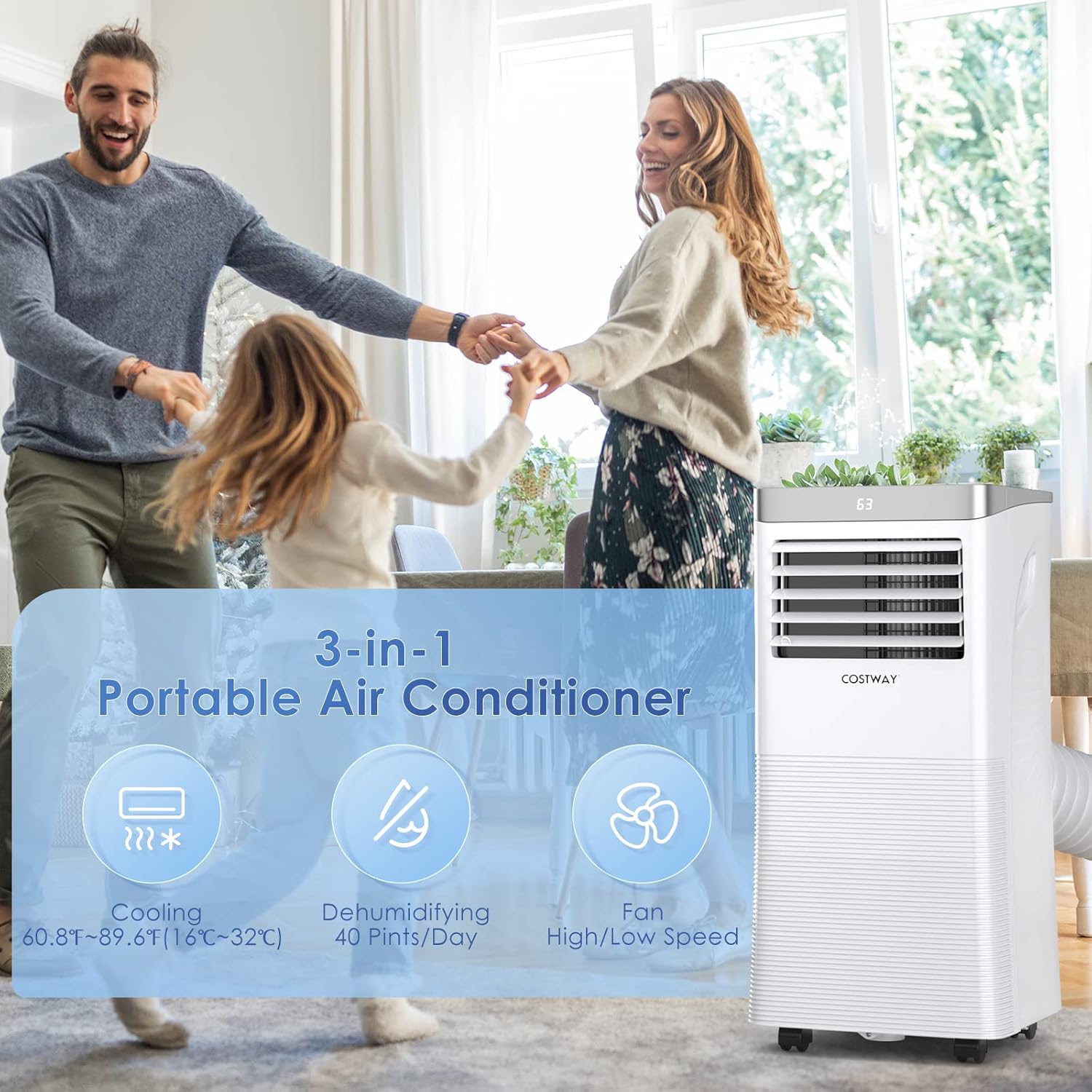
Figure 1: The portable air conditioner highlighting its three operational modes: cooling, dehumidifying, and fan.
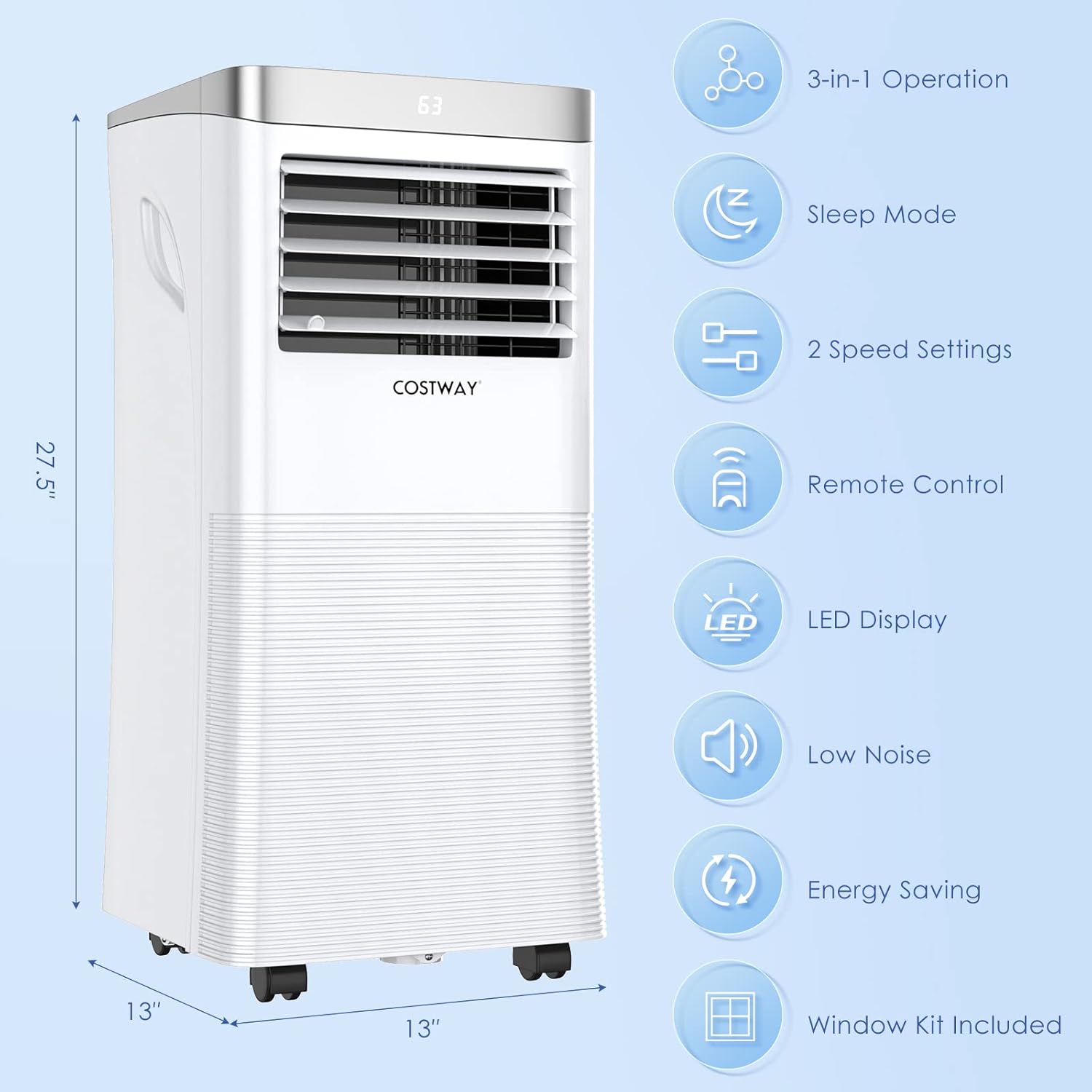
Figure 2: Side view of the unit displaying its dimensions (13"D x 13"W x 27.5"H) and key features such as 3-in-1 operation, sleep mode, 2 speed settings, remote control, LED display, low noise, energy saving, and included window kit.
2. Safety Information
Please read all safety instructions carefully before operating the appliance. Failure to follow these instructions may result in electric shock, fire, or personal injury.
- Ensure the power supply matches the voltage specified on the unit's rating label.
- Do not operate the unit with a damaged cord or plug.
- Keep the unit upright during transport and operation to prevent refrigerant leakage.
- Do not block air inlets or outlets. Maintain at least 12 inches (30 cm) clearance from walls or other objects.
- Do not insert fingers or objects into the air outlets.
- Unplug the unit before cleaning or performing any maintenance.
- This appliance is not intended for use by persons (including children) with reduced physical, sensory or mental capabilities, or lack of experience and knowledge, unless they have been given supervision or instruction concerning use of the appliance by a person responsible for their safety.
- The unit contains R410A refrigerant. Do not attempt to service the refrigerant system yourself. Contact qualified service personnel.
3. Setup and Installation
Proper installation is crucial for the efficient operation of your portable air conditioner. The unit comes with an adjustable window kit and exhaust hose for easy setup.
3.1 Unpacking
- Carefully remove the unit and all accessories from the packaging.
- Check for any damage during transit. If damage is found, do not operate the unit and contact customer support.
- Keep the packaging materials for future storage or transport.
3.2 Window Kit and Exhaust Hose Installation
The adjustable window kit is designed for both vertical and horizontal sliding windows, fitting openings from 25.5 to 47 inches.
- Attach the hose connector to the exhaust hose.
- Connect the exhaust hose to the air outlet on the back of the air conditioner.
- Adjust the window kit to fit your window opening.
- Insert the window kit adapter into the adjusted window kit.
- Secure the window kit in place, ensuring a tight seal to prevent air leakage.
- Extend the exhaust hose and connect it to the window kit adapter. Ensure the hose is not kinked or bent sharply to allow for proper airflow.

Figure 3: Components of the window kit and exhaust hose, along with installation diagrams for vertical and horizontal sliding windows. The maximum length of the exhaust hose is 62 inches.
4. Operating Instructions
Your portable air conditioner can be operated using the control panel on the unit or the included remote control.
4.1 Control Panel and Remote Control Overview
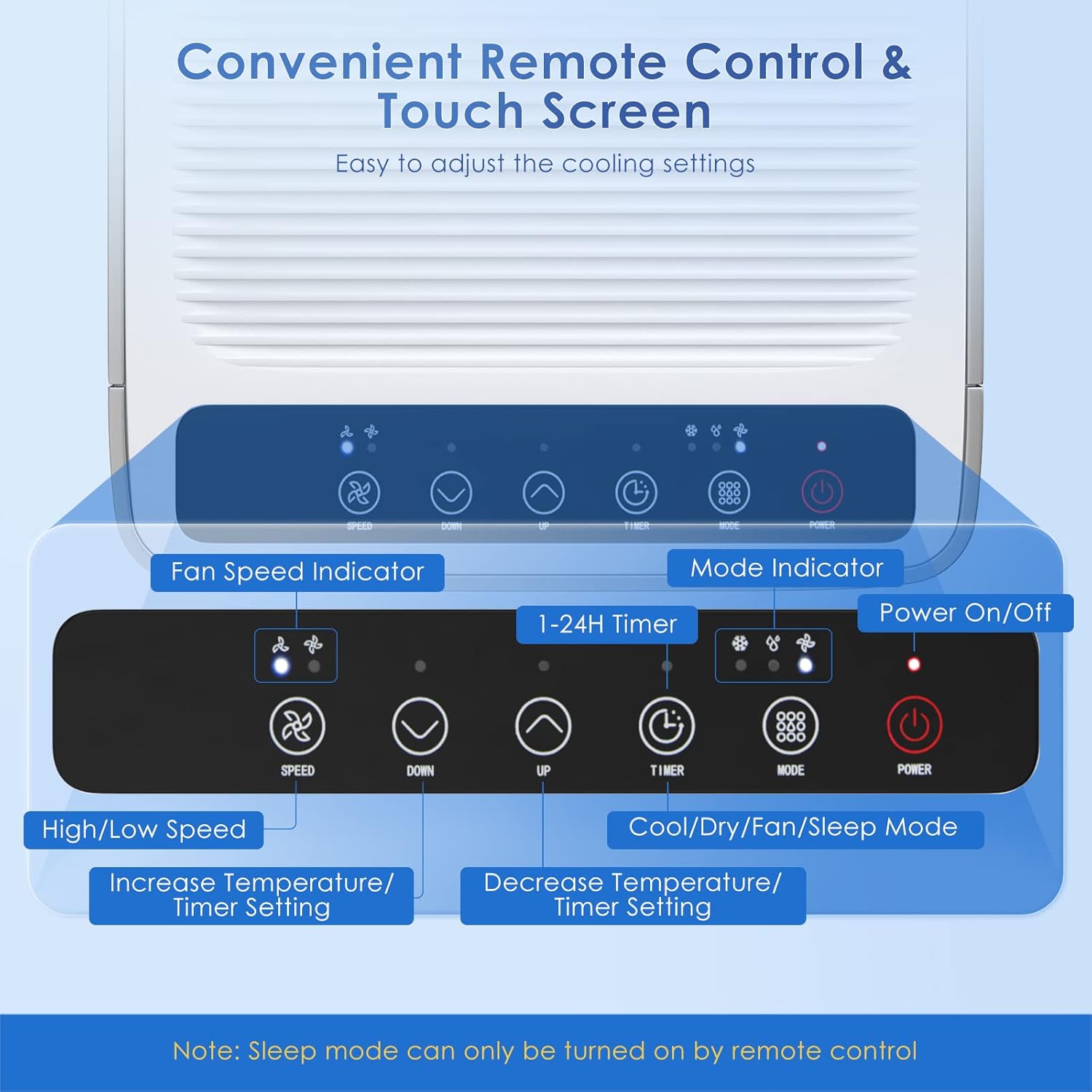
Figure 4: The smart touch control panel and remote control. Buttons include Power On/Off, Cool/Dry/Fan Mode, 1-24H Timer, Increase/Decrease Temperature/Timer Setting, High/Low Fan Speed, Fan Speed Indicator, and Mode Indicator. Note: Sleep mode can only be activated via remote control.
4.2 Operating Modes
- Cooling Mode: Press the 'MODE' button until the snowflake icon is lit. Use the 'UP' and 'DOWN' buttons to set your desired temperature (60.8°F-87.8°F / 16°C-32°C).
- Dehumidifier Mode: Press the 'MODE' button until the water drop icon is lit. The unit will remove up to 40 pints of moisture per day.
- Fan Mode: Press the 'MODE' button until the fan icon is lit. Use the 'SPEED' button to select between high or low fan speed.
4.3 Timer and Sleep Mode
- Timer Function: Press the 'TIMER' button to set an auto-on or auto-off time from 1 to 24 hours. Use the 'UP' and 'DOWN' buttons to adjust the duration.
- Sleep Mode: Activate Sleep Mode using the remote control. This mode operates at a lower fan speed and reduced noise level for comfortable sleep, automatically adjusting temperature over time.

Figure 5: The air conditioner in a bedroom setting, demonstrating its quiet operation (≤55dB) and 1-24 hour timer for peaceful sleep.
4.4 Video Guide: Product Features and Operation
Video 1: An official product video demonstrating the key features and operational aspects of the COSTWAY Portable Air Conditioner, including its portability, control panel, automatic swing function, and easy installation.
5. Maintenance
Regular maintenance ensures optimal performance and extends the lifespan of your air conditioner.
5.1 Cleaning the Air Filter
The unit is equipped with a removable and reusable filter screen to maintain air quality.
- Unplug the air conditioner from the power outlet.
- Locate the filter screen on the back of the unit.
- Gently pull out the filter screen.
- Wash the filter screen under running water with a mild detergent.
- Allow the filter to air dry completely before reinserting it into the unit.
- Clean the filter every two weeks or more frequently depending on usage and air quality.

Figure 6: Demonstrating the removal of the detachable and washable filter screen for cleaning.
5.2 Draining Water
During dehumidification or prolonged cooling, water may accumulate in the internal reservoir. The unit has a bottom drainage hole for manual draining.
- Unplug the air conditioner.
- Place a shallow pan or container under the drainage hole at the bottom of the unit.
- Remove the drain plug to allow water to flow out.
- Once all water has drained, replace the drain plug securely.
5.3 Storage
When storing the unit for an extended period:
- Ensure the unit is completely drained of water.
- Clean the air filter.
- Store the unit in an upright position in a dry, cool place.
6. Troubleshooting
Refer to the following table for common issues and their solutions.
| Problem | Possible Cause | Solution |
|---|---|---|
| Unit does not turn on | No power supply; Power cord not plugged in; Circuit breaker tripped. | Check power outlet; Plug in power cord securely; Reset circuit breaker. |
| Unit does not cool effectively | Air filter is dirty; Room size too large; Doors/windows open; Exhaust hose not properly installed or blocked. | Clean air filter; Ensure room size is within specifications (230 sq.ft.); Close all doors and windows; Check exhaust hose for proper installation and obstructions. |
| Unit is noisy | Unit not on a level surface; Fan speed set too high. | Place unit on a flat, stable surface; Reduce fan speed. |
| Water leakage | Drain plug not securely closed; Unit is tilted. | Ensure drain plug is tightly closed; Place unit on a level surface. |
7. Specifications
Detailed technical specifications for the COSTWAY Portable Air Conditioner (Model FP10122US-WH).
| Specification | Value |
|---|---|
| Brand | COSTWAY |
| Model Number | FP10122US-WH |
| Cooling Capacity (ASHRAE) | 8000 BTU |
| Cooling Capacity (SACC) | 5000 BTU |
| Coverage Area | Up to 230 sq.ft. |
| Dehumidification Capacity | 40 Pints/Day |
| Air Flow | 290 m³/h |
| Noise Level | 55 Decibels |
| Voltage | 115 Volts (AC) |
| Wattage | 920 watts |
| Refrigerant | R410A |
| Product Dimensions | 13 x 13 x 27.5 inches |
| Item Weight | 54.9 pounds |
| Material Type | ABS Plastic |
8. Warranty and Support
This product is covered by a manufacturer's warranty. Please refer to the warranty card included in your product packaging for specific terms and conditions. For technical assistance, troubleshooting not covered in this manual, or warranty claims, please contact COSTWAY customer support.
Contact information can typically be found on the official COSTWAY website or on your purchase receipt.


